sdRohan sdRohan

Groupy 2 Public Beta Feedback Thread

Groupy 2 Public Beta Feedback Thread

With the Group 2 Public Beta release, we are creating this thread so that users can report any observed issues.  

Obtaining the product

Object Desktop members can get the release from within Object Desktop Manager 

Individual purchases (as well as Object Desktop Members) can also be obtained from your account page: https://store.stardock.com/myaccount/products

For guest check-out purchase (no account), from this link: http://www.stardock.com/support/productkeyretrieval

Reporting an issue

Please include the following for anything found:

  • Exact Windows version \ build (winver.exe)

  • Detailed steps to recreate the issue seen

  • Screenshots and videos are very helpful.  Videos can be uploaded to a cloud drive service (GoogleDrive, DropBox, OneDrive, YouTube), with a shared link included in your post.  Images can be copied and pasted directly into a post.

  • If there are specific apps that the app does not work (well) with, please note what apps and their exact versions.  If any app is not common, a link to a trial version would be appreciated.

Thank you for your interest and any time you put into making Product a better product.

Sean Drohan
Stardock Support Manager

390,868 views 193 replies
Reply #126 Top

Quoting klepp0906, reply 17

Hi Basj,

I dont believe we understand one another.  All I want to hide/remove/omit is this bit. 


I'm with klepp0906 on this one. I'm not quite sure what function this button adds that isn't there without it. It's actually quite distracting for me. It would be nice to have an option to remove it from all windows, and shift the tabs to the left edge.

Please consider this as an option only.

Thanks

pelaird

Reply #127 Top

Quoting pelaird, reply 126


Quoting klepp0906,

Hi Basj,

I dont believe we understand one another.  All I want to hide/remove/omit is this bit. 


I'm with klepp0906 on this one. I'm not quite sure what function this button adds that isn't there without it. It's actually quite distracting for me. It would be nice to have an option to remove it from all windows, and shift the tabs to the left edge.

Please consider this as an option only.

Thanks

pelaird

We have added an option to hide it in the next beta.

+2 Loading…
Reply #129 Top

I don't know if it's normal but I would think that aesthetically it doesn't look good, when the windows are maximized, in the upper right corner of the groupy 2 tab bar you can see a space. even when passing the cursor over that area where the space is, I can interact with the close button of the back window.

I share a video so that what is described above is better detailed.

WinVer

Reply #130 Top

Groupy 2.0 is pretty good improvement over previous version.

I do have bug reports and feature requests.

Bug reports:

1. I have grouped tabs and when (happening frequently) I hover over the title bar the grouped tabs are not shown and sometimes I have to keep hovering for some time for the tabs to show. Other times I have to actually click on the application title bar to make groupy show the tabs. Need to make the tabs responsive to appear on hover. Showing of the tabs is very laggy on mouse hover.

2. Bug: Ctrl N is not working to add a new tab.

3. I am not seeing the active window tab show a background color to tell apart from which tab is active and which ones are not. What setting to enable to show a active tab with my specified color?


Feature requests:

1. Also, the far left Groupy button with the down arrow to access the options such as is small. It takes a few seconds to make it appear and be able to click and make it show menu options. Two suggestions: Make this a little wider and secondly, provide a shortcut key to make it appear.


Thanks.

Reply #131 Top

In Groupy2, if I enable "Replace Explorer & Notepad tabs" in Grouping settings, explorer often freeze and need to be restarted.
As long as I use "Do not replace tabs", it wont' freeze.

I'm using Windows11 Pro 21H2 in Japanese.

Regards,

Reply #132 Top

Quoting Hiroyoshi-Mori, reply 131

In Groupy2, if I enable "Replace Explorer & Notepad tabs" in Grouping settings, explorer often freeze and need to be restarted.
As long as I use "Do not replace tabs", it wont' freeze.

I'm using Windows11 Pro 21H2 in Japanese.

Regards,

Hello,
Sorry to hear you are having issues. If it is possible, please update you Windows 11 to the latest official release Version 22H2.

Thank you.
Basj,
Stardock Community Assistant.

Reply #134 Top

Upgrade to 22H2 but the same.

It seems when set the above configuration and open "another" explorer, then freeze.

Reply #135 Top

Quoting Hiroyoshi-Mori, reply 134

Upgrade to 22H2 but the same.

It seems when set the above configuration and open "another" explorer, then freeze.

Quoting sdRohan, reply 2

For the purposes of the Beta, please 1st uninstall Groupy 1, reboot, and then install Groupy 2. During the uninstall of Groupy 1, you will be given a choice to 'remove settings'; it would be wise to do so. The additional uninstall option to keep your 'saved groups' (should you have them) can be left unchecked as they should still function. Any reports of old saved groups not functioning should be reported here.

Did you have Groupy 1 running before? And did you uninstall Groupy 1 first as suggested above?

Thank you,

Basj,
Stardock Community Assistant

Reply #137 Top

Tested.

  1. Uninstall Groupy 2.0.0
  2. Install Groupy 1.5.0 just in case something left.
  3. Uninstall Groupy 1.5.0
  4. Install Groupy 2.0.0
  5. Open Explorer -> Freezed
  6. Change configuration "Open in a seperate process" to unchecked. I usually run in a seperate process.
  7. Reboot
  8. It seems to be OK for me.

Conclusion:
I assume it might be issues when we run Explorer in a seperate process.

Will keep using in a condition above, and report if anything happens again.

Reply #138 Top

Quoting Hiroyoshi-Mori, reply 137

Tested.

  1. Uninstall Groupy 2.0.0
  2. Install Groupy 1.5.0 just in case something left.
  3. Uninstall Groupy 1.5.0
  4. Install Groupy 2.0.0
  5. Open Explorer -> Freezed
  6. Change configuration "Open in a seperate process" to unchecked. I usually run in a seperate process.
  7. Reboot
  8. It seems to be OK for me.

Conclusion:
I assume it might be issues when we run Explorer in a seperate process.

Will keep using in a condition above, and report if anything happens again.

Interesting, I have forwarded your problem/question to Stardock Support Team for their assistance. Please keep an eye on this thread for any updates. We appreciate your feedback and patience.

Updates: This will be addressed in the next build.

Basj,
Stardock Community Assistant

+1 Loading…
Reply #139 Top

Any chance you will add back the color settings for:

Focused Active Tab
Focused Inactive Tab
Non-Focused Active Tab
Non-Focused Inactive Tab

Please also consider adding an option to select color for Tab Background Bar

+1 Loading…
Reply #140 Top

Hi, works great so far. Apart from beeing buggy when you have a explorer open in the group (Win11 22h2). The color scheme is very good but please set this also as a permanent setting. This would be great. When i save the group with the color after restarting the group the color is gone. with this setting i would buy it for our company...

Reply #141 Top

Lag and glitches in V.2


Hi,

Thanks for the new update.

But now I have glitches and lag ( please see the video below ).  

https://drive.google.com/file/d/1nnNkDvnYCobOmSM7ferYtVsTYYRuoIvd/view?usp=share_link


-When (Integrate the tabs) mode is selected and I create a new tab or duplicate any of current tabs the window goes up and down and sometimes tabs are stuck on top of the screen and the window is restored down automatically.

* When ( Place tabs above ) is selected all works fine. But:

- When the window is maximized rollover highlighted color disappears 


-------------------------------------- Suggestions-------------------------------------

- Please add options to control the background bar and tabs rollover color.

-Please add an option to duplicate the tabs with the painted color.

- Please add an option to maximize the window from the background bar when it reach the snap edge

- Please add nested tabs ( a tab  contains tabs below - for example, a tab contains customers below)

Thanks

----------------------------------

I'm on Windows 10 Pro. Version 10.0.19045 Build 19045

Reply #142 Top

First attempt to drag a new window (eg separate browser tab) out of a group always fails.

A search didn't show up anything like this (but it always depends on what you search for, doesn't it!) |-)  

Either the whole group gets dragged (most common), or the group height is altered. A second attempt  - without doing anything else in between - works.

This occurs whether or not 'hover to group' (ie without a CTRL key or mouse button required) is enabled.

Windows 11 22h2 - ver 22621.1702

Groupy 1 did not have this issue on this machine.

Reply #143 Top

Quoting djc5166, reply 142


Quoting Neil Banfield,

It would be very helpful if someone could do the following if you are encountering a problem with the Start11 taskbar hanging with Groupy 2.

When you hit the hang open up taskmanager (ctrl-alt-del will do so), go to processes page, find explorer and right click and pick Create memory dump file.  Please also right click again and pick the Analyse Wait chain option and post a screenshot of what that shows too.

Also please upload the dmp file somewhere and either PM me with the link or post a link on the forums again.

Again this is ONLY when the taskbar buttons appear to be hung.  Doing this without a hang wouldn't help.


Is this fixed yet? Groupy 2.0 is still dead in the water.

We have this addressed for the next build.  This only happens if you launch a second explorer process typically because of using the option for explorer folders to be in their own process.

Reply #144 Top

Hello,

I have an issue sometimes when grouping apps. The newly group window does not appear on the tab list and can not be access anymore.
When I click on the window on the task bar nothing appear.
The window only appear when I hover his taskbar icon. But I can not access it anymore. Even disabling groupy with option in parameter does not make it appear again. I had this issue with a chrome window, one of my discord and notepad++ (but I successfully manage to retrieve the last one without restarting.

One feature request: A way to bound tab width when auto size is enable (and maybe set size when not enable). I would like to have tabs smaller when the label is really small. 

Reply #145 Top

I succeed to make my discord window reappear by tinkering with Simple Runtime Window Editor. (https://github.com/dtgDTGdtg/SRWE)
It seams the window property was altered by Groupy and this alteration was permanant through restarting discord.
Concerning my disappeared chrome window I just close and re-open the window through history.

Reply #146 Top

After I posted on the blog, I saw this forum. Here were my comments:

I really wish there was an integrated "feedback" area in this beta app. Don't get  me wrong, Groupy2 is looking good, but there are definitively some things I would like to see polished; mostly app exclusions need to be made a lot simpler. I shouldn't have to go track down specific executable paths; it should be a readily available option in your app-attached menu!

Other than that major issue, its pretty annoying that Windows File Explorer changes states when adding a new tab with the + button. Nothing I do should change the window state unless its explicitly a state change button or keyboard shortcut.

Reply #149 Top

Uhm... I've received an email for Groupy2 at 6,99 but can't find it, I only see 8,45 for multi use .. 

Where to find the 6,99 version??

Reply #150 Top

Windows 10 / 22H2 / OS Build 19045.2965

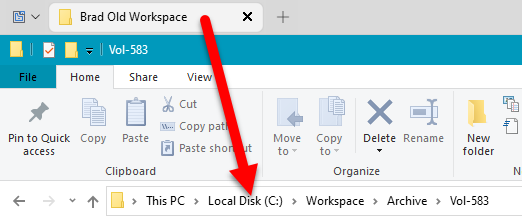
After opening a group that was created with Groupy Ver 1, the labels are duplicating. The "Brad" label incorrectly shown for my PC and a second "Brad" is shown for a co-worker.


When I open a new instance of File Explorer, the Group 2 label reports as a label from one of my groups above.

Groupy 2 seems to be stuck on this label until I reboot my PC.