sdRohan sdRohan

WindowBlinds 11 Release Issue Report thread

WindowBlinds 11 Release Issue Report thread

With the WindowBlinds 11 release, we are creating this thread so that users can report any observed issues.  

Obtaining WindowBlinds 11 

Object Desktop members can get the release from within Object Desktop Manager 

Individual purchases (as well as Object Desktop Members) can also be obtained from your account page: https://store.stardock.com/myaccount/products

For guest check-out purchase (no account), from this link: http://www.stardock.com/support/productkeyretrieval

Reporting an issue

Please include the following for anything found:

  • Exact Windows version \ build (winver.exe)
  • Detailed steps to recreate the issue seen
  • Screenshots and videos are very helpful.  Videos can be uploaded to a cloud drive services (GoogleDrive, DropBox, OneDrive, YouTube) and links included in your post.  Images can be directly added.
  • If there are specific apps that the app does not work (well) with, please note what apps and their exact versions.  If any app is not common, a link to a trial version would be appreciated.

Thank you for your interest and any time you put into making WindowBlinds a better product.

Sean Drohan
Stardock Support Manager

388,776 views 173 replies
Reply #26 Top

why is the option I want styles to be able to be able to apply texture to the explorer windows greyed out.

Reply #27 Top

In Windows Live Mail 2012 (Build 16.4.3528.0331) see pic. The top doesn't work at all. 

Not even the minimize and close button show or works.

This is how it is with all skins even the bundled skins with WB.

I've tried all settings with no change.


This how it has been with all betas ever since first beta of WindowBlinds 11. Beta 1,2,3.


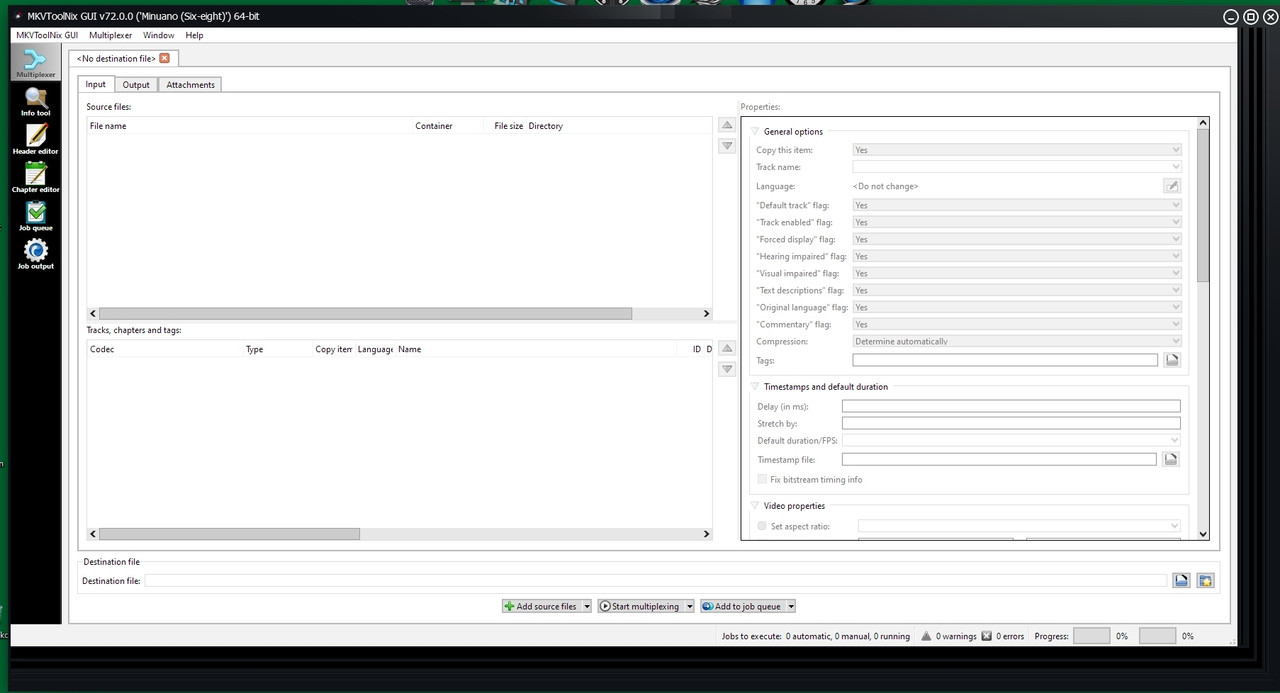
Also problem with MKVToolNix. Draw problems where the window frame doesn't paint right when resizing the window of MKVToolNix.

It all gets a mess. Reported that bug several years ago but nothing happened.


Also have other problems with WB 11.03 where some black elements of the skin doesn't paint at all in explorer and it all gets ugly.

Tried all settings in WB 11 but with no changes. 


Have to go back to WB 10.89 where everything works.


Using:

Windows 10 Pro 22H2 (19045.2311)


WB 11.03 latest.

No top:

Expected:


MKVToolNix all weird frames when resizing here with Metro8 skin:


Reply #28 Top

Skin studio needs Windows 11 default mode button. It only has up to windows 10. I want to set the default substyle for windows 11 users so that it wont apply the wrong substyle for them due to the major changes I did to the W11 version compared to 11.


Setting a dark mode image in skin studio does not actually do anything nor does it have 100% normal scale option. I think this was an over site. When I pick an image it remains no image defined.


File explorer under windows 11 does not load the BG color properly as it once did under Win10. I set it to red to show you that its still there but seems to only fill in 2 pixels on either side of it. You can barely see it on the left side of file explorer. It should be filling in completely red. And I know this is not a limitation of windows 11 since when you go darkmode with default windows 11 that its 2 toned. Also needs to have a color option for "dark explorer folder bar background (Win 10)" Unable to make theme correct for dark/light mode if one option is not there.

Reply #29 Top

Quoting Nerius, reply 27


Also have other problems with WB 11.03 where some black elements of the skin doesn't paint at all in explorer and it all gets ugly.

Tried all settings in WB 11 but with no changes. 


This is exactly the reason I told stardock in all 3 beta threads that that option of darkening elements needs to be off by default. There are way to many skins in the gallery that do not support such a feature and really destroys a lot of themes when enabled. You need to turn this option off under Windowblinds 11 Advanced settings. They refuse to make it off by default.


As for your other issues, some programs draw their own window frames and can be buggy if they are not excluded from skinning. Go to Per Application tabs in settings and exclude the programs that are buggy as that is not really an issue with WB11 but with the programs themselves.

+1 Loading…
Reply #30 Top

Yes i agree should be of as default. But i have unchecked it and makes no change.

Have also excluded program but also same result with Window Live Mail.

Reply #31 Top

Quoting Nerius, reply 30

Yes i agree should be of as default. But i have unchecked it and makes no change.

Have also excluded program but also same result with Window Live Mail.


Have you messed with windows color settings? I usually have it on half of each one depending on if the theme is light or dark. I just set it to custom and flip flop them.


Also I have not seen windows live mail used in quite some time, its been discontinued for quite some time, so that could be 100% the reason on why that program is not working right with wb11.

Reply #32 Top

Yes, i've tried change window color settings too. All of them both in WB 11 as well in Windows 10.  I know Windows Live Mail been discontinued but it works fine with WB 10.89.

In WB 10.89 all works perfect except MKVToolNix frame problem as i mentioned.

I guess i have to start work with Skinstudio again Skinstudio11 this time and see if i can figure it out and hopefully fix it. Otherwise it's back to WB 10.89.

Thanks for the reply.

Reply #33 Top

Quoting PapaBravo, reply 26

why is the option I want styles to be able to be able to apply texture to the explorer windows greyed out.

This is an option which only ever applied to Windows 7 and earlier.  We have removed it entirely from the UI for 11.01 to avoid confusion as Windows 7 is no longer a supported OS.

Reply #34 Top

Quoting don5318, reply 10

I'm curious as to why Fences shows a black background.


WB version 


Start11 version 1.34

OS info: Edition Windows 11 Home
Version 22H2
Installed on ‎10/‎29/‎2022
OS build 22621.900
Experience Windows Feature Experience Pack 1000.22638.1000.0

PC info: Device name Asuslaptop
Processor 11th Gen Intel(R) Core(TM) i3-1115G4 @ 3.00GHz 3.00 GHz
Installed RAM 8.00 GB (7.70 GB usable)
Device ID 59604132-A7A6-43CF-B8E6-7A7C8B29C08F
Product ID 00326-10000-00000-AA812
System type 64-bit operating system, x64-based processor
Pen and touch No pen or touch input is available for this display


This has been reproduced internally and resolved for a 11.01 update.  Sorry about the issue.

Reply #35 Top

Quoting Neil, reply 34

This has been reproduced internally and resolved for a 11.01 update.  Sorry about the issue.

Not on my computer. Latest Fences and WB. No other skinning apps except WSX.

Reply #36 Top

Quoting DrJBHL, reply 35

Not on my computer. Latest Fences and WB. No other skinning apps except WSX.

I believe V11.01 have not been release yet.

Thank you,

Basj,
Stardock Community Assistant

Reply #38 Top

Quoting zarvomit, reply 37

Hello i use the last version of windowsblinds11 with windows 10 all is good exept the title bar of edge i use this WindowBlinds Support FAQ but don't work :'( can you help me please ? Thank


You mistyped the command at the end. Its "--disable-windows10-custom-titlebar"

you are missing the extra - and it all needs to be lower case. also missing - between 10 and custom, titlebar. 

Reply #39 Top

hello sorry but don't work too :( i'm a noob i have restart my pc and now work :)

Thank you for help

ps: the archive with the link don't have the second -

ps2: if i close edge and restart the skin is not active i have to kill the process on the task Manager if i want to view the skin :o

Reply #40 Top

So being able to skin explorer backgrounds isn't an option anymore? It's greyed out here.

Reply #41 Top

All,

Just wanted to let you know that Start11 1.35 beta was released with some WB updates for it:

https://forums.stardock.com/515472/get;3869227

As always, thanks for the feedback.

Sean Drohan
Stardock Product Lifecycle Manager

+1 Loading…
Reply #42 Top

Quoting PapaBravo, reply 40

So being able to skin explorer backgrounds isn't an option anymore? It's greyed out here.

Quoting Neil, reply 33

This is an option which only ever applied to Windows 7 and earlier.  We have removed it entirely from the UI for 11.01 to avoid confusion as Windows 7 is no longer a supported OS.

No need to keep asking the same question when it has already been very clearly answered.

+1 Loading…
Reply #43 Top

Can confirm with MKVToolNix although the app is useable. Maximised window is fine but when resizing a window there's a lot of garbage on the right and bottom.

As for Windows Live Mail, it depends on the skin. Some do show the top bar but most just have a white box obscuring it. Amiga3+ for example works fine. But it did force Explorer to crash once I switched back to that particular one and that's a problem I've had for a while with the occasional skin now and then. Stuff still works but things are missing so I have to reboot to fix them.

Reply #44 Top

mIRC won't remember windows positions there's always a small gap or overlay when 1st run and green fish icon editors titlebar is scrunched.

Reply #46 Top

Quoting kmttbe, reply 45

Still shows version 11.0.0.3 instead of 11.1.
This is what's on the about screen for Windows 10. Dates seem correct. And the fixes apply.

Reply #47 Top

I guess I'm good then. Object desktop still tells me there is and update from 11.0.0 to 11.0.3 but when I look at the about screen in WBs it's the same as yours.

Thanks.

Reply #48 Top

Quoting kmttbe, reply 47

I guess I'm good then. Object desktop still tells me there is and update from 11.0.0 to 11.0.3 but when I look at the about screen in WBs it's the same as yours.

Thanks.

We have some issues with ODM that need addressing and will be soon hopefully. 

Sean Drohan
Stardock Product Lifecycle Manager

Reply #49 Top

Hi, Sean, I wasn't sure if you read my post regarding mIRC where the windows won't remember position. Looking forward to your response. Thanks

Reply #50 Top

Quoting PapaBravo, reply 49

Hi, Sean, I wasn't sure if you read my post regarding mIRC where the windows won't remember position. Looking forward to your response. Thanks

Reduced 43%
Original 1920 x 1080


We take note of all issues.  Its not required to keep posting on it.

Thank you for this.

Sean Drohan
Stardock Product Lifecycle Manager