
sdRohan sdRohan

Start11 1.25 Release Issue Report Thread

Start11 1.25 Release Issue Report Thread

With the Start11 1.25 release, we are creating this thread so that users can report any observed issues.  

Obtaining Start11 1.25

Object Desktop members can get the release from within Object Desktop Manager 

Individual purchases (as well as Object Desktop Members) can also be obtained from your account page: https://store.stardock.com/myaccount/products

For guest check-out purchase (no account), from this link: http://www.stardock.com/support/productkeyretrieval

Reporting an issue

Please include the following for anything found:

  • Exact Windows version \ build (winver.exe)
  • Detailed steps to recreate the issue seen
  • Screenshots and videos are very helpful.  Videos can be uploaded to a cloud drive services (GoogleDrive, DropBox, OneDrive, YouTube) and links included in your post.  Images can be directly added.
  • If there are specific apps that the app does not work (well) with, please note what apps and their exact versions.  If any app is not common, a link to a trial version would be appreciated.

Thank you for your interest and any time you put into making Start11 a better product.

Sean Drohan
Stardock Support Manager
329,343 views 179 replies
Reply #26 Top

Hello, I bought this program, mostly to have the taskbar at top, it is very organised and neat that way. All is from top down then:

Taskbar (tabs as groups of windows) -> Groupy (tabs as individual windows) -> tabs as subset of each window (for example in web and file browser).

Unfortunately, when I restart explorer to activate this function, the explorer loads the taksbar at bottom as default first, and then it is removed   but not entirely. There is void space instead, of which various programs are not always aware of. I did get a few programs to utilise this space a few times. But it is not permanent :/.


(I really like the taskbar seconds feature, btw).

(Additionally, the customized search functionality only works when running Stardock's Start11 start menu. Not sure if this is how it's supposed to work. I use Windows 11 with all latest available updates. But I mostly care about the taskbar position for now).


Could this also be a conflict with Groupy somehow? I'd never want to not use Groupy. Seriously, it's one of the best things I bought. (Also I'm on trial of Fences4 and CursorFX and I'm so impressed with each).


Windows Version and visual representation of issue:  https://imgur.com/a/ZHIWbOL  Please see screenshot for details.

Steps to reproduce: Select Taskbar position as at top and restart explorer.


Regards. (I copied my issue to here, as I have just stumbled upon this relevant thread).


EDIT: I found a workaround! It all works 100% fine with every program, even after logging out.

Steps I did to work around:

Edit registry according to this https://pureinfotech.com/move-taskbar-top-side-windows-11/

BUT don't restart explorer until Start11 has the taskbar position set to top. (Many thanks to the people involved in that article).


We can't rely on microsoft to not do more breaking changes. This needs to be fixed, so that even non tech savvy people can use this properly.


Image with the position fixed:

https://imgur.com/a/NZiBMFu


EDIT 2: Seconds don't work (are not being shown) at all sometimes with the top position after this procedure.  I restarted explorer again and they started working after some delay. Quite strange. But after retoggling that option in Start11 and logging out it keeps working for now even after reboot.


Reply #27 Top

A

Quoting TPScroggins, reply 25

...
I am glad you were able to solve this. I'll keep a note about it for others that might come across the same issue

Paul Scroggins
Associate Technical Support Analyst


Thank you!

About my other problem with the click behavior (every 5th to 10th click on the start button are not recognized), I would have a suggestion. Since this problem also is related to AWG, I don't think it will be possible to change that. So I decided to use an individual start button, and used the one from Win10, so far so good.

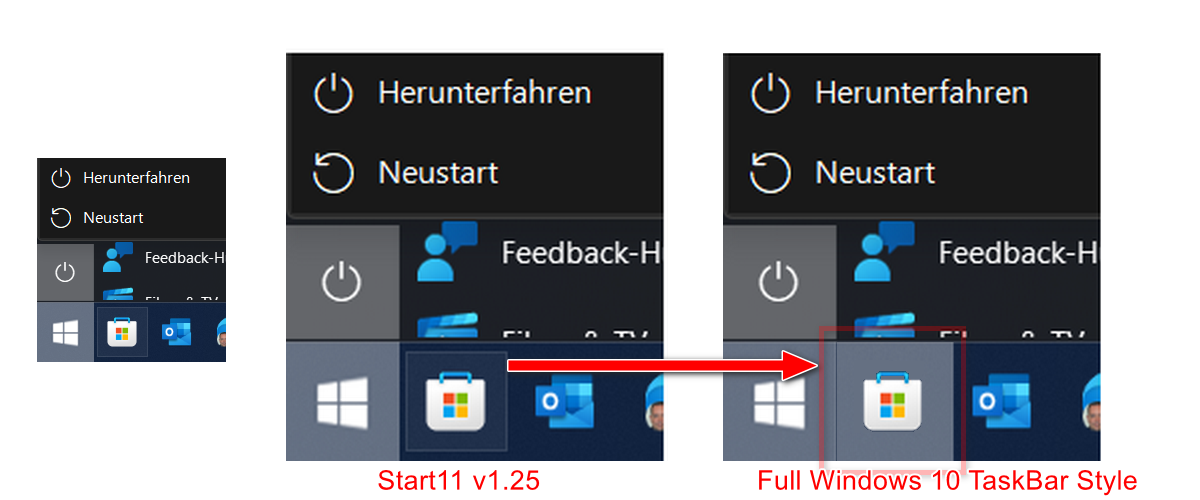
But now I noticed that the frame around selected icons on the taskbar does not match it in Windows 10 Start Menu Style.

So now my suggestion, couldn't the appropriate selection frame also be implemented in the Windows 10 style of Start11?


On the picture I show what I mean:


Here is my exactly measured Win10 dark mode button to try out (open in a new tab or download, so that you can see it correctly because of transparency):


Update: In ExplorerPatcher  there is not such a problem with start menu/button (Win 10 & Win 11 Style)  and AWG (https://github.com/valinet/ExplorerPatcher)

Reply #28 Top

I'm having a strange issue - I'm using the Win11 style and I have three shortcuts pinned to the bottom section next to the power button. After the update, however, they aren't showing up. I double checked that I had them pinned in the settings, tried removing and adding them back, adding different shortcuts, etc. Nothing worked. Not sure what's going on. 


Reply #29 Top

Quoting JAS1988, reply 28

I'm having a strange issue - I'm using the Win11 style and I have three shortcuts pinned to the bottom section next to the power button. After the update, however, they aren't showing up. I double checked that I had them pinned in the settings, tried removing and adding them back, adding different shortcuts, etc. Nothing worked. Not sure what's going on. 

Reduced 69%

Original 1198 x 682


Hi JAS,

I would recommend doing a "Purge & ReInstall", information on the process can be found at the link below:

https://forums.stardock.com/505872/start11-support-faq#reinstalling

Paul Scroggins
Associate Technical Support Analyst

Reply #30 Top

I have an issue with Start11 + Explorer Patcher. I'm using vertical taskbar.

Problem is that Control Center and WiFi flyouts are not working when Start11 is enabled

Video with the issue:

Windows 11 21H2 22000.795

Explorer Patcher 22000.778.47.1

Reply #31 Top

I'm having an issue where left-click actions are behaving like middle-click actions on some taskbar buttons, but ONLY when Start11 is enhancing the taskbar, and only for certain applications in certain situations (most noticeable with Firefox).


Windows default taskbar behavior: If Firefox windows are already open, left-clicking will NEVER open a new window. In response to a left-click, Windows will either restore the last-active Firefox window (if only one window exists), or show a selection UI of all open Firefox windows (if multiple windows exist). Middle-clicking the taskbar button will bypass this behavior and open a new window.

Start11 taskbar behavior: If Firefox windows are already open, left-clicking will sometimes open a new Firefox window. This should never happen if a window is already open.


  • Windows Version: Windows 11 21H2 (OS Build 2200.795)
  • Firefox Version: 102.0.1 (64bit)
  • Steps to reproduce:
    • Pin Firefox to the taskbar.
    • Enable "Let Start11 enhance the taskbar"
    • Set "Taskbar buttons should be combined" to "Always"
    • Open multiple Firefox windows
    • Minimize all Firefox windows.
    • Left-click Firefox on the taskbar.
    • A new Firefox window opens, which is unexpected behavior for left-click in these circumstances.


Reply #32 Top

Quoting Leapo, reply 31

Windows Version: Windows 11 21H2 (OS Build 2200.795)
Firefox Version: 102.0.1 (64bit)
Steps to reproduce:
Pin Firefox to the taskbar.
Enable "Let Start11 enhance the taskbar"
Set "Taskbar buttons should be combined" to "Always"
Open multiple Firefox windows
Minimize all Firefox windows.
Left-click Firefox on the taskbar.
A new Firefox window opens, which is unexpected behavior for left-click in these circumstances.
 

Hi Leapo,

I cannot reproduce this issue, https://cdn.stardock.us/support/uploads/2022-07-22_14-54-31tpscroggins.mp4

I would recommend doing a "Purge & ReInstall" and see if that takes care of the issue, information on the process can be found at the link below:

https://forums.stardock.com/505872/start11-support-faq#reinstalling

Paul Scroggins
Associate Technical Support Analyst

Reply #33 Top

Same behavior after a purge and reinstall. Start11 shows exactly the same behavior on all three of my computers.


Disabling taskbar enhancements fixes the behavior on all three systems, as well.

Reply #34 Top

Quoting Leapo, reply 33

Same behavior after a purge and reinstall. Start11 shows exactly the same behavior on all three of my computers.


Disabling taskbar enhancements fixes the behavior on all three systems, as well.

Do you happen to have Windows 11 PRO?   If so, could you try this out in Windows Sandbox?

https://pureinfotech.com/enable-windows-sandbox-windows-10/

Paul Scroggins
Associate Technical Support Analyst

Reply #35 Top

Same behavior there too.


Additionally, the taskbar window preview/thumbnail pop-up isn't working as expected for any taskbar button with Start 11's taskbar enhancements enabled. Clicking a taskbar button doesn't bring up taskbar previews like it does on the default Windows 11 taskbar, you have to hover and wait.

Reply #36 Top

Add spacing in Start11 Menu group. In the screen shot, in my "Office Productivity Tools" group, there is an extra medium sized row and two medium sized ghosts. I cannot figure out how to clean that up so the group heigh will shrink down. The ghost boxes are not clickable.


Reply #37 Top

I noticed with this update that the Modern style Start Menu opens about one-third of the way up my screen.  I have not tested this out on a different PC, as I wanted to test out the Start 11 app on this particular PC.

The previous version did not exhibit this issue.


Reply #38 Top

Quoting Leapo, reply 35

Same behavior there too. 

Additionally, the taskbar window preview/thumbnail pop-up isn't working as expected for any taskbar button with Start 11's taskbar enhancements enabled. Clicking a taskbar button doesn't bring up taskbar previews like it does on the default Windows 11 taskbar, you have to hover and wait.

And the only thing you installed in the Sandbox environment was Start11, yes? (important to know).

I don't show that you have Start11 under your account - are you using the trial?  Do you have the license under a different account?

If you are comfortable with working on your Windows Registry, go here:

Computer\HKEY_CURRENT_USER\SOFTWARE\Stardock\Start8

Export it

Zip it, with your userName in the name and PM it to TPScroggins, please:

TPScroggins, import it and see if then you can repro it as this will give you all the S11 settings he has enabled \ disabled.

Sean Drohan
Stardock Product Lifecycle Manager

Reply #39 Top

Quoting Leapo, reply 35

Same behavior there too.


Additionally, the taskbar window preview/thumbnail pop-up isn't working as expected for any taskbar button with Start 11's taskbar enhancements enabled. Clicking a taskbar button doesn't bring up taskbar previews like it does on the default Windows 11 taskbar, you have to hover and wait.

Is there a reason why are you using the enhanced taskbar option if you are also using combine always?

Reply #40 Top

Quoting Vernendalencientariactal, reply 37

I noticed with this update that the Modern style Start Menu opens about one-third of the way up my screen.  I have not tested this out on a different PC, as I wanted to test out the Start 11 app on this particular PC.

The previous version did not exhibit this issue.


Reduced 41%
Original 1920 x 1080


Are you using Object Dock as well?

Reply #41 Top

hi. i previously reported for 1.24 that when recording a Loom video (say longer than 60 seconds), after finishing recording; my entire explorer and start menu would crash. repeated on two computers. - Windows: 21H2 (OS Build 22000.778)

I was asked to provide a crashdump  .dmp file, which I did, but I think that it was missed. Just to let you know that this issue still persists on 1.25. link to file again:

https://www.dropbox.com/t/cwqL6gShaq0zKbBq


Reply #42 Top

on one of my computers, when I right click the start button, it shows the start11 context menu.


on my other computer, when right clicking, it shows the native context menu. video of not showing the start11 context menu:

https://nimb.ws/prRcfd

Reply #43 Top

Quoting robertodebag, reply 43

on one of my computers, when I right click the start button, it shows the start11 context menu.


on my other computer, when right clicking, it shows the native context menu. video of not showing the start11 context menu:

https://nimb.ws/prRcfd

Hello,
Sorry to hear you are having issues. Please check your right click on Start menu setting. Refer to screenshot below.

Thanks
Basj,
Stardock Community Assistant.

Reply #44 Top

Quoting basj, reply 44
Hello,
Sorry to hear you are having issues. Please check your right click on Start menu setting. Refer to screenshot below.


ah. sorry, I must have missed that. thank.


one more issue:

in chrome, I have many windows open. when mousing over chrome on the start bar, for some reason the windows show with a large gap of space above the Chrome icon:

Reply #45 Top

Quoting robertodebag, reply 45

in chrome, I have many windows open. when mousing over chrome on the start bar, for some reason the windows show with a large gap of space above the Chrome icon:

Need to know more on your system.

  1. Windows 10 or 11? And need to know its version too please.
  2. Start11 version.
  3. Monitor/s resolutions and scaling factors (100%,125% etc)
  4. Does the issue happen if you have one or two Chrome open? If not, how many Chrome open when you start to see the issue?

Thank you,

Basj,
Stardock Community Assistant

Reply #46 Top

I'm having a problem with ghosted artifacts at the top of my screen. These are pieces of windows that were moved around. A screen print doesn't show them, only a live view of the screen.  If I uninstall Start 11, the problem isn't there. I'm not placing the taskbar at the top of the screen.


Reply #47 Top

Quoting jim38, reply 47

I'm having a problem with ghosted artifacts at the top of my screen. These are pieces of windows that were moved around. A screen print doesn't show them, only a live view of the screen. If I uninstall Start 11, the problem isn't there. I'm not placing the taskbar at the top of the screen.

 
Reply #48 Top

Windows 11: Version: latest: 21H2 Build 22000.832
Start 11 version: latest: 1.25
monitor resolution and scaling: Surfacebook Studio defaults: 2400x1600, scaling: 150% recommended

the cut off point is 17 windows.

at 17 windows it looks like this: https://loom.com/i/0b8df0519ac24817a5dd88b9d160af69


after opening the 18th window it transitions to:

https://loom.com/i/8471278cfdea4126bab5477a1268a627


Quoting basj, reply 46


Quoting robertodebag,

in chrome, I have many windows open. when mousing over chrome on the start bar, for some reason the windows show with a large gap of space above the Chrome icon:


Need to know more on your system.


    1. Windows 10 or 11? And need to know its version too please.


    1. Start11 version.


    1. Monitor/s resolutions and scaling factors (100%,125% etc)


    1. Does the issue happen if you have one or two Chrome open? If not, how many Chrome open when you start to see the issue?


Thank you,

Basj,
Stardock Community Assistant

Reply #49 Top
After a short time, the Start11 menu (v1.25) is displayed offset to the top of the screen. 
Uninstalling and reinstalling did nothing.
As soon as I restart Explorer via the Start11 configuration, the menu is back in the correct position.
Windows 11 version is 22622.436 (22H2), the display is scaled to 150% (res.
2560×1440).
The problem already existed in v1.24.


Reply #50 Top

Quoting Ingo2311, reply 50

After a short time, the Start11 menu (v1.25) is displayed offset to the top of the screen. 
Uninstalling and reinstalling did nothing.
As soon as I restart Explorer via the Start11 configuration, the menu is back in the correct position.
Windows 11 version is 22622.436 (22H2), the display is scaled to 150% (res.
2560×1440).
The problem already existed in v1.24.


Are you using ObjectDock?