Heigar Heigar

First blind WIP

First blind WIP


WIP


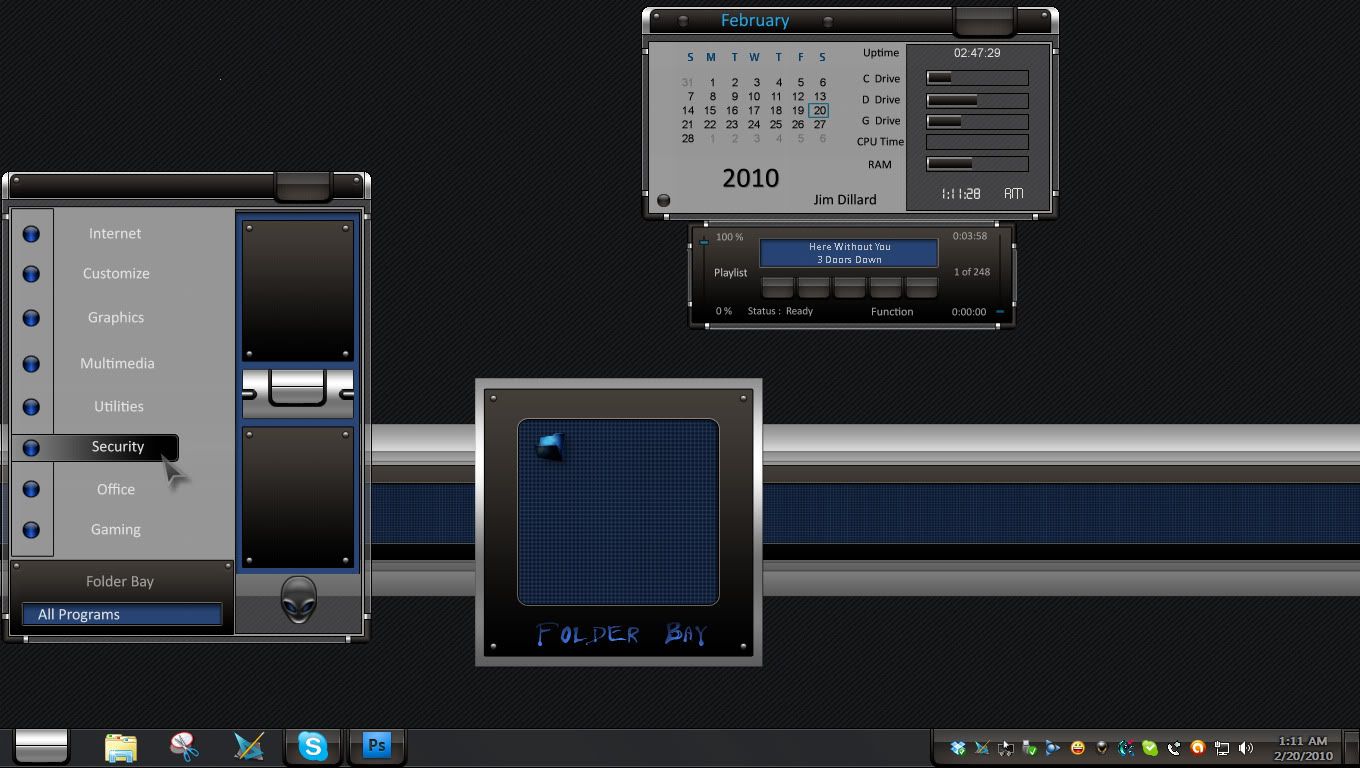
Making progress but a lot of work yet to do. This is my first blind so comments are welcome!

Start button is animated, but screenshot does not show it.

316,973 views 164 replies
Reply #76 Top

I'm guessing that original screenshot is a Photoshop mock up? You can't centre the text like that in the start menu.........

I wondered about that too

you can't change the background only behind the search button on the search box

If he does the search icon with the "background" on it, it should work fine.

Reply #77 Top

And.... can you have the All Programs arrow on the left? B[]

Reply #78 Top

Every screenshot I have shown is the blind actually applied and running ( even the original) no photoshop mock ups!

For the start menu text on the programs list I had my text margin on the left in past the clear frame and the right side set in a ways and had the text set at Horizontal Alignment  to align right. ( done on the background image not the item mouseover image) So yes you can center the text!


As for the search box:


And to get the all programs arrow on the left you have to enable "Left Align all programs/back text" in the Extra settings tab.

Reply #79 Top

Quoting BoXXi, reply 75
You can't centre the text like that in the start menu.........

Justified to the right?

/me 's SKS skills are -exstremely- rusty....

Reply #80 Top

Never thought I'd see the day, a "newbie" teaching the "veterans" new tricks.

Yes, the start menu has Horizontal and Vertical text. It's just that no one ever uses them....until now.

I'll be waiting to see this completed. Reminds me, a little, of one of MikeB314's old (first) blinds. :)

Reply #81 Top

You can make text do lots of wierd stuff if you try...so long as Neil dosnt accidently break something because you were doing something goofy...he does it to me a lot...hahah. :dur:

Reply #82 Top

Any way to change this text? Doing it through the text settings tab in that area (Places toolbar>button) has no effect what's so ever.


Reply #84 Top

First DX style...

Reply #85 Top

Quoting Heigar, reply 83

Dude, I wish I could help there, but I'm a total noob concerning windowblinds.

Reply #86 Top

Any way to change this text?

Last I checked thats one of those non working settings. :S

Reply #87 Top

Heres a trick I just found...have to see if it works after reboot...cut(delete) both background and button images and on my pc it reverts to my toolbar buttons graphics and text settings. :\ :D ;P :thumbsup:


after reboot all is good...

Weird,I never once considered NOT skinning them... :w00t:


This worked on XP...no idea on them other OS's. ^_^

Reply #88 Top

This is an amazing first WB and im highly impressed with how professional it looks, i will, without a doubt be trying this out once it is here, fantastic job Heigar :thumbsup:

Reply #89 Top

Last I checked thats one of those non working settings.

There seems to be quite a few of those settings. >:(


Thanks Stormypoo. :)

Reply #90 Top

And then there's the second edition.....:-"


Reply #91 Top

Great job on the DX themes!! :thumbsup: :)

+1 Loading…
Reply #92 Top

And for the weather.....


Reply #93 Top

Great job on the DX themes!!

Thanks! You did the real work...can't wait for this one!!!!  5*         :beer:

Reply #94 Top

Doc's Math Class

Heigar's graphics + Jim's DX = Great looking Skin

Reply #95 Top

Quoting DrJBHL, reply 94
Doc's Math Class

Heigar's graphics + Jim's DX = Great looking Skin

Ditto


Reply #96 Top

Can't wait for this blind! Jim, excellent dx's!

Reply #97 Top

Can't wait for this blind! Jim, excellent dx's!

There is all sayed.. really nice work

-I want have it soon as possible... :rofl:

Greets from
(°>..<°)
\_(,,)__(,,)_/
|/......\|
/.........\

Martin and his two budgerigars

Reply #98 Top

Quoting Heigar, reply 82
Any way to change this text? Doing it through the text settings tab in that area (Places toolbar>button) has no effect what's so ever.


No Idea but the 3 D look is fantastic !

  5*

Greets from
(°>..<°)
\_(,,)__(,,)_/
|/......\|
/.........\

Martin and his two budgerigars

Reply #99 Top


Quoting willistuder, reply 95


Quoting DrJBHL,
reply 94
Doc's Math Class

Heigar's graphics + Jim's DX = Great looking Skin


Ditto


Thanks to all 3 of you!


Quoting karmat, reply 96
Can't wait for this blind! Jim, excellent dx's!