WindowBlinds 7 Beta Bug reports

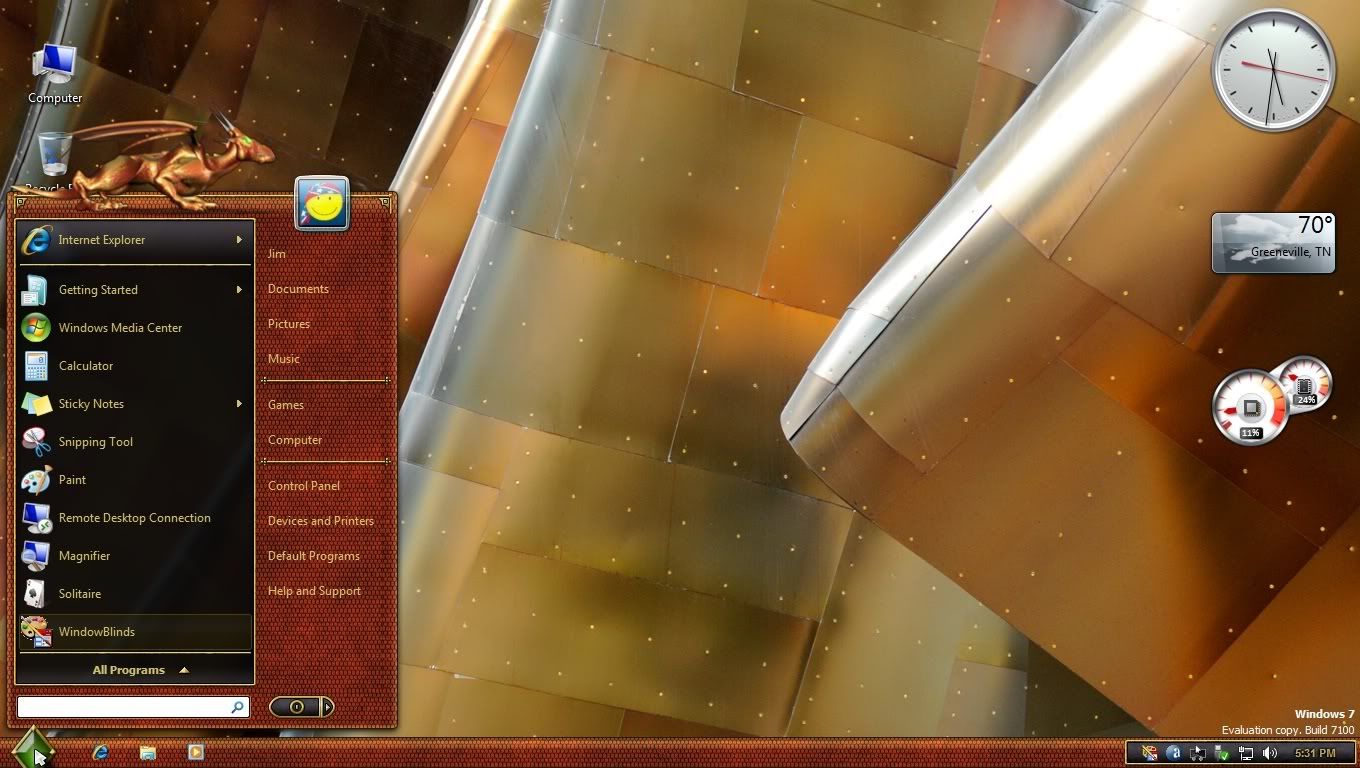
The new WindowBlinds beta has been released.  This build focuses on working with Windows 7 (and maintaining functionality in Vista and XP).

Known issues:

  • Compact start menus are right out.
  • Paint and Write titlebars are  . . not right.

Post anything that looks odd.  Make sure to give us your WB system information from the WB app, your OS (including 32 or 64 bit), and if it's hard to explain (or even if it isn't) a screenshot.


WindowBlinds v6.80.TBD (New BETA Build) 9/21/2009 - Coming MONDAY

  • Windows XP toolbar and animations settings are back under Settings.
  • Windows Vista sidebar skin settings are back under Settings.
  • Windows Explorer backgrounds tab has been added for Windows XP, Vista AND 7.
  • NEW! COOL! Textures tab added!
    • Allows users to apply a textured effect to your skins titlebar, taskbar and startmenu.
    • For skin authors, there are now three new sections in the skin to easily apply a texture to frames, taskbar or the startmenu without worrying about cutting it up and aligning it correctly.
    • Now skins can also include their own textured versions to show in the skin list.
  • Added support for enlarged menus on Windows Vista and Windows 7.
  • Some additional skin sections added for Vista / 7 including a new shadow section.
  • Fixed a bugs where the start button was clipping on multiple monitor Windows 7 boxes.
  • A feature that allows users to drag wallpapers to the large preview area and it will copy them into the wallpapers folder

Kirk Windisch

Software Development


136,403 views 97 replies
Reply #1 Top

Take two.  :)

Reply #2 Top

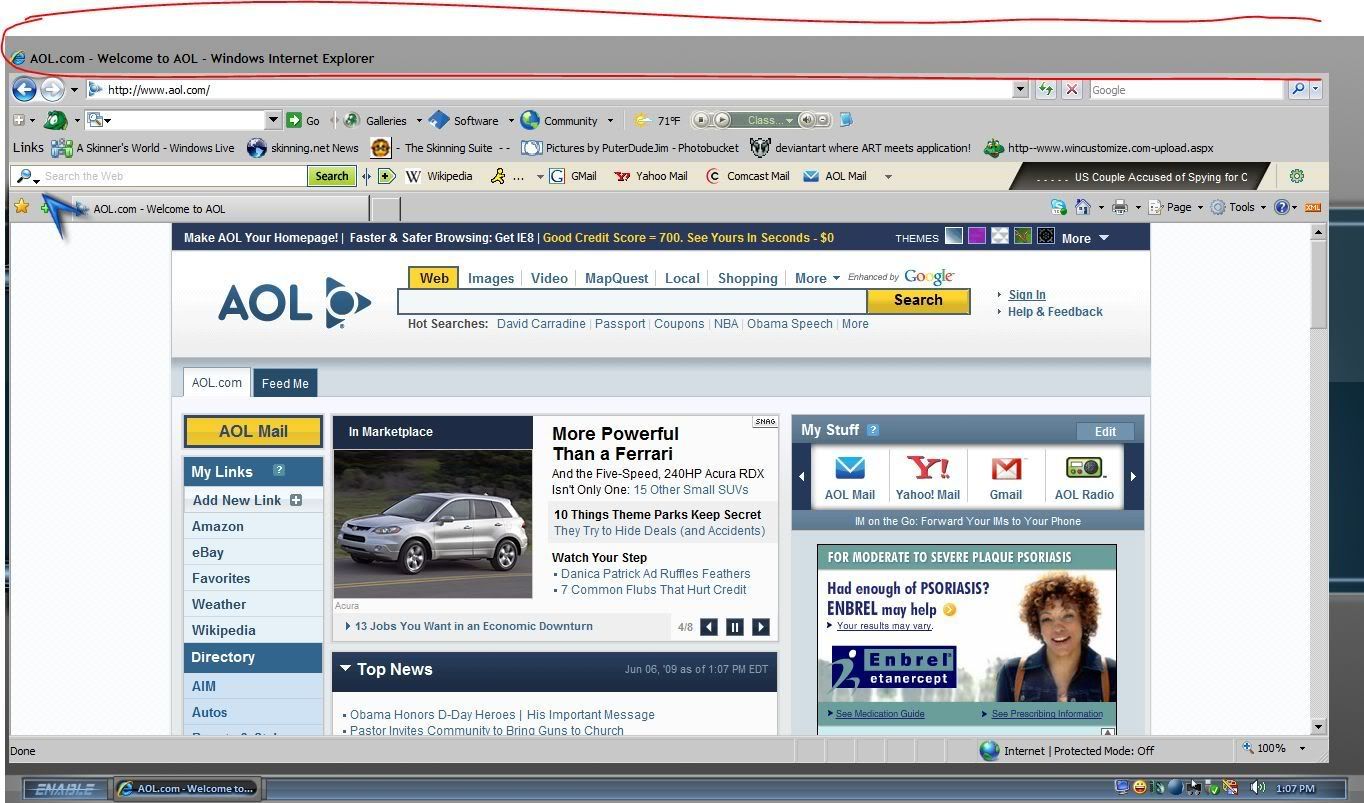
It has been 6 months since I had WB installed last so I am not up to date but the toolbars in IE8 and tabs are not getting skinned. Is this a known bugfeature or new?


Also.. Is Skinstudio ready for WIn 7 before I install it?

Reply #3 Top

Also.. Is Skinstudio ready for WIn 7 before I install it?
End of quote
I'd wait a week . . just because.  ;)

Reply #4 Top

Thanks. I suppose I can wait. The unskinned toolbars aren't so bad on my ispire skin. :P


* Menu bars in IE8 flash the correct color but then change to unskinned menubars but the menu bars look fine in Explorer.


Your computer has a Windows Experience Index base score of
Your Windows Graphics Experience score is 7.9

WindowBlinds version : WindowBlinds 7.0 (build 170 - Windows 7 Edition)

WindowBlinds is installed correctly on this PC
WindowBlinds appears to be activated on this PC
(Generic PnP Monitor) 1 is attached to NVIDIA GeForce 8800 GT
(Generic PnP Monitor) 2 is attached to NVIDIA GeForce 8800 GT

Wblind.dll      2009/06/04 15:30:20
Wbsrv.dll      2009/06/04 15:31:19
Wbconfig.exe      2009/06/04 15:49:02
Wbload.exe      2009/06/02 14:39:14
Wbhelp.dll      2009/05/14 14:39:07
Tray.dll           2009/05/14 14:39:21
Wbload.dll           2009/03/17 09:36:29
Screen.exe      2009/06/04 12:48:09

Reply #5 Top

anyone else not have a logoff/power button on the start menu when using the win7 subskin for leo? i get it when using the vista sub but not the win7 sub

Reply #7 Top

Windows 7 32 bit - Look & Feel no longer has the "Explorer backgrounds" option.  I trust that will return.  8)

Reply #8 Top

If XP x64 support does not come very soon
End of quote

XP 64 bit support is no longer, not enough of a user base for Stardock to continue support for it, I believe last version that supported XP 64 bit was 6.2.

Look & Feel no longer has the "Explorer backgrounds" option
End of quote

It is there for me, running XP Home. In fact, my settings stayed the same after updating.


Reply #9 Top

While hovering over the windows button, the button is cut.

WB7 Beta bug

If clicked or if I move out, the button is drawn complete

Edit: Tested with "Aero Metal" and "Diamond". With "Leo" the button is always drawn correctly

Your computer has a Windows Experience Index base score of 3.4
Your Windows Graphics Experience score is 3.4

WindowBlinds version : WindowBlinds 7.0 (build 170 - Windows 7 Edition) - 64 bit OS

WindowBlinds is installed correctly on this PC
WindowBlinds appears to be activated on this PC
(ViewSonic VG2030m) 1 is attached to NVIDIA GeForce 8500 (GF 8400 + GF 8200)
(Generic PnP Monitor) 2 is attached to NVIDIA GeForce 8500 (GF 8400 + GF 8200)

Wblind.dll      2009/06/04 15:30:20
Wblind64.dll      2009/06/04 15:31:44
Wbsrv.dll      2009/06/04 12:48:52
Wbconfig.exe      2009/06/04 15:49:02
Wbload.exe      2009/06/02 14:39:14
Wbhelp.dll      2009/05/14 14:39:07
Tray.dll           2009/05/14 14:39:21
Wbload.dll           2009/03/17 09:36:29
Screen.exe      2009/06/04 12:48:09

Reply #10 Top

I am a subscriber to object desktop ultimate and still couldn't find it. Where is it at? :(

EDIT: Nevermind, I had to set the option to show the prerelease software. Sorry about that.

Reply #11 Top

"It is there for me, running XP Home. In fact, my settings stayed the same after updating."

I edited that this was Windows 7 (32 bit) to make my note clearer.  Thanks.

Reply #12 Top

The bug that I found here is just that this thing works correctly for me. Is this a known bug?

Reply #13 Top

Sorry, couldn't help myself....:blush: :D

Reply #14 Top

Quoting Teknojunky, reply 6


Quoting Teknojunky,
reply 6
If XP x64 support does not come very soon, I will not renew Object Desktop any more.


Hi, add me to this list of not renewing OD without XP x64 support.


http://img41.imageshack.us/img41/1072/wb7xp64.jpg

 
End of Teknojunky's quote

I am sorry to say WindowBlinds 7 will not be supporting Windows XP 64 bit Edition.

It will be supporting Windows XP 32 bit edition (and will probably work on 32 bit Server 2003 too), Windows Vista 32 bit and 64 bit and Windows 7 32 bit and 64 bit.

The user base of XP 64 bit is simply too small to justify the additional testing and development costs.

Reply #15 Top

Quoting jmontesi4, reply 9
While hovering over the windows button, the button is cut.


If clicked or if I move out, the button is drawn complete

Edit: Tested with "Aero Metal" and "Diamond". With "Leo" the button is always drawn correctly

End of jmontesi4's quote

What build of Windows 7 do you have installed?

Reply #16 Top

When I updated, WB7 was working well. Then I updated MyColors, and ended up with "Windows Classic". I then had to verify installation and re-update WB7. Now all appears to be working well. I see the "shared file" issue still exists, and forgot to mention, Impulse updated before I installed WB7.

Your computer has a Windows Experience Index base score of 3.1
Your Windows Graphics Experience score is 3.1

WindowBlinds version : WindowBlinds 7.0 (build 170 x86 - Vista Edition)

WindowBlinds is installed correctly on this PC
WindowBlinds appears to be activated on this PC
(Generic PnP Monitor) 1 is attached to NVIDIA GeForce 8400M GS

Wblind.dll 2009/06/04 15:30:20
Wbsrv.dll 2009/06/04 15:31:19
Wbconfig.exe 2009/06/04 15:49:02
Wbload.exe 2009/06/02 14:39:14
Wbhelp.dll 2009/03/24 17:04:07
Tray.dll 2009/03/24 17:04:21
Wbload.dll 2009/03/17 09:36:28
Screen.exe 2009/06/04 12:48:09

Reply #17 Top

The start button issue is with all skins. Build 7100.


The unskinned toolbars and menubars is all skins.

Reply #18 Top

Pls tell me how to install windowsblind 7, i see t by impulse but can't update  do i need to buy it extra??

Reply #19 Top

I have my background set to change every 5 minutes. If I am at my PC working all is fine. If I go away long enough for the background to change Internet explorer opens in windows classic mode. I close IE and reopen and it is skinned as should be. This does not happen when the background changes if I am doing aanything at my PC. It's only when I leave it idle for a bit.

When it switches to classic mode the menubars, toolbars, and tabs in IE are skinned classic colors basd on the skin settings. When I close and reopen IE8 the menubars, tabs, etc. switch to unskinned but the rest is skinned properly.


in case it helps...

Reply #20 Top

This may be covered already, but I have no titlebar.


Your computer has a Windows Experience Index base score of 4.4
Your Windows Graphics Experience score is 4.9

WindowBlinds version : WindowBlinds 7.0 (build 170 x86 - Vista Edition)

WindowBlinds is installed correctly on this PC
WindowBlinds appears to be activated on this PC
(Generic PnP Monitor) 1 is attached to NVIDIA GeForce 9400 GT

Wblind.dll      2009/06/04 15:30:20
Wbsrv.dll      2009/06/04 15:31:19
Wbconfig.exe      2009/06/04 15:49:02
Wbload.exe      2009/06/02 14:39:14
Wbhelp.dll      2008/04/28 12:35:07
Tray.dll           2008/04/28 12:35:21
Wbload.dll           2009/03/17 09:36:28
Screen.exe      2009/06/04 12:48:09

Reply #21 Top

Quoting Neil, reply 15


What build of Windows 7 do you have installed?
End of Neil's quote

Official Release Candidate, build 7100

Reply #22 Top

Quoting RedneckDude, reply 20
This may be covered already, but I have no titlebar.

End of RedneckDude's quote

It looks like a bad skin load.  Did reapplying fix it?

Are other skins ok?

Reply #23 Top

ok i see this in impulse. how do i get this...im runnin win7 and vista ultimate....everytime i click to install from impuse it say to update the registration....where do i get that from or let me buy it? thanx for your help in advance:grin:

Reply #24 Top

i take it i'm the only person who doesn't have a logoff/power button on the start menu of Leo when using the win7 subskin on Win7. why do you guys have it and I don't?

Reply #25 Top

any help here for me...sorry but wb is like crack to me...i have to have it :grin: