Taskbar Icons Change

I reinstalled Start 11 because I changed my email and I needed a new account.  Me previous Start 11 allowed me to set taskbar icons and they were always shown how I set them.  But now, they change when every app is opened.  Here's a simple example:

Here's my email icon on the taskbar when it's closed (I made this icon):
     

When I open my email app, the icon changes (it's the app's default icon):
     

It didn't do this before.  Can anyone tell me how to make this icon change stop happening?

Thanks.

1,759 views 5 replies
Reply #1 Top

Do you have the Enhanced taskbar enabled?

Also, what versions of Windows and Start11 do you have installed?

Reply #2 Top

Yes, the Enhanced taskbar is set:

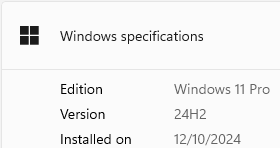
I have Windows 11:

Start11 version:

I can't say that I chose the Business Edition - it seems to have given me that when I resubscribed.

Thanks.

Reply #3 Top

Okay thanks. Now check the settings in Start11 at Taskbar > Enhanced taskbar settings > Taskbar button combining and let me know how you have that set.

Then, check Taskbar > Enhanced taskbar settings > Taskbar button appearance. Do you have "Always hide text on buttons regardless of group state" checked?

I have found that if you have "Never combine taskbar buttons" selected, with "Always hide text on buttons regardless of group state" checked, it will produce what you are seeing.

Reply #4 Top

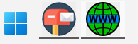
I didn't see all of the items you mentioned, but I amazingly found what I was looking for!  I clicked on "Configure enhanced taskbar..."  I then went into the top item, "Taskbar button combining" and selected "Always combine taskbar buttons".  With that, my personally made icons are remaining when items get opened (the line under each icon says it's open):

This can be shut down - I've got exactly what I wanted.

Thanks.

Reply #5 Top

Glad you got it sorted.