sdRohan sdRohan

Start11 1.1 Release Feedback Thread

Start11 1.1 Release Feedback Thread

With the Start 11 1.1 release, we are creating this thread so that users can report any observed issues.  

Obtaining Start11 1.1

Object Desktop members can get the release from within Object Desktop Manager 

Individual purchases (as well as Object Desktop Members) can also be obtained from your account page: https://store.stardock.com/myaccount/products

For guest check-out purchase (no account), from this link: http://www.stardock.com/support/productkeyretrieval

Reporting an issue

Please include the following for anything found:

  • Exact Windows version \ build (winver.exe)
  • Detailed steps to recreate the issue seen
  • Screenshots and videos are very helpful.  Videos can be uploaded to a cloud drive services (GoogleDrive, DropBox, OneDrive, YouTube) and links included in your post.  Images can be directly added.
  • If there are specific apps that the app does not work (well) with, please note what apps and their exact versions.  If any app is not common, a link to a trial version would be appreciated.

Thank you for your interest and any time you put into making Start11 a better product.

Sean Drohan
Stardock Support Manager

219,086 views 126 replies
Reply #76 Top

I'm hoping this is the release that will allow disable taskbar grouping? Its the only feature I'm missing :D Although I can't help test as I need my system to work bug free

Reply #77 Top

Quoting luiscamino, reply 55

I have an issue since I bought Start11 at v1.0 that someone here mentioned it was fixed in v.1.1.

It turns out the bug is still present and it's quite annoying, defeating the half of the purpose of the product.

Quite simply, every second time I start my computer, the taskbar icons in the main monitor are aligned to the left, instead of centered as I have set in Start11. The other monitor is fine (see screenshot below). Going to Start11 settings and forcing it to "Align left" and again back to "Center" doesn't fix it. Force closing Start11 and restarting it doesn't fix it. The only thing that fixes it is is restarting the computer.

Surface Studio 2

Windows 10 20H2 (19042.1466)

Start11 version 1.1


Reduced 43%
Original 1920 x 691


any feedback on this regarding a future fix? if it's not planned or "we can't reproduce" i might aswell ask for my money back since it defeats the purpose of the tool.

Reply #78 Top

Quoting luiscamino, reply 77

any feedback on this regarding a future fix? if it's not planned or "we can't reproduce" i might aswell ask for my money back since it defeats the purpose of the tool.

I can't reproduce this on my dual display setup. Did you try update to Start11 V1.11 Beta?

Thank you,

Basj,
Stardock Community Assistant

Reply #79 Top

Quoting basj, reply 78


Quoting luiscamino,

any feedback on this regarding a future fix? if it's not planned or "we can't reproduce" i might aswell ask for my money back since it defeats the purpose of the tool.


I can't reproduce this on my dual display setup. Did you try update to Start11 V1.11 Beta?

Thank you,

Basj,
Stardock Community Assistant


YES.  It's in every version. 1.0, 1.01, 1.1, and 1.11 Beta.

It "flip-flops" which screen is broken.  But ALWAYS one of them is.  Sometimes it's my primary, other times it's my secondary.  Windows 10 20H2 is the version I am using.  (it's Windows Enterprise as this is my work computer).

Reply #80 Top

Quoting LT1Z51, reply 80

YES. It's in every version. 1.0, 1.01, 1.1, and 1.11 Beta.

It "flip-flops" which screen is broken. But ALWAYS one of them is. Sometimes it's my primary, other times it's my secondary. Windows 10 20H2 is the version I am using. (it's Windows Enterprise as this is my work computer).

Are you also running DisplayFusion or any Display managers application?

Thank you,

Basj,
Stardock Community Assistant

Reply #81 Top

Quoting jeffstuy, reply 63

I did as requested.  I purged, re-booted, reinstalled (he latest version), and re-booted.  but I am getting the same issue:


Can I get an update about this?

Reply #82 Top

Quoting jeffstuy, reply 82

Can I get an update about this?

Hello,
Sorry to hear you are having issues. I think it is best for you to start your own thread. Also mention in there more details on your issue. Reading back your post from other thread. I need more information.

  1. Your current version of Windows 11. Any Windows updates recently since "OS build 22000.376"
  2. Start11 version currently running? V1.11 beta?
  3. How did you determined that Start11 is causing your "Runtime Error" pop ups?

Thanks
Basj,
Stardock Community Assistant.

Reply #83 Top

Quoting basj, reply 81


Quoting LT1Z51,

YES. It's in every version. 1.0, 1.01, 1.1, and 1.11 Beta.

It "flip-flops" which screen is broken. But ALWAYS one of them is. Sometimes it's my primary, other times it's my secondary. Windows 10 20H2 is the version I am using. (it's Windows Enterprise as this is my work computer).


Are you also running DisplayFusion or any Display managers application?

Thank you,

Basj,
Stardock Community Assistant

No.  Just using the built in Windows settings.  The nVidia Control Panel is installed, but I don't use it.

Reply #84 Top

Quoting LT1Z51, reply 80


YES.  It's in every version. 1.0, 1.01, 1.1, and 1.11 Beta.

It "flip-flops" which screen is broken.  But ALWAYS one of them is.  Sometimes it's my primary, other times it's my secondary.  Windows 10 20H2 is the version I am using.  (it's Windows Enterprise as this is my work computer).

that's exactly what's happening!! almost never centers both monitors, and one of the monitors is left aligned, randomly. super annoying!

i doubt it's fixed in 1.11 beta because the release notes don't mention anything about this.

i'm not using any display manager. just stock Windows 10 20H2.

also, i purged the app and reinstalled it, didn't fix it.

 
Reply #85 Top

Quoting luiscamino, reply 85


Quoting LT1Z51,


YES.  It's in every version. 1.0, 1.01, 1.1, and 1.11 Beta.

It "flip-flops" which screen is broken.  But ALWAYS one of them is.  Sometimes it's my primary, other times it's my secondary.  Windows 10 20H2 is the version I am using.  (it's Windows Enterprise as this is my work computer).


that's exactly what's happening!! almost never centers both monitors, and one of the monitors is left aligned, randomly. super annoying!

i doubt it's fixed in 1.11 beta because the release notes don't mention anything about this.

i'm not using any display manager. just stock Windows 10 20H2.

also, i purged the app and reinstalled it, didn't fix it.

Does it happen under a clean boot under a new Windows admin account?

https://forums.stardock.com/505872/start11-support-faq#cleanboot

Sean Drohan
Stardock Support Manager

Reply #86 Top

Hello!

I've switched to Windows 11 with a clean install 21H2 build:22000.438. I have a problem with Start 11. If I open the start menu there is a huge "gap" between the taskbar and the actual opened start menu. If I choose the Win7 style it works but with the others it looks like this:

Could you help me please?

Thanks!

Reply #87 Top

Hi,


This software does not work with any "Pin to Start" apps that I have used like Pin From Steam. When I go to add a tile from these programs, they add to the Windows 11 start menu, but not the Start11 start menu.

Can this be addressed please?


Thanks

Reply #88 Top

Quoting MyDolos, reply 88

Hi,


This software does not work with any "Pin to Start" apps that I have used like Pin From Steam. When I go to add a tile from these programs, they add to the Windows 11 start menu, but not the Start11 start menu.

Can this be addressed please?


Thanks

Which menu style are you using?

Is Pin From Steam a third party app and if so where can we obtain it from?

Normal shortcuts pinned to the Win11 menu should automatically get imported into the Win10/11 menus in Start11, but it may be that tool is doing something non standard.

Reply #89 Top

Hello, dear devs!

First of all, I want to thank you for your work with Start 11! But I have two issues with it. I have a 2-in1 laptop and use a touchscreen often. Recently I noticed when I touch any icon on the taskbar nothing happened. The program won't open! I have to touch a little more, wait until a menu shows, and touch the icon from the pop-up menu. Weird, because when I click on the icons using touchpad they open perfectly.

The second issue. When I touch (by touch screen or touchpad) the Start icon always opened the basic win 11 start menu. But pressing win key on the keyboard opened Start 11. On the control page I turned on every needed toggle, I think.

Please help!

Reply #90 Top

Windows 11 build 22000 (Russian locale)

1. Strange item in installer/uninstaller

2. I can't run cmd.exe via search, it's showstopper to use the Start11

Start11:

Start11 behaviour

Default:

Default

Reply #91 Top

I would get something like this except I put my taskbar on the top of the window screen on both monitors.  Sometimes, the 2nd monitor would show it at the bottom.  The quickest way to fix it is to right-click on the taskbar, select Configure Start11 / Taskbar / Advanced Taskbar Tweaks, and click "Restart Explorer."  This often fixed the issue.  It's faster than a reboot.  Hope it helps. 

Reply #92 Top
How do I make the Windows 7 Start Menu as long as the screen? I have a ton of pinned applications from Start10 that are not showing in Start11. Thank you for your help!
Reply #93 Top

Quoting mrbjk2000, reply 93

How do I make the Windows 7 Start Menu as long as the screen? I have a ton of pinned applications from Start10 that are not showing in Start11. Thank you for your help!

Please create your own thread for this.

Sean Drohan
Stardock Support Manager

Reply #94 Top

Hi,

i'm using windows 11 with start11 and fences 4, here is my configuration:

windows 11

intel i7 9700kl

32GB RAM

AMD RX580 Video card

some development programs like MPLAB, Visual Studio and VS Code

Stardock Fences 4

Stardock Start 11

oh i forgot to tell you i'm using 3 Monitors

If i install start 11 my computer start explorer restart loop directly, fences disabled by itself and the explorer restart loops are going to bluescreen of death. If i uninstall Start11 my computer is stable. Any solution?

Best Regards

Marko Petsch

Reply #95 Top

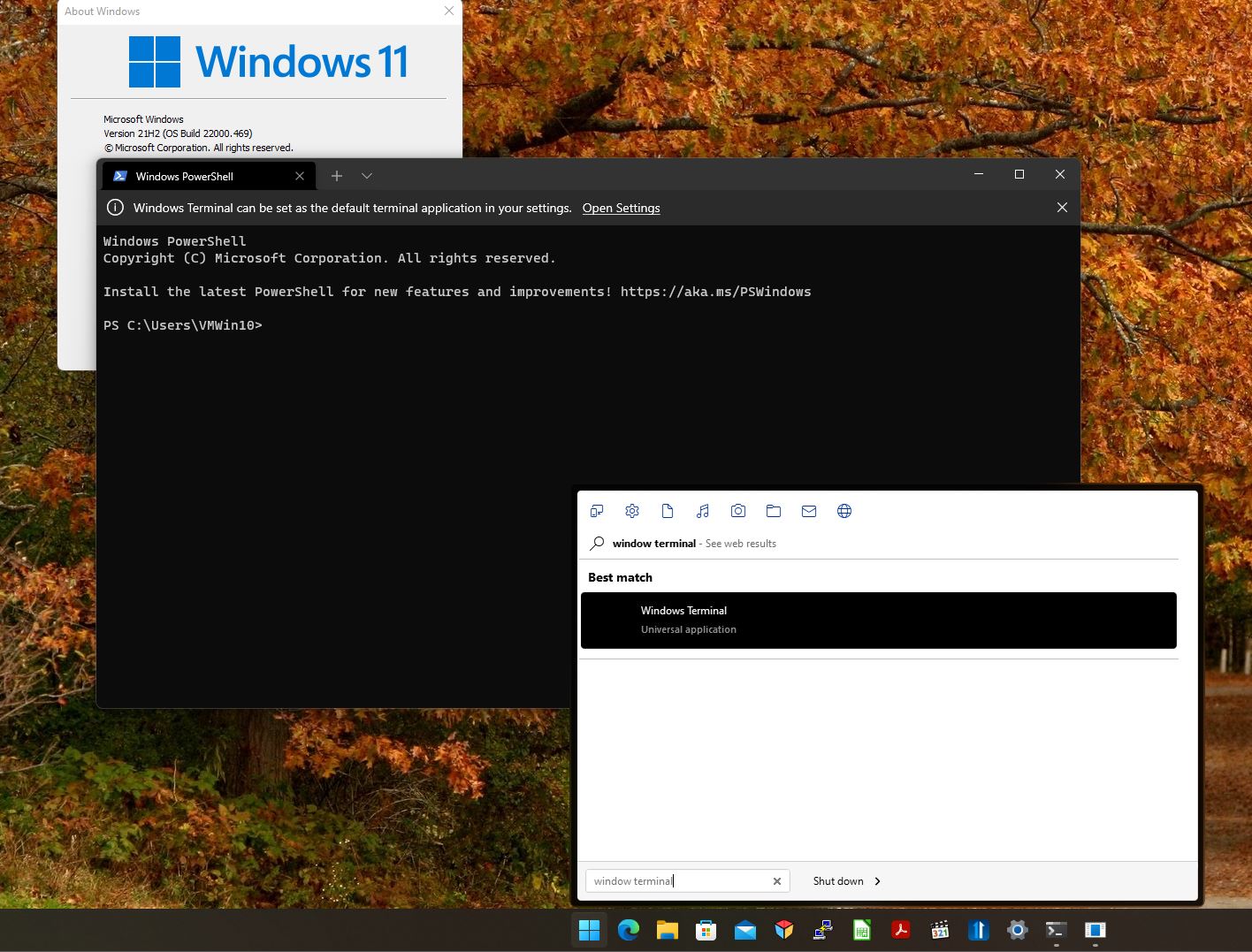
I am not sure if this is a Start11 problem. It may be the latest Windows 11 KB5008353 Build 22000.469 update.
But could someone please check this for me?

When I right click on the Start button and click on either "Windows Terminal" or "Windows Terminal (Admin)", it doesn't open.

Can someone please let me know if it also happens for you?

Reply #96 Top

Quoting ProtocolX, reply 96

I am not sure if this is a Start11 problem. It may be the latest Windows 11 KB5008353 Build 22000.469 update.
But could someone please check this for me?

When I right click on the Start button and click on either "Windows Terminal" or "Windows Terminal (Admin)", it doesn't open.

Can someone please let me know if it also happens for you?

It open this for me

Thank you,

Basj,
Stardock Community Assistant

Reply #97 Top

Hi Basj.
I mean the WinX Menu.
Right click start button.


It doesn't matter now.
As I suspected, it's not a Start11 issue. It's a Windows issue. Fixed now.

Reply #98 Top

Quoting ProtocolX, reply 98

It doesn't matter now.
As I suspected, it's not a Start11 issue. It's a Windows issue. Fixed now.

Okay, just to confirm, tested on those two and it works on both items for me.

Thank you,

Basj,
Stardock Community Assistant

+1 Loading…
Reply #99 Top

Quoting seschwarz, reply 100

Windows 10 (21H2, Build 19044.1503)

WindowBlinds 10 + Start11 (and Win7 style) = messed up context menus

Hello,
Sorry to hear you are having issues. Issue happening on all or specific Windowblinds style?

Thanks
Basj,
Stardock Community Assistant.

Reply #100 Top

Quoting seschwarz, reply 102

Do I need to contact the author?

Yes, I can recreate this issue on my system too. I don't see the same issue on any other style I tested so far. So I do believe it is best to contact the author and see if can be help.

Thank you,

Basj,
Stardock Community Assistant