Right Click Wish List

Can it be done

Looking to start a RC "Wish List" since it's my most valuable piece of software.

Wish #1 - For Multi-Monitor situations, I'd like to see the ability to set a program to open on the display clicked. I know that there are vendor & 3rd party programs that include this but it's usually bundled with a lot of stuff I don't use.

That's a start. I know there are others who value this program as much as I do, so add your own items. I'll add one here and there to keep the thread semi-active.
19,491 views 40 replies
Reply #1 Top
-Save Configuration
-Save Configuration
-Save Configuration
...
-Vista Functions like the new desktop-properties
Reply #2 Top
Allow use of pngs instead of bitmaps..which would allow for transparency on the background. The transparency slider makes everything transparent, including the text..I can make a Rainlendar using png's and can make then as tranparent as I want. This would be so much easier when making rounded corners etc in RC.

Save Config..that has always been something that should be included. Nothing worse than losing a your perfectly set up RC.

RightClick is one of the best 'under' advertised programs here. This program , once set up, can get you everywhere...fast.

Reply #3 Top
I will let the devs know about this forum post wish list.
Reply #4 Top
I agree with c242!
Reply #5 Top
Save configuration...

png-support...

plus Vista 64bit compatibility (preferably not half a year later than the 32bit version)

Reply #6 Top
In the configuration dialog, I'd like to know what "Highlight Element" does or is supposed to do. Whenever I click it a box flashes somewhere on my screen.

In the configuration dialog, I'd like to be able to drag items around and onto sub-menus like you can with the XP start menu. Or maybe a Copy/Paste function so you don't have to re-create an item if you decide to move it to a sub-menu or bring it to the main-menu

I'd like to see widget/gadget implementation expanded to cover Sidebar gadgets (so they work on XP would be nice) and it wouldn't hurt if the designers would make some that are aimed at fitting into a menu. Objectbar would benefit from that too.
Reply #7 Top
Allow use of pngs instead of bitmaps..which would allow for transparency on the background


I'm new to Right Click, having only made one so far but feel hampered by the bmp restriction. It would be great to have the use of png's. Also, when highlighting, say, a folder that brings up another background section, it would be cool to be able to use a different background instead of the main one. Is that already possible, and if so, please tell me how. Overall, I really like this program and hope to start developing some more.
Reply #8 Top
Allow use of pngs instead of bitmaps..which would allow for transparency on the background. The transparency slider makes everything transparent, including the text..I can make a Rainlendar using png's and can make then as tranparent as I want. This would be so much easier when making rounded corners etc in RC.

Save Config..that has always been something that should be included. Nothing worse than losing a your perfectly set up RC.

RightClick is one of the best 'under' advertised programs here. This program , once set up, can get you everywhere...fast.


I'm with Fairyy~ on this.Especially the transparency bit.  
Reply #9 Top
Save configuration is a big one, especially since I just lost my configuration AGAIN because of the archaic way this application works. In my opinion, RightClick should save the configuration automatically any time it's changed, there's absolutely no reason not to, but if that can't be done for some reason, then a Save Configuration option is the next best thing.

Another nice to have would be a way to backup and restore the current settings from within the menu editor.

Vista options in the "Various-Function Item" would be really nice too.

But to be honest, ANY update to this software would be welcome. This is the best StarDock application by far, the only one I use in fact, and I hate to think it's been abandoned.

EDIT: I just looked through the older posts in this category, and aside from the Vista options, all of these wish list items have been asked for since at least late 2004. So, this application is dead, StarDock obviously won't spend any resources on it. Anyone know of a similar application that is actually supported?
Reply #10 Top
I hate to think it's been abandoned.


It's in the list for an Upgrade to come out summer 2007. That's why I figured now would be a good time to let the developer know what we'd like to see.
Reply #11 Top
Where can this Upgrade list be found? I can't see a link to it anywhere on the StarDock site.
Reply #13 Top
.Png support for sure is a must for this app. I venture that this alone would double the number of skinners and users.
Reply #14 Top
.Png support for sure is a must for this app

Same goes for ObjectBar
Reply #15 Top
I'm fairly new to this app, and I now wonder how I've managed so far without it!

However, I'm finding that after reboots, RightClick loses items in the config screen: the items are still there on the desktop menu, but not in the config. As soon as the config is modified, the desktop menu then mirrors the incomplete config. It doesn't seem to be consistent either, so I don't know how to work around it. Sometimes the menu itself loses items at random.

Without a definitive way of saving the configuration, it really sours the experience of using it, having to add items again and again after reboots.
Reply #16 Top
.Png support for sure is a must for this app

Same goes for ObjectBar


agree a lot
or at least allow to use .tga and perpixel for the background
Reply #17 Top
Without a definitive way of saving the configuration, it really sours the experience of using it, having to add items again and again after reboots.


Maybe i come back form an other planet but i haven't this mater all my config is still the same after change skin or reboot
Reply #18 Top
actually I just found that I can use png's (actually they're converted to tga's).

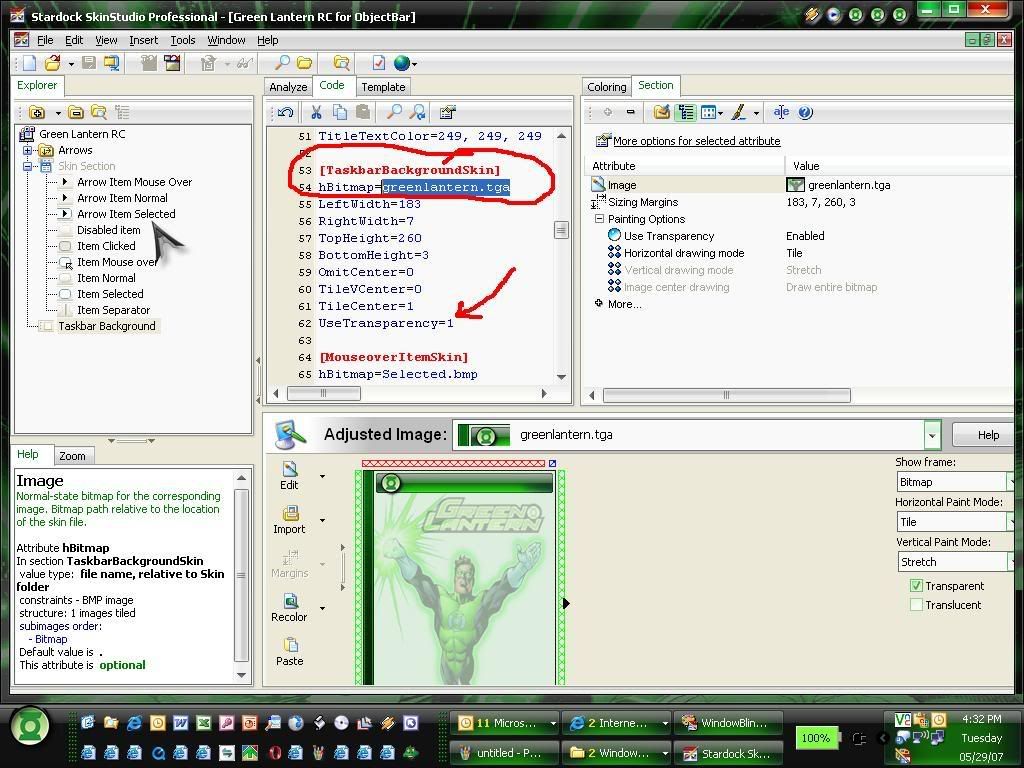
open up the obskin file in skinstudio, import the png graphic file you want to use much the same way you would when working on a wb skin. Importing the png file using skinstudio converts it to tga and you then have the use of transparency instead of using bmp's with magic pink. I just recently worked on my first right click to match a wb skin I'm working on and I opened up the obskin file (the config file inside your rightclick skin folder) by accident with skinstudio and found that I could import the png's that way. I found it easier to work in skinstudio because I could also edit margins easier by viewing them, specifying whether to tile or stretch an image. There are something you still need to code manually but skinstudio allows you to edit the config file as well. On top of that you can enter in your author, email, website info, and other special notes/info and skinstudio adds those items to the obskin file as well. I was actually impressed with the fact that it worked so easily - is anyone else using skinstudio to work on their rightclick skins?


Reply #19 Top
- is anyone else using skinstudio to work on their rightclick skins?


Yes...thats how I do it but I dont see how your keeping it a png.It converts back to a BMP in the end...if your actually using a png for the backgound of a RC I'd like to see it.
Reply #20 Top
Just retry once time with SKS and it still the same mater
UncleRob the problems is that RC display transparency on border but no in middle

look first with a .tga and second with a .bmp still the same .png as base

Reply #21 Top
the file is a png but once imported into skinstudio gets converted to a .tga file,
and then I enable transparency (as shown in the screenshot I uploaded above)
it's my first rc skin so I might not know a thing about what i'm talking about (wouldn't be the first time and definitely won't be the last either   ).

If you want to test it out, I could zip it up & send it to you by email. let me know   
Reply #22 Top
I would like to see that yes cause i tried like you and i'm interesting
Reply #23 Top
the file is a png but once imported into skinstudio gets converted to a .tga file,
and then I enable transparency (as shown in the screenshot I uploaded above)
it's my first rc skin so I might not know a thing about what i'm talking about (wouldn't be the first time and definitely won't be the last either ).

If you want to test it out, I could zip it up & send it to you by email. let me know


Id like to see it too...the program itself has never supported pngs.

[email protected]
Reply #24 Top
ok I just double checked this and although I can use the .tga file, it isn't transparent, the area that should be transparent is white, sorry about that guys, I guess my meds must be wearing off or something,

- and I thought I had made a new discovery or something,
look at me I'm Christopher Columbus and hey there's North America over there!

The group may give me a collective beating at any time now, sorry for the confusion I've cause folks!

.... Take it easy on me - I bruise easily.
Reply #25 Top
ok I just double checked this and although I can use the .tga file, it isn't transparent, the area that should be transparent is white, sorry about that guys, I guess my meds must be wearing off or something,

- and I thought I had made a new discovery or something,
look at me I'm Christopher Columbus and hey there's North America over there!

The group may give me a collective beating at any time now, sorry for the confusion I've cause folks!

.... Take it easy on me - I bruise easily.


No beating..I had hoped you found a secret we all didn't know about.
Oh well...maybe next build will support transparency..