Hengest Hengest

Opera is now free!

Opera is now free!

Though not free as in beer

http://www.opera.com/
The Opera web browser is now completely free for anyone without any annoying ad. banners at the top.

Why we're going free

Opera has removed the banners, found within our browser, and the licensing fee. Opera’s growth, due to tremendous worldwide customer support, has made today’s milestone an achievable goal. Premium support is available.


So, if you haven't tried it out yet, give it a go. Opera offers many of the same features as Firefox (security, tabs, skins, etc), although it does seem to, generally, use-up less system resources than Firefox.

71,689 views 55 replies
Reply #26 Top
Island Dog & Chris, on the advanced tab under Network, do you have the browser identified as Opera?
Reply #27 Top
. Version 1.5 of the Sun Java Runtime Environment

Hengst,
You have it. What were you trying to do when WC said it did not support Opera?
Reply #28 Top
No, it's identified as IE.
Reply #29 Top
I tried out opera back when it was a simple MDI app, way back in '96 or '97, before skinning was even added it. I remember it fondly because it was the "floppy disk web browser", as in, the only webbrowser that you could download the install to a floppy and it would fit.
Reply #30 Top
Just downloaded and no problems with WC or the forums so far. I was wrong. When I submitted the post thru Opera I got the continuing reload. Had
Firefox open at same time and it was posted but Opera is still cycling.
Reply #31 Top
sland Dog & Chris, on the advanced tab under Network, do you have the browser identified as Opera?

Setting it to Opera / Mozilla / IE makes no difference. This thread page continuously reloads over and over again. Using Opera 8.5 BTW
Reply #32 Top
Here's something interesting. The continuous reload only occurs when I'm logged in to the wincustomize site. If I load this thread page when I'm not logged in, everything is fine.
Reply #33 Top
I'm on version 8.02

I always wait a few days before upgrading to see if any problems arise from the upgrade. I'd say that there's one this time. I think it's going to have to be addressed on the WC end because I haven't seen it reported on other sites.

I always have mine identified as opera due to some strange results when ID'd as IE
Reply #34 Top
I'm having the reload problem now, but didn't have it before upgrading to 8.5. A few minutes ago I made a post about it on the Opera forum. Will let you know if I find out anything more
Reply #35 Top
re #32: I just tried logging out & had the same result-- the reloads don't happen if I'm logged out. I was using Opera 8.2 & never had this problem until yesterday evening after upgrading to 8.5. (didn't change any settings before noticing the reload issue.)

Lanetec is right about upgrades!
Reply #36 Top

I haven't seen that error message here. However, when I look at a post in the forums the page seems to continuously "reload".

They broke the newest version of Opera.  We use location.href = .../Forums.aspx?ForumID=24&AID=87132#671959 to jump to the last comment that was read.  It appears that Opera is now ignoring the # anchor tag thus the above line causes Opera to continually to reload the page.  So we had to chop that option out for Opera.

Reply #37 Top
Thanks, T_Man. I will post your comment on the Opera forum in hopes of getting it fixed.

Some WC users added posts to my thread about the same problem. Will let them know you took care of it.
Reply #38 Top

Thanks for the update T-Man. 

Reply #39 Top
Glad I read this. I just logged on a little while ago and noticed I wasn't going to the last read post. I was just about to post a bug thread.
Reply #40 Top
Hengst,
You have it. What were you trying to do when WC said it did not support Opera?


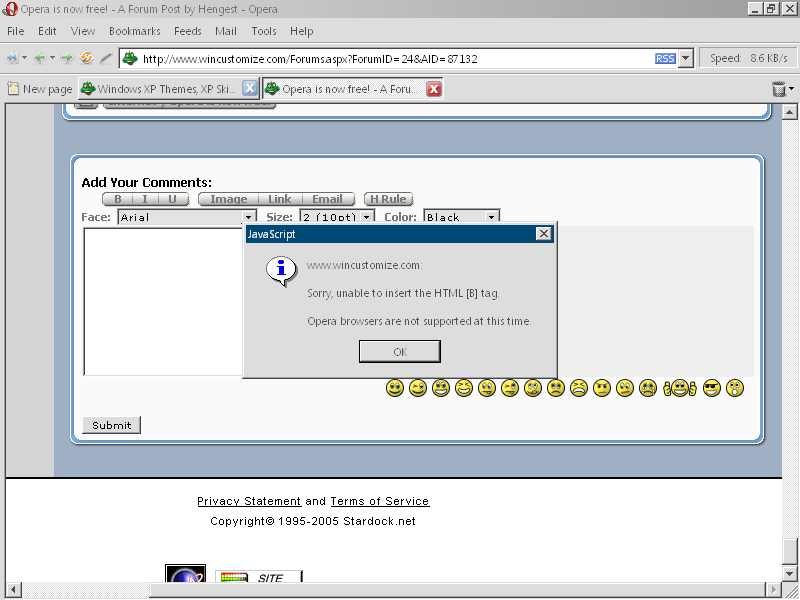
I was clicking the 'B' to insert the bold tags.
Edit: I'm also running version 8.50 of Opera on Windows 2000 with Service Pack 4.

Reply #41 Top
Hengest, I get that trying to use bold text also. It seems like I've never been able to do bold, italics or underline text since the new site opened. I'll have to let someone else check it with FireFox since I uninstalled it, I don't remember if I tried it with IE.

Anyone able to use the three buttons?
Reply #42 Top
Ok, I'm in IE right now
Italics
Underlined
Reply #43 Top
I've noticed a similar problem-- can't apply a different font to part of a post
Reply #44 Top
Trying in IE--With Opera the font appears to be applies to all the text
Reply #45 Top
OK- Using Opera again- same w/ IE as w/ Opera
Reply #46 Top


Test test. I've been running around this site with Opera. Seems a bit quicker to navigate than FireFox.
Reply #47 Top
OK- Using Opera again- same w/ IE as w/ Opera


Isn't Opera a fancy wrapper for IE?
Reply #48 Top
Isn't Opera a fancy wrapper for IE?

No, your thinking of Maxthon, which was once called MyIE. It's the same engine, tweaked by a third party.
Reply #49 Top
Everyone who has been having problems with using bold, italics, or underlined, this is an admitted problem with Opera. I believe it is a feature called Rich Text. This is what you are using when you are using different styles of text. Opera does not support it at this time. However, this feature will be in the next major version of Opera, Opera 9.
Reply #50 Top
Why would Opera... the greatest browser in the world... ignore the # symbol? They must have realized that is a way to hack into browsers but didn't say anything about it.


The
Opera Fanboy