Multiplicity says subscription expired regularily

When I boot up  my PC, every so often I have to re-enter my Product Key. This has occurred every month or so. Today's occurrence ties into a new version release of the product yesterday.

How to stop this occurring until the subscription date actually comes due?

476 views 10 replies
Reply #1 Top

Hello,

Sorry to hear you’re experiencing this issue. In many cases, it occurs when a system utility or application performs scheduled cleanup tasks and mistakenly removes the license activation signature file.

Please refer to this guide for detailed steps: https://support.stardock.com/space/SHC/1260552209/Error:+212+or+Product+Keeps+Prompting+to+Activate

Some well‑known system cleaners that run regular file cleanup include:

  • CCleaner

  • Glary Utilities

  • Advanced SystemCare

  • Wise Disk Cleaner

If you have any of these or similar tools installed, try adjusting their settings to exclude Stardock files from cleanup.

Thank you,

Basj,

Stardock Community  Assistant.

Reply #2 Top

This is the entire contents of %ProgramData%\Stardock\

MP2 and Registrations are both empty

Reply #3 Top

This is what I get on my system. The Multiplicity folder should have some files as shown in the video below. The license.sig file should be there. If not Multiplicity, from what I know, will ask for activation again. Do you see the license.sig file in the Multiplicify folder?

Thank you,

Basj,

Stardock Community  Assistant

Reply #4 Top

Thank you for your help.

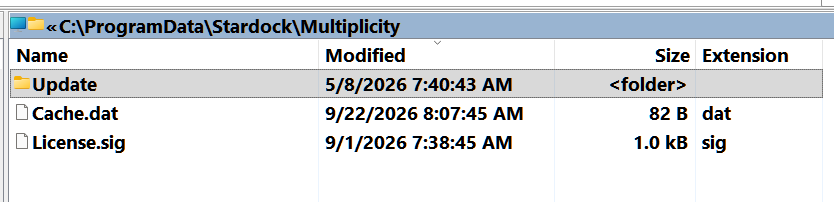
Yes, I do see the two files, along with a folder called "Update" which holds one file called "Multiplicity4_Setup" time-stamped 05/08/2026.

Both the Cache.dat and License.sig are timestamped today.

I forgot to mention that I do not use cleaner apps.


Reply #5 Top

While you see those files, does Multiplicity still asking for you to activate it? If does not, recheck again this folder once you see the popup asking for activation appear, check it before you reactivate. See if the file still there. Report back.

Thank you,

Basj,

Stardock Community  Assistant

Reply #8 Top

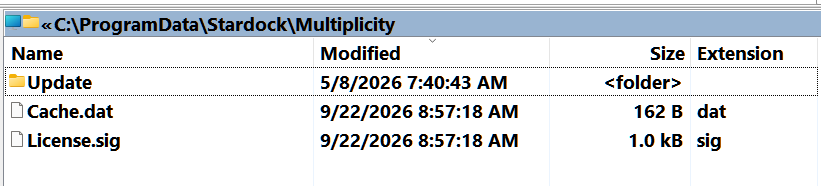
And this is after I reentered the license info again, and which of course lets Multiplicity run again. (Exactly 3 weeks to the day)

Reply #9 Top

Hello,
I have forwarded your problem/question to Stardock Support Team for their assistance. Please keep an eye on this thread for any updates. We appreciate your feedback and patience. Thank you.

Basj,
Stardock Community Assistant

Reply #10 Top

Hi gwp55,

Thanks for working through this with us.  To investigate further, can you please provide your activation log file in a support ticket?  

The guide below covers how to locate and send it to us:

https://support.stardock.com/space/SHC/2493022220/Collecting+Activation+Logs

Best regards,

Adam McGuinness
Stardock Support Specialist