deskscapes 26
clock/countdown overlay
how do i customize an clock/countdown overlay in deskscapes 26 that is counting down to an date say 2 years in the futer from today on?
thx,
dc.
clock/countdown overlay
how do i customize an clock/countdown overlay in deskscapes 26 that is counting down to an date say 2 years in the futer from today on?
thx,
dc.
Hello,
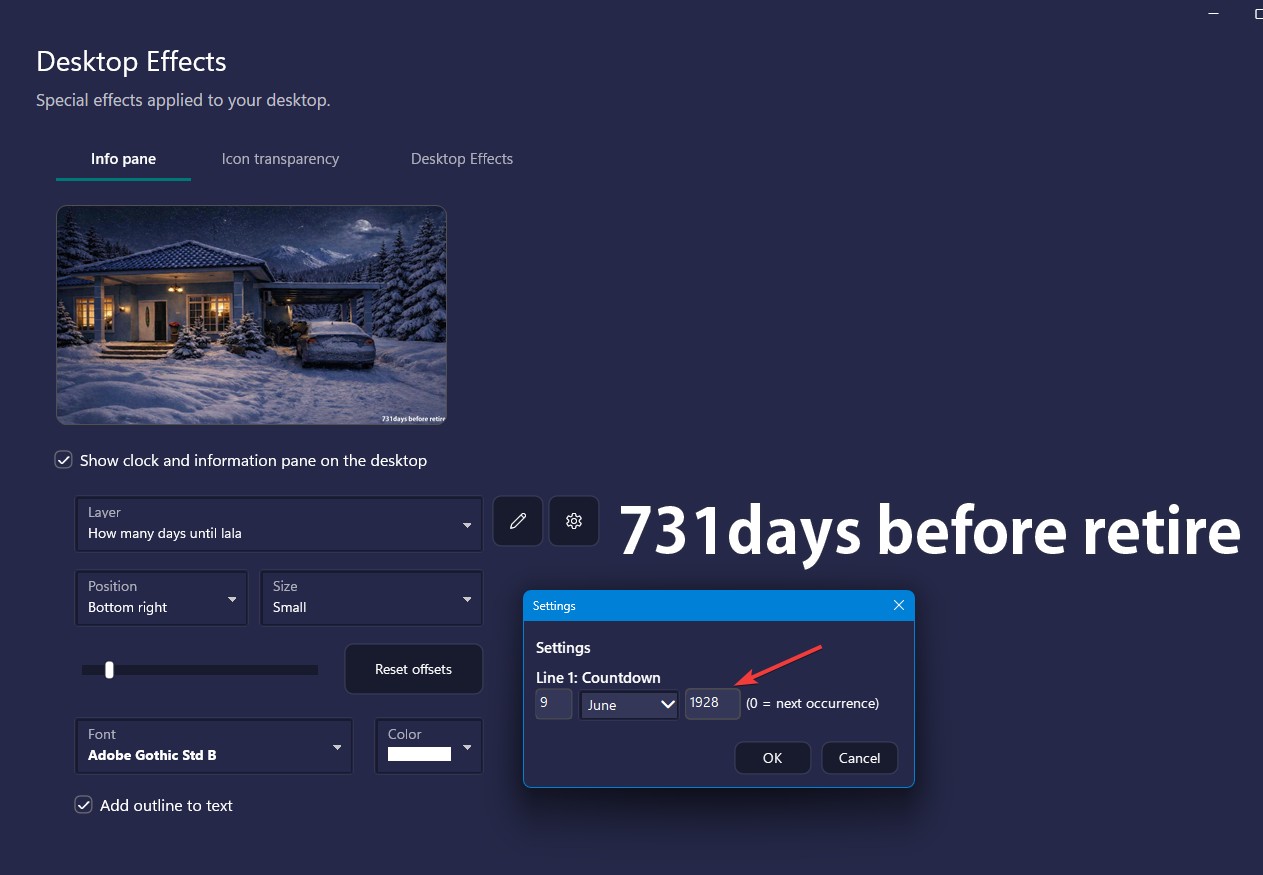
I checked, you can try changing the days until Christmas into something else just need to use the edit and change the text and set the countdown date. Just that on my system to set to 2 years I need to put in 1928 instead of 2028. Not really sure why. Refer to my screenshot below.

I have forwarded this issue to Stardock Support Team for their assistance. Please keep an eye on this thread for any updates. We appreciate your feedback and patience. Thank you.
Basj,
Stardock Community Assistant
not working, how to add an time zone thinggie? eg GMT or UTC?
Not really sure, what you mean by time zone?
Thank you,
Basj,
Stardock Community Assistant
Hello,
Thank you for posting. I can reproduce these results. We now have it logged for review.
Internal Ref: ODNT-12457
Best regards,
Adam McGuinness
Stardock Support Specialist
Welcome Guest! Please take the time to register with us.