Fences 6 and windows 11

Fences is not working

I have used Fences for over 5 years and love it.

I upgraded to a Windows 11 notebook from a Windows 10 NB.

It is Windows 25H2 build 26200.8246

It is Product: Fences 6, version 6.2.0.1

It installs and if I choose to let it set fences they are created, but if i do it as custom they are not created.

I have installed and uninstalled several times and have run the purge bat several times as well to no avail.

I have turned off my firewall and antivirus for some of the installs.

The config fences option was not even available either from the Fence header or from windows right click.

I merged the reg key for locking. (I have rebooted each time I made a change).

I locked and unlocked the Fences.  I still cannot move any files or folders from the default fences or to them or create new ones.

The configure fences option now shows both in the fences header and the windows right click menu, but I just get an activity circle for a few seconds and then nothing.

I have not been asked for a product key nor have any way to add it.

What am I missing?  I really need to get this working.

Thank you,

John 

Moved to Fences area

 

268 views 8 replies
Reply #1 Top

Hello,
Sorry to hear you are having issues. Perhaps something is conflicting with Fences. Please try clean boot: https://support.stardock.com/space/SHC/1332445272/Fences+Clean+Boot. Do note that clean boot need to be done with care. Try it and report back. 

If the issue still appear we need more information.

It installs and if I choose to let it set fences they are created, but if i do it as custom they are not created.

What do you mean by this. Please elaborate.

Thank you,
Basj,
Stardock Community Assistant.

Reply #2 Top

I will try the boot, but is there a way to add the license number manually through the registry or command if that could be the issue?

When your installation ends, it asks if you want to customize your fences (start without any fences on the screen) or if you want to use the default fences set up (i.e. files, programs, files, etc.).  It sets up the default fences (although you cannot add or move anything in or out) and if you customize, you cannot create any fences.

Until I added the reg mod for locking, I did not even see the config option, I only had the remove fence option from the fence header.  I don't understand why there are so many issue in using this product with Win 11.


Reply #3 Top

This similar issue was reported by someone before. Do you have 360 Total security installed or something similar which also have their own desktop organizer that blocking Fences from working properly. Refer to this thread: https://forums.stardock.com/494957 or you have previously locked your Fences. You just need to unlock it. If unlock don't appear on your system, please refer to this guide: https://support.stardock.com/space/SHC/1621360668/Show+%22Lock+Fences%22+in+Fences+5+and+6.

Thank you,

Basj,
Stardock Community Assistant


Reply #4 Top

I uninstalled and ran purge and did a clean boot install and the results are the same.

I have spent way too much time (over 2 days to get this to work as It helped me a lot, but now it is a burden and i will need to find another way to manage my desktop.

For 1 last shot there were these errors in the set up log:

[04/24/2026 10:52:13] Error Script: On Startup, Line 668 (1605)

[04/24/2026 10:52:14] Info Deleting C:\Users\JLAPAG~1\AppData\Local\Temp\_ir_sf_temp_3\GetMachineSID.tmp

[04/24/2026 10:52:14] Error Script: On Startup, Line 439 (2502)

[04/24/2026 10:52:14] Info Deleting C:\Users\JLAPAG~1\AppData\Local\Temp\sdWebResults.xml

[04/24/2026 10:52:14] Error Script: On Startup, Line 450 (37000)

[04/24/2026 10:52:14] Error noXML - Error parsing sdWebResults.xml. Check Internet Explorer proxy server settings.


Reply #6 Top

Few questions.

  1. Did any error popup while you installing the product? If yes, what error was it?
  2. Please check if Fences get Start up properly: https://support.stardock.com/space/SHC/1331232868/Fences+is+not+starting+after+boot.
  3. Much appreciate if you can verify my questions in Reply#3.

Thank you.

Reply #7 Top

Sorry, I missed that response.


I do not have 360 Total security.

I do have Comodo Anti-virus/FW. I tried to install with it turned off.

I have Startallback installed.  I had Startisback on my Win 10 NB, and there was no problem.  I turned StartAllback off, and no difference.

I have Explorer patcher installed.

I added the reg hack to enable locking and unlocking and have done that many times.

I have run the purge bat several times as well.

I have installed under a clean boot

I have never had a Fences crash or install error message.

When I first log in, I do not even see the configure Fences option on right clock, but after I try to create a Fence and nothing happens, the option appears on right click.

There are 2 instances of Fences in Startup

There is no Fences nor any Stardock process running in processes.

In my Win 10 NB, there is a fences process running.

When I manually start Fences in the Program (86) directory, it shows in processes for a few seconds and then goes away.  I do not know how to track what happens to it and why it does not stay in processes.

I did send the error messages that the log file showed in Reply 4.


I don't know what else to do.

Reply #8 Top

Hello,
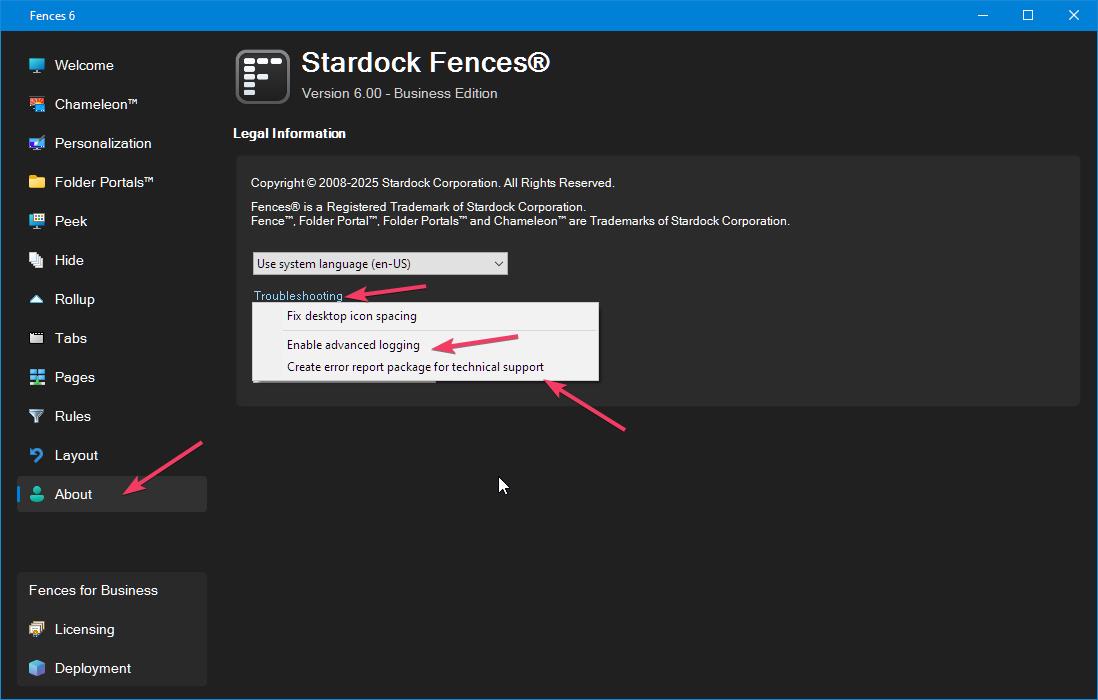
Please turn on Enable Advance logging and than send in the error report package. Refer screenshot below. Let me know once that is done.

Thank you,

Basj,
Stardock Community Assistant