Mouse jumps due to different resolutions

Multiplicity 4.07, Windows 11 25H2

I have a 17" laptop with a resolution of 1920x1080 and a 32" desktop with a resolution of 3840x2160.  When I move the mouse from one monitor to the other, the mouse cursor jumps up or down depending on which monitor I switch too.  Is there anything that can be adjusted to fix this issue?  I do not want to change either monitor's resolution.
 

781 views 21 replies
Reply #1 Top

Hello,
Sorry to hear you are having issues. I have forwarded your problem/question to Stardock Support Team for their assistance. Please keep an eye on this thread for any updates. We appreciate your feedback and patience. Thank you.

Basj,
Stardock Community Assistant

Reply #2 Top

Hi bgregor01,

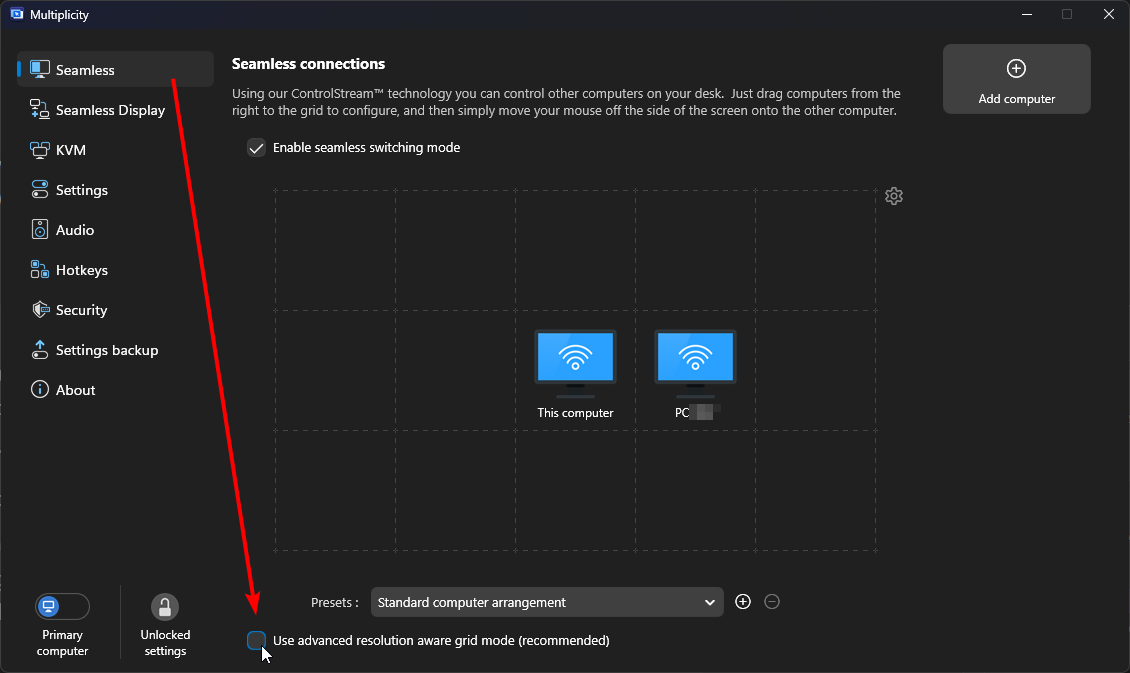
Thanks for posting. If you aren't already doing so, can you try selecting "Use advanced resolution aware grid mode"

Selecting this grid mode (from the Seamless tab) should allow more flexibility with where your PC displays are positioned and could help with mouse entry/exit points from one PC to the next.

Please let us know if using this mode helps.  If other specific settings seem to be contributing factors, some more details about your specific configuration/settings may also be helpful.

Best regards,

Adam McGuinness
Stardock Support Specialist

Reply #3 Top

I have tried your suggestions with no help. I have also tried changing the scaling +/- with no help. The only thing that fixes the problem is if I make both monitors resolution the same, which I don't want to do.

Reply #4 Top

Any word on this?  It's not very usable with this issue still open.    If there is no resolution to this I will probably ask for a refund.

I would really like this to be worked out but it's clearly not what it should be.  I wonder if anyone else is having the same issues.


Reply #5 Top

Hello,
I have forwarded your problem/question again to Stardock Support Team for their assistance. Please keep an eye on this thread for any updates. We appreciate your feedback and patience. Thank you.

Basj,
Stardock Community Assistant

Reply #6 Top


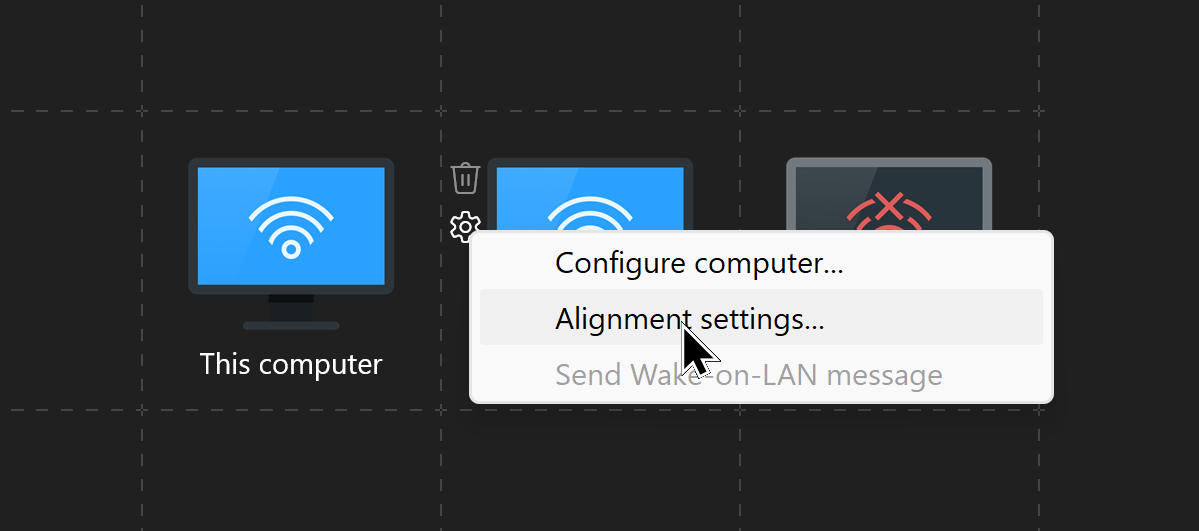
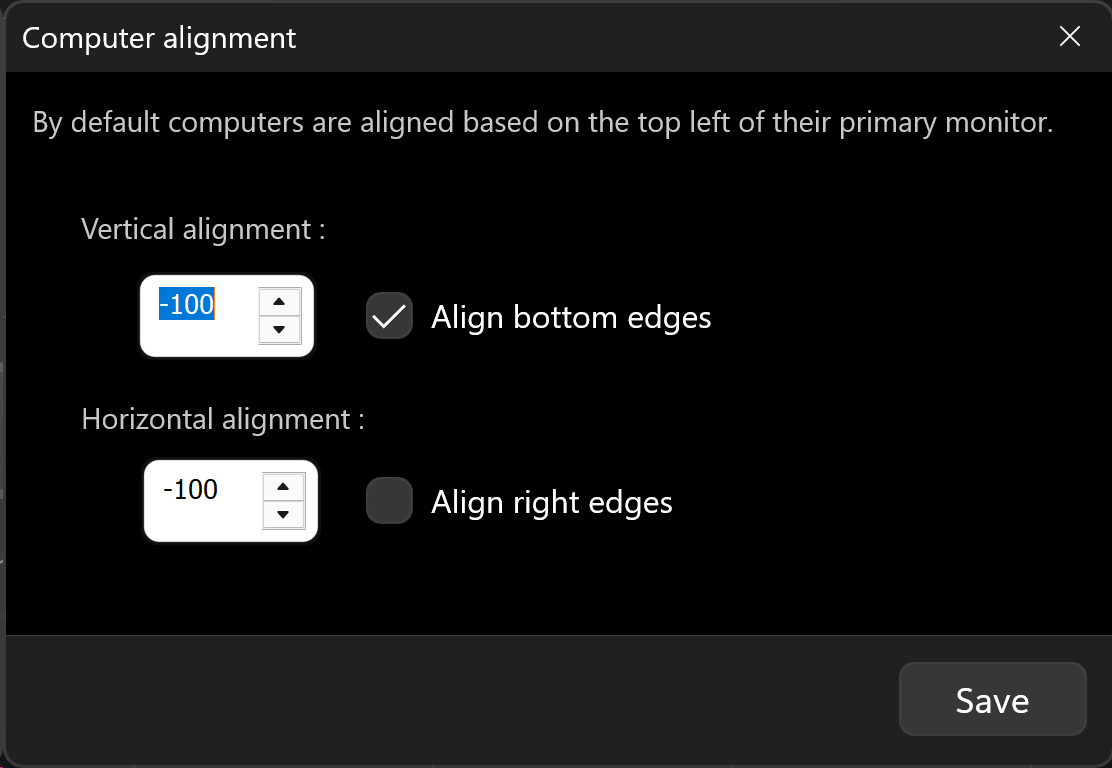
Is there anything that can be adjusted to fix this issue?

This....

Uncheck

Mess with these settings....

Sean Drohan
Product Lifecycle Manager


Reply #7 Top

I have tried these settings and they did not help, in fact certain ones made it worse.  I will try them again in case I missed something.  I will reply with my findings.

Reply #8 Top

Are you wanting the mouse to retain the same position as in if it is 200 pixels from the top of computer A then it needs to be 200 pixels from the top of the computer B? 

Or are you wanting it to be if it is 25% from the top of one then it should be 25% from the top of the other.

Or are you wanting it to physically be the same offset, so x cm from the top of the screen?

Reply #9 Top

If I’m in file explorer on both computers looking at the same folder and the mouse cursor is on a filename on computer A when I move the mouse to computer B it should also be on the same filename. I think your first scenario is correct. I tried Microsoft’s MouseWithoutBorders and it works well but I like the features in Multiplicity better.

Reply #10 Top

Quoting bgregory01, reply 9

If I’m in file explorer on both computers looking at the same folder and the mouse cursor is on a filename on computer A when I move the mouse to computer B it should also be on the same filename.

That is not how Seamless works - it works no differently than a cursor changing to a 2nd monitor on a PC with 2 screens.

Sean Drohan
Product Lifecycle Manager

Reply #11 Top

I guess I didn't explain it well.  All I'm saying is when dragging the mouse from monitor A to monitor B, it should be at the same location horizontally.  When I do this  the mouse jumps up or down 2 to 3 inches depending on which resolution I move from/to. If the cursor is 8" down from the top of the screen on monitor A it should end up 8" down from the top of the screen on monitor B

Reply #12 Top

From what I know that is normal behavior for monitors with different resolution setup side by side. It will jump up or down when going across each other, with or without Multiplicity.

Thank you,

Basj,
Stardock Community Assistant

Reply #13 Top

Well I'm not so sure because I am already testing another similar product that does not exhibit this behavior, in fact it works extremely well, just without some of the nicer features of Multiplicity.

I wanted to keep Multiplicity but apparently this issue can't be resolved so I am going to attempt a refund.

Thank you for addressing this even though there is no resolution.

Bob Gregory

Reply #14 Top

Ok, I tried to request a refund TWICE and got the following message both times.  What does this mean?

Reply #15 Top

Hello,
Please raise support ticket using the link below, use the "Refund" option. Include all information details. Remember to record down the ticket number for future reference if needed. Do not raise multiple ticket, that will make your ticket back to the end of the line. Send once and wait. Ticket will be answer by the order they send in.

https://stardock.atlassian.net/servicedesk/customer/portal/4/group/13 

Thanks 
Basj,
Stardock Community Assistant

Reply #16 Top

That is the link I used.  I just tried it again and got the same message.

Reply #17 Top

Hello,
I have forwarded your problem/question to Stardock Support Team for their assistance. Please keep an eye on this thread for any updates. We appreciate your feedback and patience. Thank you.

Basj,
Stardock Community Assistant

Reply #18 Top

I think you just needed to switch to advanced resolution aware mode for the grid.  Then (subject to scaling differences) things are lined up exactly.

Reply #19 Top

Quoting Neil, reply 18

I think you just needed to switch to advanced resolution aware mode for the grid.  Then (subject to scaling differences) things are lined up exactly.

That...

But if you still need a refund PM me the email address you are trying to use and the Stardock order number. 

Sean Drohan
Product Lifecycle Manager

Reply #20 Top

I had switched to advanced resolution aware mode and changed the scaling factor up but never past 150% because it didn't seem to change anything.  I decided to try 200% and it is now working fine, no refund needed.  Thanks to all.  You can close this ticket.

Bob Gregory

Reply #21 Top

Quoting bgregory01, reply 20

I had switched to advanced resolution aware mode and changed the scaling factor up but never past 150% because it didn't seem to change anything.  I decided to try 200% and it is now working fine, no refund needed.  Thanks to all.  You can close this ticket.

Bob Gregory

Pleased to read.

Sean Drohan
Product Lifecycle Manager