Multiplicity bugs.

After 3 months of use of this unusable (probably beta and unfinished) software, im curious to see if others peoples have the same problems:

1- Mouse hangs/freeze/lag.

2- The mouse is non responding at all. (need to restart multiplicity multiple time until we can get a working mouse, sometime i have to reboot the entire multiplicity server).

3- No mouse from the client.

PortsFix was put. And also corrected since even multiplicity give a non working .bat.

Is this company a joke ? they sell unworking/unfinished products ?

Moved to Multiplicity Area.

3,147 views 14 replies
Reply #1 Top

Hello,
Sorry to hear you are having issues. Need more details. 

  1. Windows 10 or 11? Also need its full version and OS Build number for all connected system. Use Winver.exe to get these numbers.
  2. Full Multiplicity version number installed.
  3. Did you report your issue here previously under different user name? If so, please post a link to it so we can refer back to it.
  4. If not, have you tried these guide and see if it help with your issue.
    1. https://support.stardock.com/space/SHC/1287389230/Mouse+is+stuck+on+the+Secondary 
    2. https://support.stardock.com/space/SHC/1287815231/Mouse+Cursor+Lags+on+Secondary 
    3. https://support.stardock.com/space/SHC/1288011870/Missing+Mouse+Cursor+on+Secondary 

Hope to hear again from you.

Thank you,
Basj,
Stardock Community Assistant.

Reply #2 Top

1. Windows 11 PRO 25H2 Build 26200.7322. Fully updated. (17-12700K 3.6ghz/64gb RAM)

2. Latest version: 4.07 Business.

3. No.

4. Its not problems im talking about. But i got the #1 one time when i tried the Seamless mode. It seem, everyting bug. (i will not talk about the test i made with Seamless Display, that forced me to total hard reboot my computer because of lag.

Problems im talking about are with KVM.

Problem appear randomly, sometime im just using it, and, magicaly, after some time, i lost access with the mouse. I only see screen. I try to reconnect, no mouse, only screen, i do that many time, then "sometimes" the mouse return after 7-8 reconnections.

Sometimes its when i try to connect on the client, the mouse its not really a lag, its more like its freezing and unfreeze and refreeze and reunfreeze, so the mouse move with kind of "step" then when i click on the application, the app "hangs" and i have to manually kill the process and reopen again. (sorry i dont know how to explain it).

I also open all ports with the script provided by stardock.

Thats the major problem i have. The problem appear on all client (internal network, and also external network).

I dont have any problem with my computer, and i formatted 2 days ago.

Reply #3 Top

Hello,
I have forwarded your problem/question to Stardock Support Team for their assistance. Please keep an eye on this thread for any updates. We appreciate your feedback and patience. Thank you.

Basj,
Stardock Community Assistant

Reply #4 Top


1- Mouse hangs/freeze/lag.

After 3 months of use of this unusable (probably beta and unfinished) software

We use this software daily (I could not do my job without MP), so do many Fortune 500 companies, and 911 centers all over the US.  Its been around for over a decade. 

If you are having issues, just like if they were, we will resolve them.


1- Mouse hangs/freeze/lag.

'Hang/Freeze/Lag' where, on the Primary or Secondary. 

What version do you have installed on each PC (About tab in the MP config - they need to match).  What OS version for each?

2- The mouse is non responding at all. (need to restart multiplicity multiple time until we can get a working mouse, sometime i have to reboot the entire multiplicity server).

If the mouse is 'trapped' on any PC, restarting the service is indeed a way to free it
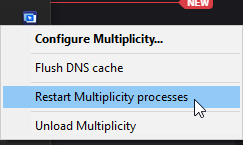

3- No mouse from the client.

If you mean no 'cursor', try:


PortsFix was put. And also corrected since even multiplicity give a non working .bat.

I wrote the portfix.bat, what is not working, wtftbk?

Quoting wtftbk, reply 2

Problem appear randomly, sometime im just using it, and, magicaly, after some time, i lost access with the mouse

How frequent is 'randomly'?

Quoting wtftbk, reply 2

Thats the major problem i have. The problem appear on all client (internal network, and also external network).

Multiplicity does not work on an 'external' network (different subnets) without a VPN (something that gets both PCs on the same subnet).

The most common resason that mouse responsiveness is effected it when one of the PCs is getting crushed (look at taskmanager) or the network connection is getting throttled. 

If you have other questions, I would be happy to help.

Sean Drohan
Product Lifecycle Manager

 

Reply #5 Top

Lol...

The software hang EVERYDAY.

For #2: I will not restart process 10 times a day. Fix your software. Then the mouse is not "trapped" the mouse is just not working in the client. And the software totally hang and have to be restarted.

For #3: This is not a fix. If mouse is working for first 30mins, it have to continue working all the day. And not stopping at totally random time. Fix your software.

For #4: Already answered this. Latest fully updated version (4.07 Business). And windows 11 fully updated also.

For #5: you write the file ? Review it. There is bugs. (Line 70 and 88) - This "EdgeRunner"" folder doesnt exist. -> "C:\Program Files (x86)\EdgeRunner\Multiplicity\Multipl2.EXE" 

- How frequent is randomly? ---> EVERYDAY.

The mouse "responsiveness".. how you call it when i try to connect and the mouse start lag and app crash ? Look like for you its normal to need 10 minutes to be able to connect correctly with having to kill the software, reload the process, and try to connect 5 to 10 time? Is this normal?

I paid for a business version, it was my biggest mistake.

Reply #6 Top

Quoting wtftbk, reply 5

The software hang EVERYDAY.

'For you'.  If it did this for a fraction of the clients we sell to, we would not be able to sell the product.  As with any issue where that is the case, we need to find out why its not reliable 'for you'.  However, unless the tone of this thread does not change (more on that below), we're done.

Quoting wtftbk, reply 5

For #2: I will not restart process 10 times a day. Fix your software.

Quoting wtftbk, reply 5

I paid for a business version, it was my biggest mistake.

Ok, we are done...

When you are ready to dial it down and work with us, with a tone and word choice that is as respectful as ours is, wtftbk, let me know.

Sean Drohan
Product Lifecycle Manager

+1 Loading…
Reply #7 Top

Im ready, but give me real fix, and not a non working fix like "reboot your MP".. even after i do your "restart" the software HANGS. I not tell that even that "reboot" sometimes i have to do 2-3-4 times before able to get a mouse ? 

Give me a REAL fix. Not a restart your process. You cannot tell me this. its not a fix. Its a bug that you cannot fix. Simple as that.

Reply #8 Top

So you said we are done.. so refund me. i start my refund process on my credit card. You just show me you dont want to fix your program.

Reply #9 Top

Quoting wtftbk, reply 7

Im ready, but give me real fix, and not a non working fix like "reboot your MP".. even after i do your "restart" the software HANGS. I not tell that even that "reboot" sometimes i have to do 2-3-4 times before able to get a mouse ? 

Give me a REAL fix. Not a restart your process. You cannot tell me this. its not a fix. Its a bug that you cannot fix. Simple as that.

If there was something to fix, we would.  99% of the Multiplicity history page here is the result of 'respectful' client feedback:

https://www.stardock.com/products/multiplicity/history.cshtml

If there was a problem with the app, yours would be on that list eventually.  You chose a different path. 

Quoting wtftbk, reply 8

So you said we are done.. so refund me. i start my refund process on my credit card. You just show me you dont want to fix your program.

You got it, brother...  You should see the refund receipt by the time you read this.

Good luck, wtftbk.

Sean Drohan
Stardock Product Lifecycle Manager

Reply #11 Top

Quoting wtftbk, reply 10

Just to be clear. im not your brother.

Perhaps not - I was a guy that is very knowledgeable about MP, super willing to work with you, was polite, and was certain we could find the cause, but instead, you gave me this.

After 3 months of use of this unusable (probably beta and unfinished) software

Is this company a joke ? they sell unworking/unfinished products ?

And many more like it.  We have many more clients that are respectful, and I can't wait to help them - just as I was initially with you, wtftbk.

Sean Drohan
Stardock Product Lifecycle Manager

Reply #13 Top

Albeit a tad late to help here, a saying comes to mind: "Attitude is everything, so pick a good one."- Wayne Dyer

+1 Loading…
Reply #14 Top

Quoting DrJBHL, reply 13

Albeit a tad late to help here, a saying comes to mind: "Attitude is everything, so pick a good one."- Wayne Dyer

There is a reason I am the only one that answers MP tickets \ posts (other than the lead dev himself - who I talk to daily and I will fly to London to see him this Easter - he is a fantastic man, father, and incredibly intelligent - he also gives a great deal of attention to client issues). 

I mapped every registry entry for MP, I wrote the manual, I wrote the portFix; I wrote the MP support section in the Help Center - you name it, I likely did it for MP. The product is dear to me and is VERY important to many, many companies - it has to work, or they are dead in the water (many police departments and 911 centers rely on it daily). 

In other words, all the regulars here know how involved I \ we get with such requests.  The one thing we insist on is respect, a willingness to try (sometimes painful) things, and an open mind.  If the OP creates a new thread that satisfies these, I would very much like to leverage all that I have access to, all my experience with the product, all the resources I have, to him.  Until then, this thread is now locked. 

Sean Drohan
Stardock Product Lifecycle Manager

+2 Loading…