Start 11
Task bar position / Position barre des tâches
 Stardock Forums
Hello,
My PC:
Start 11 2.6 enabled
Windows 11 25H2
Build 26200.7922
Windows Features Experience Pack 1000.26100.300.0
My problem today is:
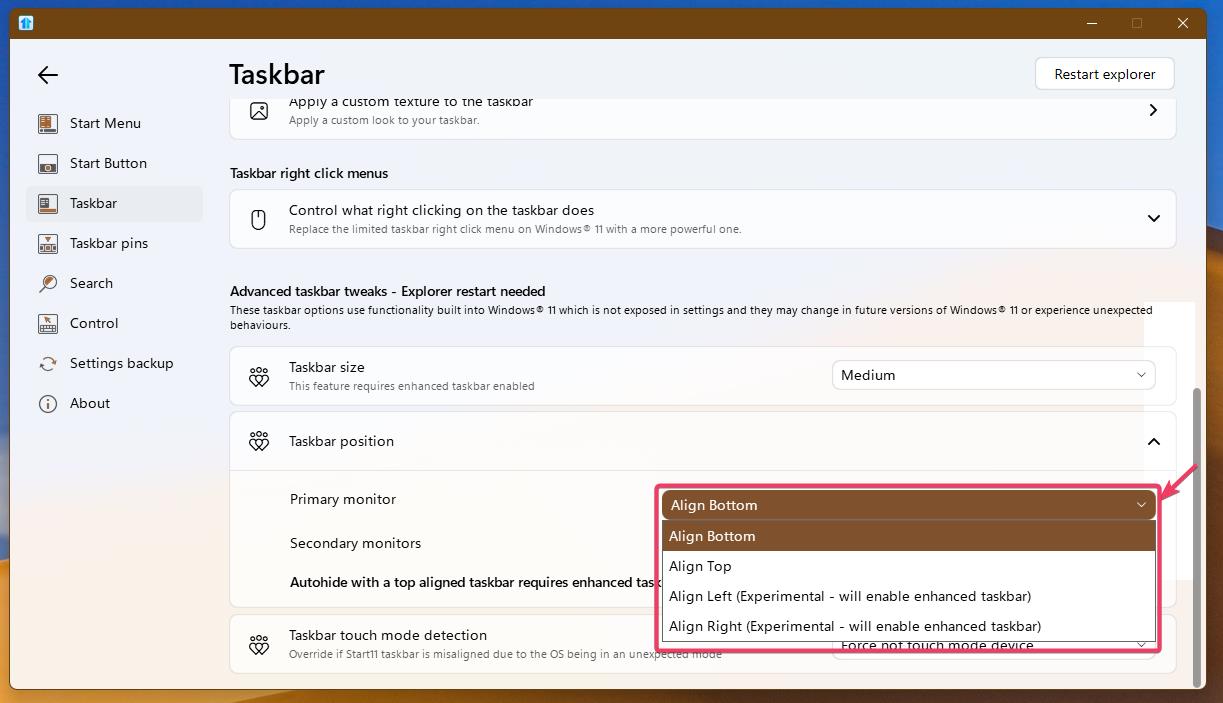
For some reason, my taskbar is now displayed at the top of my screen... I've tried everything to move it back to the bottom, but I can't find how to do it in Start11. I found the Windows taskbar configuration online at: https://www.commentcamarche.net/informatique/windows/1723-barre-des-taches-de-windows-11-comment-la-deplacer/, but it seems that the value given is correct for the bar to be at the bottom. I tried changing this value to test it, but the change wasn't saved, probably because of Start11's control.
How can i use Start11 to put my taskbar back at the bottom?
Thanks in advance to anyone who replies.
Translated with DeepL.com (free version)
in french:
Bonjour,
Mon problème aujourd'hui est:
ma barre des tâches je ne sais pourquoi s'est retrouvée affichée en haut de mon écran... J'ai beau cherché comment la remettre en bas, je ne trouve pas dans Start11. J'ai trouvé sur la toile la configuration de la barre des tâches selon Windows grâce à : https://www.commentcamarche.net/informatique/windows/1723-barre-des-taches-de-windows-11-comment-la-deplacer/, mais il semble que la valeur donnée soit la bonne pour que la barre puisse se trouver en bas. J'ai d'ailleurs chercher pour tester à modifier cette valeur, mais ce changement ne s'enregistre pas, je pense à cause de la main-mise par Start11.
Comment puis-je avec Start11 remettre ma barre des tâches en bas ?
Merci d'avance à qui me répondra.