An uninstalled program still appearing in Start11 Menu

But not in Windows Start Menu

I have uninstalled ClickUp but a related Start Menu item, Click To Task persists in Start 11 Menu. I have been through the registry and removed all left over Click Up items, I have checked all other places advised on web to ensure the program is completely removed from my PC including my browser - it is fully gone and ClickUp or Click to Task do not appear in Wndows Start Menu but Click To Task remains in Start 11.

I have uninstalled Start11 without saving my settings, rebooted and reinstalled. I have downloaded and run PurgeStartALL but no change.

Would appreciate other suggestions please.

Moved to Start Menu Products area
 

399 views 4 replies
Reply #1 Top

Hello,
Sorry to hear you are having issues. Need more information.

  1. Windows full version and OS Build number. Please use Winver.exe to get these numbers.
  2. Start11 full version numbers.
  3. Post video or screenshot showing us where the "Click to Task" appear?
  4. Does "Click to Task" also appear on Windows Original Start menu?

Thank you,
Basj,
Stardock Community Assistant.

Reply #2 Top

Hi, thank you for your quick response.

Windows 11 Pro 25H2 OS Build 26200.7840

Start 11 v2.6

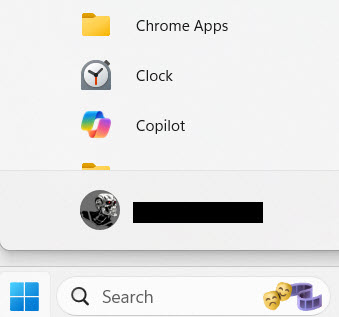
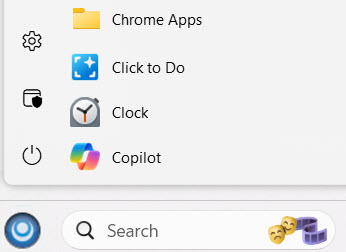
Attached two images show Click To Task in Start 11 menu but not present in Windows Original Start menuClick to Task in Start 11 menu

Click To Task not present in Windows Original menu

Reply #3 Top

Hello,
I recheck my Windows 11, and see Click to do is something that come installed with Windows 11 and has nothing to do with "Clickup". I have "Click to do" on my Start menu too, and I never install Clickup.

As a reference from search result on Google:  Click to Do is a Microsoft Windows 11 AI feature for Copilot+ PCs that allows you to instantly interact with text and images on your screen. By holding the Windows key and clicking on screen content, you can summarize text, edit photos, or perform searches using local AI. It acts as a contextual, on-screen menu for fast, local productivity.

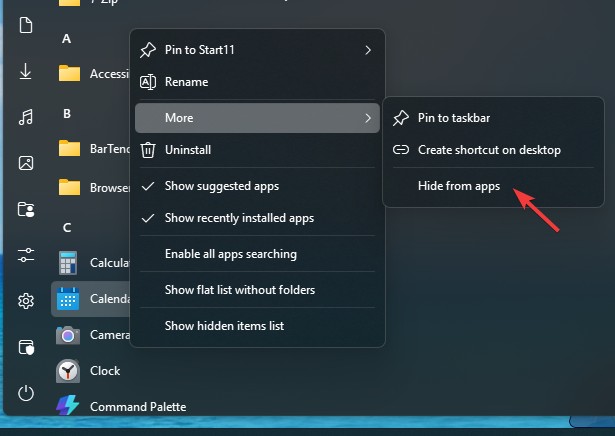
As a work around, you can use the "Hide from app" option. Right click on "Click to do"->More-> Hide from apps. This should hide "Click to do" from that list.


Thank you,
Basj,
Stardock Community Assistant.