"Run as Administrator" not working from ObjectDock

Shortcuts that run as admin do not run as admin from ObjectDock

I have ObjectDock 3.01 installed and it seems to work fine EXCEPT I have a couple of shortcuts that won't run in the "Run as Administrator" mode while I have other shortcuts which DO run in admin mode. I just setup a new computer, fresh installs for all my apps. On my old Win11 setup (new one is also WIN11), the shortcuts for the app I'm having problems with DID run in admin mode in ObjectDock, now they do not.

1. Program is installed, nothing unusual/no warning dialog boxes

2. Shortcuts created on desktop and start menu

3. In both places, at the shortcuts, I have selected PROPERTIES > ADVANCED and then checked "Run as Administrator"

4. The shortcuts on the desktop and start menu run in admin mode. Fresh, separate shortcuts for the app run in admin mode from the desktop.

5. Drag the desktop shortcuts to ObjectDock

6. Click on the shortcut that appears in ObjecDock and the app does NOT run in administrator mode as associated with any of the original app shortcuts.

Troubleshooting so far:

-> In ObjectDock, I HAVE gone to SETTINGS > ADVANCED TWEAKS and UNchecked the "When shortcut is run..." option. Since I have selected the "Run as Admin" option in properties for both "real" shortcuts, this should have been the fix. It does not change the conditions.

-> In ObjectDock, I HAVE gone to SETTINGS > ADVANCED TWEAKS and CHECKED the "When shortcut is run..." option. A dialog box appears and says "this feature will only have an effect when indicators are being used on a given dock, and does not work on tabbed docks." I have a tabbed dock. Nonetheless, clicked, OK, then Quit ObjectDock, restarted ObjectDock, and then in SETTINGS > ADVANCED TWEAKS I UNchecked the "When shortcut is run..." option. No change.

-> Since this function is associated with a specific app, and others seem to run ok in administrator mode, I have UNinstalled that app, deleted all its settings, rebooted, and reinstalled the app fresh, including creating shortcuts during the installation AND then manually creating shortcuts from the original .exe file. That does not change the function in ObjectDock, it still won't run in administrator mode.

-> I have uninstalled and reinstalled ObjectDock BUT, since I have several tabs set and don't really want to recreate them, I copied my original folder into a backup, then copied that backup into the ObjectDock settings folder. I'm not inclined to go about recreating 8 tabs and adding a lot of shortcuts - that would be tedious and doesn't seem like the best solution.

Just a guess, but I suspect that in Settings.ini the issue is with the key "OverrideShowDesktop=1". I am hesitant to change any of the keys in the Settings.ini file, and that may be the wrong one anyway, so I am open to suggestions here (most anything except recreating 8 tabs...)

Moved to ObjectDock area

1,034 views 5 replies
Reply #1 Top

Hello,
Sorry to hear you are having issues. Just to confirm, this issue only appear on few specifics application, yes? If so, please share these application so we can test it.

Thank you,
Basj,
Stardock Community Assistant.

Reply #2 Top

Thank you. The only app it seems to be ignoring is FreeFileSynch https://freefilesync.org/

Reply #3 Top

Unfortunately, I can not reproduce your issue on my system.

  • I have set FreeFileSync to "Run as Admin."

  • Drag FreeFileSync desktop shortcut into one of my ObjectDock Dock.
  • Click on it and It open up with Admin (refer my video below)

Perhaps, try uninstall and reinstall FreeFileSync.

Thank you,

Basj,
Stardock Community Assistant

Reply #4 Top

Basj:

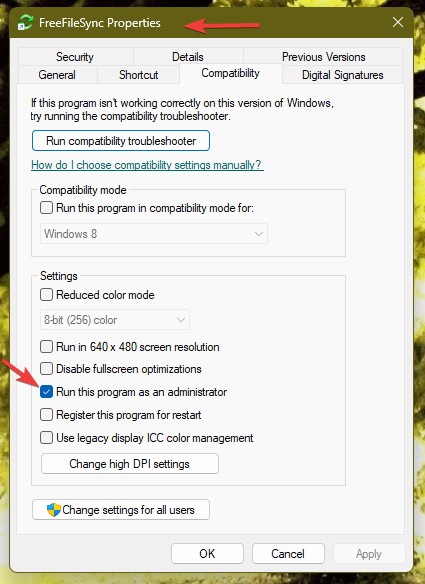
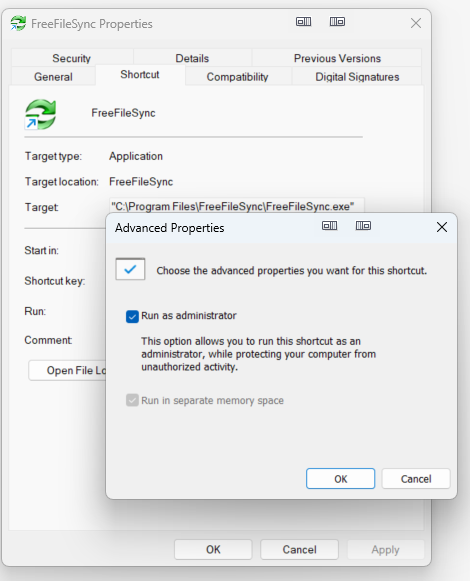
Thanks, like you, I thought uninstall and reinstall would have been the solution as noted in my original post; however, what I noticed after looking at your screenshot, is that I had been setting the shortcut to "run as admin" from the Shortcut Advanced Properties tab selection, like this:

I was thinking that setting for the Shortcut was making that change to the shortcut I wanted run in Admin Mode. But I had NOT thought to change that setting under the "Compatibility" tab as you show in your screenshot and video! 

So, per your suggestion, changing that setting under the "Compatibility" tab made all the difference: now it runs in admin mode!

Additional steps:

--> With the Shortcut "Advanced Properties" tab selection checked to run as admin (my screenshot) and after checked the box in the "Compatibility" tab (your screenshot) the app runs in admin mode then....

--> ... went back and UNchecked it under the Shortcut Advanced settings (my screenshot) to test the function and with that box UNchecked in the Shortcut Advanced settings but the box checked in the "Compatibility" tab (your screenshot), it still runs in admin mode....

It doesn't seem that the Shortcut Advanced settings are applied in ObjectDock but that setting does apply to the original desktop or Start menu shortcuts... With the box checked per your instructions from the "Compatibility" tabFreeFileSynch runs in admin mode no matter what is checked in the Shortcut Advanced settings. 

--> One more step: for the other shortcuts I had running in admin mode from ObjectDock, I had NOT checked the selection under the "Compatibility" tab but they are running in admin mode where I had checked the box as seen in my screenshot above. to test the other shortcuts, per your suggestions, I checked the box in the Advanced selection under "Compatibility" tab and they still work as I would prefer: in admin mode. 

--> I ran the same test, unchecking the box in the Shortcut Advanced section and that made no change, they would still run in Admin mode with the box checked in the "Compatibility" tab

That seemed odd to me...I thought the shortcut settings would control... so that is what that threw me off. Since the box was checked in the Shortcut Advanced selection and this was related - I thought - to the shortcut - I never thought to look under the "Compatibility" tab for that setting as well!!

Hopefully, someone else would find this helpful.

Thank you for the help, Basj, that solved it!

Reply #5 Top

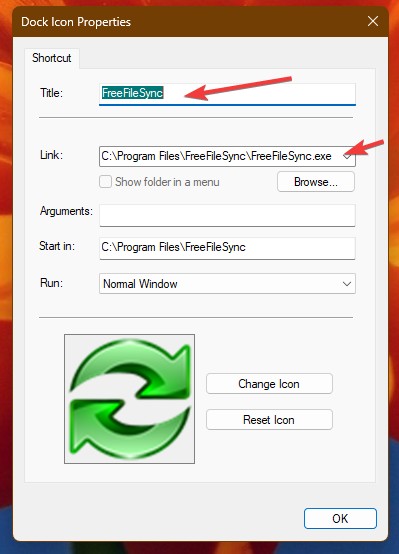
My guess is this, ObjectDock pinned icon is using direct link to original application to run it. This can be seen at it Dock Icon properties: Link: as can been seen below. The admin method you set above is to the shortcut only, not changing the actual application itself. That is probably, why it is not running under admin.

Thank you,

Basj,
Stardock Community Assistant