ObjectDock Hiding When Showing Desktop

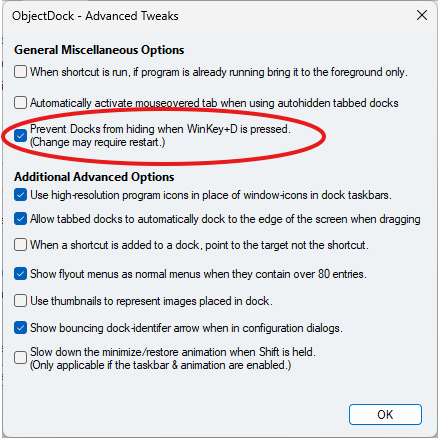
I have the standard hotkey for showing the desktop assigned to one of my mouse buttons (Windows Key + D). I also have the setting in ObjectDock to "Prevent Docks from hiding..." toggled on. But for some reason, it's not respecting that setting.

Whenever I hit the show desktop hotkey command via the mouse button, it minimizes all my foreground apps (as it's supposed to) but takes the dock with it as well when showing the desktop. Any ideas why that is? Here are my settings:
1,687 views 4 replies
Reply #1 Top

Hello,
I have forwarded your problem/question to Stardock Support Team for their assistance. Please keep an eye on this thread for any updates. We appreciate your feedback and patience. Thank you.

Basj,
Stardock Community Assistant

Reply #2 Top

Hello,

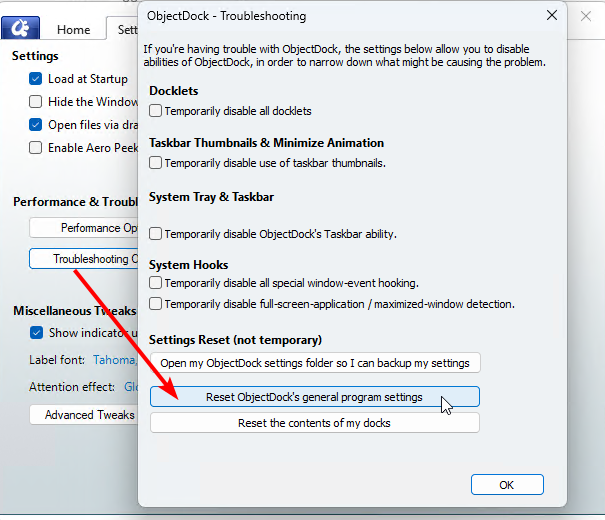
Tested this a bit and found it only occurred for me after I "Reset ObjectDock's general program settings":  

However, I then "Reset the contents of my docks".  After doing that, your docks will clear, but I was able to add new ones, and this stopped being an issue for the new docks. 

Curious if this fits what's occurring for you and if this helps.

Best regards,

Adam McGuinness
Stardock Support Specialist

Reply #3 Top

Thanks, but I don't think that's applicable for me.

When I first installed Objectdock about a month ago on my fresh install of Windows 11, I deleted the default dock and created a custom one (like I always do). And this was already set to not hide the dock when showing the desktop from the first install. So this behavior has always happened (and it was a frequent issue for years on my last build of Windows as well).

I also recently uninstalled Objectdock and reinstalled it (to try and fix a separate issue posted here), but it's still happening. The Win+D command still hides it and it won't pin itself.

If it helps, my settings for the Accessibility menu are as follows:

  • Accessibility - Regular
  • Mouse Activity & Sensitive - Show dock when mouse touches edge = Unchecked
Reply #4 Top

Sorry to hear the trouble remains.  We'll have our findings here logged.

Internal Reference:  ODNT-11951

However, the question remains: Could some mechanism of the "Reset the contents of my docks" button allow you to create new docks without the same issue?

I understand if you are hesitant to clear your docks in this manner, but it would seem useful to know if that exact button before creating a new dock has a desired outcome. 

Thanks for posting and best regards,

Adam McGuinness
Stardock Support Specialist