WindowBlinds 11.07 - No transparency / blur on Aero-style themes

(Aero 11, Aero7X Reset) on Windows 11 24H2 to 25H2 - intermittent or completely missing

Hi,

I'm having a persistent issue with transparency and blur effects not working properly in WindowBlinds 11.07 on Windows 11 version 25H2 (build 26200.7628). Please note that I bought both WindowBlinds and Start11 last year (May 2025). I was on Windows 11 version 24H2 (I think?) and it already didn't work at that time.
Specifically, when using Aero-inspired themes like "Aero 11" by SimplexDesigns or "Aero7X Reset" by NewInfinitePro, the window frames/titlebars show no transparency or glass/blur effect at all — they appear as solid colors (usually black or the accent color) instead of the expected Aero Glass look.

Here's how it behaves :

  • Transparency is completely absent in almost all cases.
  • Very rarely (right after a fresh boot), the transparency appears correctly for a few seconds/minutes.
  • As soon as I interact with the theme (change settings, re-apply, switch skins, or even just move a window sometimes), the transparency disappears immediately and never comes back until next reboot.
  • This happens only on old-style Aero/Vista/7 themes; modern skins sometimes work better.
  • Windows native "Transparency effects" are enabled in Settings > Personalization > Colors.
  • No battery mode (I'm on desktop/AC power).

My setup:

  • Windows 11 Pro 25H2 (OS build 26200.7628)
  • WindowBlinds 11.07 (latest as of January 2026)
  • Start11 installed and active (purchased together with WindowBlinds in May 2025)
  • Other Stardock tools: none else active that I know of
  • Previously used for a unsuccessful Windows XP transformation (but fully uninstalled): ExplorerPatcher and Open-Shell (before buying Stardock suite)

What I've already tried (extensively, no success):

  1. Clean boot (msconfig) to rule out third-party conflicts.
  2. Fully uninstalled and reinstalled WindowBlinds (fresh download from Stardock account).
  3. Updated graphics drivers (latest from NVIDIA/AMD/Intel).
  4. Restarted DWM via PowerShell: Restart-Service uxsms
  5. Reset Windows Explorer multiple times.
  6. Thoroughly cleaned remnants of ExplorerPatcher (uninstall exe renamed to ep_uninstall.exe, Revo Uninstaller, manual delete of folders/registry keys like HKEY_CURRENT_USER\Software\ExplorerPatcher).
  7. Same for Open-Shell (uninstall, Revo, deleted registry keys under Open-Shell).
  8. Reset DWM-related registry keys:
    • Deleted entire HKEY_CURRENT_USER\Software\Microsoft\Windows\DWM
    • Deleted CaptionFont in HKEY_CURRENT_USER\Control Panel\Desktop\WindowMetrics
    • Restarted Explorer/PC after each change → fixed the bold titlebar font issue (Segoe UI is now normal weight), but transparency still broken.
  9. In SkinStudio: loaded the themes, manually increased transparency sliders (30-60%), enabled blur/glass where available, saved as new skin, re-applied → no change.
  10. Disabled "Let Start11 enhance the taskbar" (and all taskbar-related options in Start11) → no improvement.
  11. Temporarily fully disabled Start11 → still no transparency in WindowBlinds.
  12. Tested with Windows default theme → native transparency works fine, so DWM itself is functional.

It seems like something is preventing WindowBlinds from properly applying the Aero Glass/blur to the frames on this build. I bought the suite in May 2025 on an earlier Windows version (probably 24H2 or before), and the issue never left despite WindowBlinds and Start11 updates...

Has anyone else experienced this exact intermittent/no-transparency behavior with Aero 11 or similar skins? Is there a known incompatibility or a beta/hotfix for WindowBlinds on recent builds? Any other registry tweak, setting, or workaround I missed?

I'm sure something went wrong when I used ExplorerPatcher or Open-Shell (or any other tweaking software), as right before aborting the process and going for Stardock apps, my windows titlebars text where all bold, and I COULD NOT find a way to revert this change on my computer (despite having removed any known modification from both of theses apps).

Thanks a lot for any help or advice — really appreciate it!

(If useful, I can attach screenshots of the solid titlebars, SkinStudio settings, registry if necessary, etc.)


Best regards,

4,554 views 8 replies
Reply #1 Top

Hello,
Sorry to hear you are having issues. As a test, if you have not done it, try testing it in Windows Sandbox and see the issue appear while in there: refer here for steps https://support.stardock.com/space/SHC/1416396827/Testing+WindowBlinds+in+Sandbox 

Thank you,
Basj,
Stardock Community Assistant.

Reply #2 Top

Did you use anything else that offered glass effects?

I saw a report of a problem with some windhawk mod before that caused the OS to tell WindowFX the DWM was off.  This would have a similar effect on WB.

Reply #3 Top

Hi,

First of all, thank you for taking a look at my issue. Sorry I took time to reply, I'm new on the forum and the reply button wasn't available on my UI so I couldn't reply yet.

Now I've heard of Windhawk but I've never used it before the problem occurred. I tried it way after I noticed the problem, and it was only to try to fix it. But it didn't work either, as well as all the other stuff I've tried.

Allow me to provide more context about my issue that might help figure out where the problem is (I think). 
Initially I didn't have WindowBlinds. I was feeling nostalgic and I wanted to change my Windows theme to look like Windows XP.

So Before buying WindowBlinds, I wanted to know if there was an open source way of changing my Windows theme to XP.

I found tutorials and resources online, including these two guides on how to achieve this goal using multiple open source softwares like Open-Shell, RetroBar, ExplorerPatcher, Winaero Tweaker, etc : 

This one is very basic and mostly uses RetroBar and Open-Shell : How To Make Windows 11 look like Windows XP (by CyberCPU Tech)

This one is longer and goes more in depth. It uses ExplorerPatcher, RetroBar, Open-Shell, and a few other open source tweaker softwares : How to transform Windows 11 into Windows XP (by MrAmayosken)

And I believe MrAmayosken's guide is the one where I messed something up with my system before buying/trying WindowBlinds. This guide goes through a lot of steps. It uses ExplorerPatcher as well as many .reg files that, I believe, permanently changed stuff on my system. 
I say this because I chose to stop following the guide (probably before the Windhawk step), as I felt like I wasn't understanding all I was doing and I knew the more I was following the guide the more I was permanently making undesired changes on my system. 

When I went to revert all the changes made by going back to my restore point, created before doing all this (as recommended by the guide), it was gone. It probably disappeared after one of the few reboots that were required in the steps of the guide.
So I was left with the only option to reset/uninstall as many of the installed tweakers as I could. And ExplorerPatcher was one the only ones I couldn't easily get rid of. Trying to revert all the changes it did on my PC never felt like working. And I believe I've tried everything in the software itself to make it remove all the modified stuff, but even then nothing went back to normal.

Among the few visible permanent changes, I have noted :
- Bold window title text for file explorer and pretty much all other windows; 
- And most of the times (if not always) no transparency on my system (despite toggling on or off "transparency effects" on my system's settings).

Then when loosing all hopes of getting rid of all these changes (without having to factory reset my entire PC), I bought WindowBlinds, to make changing my theme way easier.

But that's when I tried using Windows Vista/7 inspired themes, I noticed that the transparency effect was not working.
Looked through for that issue online but no one seemed to have it. That's when I guessed it was only on my system that it was not working.

I believe it's due to a registry key or an other system file that was changed by ExplorerPatcher, but I'm not sure. And if it is the case, I have absolutely no idea what file it might be.

If all this helps you find where the problem is, I'd be very happy.

And anyways, thanks for helping find a fix for this !
One of the only reasons I bought WindowBlinds was for using retro/aero inpired Windows themes, and they really loose all their utility without transparency...

Reply #4 Top

Just another thing.

I'd like to add that I tried to open WindowBlinds and use the Windows 7 themes I normally use but in a sandbox environment, just to know if the problem persists even there. 

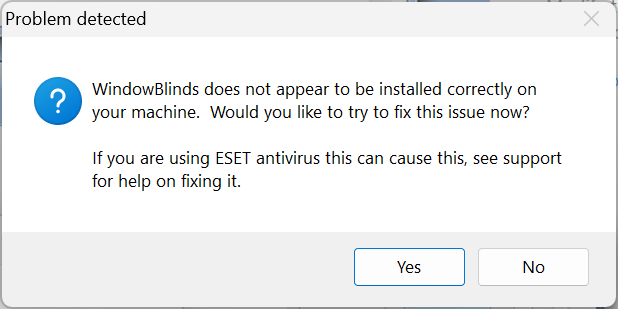
But I couldn't get to load any theme in the sandbox because when I tried to, this message appeared and the theme would not load :

I never had this message pop up on my normal environment.

And I have no idea what it means so I gave up the sandbox test.

Reply #5 Top

Hello,
I can see you’ve put a lot of effort into customizing your system, but since there were extensive registry edits before WindowBlinds, it’s hard to know exactly what’s been changed or undone. That’s probably why some parts aren’t working as expected now. The most reliable way to get everything stable again is to start fresh with a clean Windows 11 install. That way you’ll have a known good baseline, and then you can add WindowBlinds, without worrying about leftover tweaks interfering. It’ll save you a lot of troubleshooting in the long run.

As for the not install properly part, perhaps there are few files not get copy/install properly due to some security setting or installation issue. But looking at again testing on Sandbox might not help you in this situation. 

Thank you,
Basj,
Stardock Community Assistant.

Reply #6 Top

Have you run sfc /scannow from an elevated command prompt? It can't possibly harm your computer and might well fix altered system files.

Reply #7 Top

I actually have run both DISM /Online /Cleanup-Image /RestoreHealth and sfc /scannow and restarted my computer just a couple minutes ago.

Unfortunately this did not work either.

Reply #8 Top

Quoting BauKo., reply 7

Unfortunately this did not work either.

Sorry it didn't help, BauKo. 

To be clear, you currently have no other customizing software on your computer other than Stardock's?

You can also do a chkdsk /f /r /x which not only fixes the MFT but also restores files including restoring files on bad sectors while the /x dismounts the disk and makes sure all open handles are closed. After entering the chkdsk /f /r /x  command, you have to reboot as C has to be lovked but you probably know that already.