ObjectDock Not Respecting Windows Dark Mode

I purchased ObjectDock 3.01 for my fresh install of Windows 11 I just set up. I've used it before, but now I'm having a weird quirk.

I have my desktop theme set to dark mode where all the Windows File Explorer/menu bars load with the dark theme (IE: File Explorer, dialog boxes, ect).

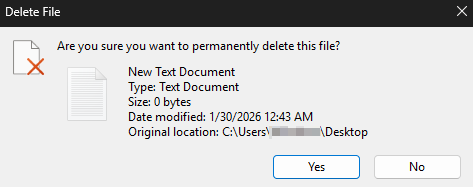
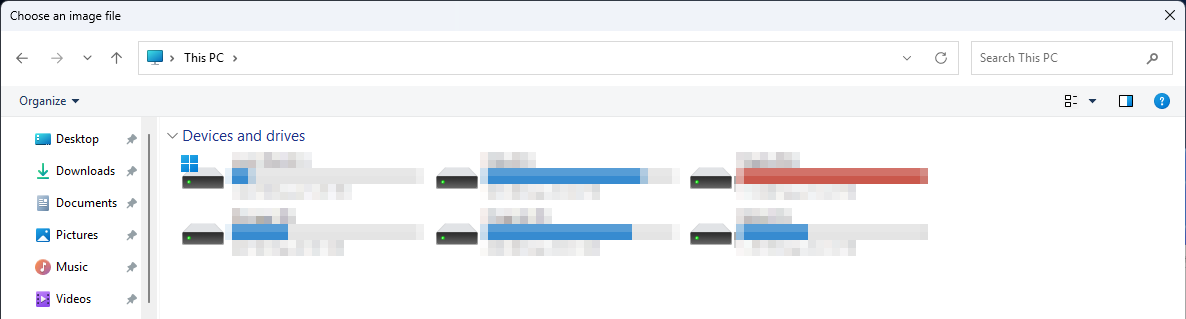
When I first installed ObjectDock, it would follow this color scheme. But I noticed tonight, after trying to clear the Recycle Bin, this color theme seems to be broken (just in the app, Windows is fine). It's also happening in the settings menu (when I try browse folders from within ObjectDock, to look for custom icons for example).

Here are some screenshots:

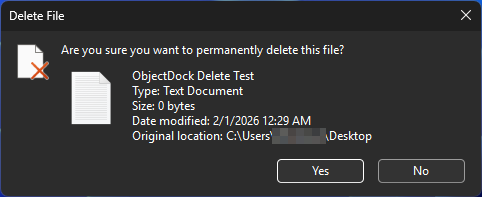
What my dialog boxes look like in Windows 11 (and how ObjectDock started out):
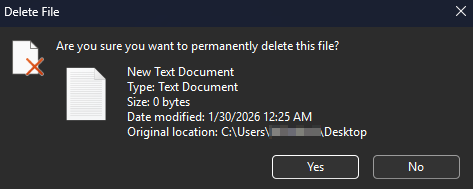
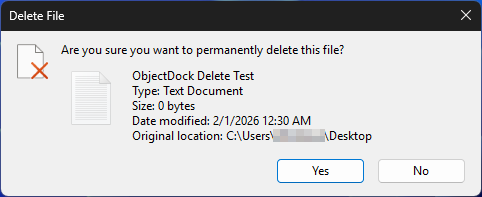
What ObjectDock is doing now:
Moved to ObjectDock area

2,179 views 7 replies
Reply #1 Top

Hello,
Sorry to hear you are having issues. Yes, some part in ObjectDock did not get the dark theme GUI yet. But, from my short testing I don't see OD3 change File explorer dark theme to light when using it. Refer to my short video below.

Would like to suggest, try, uninstall OD3, reboot immediately (important), download latest version available in your account product download page: https://store.stardock.com/myaccount/products. Install it, reboot immediately again. Retest it and report back.

Thank you,
Basj,
Stardock Community Assistant.

Reply #2 Top

Thanks for the info. I did want to also mention that as far as I remember, the Objectdock was following Windows dark mode at one point. It's just something that stopped recently. So the Recycle Bin prompt used to be all black. Then it reverted.

Before I uninstall and reinstall, can you tell me if there is a way to back up the dock I have set up with all it's customization/color settings? It took me a long time to color match it to my taskbar and I don't want to lose that. Can I import it back after install?

Reply #3 Top

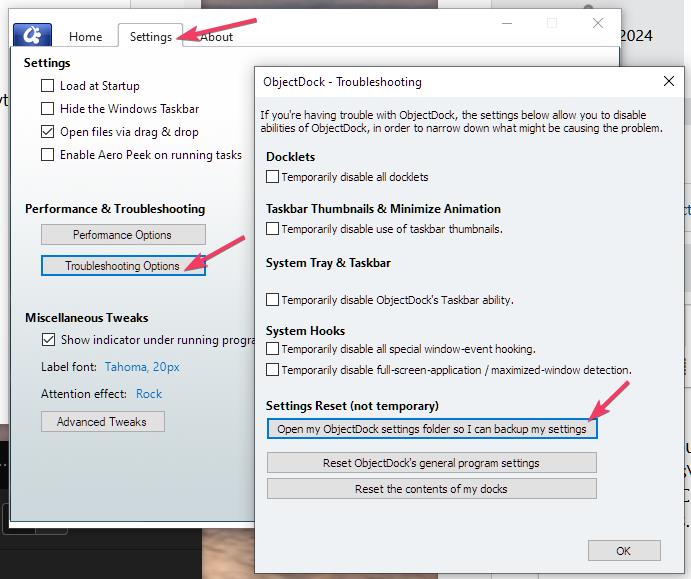
To backup use these settings and buttons

Thank you,

Basj,
Stardock Community Assistant

Reply #4 Top

Those are Windows dialogs so I would suggest an OS change.  Microsoft had been looking into improving dark mode as some dialogs did not support them (OS ones).  It may be they have rolled this back or for compatibility only enable it on supporting apps.

I am also assuming you are not using a tool that 'improves' dark mode as it may be that has changed.

What version of Windows are you using exactly?

Reply #5 Top

Only using the default Windows 11 25H2 dark theme (no other apps for that). I tested it, thinking this might be a Windows glitch. So I turned light mode on and then back to dark (just to refresh it). And checked several of my other apps to ensure they were respecting the dark mode settings. They all seem fine.

It's weird, as I'm pretty sure Objectdock did respect the dark mode fine at first, until I started doing some registry edits to change this setting for Start11. That's when Objectdock dropped the dark mode in some places.

Will try reinstalling and see how that works. Will report back.

Reply #6 Top

Just did an uninstall and cleaned any remnants in the registry/system files using Revo Uninstaller and Revo Registry Cleaner. Then reinstalled the latest version of ObjectDock. But still no change. I'm still getting Windows Recycle Bin deletion confirmation in all dark theme with ObjectDock Recycle Bin shortcut in partial (black toolbar with light theme background).

Can someone check this on their system (just to make sure I'm not crazy). I could have sworn that ObjectDock was originally in dark theme mode as well for these dialogs.

Windows 11 Recycle Bin confirm dialog screenshot:

ObjectDock 3.01 Recycle Bin confirm dialog screenshot: 

Reply #7 Top

Hello,
I have forwarded your problem/question to Stardock Support Team for their assistance. Please keep an eye on this thread for any updates. We appreciate your feedback and patience. Thank you.

Basj,
Stardock Community Assistant