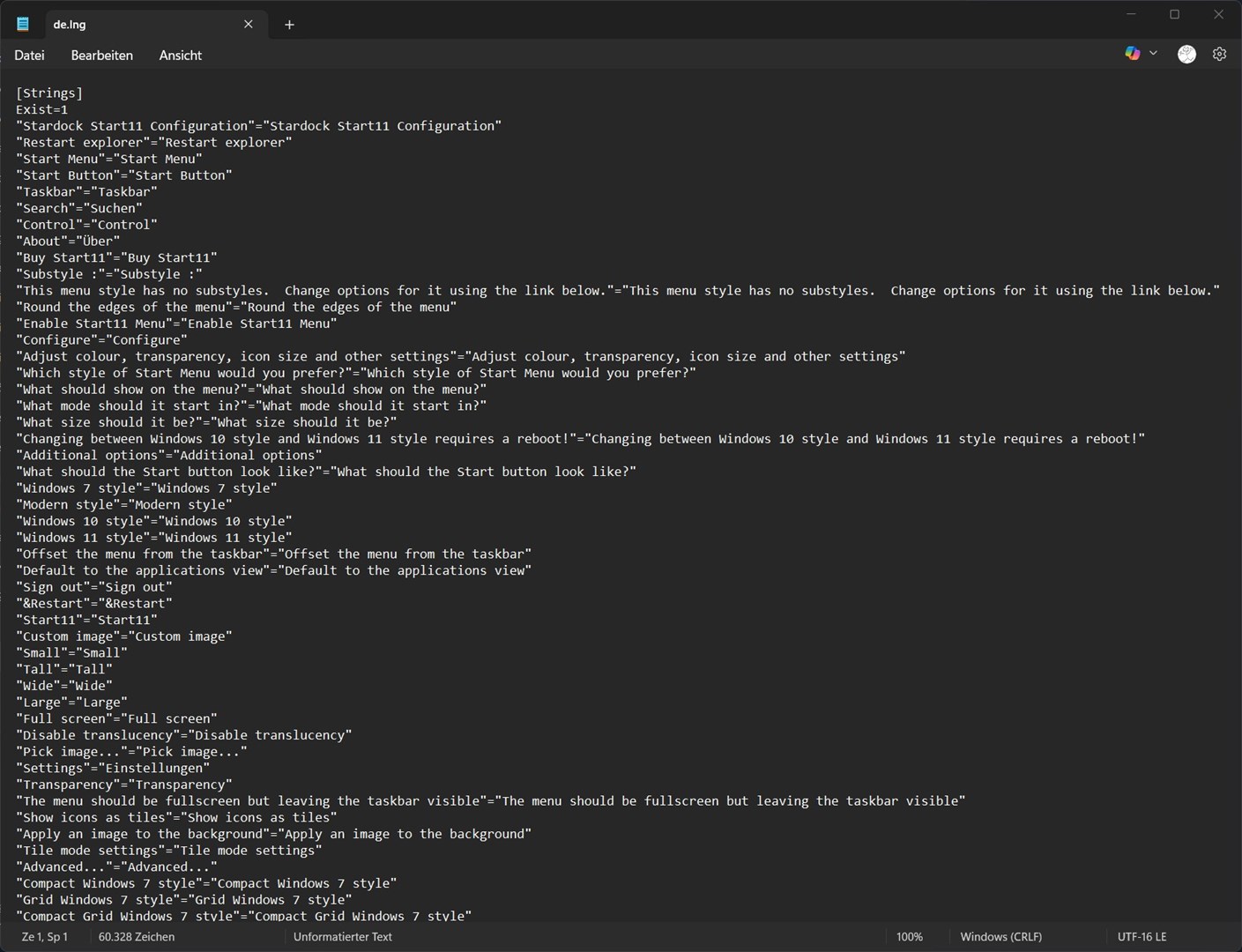
Keine deutsche Übersetzung in den Menues Start11 2.6
In den Menues gibt es es keine deutsche Uebersetzung, nur englisch.
In den Beta-Versionen 2.6.0.0-2,.6.02 funktionierte es auch nicht!!
Was tun??
In den Menues gibt es es keine deutsche Uebersetzung, nur englisch.
In den Beta-Versionen 2.6.0.0-2,.6.02 funktionierte es auch nicht!!
Was tun??
Hallo Bicher,
das ist mir auch aufgefallen. Du kannst die Sprachdatei unter folgender Seite herunterladen:
Start-Products/Start11 v2/de.lng
Ich habe noch eine aktuellere Version, die ich aber noch nicht hochgeladen habe. Leider werden Fehler sehr langsam gefixt bzw. Vorschläge nicht angenommen. Darum ist mir etwas die Lust mit dem Tool sich weiter auseinander zu setzen vergangen.
Hello,
Sorry to hear you are having issues. But, have you actually download and install the latest v2.60 full release as mentioned here: https://forums.stardock.com/540382/
Thank you,
Basj,
Stardock Community Assistant.
Bei mir ist es das Gleiche. Keine deutsche Übersetzung in der Version 2.6.
Bei Nutzung der de.lng sehen die Umlaute falsch aus, zum Beispiel ä = a1/4.
Please post some screenshots of these issue so I can forward it to Support.
Thank you,
Basj,
Stardock Community Assistant


Bei der de.lng, die auf der Website verlinkt ist, ist die UTF nicht UTF-16 LE und statt Windows (CRLF) ist es Unix (LF).
Hello,
I have forwarded your problem/question to Stardock Support Team for their assistance. Please keep an eye on this thread for any updates. We appreciate your feedback and patience. Thank you.
Basj,
Stardock Community Assistant
Die Ansage ist so nicht richtig. Die Deutsche Language-Datei ist im Ordner <lang> schon da. Bei der neuen Version ist das Problem, dass sich der Automatische Abgleich mit der Windows 11 Sprache Deutsch nicht vollzieht. Fehler im Setup und sollte korrigiert werden, ansonst eben zurück zu 2.56 da funktioniert es noch. Grüße Lutz
Hello all,
Thank you for posting. We've identified the issue, and will have this fixed in the next beta and subsequent release.
Best regards,
Adam McGuinness
Stardock Support Specialist
Du hast recht, das war mir gar nicht bewusst.
Hier die aktuelle Sprachdatei für Start11v2 2.6.0.2:
de.zip
Die Datei in den Installationsordner von Start11 entpacken.
Bspw.: c:\Program Files (x86)\Stardock\Start11\lang\
I wanted to fix this sooner, so I did.
Any new install will have a proper de.lng in the \Start11\lang folder.
thomas-k, thank you very much for bringing this to our attention and for taking the time to produce a new de.lng file. However, we have to preserve our process flow and I want to include you in it.
We greatly appreciate having native speakers contribute to the accuracy of translations. However, we use GitHub to manage it for likely obvious reasons (a history is not the least of them). If you do go to your account page, the version of Start11 there has how we updated the de.lng file - it may not agree with how you would have translated them. If you want to have any changes reviewed, please visit Github, and make a pull request. The only thing I ask (and I need to update the requirements) is that it has the exact same number of lines in the en.lng file (currently, that is 948). That means not extra comments or lines.
GH page:
https://github.com/StardockCorp/Stardock-Software-Localization
Start11 \ German specifically:
https://github.com/StardockCorp/Stardock-Software-Localization/tree/main/Apps/Start-Products/Start11%20v2
Make sure to reveiw the 1st as there are instructions on how to manage submissions. If you have ANY questions or feedback on the page, let me know and I will review them.
However, if you see something that SHOULD be in the en.lng file, PLEASE let us know.
Again, thank you very much for your time and support.
Sean Drohan
Stardock Product Lifecycle Manager
Ich wollte das früher beheben, also habe ich es jetzt getan.
Jede neue Installation enthält nun eine korrekte de.lng-Datei im Ordner \Start11\lang.
thomas-k, vielen Dank, dass Sie uns darauf aufmerksam gemacht und sich die Zeit genommen haben, eine neue de.lng-Datei zu erstellen. Wir müssen jedoch unseren Prozessablauf einhalten und ich möchte Sie gern darin einbinden.
Wir können gar nicht genug schätzen, wenn Muttersprachler zur Genauigkeit der Übersetzungen beitragen. Allerdings verwalten wir diese aus naheliegenden Gründen über GitHub (eine Versionshistorie ist dabei nur einer davon). Wenn Sie sich auf Ihrer Kontoseite die dort verfügbare Start11-Version ansehen, sehen Sie, wie wir die de.lng-Datei aktualisiert haben – möglicherweise entspricht das nicht genau Ihrer eigenen Übersetzung.
Wenn Sie Änderungen überprüfen lassen möchten, besuchen Sie bitte GitHub und erstellen Sie dort einen Pull Request. Die einzige Voraussetzung (die ich noch in den Richtlinien ergänzen muss) ist, dass die Datei exakt dieselbe Anzahl an Zeilen wie die en.lng-Datei hat (derzeit 948). Das bedeutet: keine zusätzlichen Kommentare oder Leerzeilen.
GitHub-Seite:
https://github.com/StardockCorp/Stardock-Software-Localization
Start11 \ Deutsch:
https://github.com/StardockCorp/Stardock-Software-Localization/tree/main/Apps/Start-Products/Start11%20v2
Bitte lesen Sie sich zuerst die Hauptseite durch, da dort Anweisungen zur Einreichung von Änderungen stehen. Wenn Sie irgendwelche Fragen oder Anmerkungen zu der Seite haben, lassen Sie es mich wissen – ich werde sie mir gern ansehen.
Wenn Sie jedoch etwas entdecken, das Ihrer Meinung nach in der en.lng-Datei fehlen oder anders formuliert sein sollte, informieren Sie uns bitte unbedingt.
Nochmals vielen Dank für Ihre Zeit und Unterstützung.
Sean Drohan
Stardock Product Lifecycle Manager

Same problem here. Only a handful of items is translated, most menu items are in English. Example:


As sdRohan mentioned in his previous reply, we've just updated the available download with corrected translations.
If you downloaded before the past hour or so, I advise using a fresh browser and downloading from your account page (https://store.stardock.com/myaccount/products) again.
Best regards,
Adam McGuinness
Stardock Support Specialist
---
Wie sdRohan bereits in seiner vorherigen Antwort erwähnte, haben wir die verfügbaren Downloads soeben mit korrigierten Übersetzungen aktualisiert.
Falls Sie die Datei vor etwa einer Stunde heruntergeladen haben, empfehle ich Ihnen, einen neuen Browser zu verwenden und die Datei erneut von Ihrer Kontoseite (https://store.stardock.com/myaccount/products) herunterzuladen.
Danke,
Adam McGuinness
Stardock Support Specialist
Jetzt funktioniert es mit der Datei aus de.zip. Ich hatte zwischendurch die Datei aus Version 2563 benutzt, das funktionierte als Ersatz ganz gut.
Vielen Dank für die Bemühungen
Now it's fixed with the new setup-file. Thanks for all.
For the most part, we try to accommodate sizes for other languages but with the exception of Asian translations, every other is more verbose than English. That is (by far) our largest audience. We will continue to refine the translation process but it can be done if the meaning of the text is lost by shortening it.
Again, anyone willing is able to submit changes
https://github.com/StardockCorp/Stardock-Software-Localization
Sean Drohan
Stardock Product Lifecycle Manager
Hello Sean,
I have removed my comments and uploaded my revised language file to Github:
https://github.com/StardockCorp/Stardock-Software-Localization.
It has the exact same number of lines in the en.lng file (currently, 948).
Unfortunately, this also means that some entries are missing, which is why a few menu items still appear in English.
That’s why I’m sharing an updated language file here, containing the missing texts at the very end of the file.
Best regards
Thomas
Sprachdatei für Start11 v2 (Version 2.6.0.2)
Die offizielle Sprachdatei enthält derzeit leider noch nicht alle Verbesserungen. Daher stelle ich hier eine aktuelle Version zur Verfügung. Sollten jemandem ungewöhnliche Formulierungen oder Fehler auffallen, können diese mir gerne gemeldet werden. Viele Einträge habe ich bereits überarbeitet. Für eine vollständige Neuübersetzung fehlt mir jedoch die Zeit, weshalb vereinzelt noch unschöne Formulierungen oder Fehler enthalten sein können.
Hier findet ihr die aktuelle Sprachdatei für Start11 v2 (Version 2.6.0.2):
Bitte entpackt diese Datei in den Unterordner "lang" innerhalb eures Start11-Installationsordners.
Beispielpfad: C:\Program Files (x86)\Stardock\Start11\lang\
Google Drive: de.zip
I want to be clear on this: those extra lines that you added to the bottom, after adding them, do they then translate in the UI?
Sean Drohan
Product Lifecycle Manager
I want to be clear on this: those extra lines that you added to the bottom, after adding them, do they then translate in the UI?
Sean Drohan
Product Lifecycle Manager
Yes, that’s correct. Without those entries, some texts in the UI remain in English. However, I left those additional entries out on GitHub.
"Element Large"="Element – groß"
"Flow Large"="Flow – groß"
"Reflow Large"="Reflow – groß"
"Sonar Large"="Sonar – groß"
"Music folder"="Musikordner"
"Pictures folder"="Bilderordner"
"Videos folder"="Videosordner"
"Documents folder"="Dokumenteordner"
"Windows-Tools"="Windows-Tools"
"Pin to Start menu"="An Startmenü anheften"
"Open &Task Manager"="&Task-Manager öffnen"
"All Fences"="Alle Fences"
Yes, that’s correct. Without those entries, some texts in the UI remain in English. However, I left those additional entries out on GitHub.
"Element Large"="Element – groß"
"Flow Large"="Flow – groß"
"Reflow Large"="Reflow – groß"
"Sonar Large"="Sonar – groß"
"Music folder"="Musikordner"
"Pictures folder"="Bilderordner"
"Videos folder"="Videosordner"
"Documents folder"="Dokumenteordner"
"Windows-Tools"="Windows-Tools"
"Pin to Start menu"="An Startmenü anheften"
"Open &Task Manager"="&Task-Manager öffnen"
"All Fences"="Alle Fences"
Since you said they do traslate, I have added them to de and all the other core lang including en.lng.
thomas-k, thank you for your work here, truly. The next update has yet to be formed but I will do my best to remember to give you credit in the changelogs when the project is created (for the next update).
Sean Drohan
Product Lifecycle Manager
Welcome Guest! Please take the time to register with us.