How Can I Get ObjectDock to Startup Minimized, Especially Just to The System Tray?

I cannot seem to find a setting to get ObjectDock 3.0.1 the start up MINIMIZED, especially ONLY to the System Tray.

I have things set up to automatically start ObjectDock when I login, and I could almost swear that this used to work, because I don't remember getting the ObjectDock window just after login on my screen until today.

But I cannot figure out how I might have accomplished that.

3,020 views 12 replies
Reply #1 Top

Sorry.  This should be in category ObjectDock.  I wish I knew how to change that.


I changed it to the correct Category. Jan Oscar, moderator

Reply #2 Top

Hello,
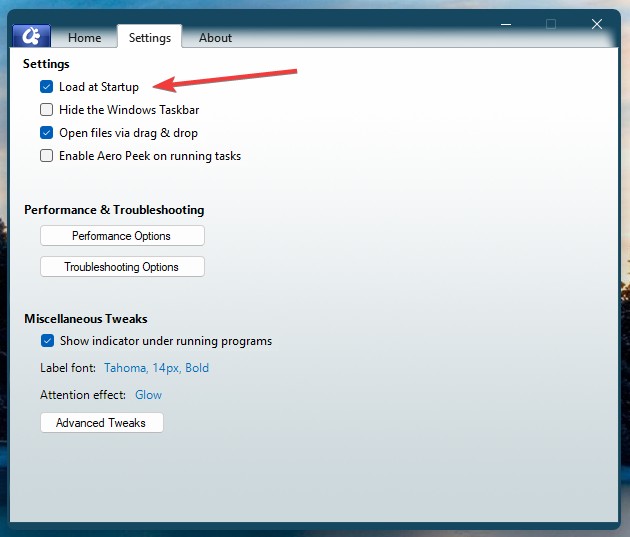
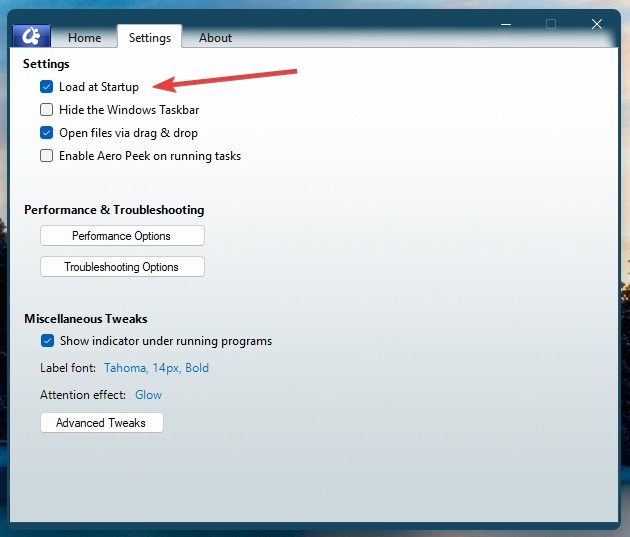
Sorry to hear you are having issues. From what I know, you just need to have this setting turn on. And it should load on startup without opening OD3 configuration window. Perhaps something went wrong while you installing the software. 

Please try, uninstall ObjectDock, reboot immediately (important), redownload latest version available in your account product download page: https://store.stardock.com/myaccount/products. Install it, reboot immediately again. Retest it and report back.

Thank you.
Basj,
Stardock Community Assistant.

Reply #3 Top

I have uninstalled and re-installed the app, but unfortunately that did not help.


Like with other apps like this that work "in the background":

  • I would like to make it so that, when the app starts, it does not open a window.
  • I want for there to be an icon in the taskbar only when the window is actually open.
  • Unless the window is open, the only thing I need is an icon in the System Tray.
Reply #4 Top

Quoting WoofGrrrr, reply 3

Like with other apps like this that work "in the background":

I would like to make it so that, when the app starts, it does not open a window.
I want for there to be an icon in the taskbar only when the window is actually open.
Unless the window is open, the only thing I need is an icon in the System Tray.

I believe, these is what I get since I use ObjectDock v3. It is by default. So something is not working right in your system. Perhaps, try purge and reinstall steps as mention here : [Link]. Just make sure to redownload the latest version from your account page. Reboot after the purge. Reinstall and reboot again after the installation. Retest and report back here.

Thank you,
Basj,
Stardock Community Assistant.

Reply #5 Top

Thank you.  That seems to have done the trick.  I'm happy now.

But how did it get configured so it did not operate this way?  I cannot see to see any settings for it.

Reply #6 Top

Quoting WoofGrrrr, reply 5

But how did it get configured so it did not operate this way? I cannot see to see any settings for it.

Setting to do what exactly?

Thank you,

Basj,
Stardock Community Assistant


Reply #7 Top

Like I said, ObjectDock was starting up with it's Setup Window showing.  The same Window that shows when you double-click its icon in the System Tray.

I went through that whole process of having to re-install the app, and then PURGE and RE-INSTALL the app, to get that behavior to STOP.

I do not know what caused that behavior, WHAT SETTINGS I MIGHT HAVE CLICKED that might have caused it, because I can find no such settings in the UI.


THOSE settings.  Settings to do THAT, exactly.


Because I do not want to have this happen again.


Reply #8 Top

Please try this, just un-tick this setting, this should stop it from start on boot up.

Reboot the system. And confirm OD3 does not start.

Re-tick "Load at Startup" again. Reboot the system. Does it OD3 load again upon Startup? With or without the OD3 configuration Windows open up? Report back.

Thank you,

Basj,
Stardock Community Assistant

Reply #9 Top

Please READ what I said more carefully.


That is NOT what I asked about.

I did NOT ask about how to make ObjectDock start on login or not.

I asked about ObjectDock displaying it's SETUP WINDOW **WHEN** it DOES start.  Whether it starts at login or not.

I do NOT want to see the Setup Window when ObjectDock starts.

I had to go through all the trouble of PURGING and RE-INSTALLING to get this behavior to stop.

I want to make sure it does NOT happen again.

Tell what settings I might have changed to cause that to happen so that I know **not** to do that again!

AND so that I know what settings to change back **IF ** it happens again.

THAT is what I am asking.

Reply #10 Top

Hello again,

As I mentioned, perhaps it is not clear to you. The opening of Object Desktop Configuration Windows every time you reboot your system is not normal. If it is, we should see a lot of other user complain on it by now. And, you also mentioned in your very first post, it was not like this before, yes?

So something is triggering OD to open up its configuration Windows every time you reboot your system. That is what we're trying to figure out. There is no setting within OD3 that can force OD configuration to open up every time you reboot.

What I suggested in my reply#8, is perhaps by disabling, reboot and re-enabling "Load at Startup" could reset it to default and make it okay again.

What I would like to suggest next is perhaps try to Create another new admin account and test it under that account and see if the issue appear while in that new admin account.

There are lot of cases reported that some weird behavior resolved just by creating a new admin account.

Here is how to create a new admin account: 

Creating a new Windows Administrator Account

For testing, please create a new Windows Administrator account.

Its important that it is an Adminitrator account to ensure the PC has all associated privilages.

Windows 10 & 11

http://windows.microsoft.com/en-us/windows-10/create-a-local-user-account-in-windows-10

Log in under that account and try. 

This was taken from Fences Clean Boot: https://support.stardock.com/space/SHC/1332445272/Fences+Clean+Boot 

Try it and report back.

Thank you,

Basj,
Stardock Community Assistant


Reply #11 Top

Do you have an active dock?  For example when I open Objectdock from my start menu I just get a dock by my taskbar.  But if all docks are deleted then configuration will launch.  Are you using multiple desktops perhaps?

Reply #12 Top

As I have said, I have already gone through all the trouble of PURGING and RE-INSTALLING the app.

After doing that, the app is now is working as I expected.  And now I have no idea how make it so that I can re-produce the problem again so it can be diagnosed.

If you say there is no conceivable way to use the settings UI to make the app work as I described -- before I purged and re-installed -- then it must have been some bug in the app that only I have encountered thus far.

You might want to escalate this to development in case they might wish to investigate this further.


I am done.

Thank you.