Crashing after start

I am using Win11 Pro Insider build 28000 and Connection Explorer ends just after the map display. I must say this build has some other problems also, so perhaps it is a problem with this build.

1,615 views 10 replies
Reply #1 Top

That's not expected at all, did you have a previous build installed? Also, is the OS in English or another language? 

If you go to C:\Users\brad\AppData\Local\Stardock\ConnectionExplorer (replace Brad with your account name) there is a debug log, if you can DM me any errors you see in there, that would be appreciated.

Reply #2 Top

I sent the debug.log to you as DM, I hope you got it.

Reply #3 Top

I have the same crashing problem, but there's no AppData\Local\Stardock\ConnectionExplorer directory.

The first? beta worked at least it didin't crash, but this current version crashes as soon as the UI is ready.

There's crash dumps if you need want them.

Reply #4 Top

Are you able to see if the system tray app is running? There is an issue I am trying to track down where the system tray is locking the database and when the main UI window open, it hangs as it cant reach the database to populate the fields.

As a workaround, start the main UI, then the system tray app.

I have an update that should reduce the likelihood of this happening but need additional testing to make sure it doesnt cause any other downstream issues.

Reply #5 Top

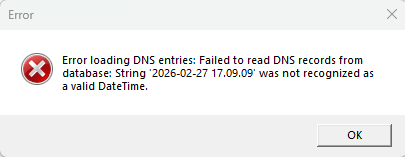
I "solved" my problem by reinstalling Windows 11 Pro, it is a big job and I am still checking and fixing things. Anyway Connection Explorer works now almost. I am getting message about incorrect datetime, your program does not like European style of datetime:

Reply #6 Top

Quoting bdsams, reply 4

Are you able to see if the system tray app is running? There is an issue I am trying to track down where the system tray is locking the database and when the main UI window open, it hangs as it cant reach the database to populate the fields.

As a workaround, start the main UI, then the system tray app.

I have an update that should reduce the likelihood of this happening but need additional testing to make sure it doesnt cause any other downstream issues.


I think I had for some reason always clicked the "start tray" button and crashed after that. Now when I continued the tutorial without enabling it doesn't crash anymore.

But I don't get anything in connections tab, total connections 0 etc. Should there be something? Or the tray needs to be running...?

I'm also in Europe so European/Finnish locale should be working, I don't get the same dns error though as Gideonkl does.

Reply #7 Top

Are you on the latest build? 

You should be able to start the main UI,  you will need to start the system tray as the sys trap app is what does the data processing.

Reply #8 Top

Quoting bdsams, reply 7

Are you on the latest build? 

You should be able to start the main UI,  you will need to start the system tray as the sys trap app is what does the data processing.


I think I am, what object desktop has suggested.

Now when I enable the tray I don't crash anymore though. But I get the DNS error about date string not being recognized.

So progress, but still not fully functional.

Reply #9 Top

I had to re-install Win11 again as the previous installation had many problems. Everything works much better now except Connection Explorer, it is back to the original problem it is crashing after the world map is displayed. I am thinking that there could be some program that is coursing this problem, but it is difficult to say which one.

Reply #10 Top

Now the Connection Explorer is working. I had to uninstall it and remove all trace of the program, reboot and install again. I used Revo Uninstaller Pro and it made the removal of traces easier.

+1 Loading…