Multiplicitity 4.08 Beta Feedback

With the Multiplicity 4.08 beta release today, we are creating this thread so that users can report any observed issues.  

Obtaining Object Desktop Insider Builds

Object Desktop Manager

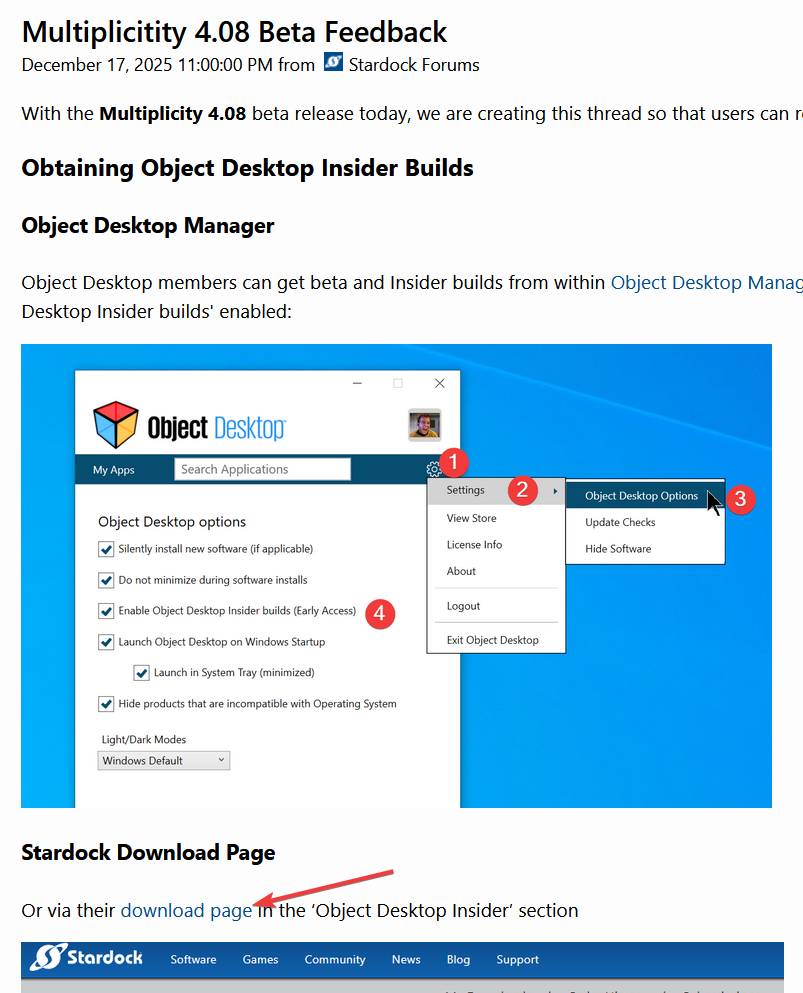
Object Desktop members can get beta and Insider builds from within Object Desktop Manager with 'Enable Object Desktop Insider builds' enabled:

image-20240219-210025.png

Stardock Download Page

Or via their download page in the ‘Object Desktop Insider’ section

image-20240219-213743.png

Obtaining Beta Releases

Stardock.com

If a beta was released, Object Desktop Members would see it in the ‘Object Desktop’ section.

Individual purchases would see it on their registration of the product under their download page.

image-20240219-214050.png

Steam

  • Right-click the Product in Steam

  • Properties

  • Betas

  • Select the beta branch at the top right (there is no password)

Example

https://cdn.stardock.us/support/uploads/steamwebhelper_2024-02-19_17-44-35.png

Reporting an issue

Please include the following for anything found:

  • Exact Windows version \ build (winver.exe)

  • Detailed steps to recreate the issue seen

  • Screenshots and videos are very helpful.  Videos can be uploaded to a cloud drive service (GoogleDrive, DropBox, OneDrive, YouTube), with a shared link included in your post.  Images can be copied and pasted directly into a post.

  • If there are specific apps that the app does not work (well) with, please note what apps and their exact versions.  If any app is not common, a link to a trial version would be appreciated.

Thank you for your interest and any time you put into making Multiplicity 4 a better product.

4,933 views 9 replies | Pinned
Reply #1 Top

Multiplicity 4.08 Beta Changelog

Date

01/13/2025

Version

UI: 4.08
File Version: 4.0.8.1

Changes

  • Resolves a memory leak in KVM and Seamless mode for connections which are open for a very long time

Date

12/17/2025

Version

UI: 4.08
File Version: 4.0.8.0

Changes

  • Vertical monitor for KVM mode fix

  • Fix for new AMD cards on insider builds of Windows being too high contrast on KVM mode

  • Adds limited HDR support so having HDR enabled in the OS will not make everything overbright in KVM mode but sdr content will be less bright than usual to ensure HDR doesn't just clip to solid white

Reply #2 Top

Known issues

While we appreciate all feedback, please remember that we offer no official support for beta \ preview \ developer channel versions of Windows. If you report issues while in any of those early release channels, you should not expect them to be addressed unless it still exists in a retail version of Windows.

  • TBD
Reply #3 Top

***Reserved***

Reply #4 Top

All, the Multiplicity 4 beta has been updated.  For details, please see:

https://forums.stardock.com/540065/get;3985292

As always, thanks for the time, feedback, and support.

Sean Drohan
Product Lifecycle Manager

Reply #5 Top

Why not include a link for downloading it?

Also, is another version coming sometime?

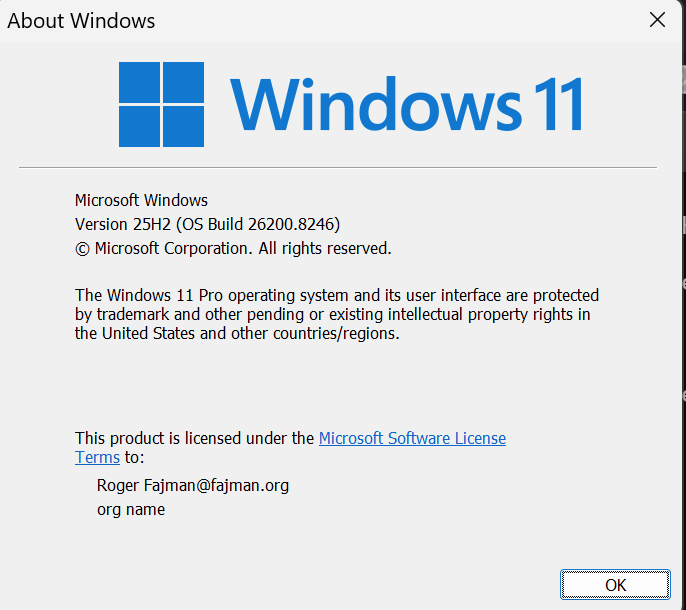
With the previous beta copy/paste of a file from one PC to another in KVM mode didn't work for me, but did work, although a bit strangely, in the earlier released version.  Here's my current Windows version:

I've refreshed windows in the meantime.  The other PCs are not available now.  Sorry about that.  I'll understand if you don't want to look at it without more current information.  I'll try it again with the latest beta when I get a chance.

By the way, my email address is wrong in the image above.   

Moderator: Please do not use your private email as this is a public forum and your security will be compromised. If your email needs correction, please do it via your account.

Reply #6 Top

Quoting rfajman, reply 5

Why not include a link for downloading it?
End of rfajman's quote

There is a link to your account product download page up there

If you don't see it in there, perhaps, you have some issue with your account. Please report back here.

Thank you,

Basj,
Stardock Community Assistant

Reply #8 Top

I have run into issues with Show Remote Monitor and Show in Monitor. Note, my primary PC has 5 monitors in 2 rows.

I have 3 monitors on the remote computer and when I use Show Remote Monitor and select Monitor 1 it works fine.  Selecting Monitor 2 or Monitor 3 doesn't change what it is shown (still showing Monitor 1).  Happens in fullscreen and non-fullscreen.

Show in Monitor rarely ends up on the monitor I selected.  For example, selecting Show in Monitor 1 ends up moving it to Monitor 4 (after the move Monitor 4 is checked in the Show in Monitor menu).  It does appear to work correctly if the monitor I select is the next in the list (i.e. It is currently on 2 and I select 3 it will go to 3; also works going from 5 (last) to 1, but not reverse order).

When Multiplicity connected this morning, it didn't show up on any monitor (showed on taskbar like normal).  I had to turn off a monitor on the primary PC to get it to show (causing windows to refresh what displays are attached).  Today this only happened when connecting, but I believe it happened a few times last night when using Show in Monitor.

Last night I was on 4.07 then I upgraded to 4.0.8.1 Beta this morning before trying it.

I have used the Seamless tab as the guide to determine what Monitor number is which physical monitor since those numbers match what actually gets checked in the Show in Monitor menu.  It was confusing last night until I realized the numbering in the Seamless tab didn't match the number in Windows settings.  It would be helpful if they matched.

FYI, the numbers on the Seamless tab last night when 4.07 was installed were different than today with 4.0.8.1 installed.  Monitors 1 & 4 still referred to the same physical monitors, but the other 3 switched.

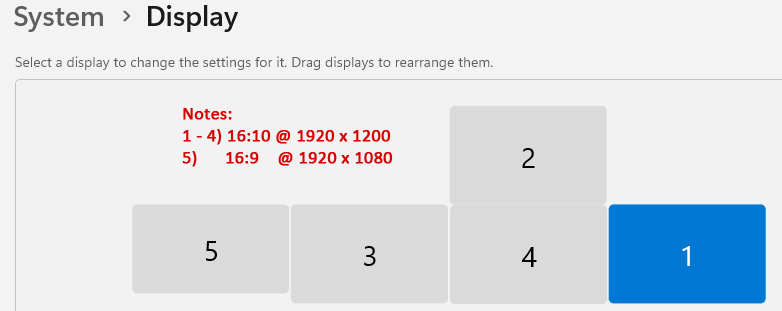
Primary PC Windows 11 Display Settings:

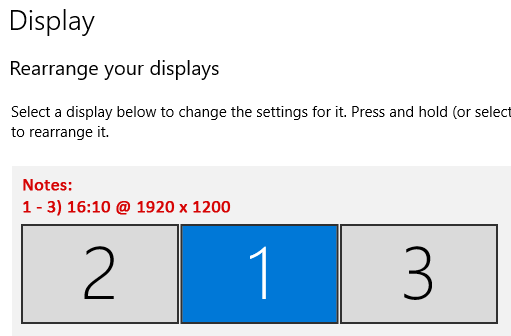
Secondary PC Windows 10 Display Settings:

Monitor 3 above corresponds to Monitor 1 in Multiplicity and is the primary in Windows.

The Secondary PC monitors are the same physical monitors as 1, 3 & 4 on the Primary PC (plugged into different ports).  I had hoped Multiplicity wasn't limited to viewing 1 monitor at a time so I could switch the 3 monitors back and forth between the two PCs.


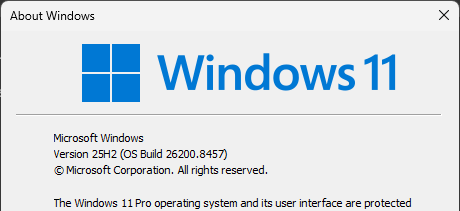
Primary PC Windows Version:

Secondary PC Windows Version:


Reply #9 Top
Quoting russellsmith2, reply 3994136

I have run into issues with Show Remote Monitor and Show in Monitor. Note, my primary PC has 5 monitors in 2 rows.

I have 3 monitors on the remote computer and when I use Show Remote Monitor and select Monitor 1 it works fine.  Selecting Monitor 2 or Monitor 3 doesn't change what it is shown (still showing Monitor 1).  Happens in fullscreen and non-fullscreen.

Show in Monitor rarely ends up on the monitor I selected.  For example, selecting Show in Monitor 1 ends up moving it to Monitor 4 (after the move Monitor 4 is checked in the Show in Monitor menu).  It does appear to work correctly if the monitor I select is the next in the list (i.e. It is currently on 2 and I select 3 it will go to 3; also works going from 5 (last) to 1, but not reverse order).

When Multiplicity connected this morning, it didn't show up on any monitor (showed on taskbar like normal).  I had to turn off a monitor on the primary PC to get it to show (causing windows to refresh what displays are attached).  Today this only happened when connecting, but I believe it happened a few times last night when using Show in Monitor.

Last night I was on 4.07 then I upgraded to 4.0.8.1 Beta this morning before trying it.

I have used the Seamless tab as the guide to determine what Monitor number is which physical monitor since those numbers match what actually gets checked in the Show in Monitor menu.  It was confusing last night until I realized the numbering in the Seamless tab didn't match the number in Windows settings.  It would be helpful if they matched.

FYI, the numbers on the Seamless tab last night when 4.07 was installed were different than today with 4.0.8.1 installed.  Monitors 1 & 4 still referred to the same physical monitors, but the other 3 switched.

Primary PC Windows 11 Display Settings:

Secondary PC Windows 10 Display Settings:

Monitor 3 above corresponds to Monitor 1 in Multiplicity and is the primary in Windows.

The Secondary PC monitors are the same physical monitors as 1, 3 & 4 on the Primary PC (plugged into different ports).  I had hoped Multiplicity wasn't limited to viewing 1 monitor at a time so I could switch the 3 monitors back and forth between the two PCs.


Primary PC Windows Version:

Secondary PC Windows Version:

End of russellsmith2's quote

Hello,

Sorry to hear you are having issues. Please create your own new thread for more specific to your own systems issue. We will try to help over there. This thread is more into general feedback thread.

Thank you,

Basj,

Stardock Community  Assistant.