Multiplicity 4.07 Released

With the Multiplicity 4.07 release today, we are creating this thread so that users can report any observed issues.  

Obtaining the product

Object Desktop members can get the release from within Object Desktop Manager 

Individual purchases (as well as Object Desktop Members) can also be obtained from your account page: https://store.stardock.com/myaccount/products

For guest check-out purchase (no account), from this link: http://www.stardock.com/support/productkeyretrieval

Reporting an issue

Please include the following for anything found:

  • Exact Windows version \ build (winver.exe)

  • Detailed steps to recreate the issue seen

  • Screenshots and videos are very helpful.  Videos can be uploaded to a cloud drive service (GoogleDrive, DropBox, OneDrive, YouTube), with a shared link included in your post.  Images can be copied and pasted directly into a post.

  • If there are specific apps that the app does not work (well) with, please note what apps and their exact versions.  If any app is not common, a link to a trial version would be appreciated.

4,670 views 10 replies | Pinned
Reply #1 Top

Multiplicity 4.07 Changelog (Released 09/11/2025)

09/11/2025

Version

  • UI: 4.07

  • MultiplicityConfig.exe: 4.0.7.2

Changes

  • Tweaks to the MAC address code to resolve the issue on mixed IPv6/4 networks

  • Resolved issue with new grid mode and switching vertically

  • Tweaks to seamless display driver for reliability and performance.

  • Stability improvements when using seamless display on secondary machine causing it to disconnect sometimes.

  • Resolves the issue of not returning to the Primary PC when using Shift-hold feature when switching computers.

  • Hotkeys assigned to machines set to use KVM connections will now switch to an open instance rather than opening a new window, allowing easier switching

  • Tweak for WakeOnLan for multiple networks

  • Resolved memory leak using seamless display on the Secondary PC, causing it to disconnect sometimes.

  • Tweaks to the Seamless Display driver for reliability and performance.

  • Fixes issue with game mode losing mouse input in KVM mode.

  • Fixes an inefficiency with sending keyboard input in KVM mode.

Reply #2 Top

Known issues

While we appreciate all feedback, please remember that we offer no official support for beta \ preview \ developer channel versions of Windows. If you report issues while in any of those early release channels, you should not expect them to be addressed unless it still exists in a retail version of Windows.

  • tbd
Reply #3 Top

***Reserved***

Reply #4 Top

When 4.07 was installed on my primary, I could not connect to a secondary running 4.05. Anydesk to the rescue! I installed 4.07 on the secondary but still could not connect fully: the window came up but neither the mouse nor keyboard was sent from primary to secondary. So I removed the secondary from the primary's list and went through setup to reconnect. The setup is broken, but I finally got through. Again disconnected the secondary and went through the setup to get screenshots for this post.


First the network scan. Unlike 4.05, 4.07 did not find computer name, only the IP address:
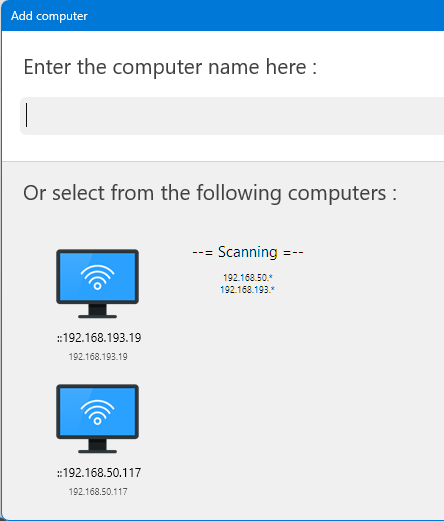


Notice the two colons in front of the IP addresses. I chose the top address (both are the same machine, NearlyHedlesNik) giving this:
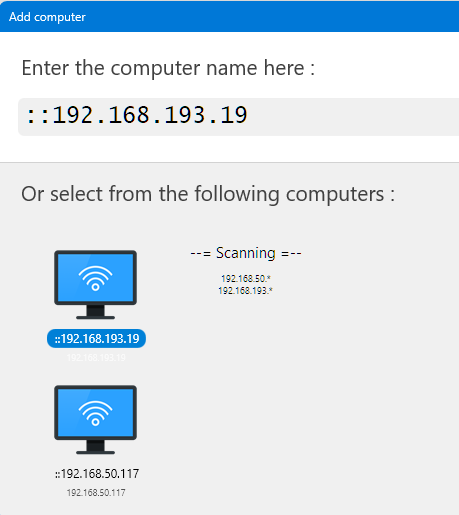


Those colons went into the computer name: it did not ocur to me the first time that that would also be used as the IP for connection. Notice the "Always use the IP address ..." option shows the colons as part of the IP address. Did not catch that the first time when I checked the option.


After entering the passcode and clicking "Test" the following came up:
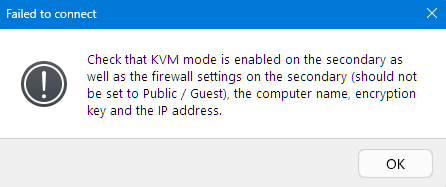


Repeating the setup and removing the colons from the computer name (second screenshot above) fixed the problem.

Reply #5 Top

All,

Multiplicity 4.08 beta has been released.  For details, please see:

https://forums.stardock.com/540065/multiplicitity-408-beta-feedback

As always, thanks for your time, feedback, and support. 

Sean Drohan
Stardock Product Lifecycle Manager

Reply #6 Top

Multiplicity 4.70 Pro - Memory problem causing Windows total crash.
Windows 11 Pro - 25H2 (Build 26200.7462)
When I leave a remote connected window open but minimized overnight, attempting to access the desktop the next day shows my PC virtually totally locked up. While the cursor moves, nothing works, and little to no screen content shows, CTL-ALT-DEL goes nowhere. I must power cycle my PC to resolve.

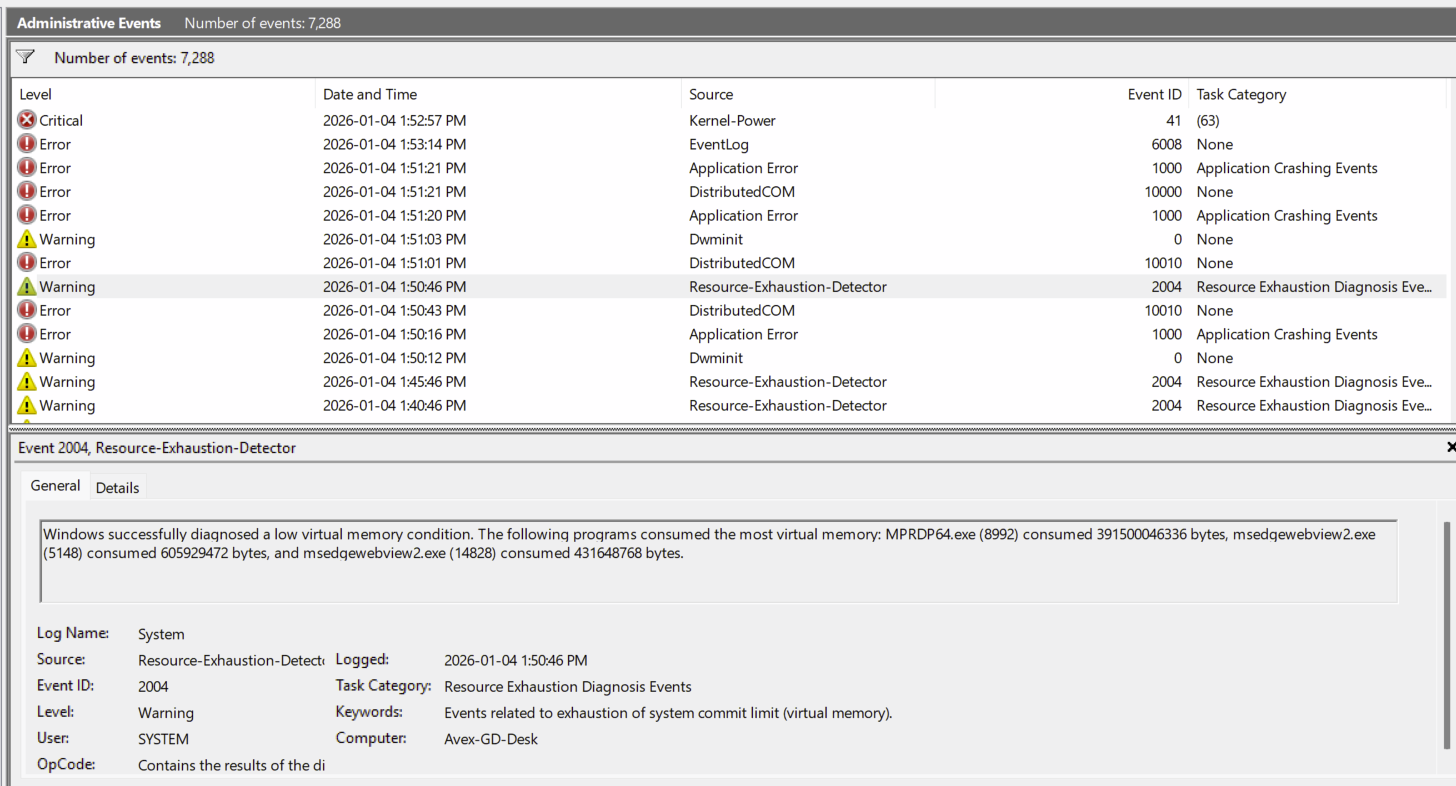
Steps to reproduce: Right click on Tray Icon, select KVM Mode, select the remote PC to connect to (also Windows 11 25H2, and I only have 1 configured for now) select Connect. Connection to remote PC works fine, do a few things on the remote then minimize the remote window. Come back 12 to 16 hours later to a crashed PC.  The Windows Event Viewer shows various failures before and after a Resource Exhaustion-Detector Warning, which lists MPRDP64.EXE consuming 391500046366 bytes of memory, after which there is a few more Errors because there is no memory left and ending with the Critical Warning stating Windows did not shut down properly

From the Event Viewer:

Reply #8 Top

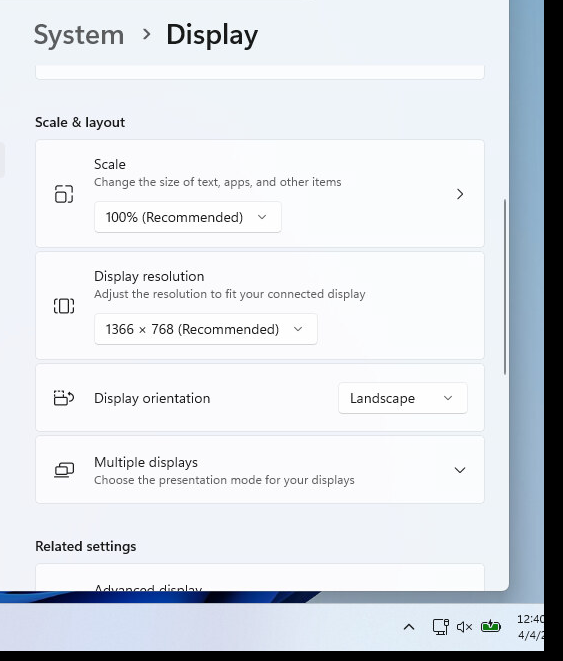
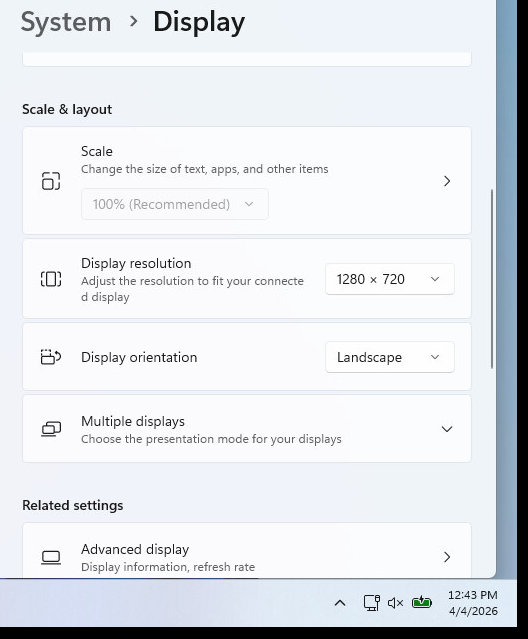
When my laptop is used as a secondary, the right side of the screen is truncated when using the recommended display size setting. Changing the setting to the next size smaller results in a full display in MP4.

Truncated (bottom right corner):


Not truncated:


The primary is running Windows 11 Pro Version 25H2 build 26200.8117

The secondary is running Windows 11 Home Version 25H2 build 26200.8037

There is no need to try to help me correct this as the difference in screen size is of little consequence - the secondary is not accessed very often and I can do everything. This posting is more FYI for Stardock. That said, if there are any tweak suggestions that might help Stardock identify the cause of the problem, I will do those.

Reply #9 Top

Quoting nickotime, reply 8

When my laptop is used as a secondary, the right side of the screen is truncated when using the recommended display size setting. Changing the setting to the next size smaller results in a full display in MP4.

Truncated (bottom right corner):


Not truncated:


The primary is running Windows 11 Pro Version 25H2 build 26200.8117

The secondary is running Windows 11 Home Version 25H2 build 26200.8037

There is no need to try to help me correct this as the difference in screen size is of little consequence - the secondary is not accessed very often and I can do everything. This posting is more FYI for Stardock. That said, if there are any tweak suggestions that might help Stardock identify the cause of the problem, I will do those.

Thanks for the report.

Is this with MP 4.07 or 4.08 beta?

Reply #10 Top

There is another topic labeled "Multiplicitity 4.08 Beta Feedback" to report problems with 4.08 Beta. This is the 4.07 thread: 4.07 issue.