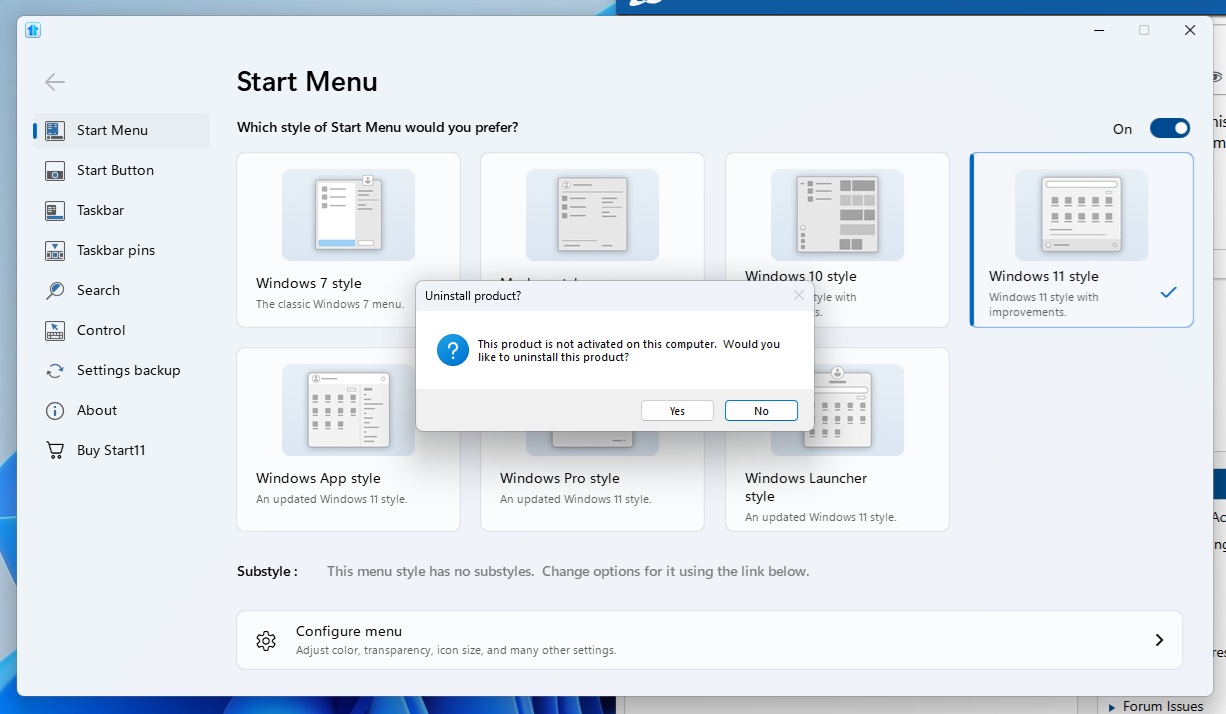
Start 11 won't activate. Windo pops up "This product is not activated on this computer. Would you like to uninstall this product?"

I can't activate or use Start 11. I have the product key but when I start Start 11 a window pops up that reads, "This product is not activated on this computer. Would you like to uninstall this product." I have a choice of "Yes" or "No" if I hit yes, it uninstalls the program. If I hit not it closes the Start program and I can not use it or activate it. How can I activate it?
3,316 views 9 replies
Reply #1 Top

Hello,
Sorry to hear you are having issues. What popup message or error message appear when you try activate it?

Thank you,
Basj,
Stardock Community Assistant.

Reply #2 Top

"This product is not activated on this computer. Would you like to uninstall this product." I have a choice of "Yes" or "No" if I hit yes, it uninstalls the program. If I hit not it closes the Start program.


Reply #3 Top

Please try this: 

Press the Windows key and "R" at the same time. A "Run" dialog box will pop up, please paste the path below into the "Open" field and press OK: 

%ProgramData%\Stardock\

In the folder that pops up, you should see a folder named START11. Please delete this folder and all of its contents.

After you have deleted that folder, please attempt to activate it once again and it should succeed without any errors.

Thank you,

Basj,
Stardock Community Assistant


Reply #4 Top

It just recreates the same folder, opens the program and gives me the same option. Either press Yes to uninstall or no and it closes the program. 

I'm trying to activate it by opening the program and then looking for an Activate button or something. It freezes and I cannot make any selections until the Uninstall dialog window opens. Am I trying to activate it correctly or is there another way to activate it?

Reply #6 Top

Is this a steam version?

If not this sounds like a problem with the .net framework on your computer which is preventing the activation UI from displaying.

Reply #7 Top

I did these steps and is seems this isn't the problem either. What is happening is exactly like the screenshot I posted earlier in this thread. The program opens. I can't do anything and then a couple seconds later that small window opens that reads "This product is not activated on this computer. Would you like to uninstall this product." pops up. the only options I have are to hit "Yes" and it uninstalls the program, or "No" which just closed the program.

Reply #8 Top

Neil Banfield. It's not the Steam version but I am going to uninstall Start. Use the Microsoft .net Framework repair tool. Restart. Reinstall Start. I'll update this with the results.

*Update*

None of this worked. It's still doing the same thing. 

Reply #9 Top

Perhaps, you should try purge and reinstall steps as mention here : [Link]. Just make sure to redownload the latest version from your account page. Reboot after the purge. Reinstall and reboot again after the installation. Retest and report back here.

Thank you,
Basj,
Stardock Community Assistant.