Invert the System Tray icon when the task bar is on top

Bug/Oversight

A minor detail that seems to have been missed:

When the taskbar (enhanced in my case) is on top, in order to better match how the taskbar used to behave on older Windows versions that natively supported the position the System Tray icon needs to be inverted from how it is currently: 
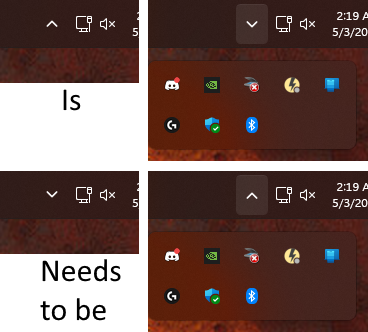
To be clear:

  • Currently:
    • Tray closed - Arrow points up
    • Tray open - Arrow points down
  • Correct:
    • Tray closed - Arrow points down
    • Tray open - Arrow points up 

When using Start11's left/right align feature, the System Tray icon is properly turned sideways and points in the correct direction (right/left respectively), so this icon is definitely something that's already setup to be modified by Start11 and as such I imagine that a tweak just needs to be added for the top configuration. 

1,963 views 5 replies
Reply #1 Top

Hello,
I have forwarded your request to the Stardock Support Team for their review and recommendations. Please keep an eye on this thread for any updates. We really do appreciate your feedback, Thanks

Basj,
Stardock Community Assistant.

Reply #2 Top

Just wanted to bump this since it should be easy enough to fix whenever it can be gotten to.

Reply #3 Top

Hello again,

Sorry, there is nothing new to report on this one.

Thank you,

Basj,
Stardock Community Assistant

Reply #4 Top

Hi oblivioncth,

I've reproduced your findings and have this logged.

Internal Reference: ODNT-11969

Thanks for posting and best regards,

Adam McGuinness
Stardock Support Specialist

Reply #5 Top

Hello again,

We've now addressed this in the latest beta update for the software. 

For details on getting the beta, listed changes, and feedback, please see:

https://forums.stardock.com/541012/page/1/

Thanks again and best regards,

Adam McGuinness
Stardock Support Specialist

+2 Loading…