Recent Documents doesnt work on Start 11 v2

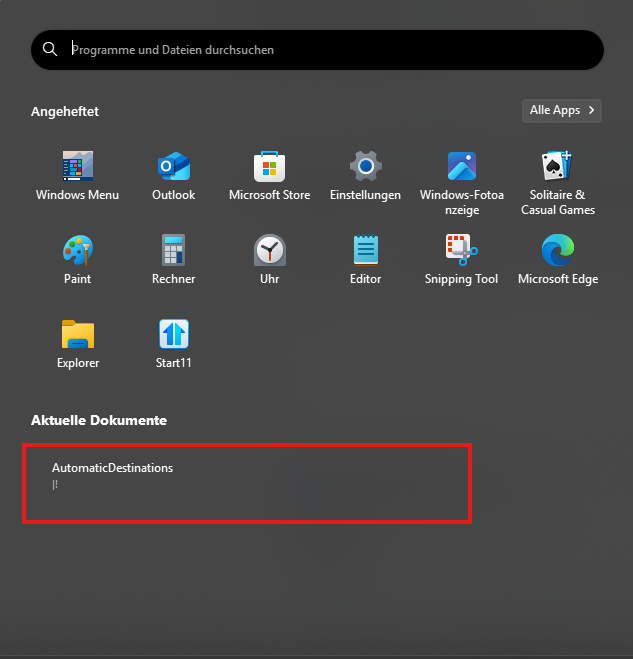
AutomaticDestinations |!

As you can see below, 'Recent Documents' doesn't work on Start 11 v2. All I get is "AutomaticDestinations |!". 

I'm on Windows 10 running the latest version of Start 11.

If I click on the "AutomaticDestinations |!" I get the message seen in my second image.

Recent Documents doesn't wrok in Start 11 v2 on Windows 10


18,775 views 33 replies
Reply #1 Top

Hello,
Sorry to hear you are having issues. Need more details on your system.

  1. Windows full version/build number. Please use Winver.exe
  2. Start11v2 full version number.

BTW, what do you get if you check your recent document list via Windows Explorer?

Thanks.
Basj,
Stardock Community Assistant.

Reply #3 Top

Quoting robbybur, reply 2

Thanks but I deleted it.

Not sure what you mean by that.

Thank you,

Basj,
Stardock Community Assistant

Reply #4 Top

I deleted the program in favour of something that works.

Reply #5 Top

Quoting AltitudeDashboard2, reply 5

I also have the exactly same issue


Start11 version 2.08

Hello,
Sorry to hear you are having issues. Please try this, uninstall Start11, reboot immediately after uninstall finished. Download the latest v2.09 beta. Install it, reboot immediately again after installation finished. Retest it and report back.

Thank you
Basj,
Stardock Community Assistant.

Reply #6 Top

Quoting AltitudeDashboard2, reply 7

I have uninstalled Start11 using Revo Uninstaller, reboot, installed Start11_2.0.9.0-j137-Setup_sd, reboot but unfortunately it ddin't solved the problem

Please try cleanboot: https://forums.stardock.com/505872/start11-support-faq#cleanboot. Try it and report back.

Thank you,

Basj,
Stardock Community Assistant

Reply #7 Top

Quoting AltitudeDashboard2, reply 9

I tried cleanboot and it disabled Start11 (as expected). I enabled Start11 but the issue is still there.

To be honest, I don't see the point of these tests, what do I have to do next? Reinstall Windows? Most likely people using Start11 are advanced users who already tried rebooting or check if the computer is plugged in.

I tried contacting Stardock support via [email protected] but my ticket was autoclosed. It seems Stardock does not offer technical support for Start11 except for refunding and order support.

Also, I had to wait one day to reply to this thread because I am a new user and I have hit the limit. Then how can a user get support?

I would ask for a refund but it's more than 30 days since I have purchased this non working piece of software. There is no real support This is one of the worst experiences I ever had with a product. I know it's cheap, I will consider the 10 bucks lost and call it a day.

I have uninstalled Start11 and I will not look back.

Also, I must mention, there is no way to delete a user account on this forum, as an European citizen I have the legal right to be forgotten.

Sorry to hear that, but, yes, Stardock does it technical support only via forums and looking back on your post. Your posts only started 1 day ago. Not sure why you did not post your issue earlier, since you mentioned you having the issue for more than 30 days. I asked you to test it on your system since the issue happen on your system. I am trying to figure out the issue, since the issue not happening on my system. Moving forward, I have forwarded your problem to Stardock Support Team for their assistance. Please keep an eye on this thread for any updates. We appreciate your feedback and patience.

Thank you.

Basj,
Stardock Community Assistant

Reply #8 Top

Quoting AltitudeDashboard2, reply 9

To be honest, I don't see the point of these tests, what do I have to do next? Reinstall Windows? Most likely people using Start11 are advanced users who already tried rebooting or check if the computer is plugged in.

You don't see the point of going through the necessary steps to see why it is not working for you but is for 100s of thousands of other clients?

We have no idea the experience level of any given client so rudimentary questions are not only appropriate, they are crucial.

Quoting AltitudeDashboard2, reply 9

I tried contacting Stardock support via [email protected] but my ticket was autoclosed. It seems Stardock does not offer technical support for Start11 except for refunding and order support.

When emailed what is essentially a spam pit (support@[insertAnyCorpDomain]), you were sent a reply explaining why we only provide usage support in the forums. While many reasons and advantages are illustrated, one should be immediately clear; you now have had 2 Stardock support personnel addressing your post in under a day. 

Quoting AltitudeDashboard2, reply 9

I would ask for a refund but it's more than 30 days since I have purchased this non working piece of software. There is no real support This is one of the worst experiences I ever had with a product. I know it's cheap, I will consider the 10 bucks lost and call it a day.

I have uninstalled Start11 and I will not look back.

That is unfortunate, AltitudeDashboard2.  If your attitude about our support efforts and practices changes, we are certainly ready and willing to provide it. 

Quoting AltitudeDashboard2, reply 9

Also, I must mention, there is no way to delete a user account on this forum, as an European citizen I have the legal right to be forgotten.

Please see:

https://stardock.atlassian.net/servicedesk/customer/portal/4/group/14/create/10143

Sean Drohan
Stardock Product Lifecycle Manager


+1 Loading…
Reply #9 Top

Quoting AltitudeDashboard2, reply 12

Please note that it should probably be in your company's interest to have a stable product and fix bugs such that you have a good product and become more popular. It is not my interest to conduct test on my PC.

Stop and think for a minute. Stardock sells many software products worldwide, hence 100,000's of user for Start 11. You have a unique issue that I have only seen once before. 2/100,000 = 0.002% of users. This tells me that something about your system is preventing Start11 from working correctly. The Stardock community has been trying to help you figure it out since you reported the issue.

As far as Stardock support, it's one of the best support systems I have ever encountered. An experienced user usually responds within a few hours. Basj is an expert user who troubleshoots problems for users and is a member of the Stardock team. If he or other users are not able to help you, your issue is then reported to the development team, who once again, usually respond quickly. It is a very personal experience. On the other hand, my experience with email support is awful. It first goes to a bot or a script operator, and the answer does not even relate to the questions. It's like they didn't even read you entire email. Then you reply back, and you may get one or two more scripted email responses. At some point someone with knowledge of the product will reply and try to help.

As far as new members being limited to fewer posts at first; it's related to keeping spam posts to a minimum.

Sorry you feel that you did not get the quality of support you expected, but as I said, Stardock provides one of the best support systems I have ever used. :grin:  

+2 Loading…
Reply #10 Top

Quoting AltitudeDashboard2, reply 12

Please note that it should probably be in your company's interest to have a stable product and fix bugs such that you have a good product and become more popular. It is not my interest to conduct test on my PC.

Please see our efforts to make Start11 the best it can be while keeping up with the changes Microsoft makes to both Windows 10 and 11.

https://www.stardock.com/products/start11/history

Please also see the critical reception of those efforts

https://www.xda-developers.com/start11-v2-review/

https://youtu.be/KG_sO8N6ut8?si=vOPoHYKwrfby_Z2C

Again, if you change your mind and allow us to help you, we are ready and willing. 

Sean Drohan
Stardock Product Lifecycle Manager

Reply #11 Top

Quoting AltitudeDashboard2, reply 15

If support is so good how come no one knows what this "AutomaticDestinations |!" means? My speculation is that this is some class which appears when the list is empty but I am not an expert.

AutomaticDestinations is a system folder containing data files of the type "AUTOMATICDESTINATIUONS-MS." I believe the OS uses these data files to access Recent files.

You can access this folder with Win+R and then enter

%APPDATA%\Microsoft\Windows\Recent\AutomaticDestinations

My guess is that the Search engine is unable to locate this folder, or Start11 is unable to locate it, or it's actually missing.

Can you verify that this folder exists on your system.

Reply #12 Top

Automatic destinations is nothing to do with Start11 and is not a Start11 class or a placeholder bit of text.  The recent documents list literally lists whats in the recent folder with some things removed.  It may be we want to strip that out too, but I have never seen Automatic destinations in the list on any Win10 or Win11 computer and it is curious you would have an actual subfolder in that folder as there should be none.

So the question has to be what created it?

Reply #13 Top

Quoting Neil, reply 17

Automatic destinations is nothing to do with Start11 and is not a Start11 class or a placeholder bit of text.  The recent documents list literally lists whats in the recent folder with some things removed.  It may be we want to strip that out too, but I have never seen Automatic destinations in the list on any Win10 or Win11 computer and it is curious you would have an actual subfolder in that folder as there should be none.

So the question has to be what created it?

It does not appear in the Recent folder if you navigate to it using explorer. However, if you RUN the following command it appears.

%APPDATA%\Microsoft\Windows\Recent\AutomaticDestinations

As you can see, the files from today also appear as shortcuts in the Recent Items folder.

Reply #14 Top

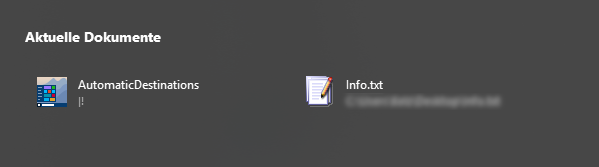
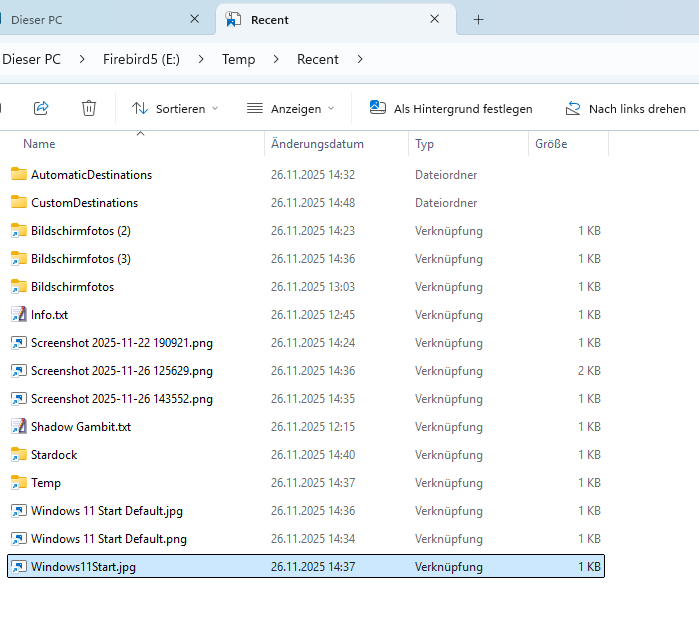
Apparently, the problem has not yet been solved. After I deleted all recent files, this remained:


All attempts to resolve this issue have failed. Neither deleting the registry entry nor deleting
“C:\Users\Thomas\AppData\Roaming\Microsoft\Windows\Recent\AutomaticDestinations” nor reinstalling the program has helped.

The “AutomaticDestinations” folder is created by Start and is part of Quick Access, and must not be deleted, as this would also delete all entries.

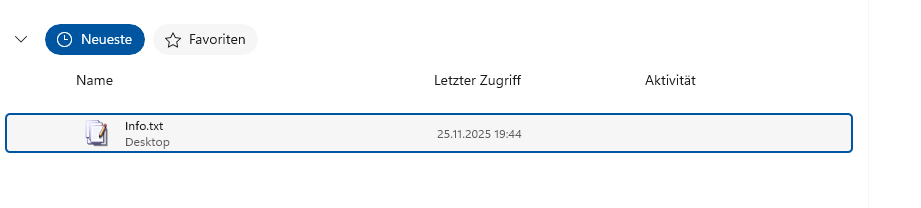
After opening a text file, it looks like this:


Start – Datei-Explorer:

My system:

Windows 11 Professional 25H2 Build 26200.7171
Start 11 v2 2.56


Reply #15 Top

Quoting thomas-k, reply 14

Apparently, the problem has not yet been solved. After I deleted all recent files, this remained:


All attempts to resolve this issue have failed. Neither deleting the registry entry nor deleting
“C:\Users\Thomas\AppData\Roaming\Microsoft\Windows\Recent\AutomaticDestinations” nor reinstalling the program has helped.

The “AutomaticDestinations” folder is created by Start and is part of Quick Access, and must not be deleted, as this would also delete all entries.

After opening a text file, it looks like this:


Start – Datei-Explorer:


My system:

Windows 11 Professional 25H2 Build 26200.7171
Start 11 v2 2.56


Hello,
Sorry to hear you are having issues. As a test if you open up Windows 11 default Start panel with the show recent document turn on in Windows setting, does that same folder show up there?

Thank you,
Basj,
Stardock Community Assistant.

Reply #16 Top

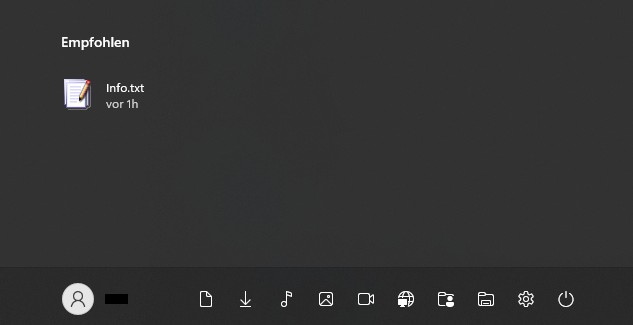
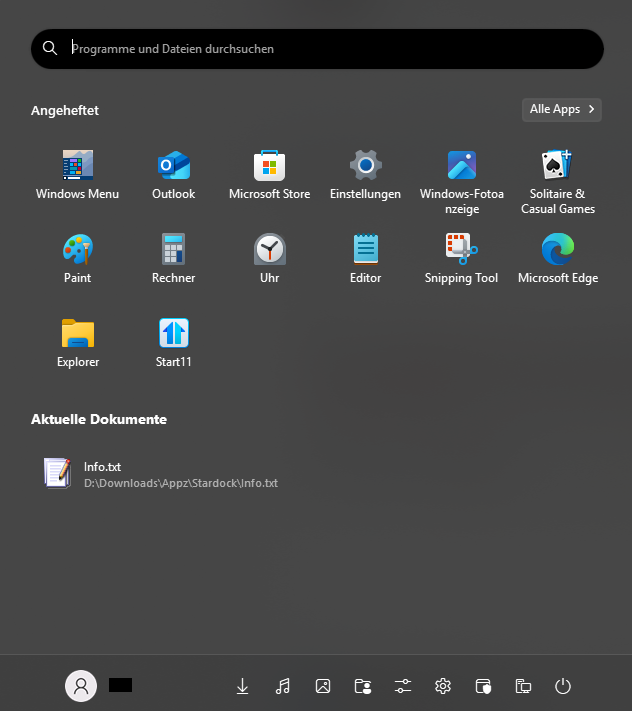
Windows 11 default Start panel:

As you can see, there is no entry for "AutomaticDestinations" here.

Recent (Default):

C:\Users\Username\AppData\Roaming\Microsoft\Windows\Recent\

These two folders should be excluded. They do not belong to the recent files.

C:\Users\Username\AppData\Roaming\Microsoft\Windows\Recent\AutomaticDestinations\
C:\Users\Username\AppData\Roaming\Microsoft\Windows\Recent\CustomDestinations\

As I said, I really tried everything.

Recent (actual):

E:\Temp\Recent\

Reply #17 Top

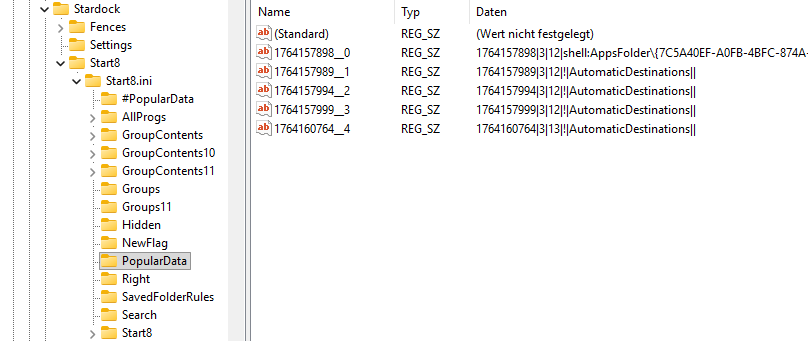
Curiously, the recent folder is located under the “PopularData” entry in the registry.


Reply #18 Top

I don't see this issue on my system. However, I have forwarded your problem/question to Stardock Support Team for their assistance. Please keep an eye on this thread for any updates. We appreciate your feedback and patience. Thank you.

Basj,
Stardock Community Assistant

Reply #19 Top

Thank you. On my other Windows 11 PC, this entry “AutomaticDestinations” is neither present in the Start 11 Start menu under “Recent Documents” nor in the registry. There, it works the way it’s supposed to. It would be nice if this could be fixed.

What I mean by this is that it’s not a general problem. In fact, this should be something that can be resolved somehow. Where does Start11 store this information? Only in the registry (Stardock/Start8/...)?

Is it possible that this error is being caused by the Windows itself?

Reply #20 Top

Hello,


Today, I sat down again for about an hour and really tried everything. For example, I searched the registry and the hard drive for entries related to "AutomaticDestinations," stopped the Start11 service, reloaded it, and ended the Explorer.exe task. I also deleted and renamed the "AutomaticDestinations" and "CustomDestinations" entries multiple times. At one point, after deleting and renaming, I even saw "+AutomaticDestinations" appear under "Recommended."


What can I say, I finally managed to solve the problem. Interestingly, the error doesn't occur on the second user account on the same PC, which is what I had hoped for.


Since I tried so many different things, I can't say exactly what fixed the problem, but I have a suspicion.

Reply #21 Top

So, are you saying that your primary user account was corrupted?

Reply #22 Top

Quoting pelaird, reply 21

So, are you saying that your primary user account was corrupted?


Hello,

The account is not corrupt. At the very beginning, the error wasn’t there. It only occurred after I manually removed the individual entries from "Recommended Documents" via the context menu: Remove from List.

When deleting these entries, the Start11 menu froze, and I had to end the process through the Task Manager. In this process, the "Recent" shortcut was likely corrupted.

In the other account, I looked at both "Recent" shortcuts using the file manager, Total Commander. They had different properties. I then copied one "Recent" shortcut over the other. After switching back to the original account, the error was gone.


+1 Loading…
Reply #23 Top

Okay, thanks for the explanation. I'm glad you finally solved the issue. If it returns again, let us know. :grin:  

Reply #24 Top

I took a closer look at the recent folder. Basically, its appearance and name are determined by the "desktop.ini" file contained within it.


Code: c++
  1. [.ShellClassInfo]
  2. LocalizedResourceName=@%SystemRoot%\system32\shell32.dll,-21797
  3. InfoTip=@shell32,dll,-12692
  4. IconResource=%SystemRoot%\system32\imageres.dll,-117
  5. CLSID={0C39A5CF-1A7A-40C8-BA74-8900E6DF5FCD}


I assume that the missing 'CLSID' entry was the cause of my problem. Everything else is more or less just cosmetic.

Reply #25 Top

I have the exact same problem and have read this thread twice. I do have an automatic destinations folder, rebooted etc . This is clearly a known problem. Is there a fix? (I'm on start 2.56 and Windows 11 25H2)

Also as a side note ..... I'm using my other account to login into this forum to find a fix for this. The account I used originally to purchase Start11, I can't use because its asking for a verification code but not sending me one by my main email account. I've tried 5 times