Unknown

How to Disable Groupy for Windows Explorer (SOLVED)

▼

How to Disable Groupy for Windows Explorer (SOLVED)

Please, can anyone tell me how to disable Groupy for Windows Explorer on Windows 11. No matter what I do, Groupy is still showing on the top of Explorer. I ticked: "Automatically exclude from auto grouping..." Anyone?
81,376 views 32 replies +1 Loading…
Reply #26 Top

So I thought to check how it looked on another machine. I haven't messed about too much with this Windows 11 install, pretty much just installed chrome & let it sit there. This installation also has the ribbon above the menubar..

However, Groupy 2 installed reasonably well.  At first it looked like it didn't take, but after I'd closed the tabs that already existed before I rebooted, it seems to be working just fine.

Unfortunately, this is just on a partition on a dual-boot machine as a test installation, so there's not really any of my other software installed to give me any idea of what might be messing things up on my main machine...

Cheers,

Reply #27 Top

Just updated this test install to 23H2 and now my address bar/ribbon looks the same as yours...

At least that little mystery is solved... The update completely breaks my problem office PC though... :-(

Reply #28 Top

Hello,

Sorry, I was away and just managed to get back to this. I see this guy actually had trouble with integration, but that is not related to my issue at all, I don't know why they got into this thread since it is unrelated to the title and misleading for others. I actually wanted to remove Groupy entirely for windows explorer. I am sorry but I much rather prefer the built-in windows tab management and don't want Groupy replacing it nor do I want Groupy on top of the built-in windows tab management. Is this possible?


Windows Version 22H2 (OS Build 22621.2715)

Groupy Verison 2.12


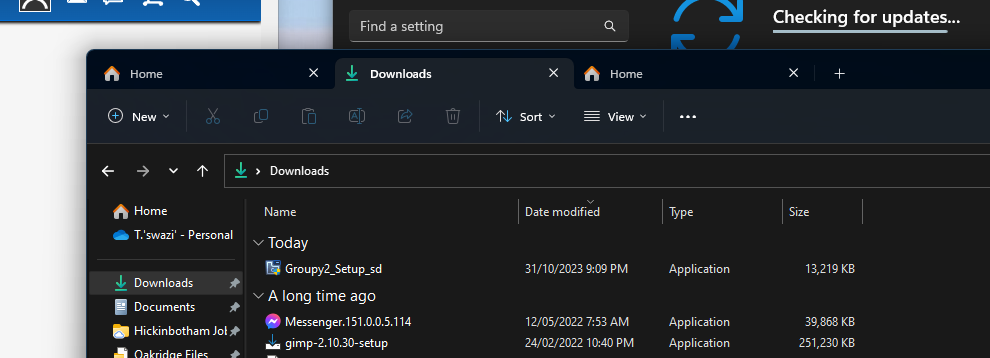
This is how my Explorer window looks:

Reply #29 Top

Quoting otmanzy99, reply 28

I actually wanted to remove Groupy entirely for windows explorer.
End of otmanzy99's quote

Exclude explorer.exe

https://cdn.stardock.us/support/uploads/2023-11-21_10-56-02.mp4

Sean Drohan
Stardock Product Lifecycle Manager

+1 Loading…
Reply #32 Top

Quoting LucaSorvillo, reply 31

i dont want it on my explorer but it continue to appear (only case that i want it is when in group). Look notepad how is clear...

End of LucaSorvillo's quote

That is Windows itself, not Groupy...

https://www.xda-developers.com/windows-11-notepad-tab-support-dev/

https://www.thewindowsclub.com/how-to-use-tabs-in-file-explorer-in-windows-11

Sean Drohan
Stardock Product Lifecycle Manager
