W11's Start Menu (without Start11) Is About to Get Worse

You'll be able to turn the ads of...for now...

https://www.windowslatest.com/2023/04/10/microsoft-is-bringing-ads-or-alerts-to-windows-11-start-menu-but-you-can-turn-them-off/

Another reason to get Start11: M$ is planning to advertise on the W11 start menu...as if it weren't crappy enough as it is. Even if Start11 can't rid us of their adverts, we can switch to the W10 or W7 menus. 
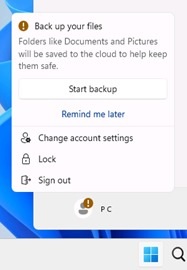
Windows 11 Start menu ads

from windowslatest


This first appeared in the optional March update, but will be in the April or May update as non-optional. For now, there's a way to shut it down via an optional toggle to Settings > Personalization > Start, so you can easily disable these recommendations. In the article linked there's a screenshot which shows it.

The production and preview versions won't have it without you making alterations, at this point but as note above, it will be in the April or May update and whenever MS decides, they'll turn it on for everyone. As for now, it's only a lucky few (lol) who receive this gift as MS wants to gauge reactions...which aren't happy ones in MS's blog apart from their fan bois.

USB4 and USB4 devices are in the update, as well:

"You can find the dedicated USB4 Hubs and Devices Settings page under Settings > Bluetooth & devices > USB > USB4 Hubs and Devices. This new page lets you dock, high-performance peripherals, and displays. It also provides users with information about the connected peripherals and their capabilities." - Windowslatest

Anyhow, just to keep ya'll up to date...


99,702 views 12 replies
Reply #1 Top

How lovely.  The Start11 Win7/10/11 menus will not show this.

Reply #2 Top

Quoting Neil, reply 1

How lovely.  The Start11 Win7/10/11 menus will not show this.

"Go ahead...make my day!". 

I figured W7 and W10 wouldn't, but with MS's coding, I was more circumspect regarding W11. So glad it'll kill that crap.

Reply #3 Top

Remind me again...what's the advantages of Win 11? ...;)

Reply #4 Top

Quoting Neil, reply 1

The Start11 Win7/10/11 menus will not show this.
  Looks like a Win Win Win situation to me!

Reply #5 Top

Quoting RedneckDude, reply 4


Quoting Neil Banfield,

The Start11 Win7/10/11 menus will not show this.

  Looks like a Win Win Win situation to me!

Someone hit him. Please. ;)

+1 Loading…
Reply #6 Top


Even if Start11 can't rid us of their adverts, we can switch to the W10 or W7 menus. 

Start 11 gets rid of anything in the start menu that Stardock doesn't explicitly put in except pinned items because of the item syncing so no need for you to worry

Reply #7 Top

I honestly downgraded back to windows 10 to avoid any more of that crap they are trying to force on its users. The day I cant use windows 10 no more is the day I finally leave windows and move to linux.

+2 Loading…
Reply #8 Top

Quoting SimplexDesigns, reply 7

I honestly downgraded back to windows 10 to avoid any more of that crap they are trying to force on its users. The day I cant use windows 10 no more is the day I finally leave windows and move to linux.

There are ways to safely continue using Windows 7.

I'll let you know when that changes...;)


Reply #9 Top

Quoting DanHolli, reply 6

Start 11 gets rid of anything in the start menu that Stardock doesn't explicitly put in except pinned items because of the item syncing so no need for you to worry

I'm not at all worried, nor was I.

Reply #10 Top

Quoting Jafo, reply 8


Quoting SimplexDesigns,

I honestly downgraded back to windows 10 to avoid any more of that crap they are trying to force on its users. The day I cant use windows 10 no more is the day I finally leave windows and move to linux.


There are ways to safely continue using Windows 7.

I'll let you know when that changes...;)


I would stick to windows 7 but man. All my apps dropped windows 7 support. Cant even install them. So I had to move on to win 8 for a while. Same thing happened. Now in the when will 10 support for my apps be dropped. lol

Reply #11 Top

Quoting SimplexDesigns, reply 7

I honestly downgraded back to windows 10 to avoid any more of that crap they are trying to force on its users.

Well said! I did the same thing about a week ago. Now I'm looking for a legal way to upgrade Windows 10 Pro to Windows 10 LTSC which will be supported until 2032. :inlove: I really hope that I can do this...

Reply #12 Top

Quoting SimplexDesigns, reply 10

I would stick to windows 7 but man. All my apps dropped windows 7 support. Cant even install them. So I had to move on to win 8 for a while. Same thing happened. Now in the when will 10 support for my apps be dropped. lol

Cleverly...the 'support' for those apps was to keep up with often unwanted MS Updates which introduced issues they then had to cater for.

Joke's on them when MS has totally ceased interfering with the OS [no support] ...all the proggies simply keep working just as well as they always did.

System now only ever needs to reboot if I ever turn it off...as no OS update messes with you in the background.

Current 'uptime'...95 days, 14 hours and 7 minutes...;)

3 months would classify as 'stable' ...;)