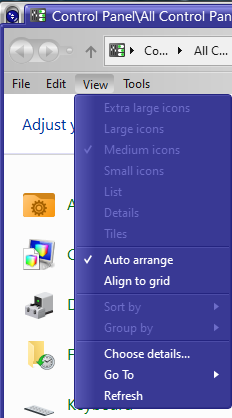
How to change the color of the test in a context menu

I have a couple of WB skins I really like but that have a light gray background with white text on the context menu, the right click on an icon menu. I'm runnning WB11 and Win10 22H2, but that shouldn't matter as this issue has existed for as long as I can remember. I've been using WindowBlinds since 1998.

Try as I might I cannot isolate in Skin Studio what precise item controls this color.  So...

HELP!

TIA

11,745 views 13 replies
Reply #1 Top

Hello,
Sorry to hear you are having issues. But, I think it is best if you post screenshots showing which area you're referring to.

Thanks
Basj,
Stardock Community Assistant.

Reply #2 Top

Quoting basj, reply 1

screenshots showing which area you're referring to
- and the names of the skins.

Reply #3 Top

Please remember that this is only an example of what I need to figure out how to fix. In Skin Studio I'm trying to find out precisely what item makes up the context menu font. This example is from

Metall


Updated Aug 21, 2018 by Z71

For Windows 7, 8.1 and 10.

In this skin and others the menu font works fine for Win32 applications' menus...

Not for context menus, right-click menus it is too difficult for me to see clearly enough.

I found which Skin Color is used for both menu text colors, but I only want to change one of them. In Skin Studio it does not specify the context menu separate from the app menu as far as I can see. So this is what I'm looking for, what precisely are the context menu background color and font color items called. Is there a data dictionary of the UI elements somewhere? Something to reference so I can edit these few skins that precent this way?

Reply #4 Top

On Windows 10. The right click menu color is set here:

Thank you,

Basj,
Stardock Community Assistant

Reply #5 Top

Might also need to change menu mouse over item or mouse over text. Below is where you need to change the mouse over item. Need a little bit of graphics edit.

Thank you,

Basj,
Stardock Community Assistant

Reply #6 Top

Thanks, Basj. I will give these a try.

Reply #7 Top

It just keeps getting worse. Now that changes will not save to either the original nor the modded, nor does the save as WBA work. And every time I run WB, including rebooting, or applying a skin to it, or any other function it has suddenly started prompting for the activation.

I suspect there's a good chance these issues are linked...

Reply #8 Top

Wait, how do you do the skin editing? With Skinstudio 11 or Skinstudio 10? Also, when you edit is done, how do you apply the edited skin? Why do you need to save as WBA? You only need to do those when you have done all the modification needed and you wanted to take the WBA file to another machine or upload it.

Thank you,

Basj,
Stardock Community Assistant

Reply #9 Top

It is SkinStudio 10.0 I have no option to install 11 that I can see.

It is not saving the skin at all, nor does applying from within SS work, so I tried the save as  WBA since I saw it references in another thread with a similar problem.


Reply #10 Top

I found the Skin Studio 11 download, and it shows the Menu changes as in the screen shot your provided. However, when I open a context menu the color has not changed.


Here's the two items I changed Menu and Menu text


And yet the contest menu still looks like

Reply #11 Top

If you have WB11, than Skinstudio 11 should be available within your Account Product page: https://store.stardock.com/myaccount/products.

Also everytime you edit a skin it is a good practice to save and apply it so see if the editing is good before move on to something else. If something is bad you can always undo what you did since it is still fresh in your mind.

Thank you,

Basj,
Stardock Community Assistant

Reply #12 Top

In that skin there are few substyles, it might be you're changing different substyle while applying the unchanged one. The best way is to use the apply skin button within skinstudio.

Thank you,

Basj,
Stardock Community Assistant

Reply #13 Top

I'm using the same sub-skin every time. And I am using the apply button in SS.  The fix for Error 212 did get rid of the activation problem I started having yesterday.

I rebooted and now the background color of the context menu in question has changed! Strangely enough now it is also applying changes without a reboot. So I think I'm all sorted. Thanks for the pointers and efforts.