With Start11, It's More Than the Menu

Making Windows 11 a little more personal

Last week, Microsoft released Windows 11 – a new OS - and with it a big marketing push to convince all of us to upgrade. At nearly the same time, we also made available our first release candidate of Start11 to help you create a more personal and productive Start menu and taskbar.

This is an exciting time for fans of Windows, as this is the first overhaul of the visual elements of the OS since July 2015 (when Windows 10 was released). With Windows 11, Microsoft is changing up the formula and providing a new look for the classic operating system.

One of the interesting things about StartX products is that it's not just about enabling a Start menu from previous versions of Windows. Especially with Start11, we are going beyond enabling classic features and updating the application to support new experiences like modern adaptations of previous menus, and also bringing the Windows 11 style menu to Windows 10.
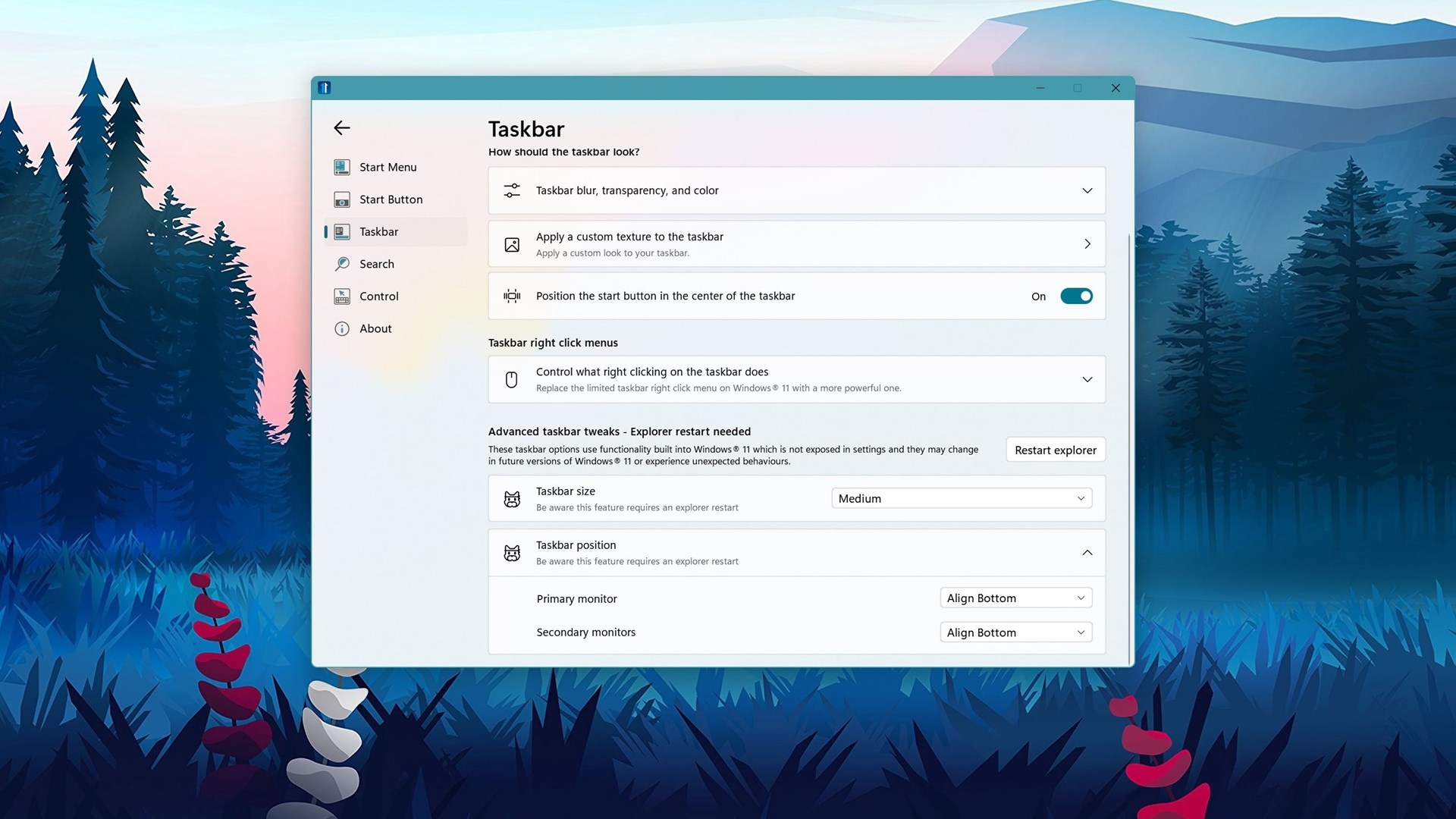
But it's not always about making Windows act like a previous version - it's about making Windows fit your personality and letting you control what your desktop looks like.

As an example: the taskbar. While it's convenient that Start11 brings back a context menu that has more than one option, Start11 also enables the ability to change its size, color, texture, position, blur, and more. The taskbar is critical to everything you do on Windows, and Start11 lets you customize nearly any aspect of it.

Stardock software is about making your own devices feel more personal, and oftentimes, more productive. Windows 11 was made to fit the needs of 1.3 billion Windows devices but if you don’t fall into that bucket that Microsoft has decided is good for everyone, well that’s why we built Start11.

And with Windows 11 coming out last week and our release of RC1 of Start11, we are staying true to the idea that Windows should be personal and productive. Of course, to get the most out of Windows and to customize every part of the platform, make sure to take a look at the Object Desktop suite.

The release last week was a big milestone for the team, but we are far from done. We have many more features to add, bugs to squash, and feedback to absorb as we build out a tool that we know will be the premier application for making your Start menu more personal and productive.


38,695 views 14 replies
Reply #1 Top

Good post. :thumbsup:  

+1 Loading…
Reply #2 Top

Quoting neone6, reply 1

Good post. :thumbsup:  

I agree! :-)

Reply #3 Top

I will likely wait for Windowblinds 11 before customizing the start menu.  I look forward to using both together!

Reply #4 Top

No more being able to include system- and own folders as menu in the right panel killed it for me, sorry.

Reply #5 Top

Quoting c242, reply 4

No more being able to include system- and own folders as menu in the right panel killed it for me, sorry.

?

You can add things to the right hand list as you could before.  You can even add custom shortcuts.

You do know you have to click the settings button under the menu style to get to all the advanced controls?

Reply #6 Top

I must have missed an update! Sorry for that.

Reply #8 Top

I still haven't upgraded to Win 11 as yet, despite it being released a week or so ago.  I've had other priorities and projects that have kept me rather busy... with one of those projects being an extensive update of my work station from various off-cuts/bits n' pieces I kept for 'just-in-case' they were ever needed somewhere down the track.

However, I will get around to it in the next few days.  In the meantime, though, I will install Start11 on my Win 10 machines, given the positive comments I've seen.

BTW, I will post some pics of my new setup once it is finished and loaded up with my machines and stuff.

Reply #9 Top

Still haven't finished my workstation setup cos I took the day off from carpentry stuff, but I did manage to install Win 11 on my HP 2-in-1 laptop/come tablet.  To be honest, I didn't think it was going to install, being its an older model and probably not meeting the requirements, but to my surprise it installed despite a couple of hiccups to begin with.

I got a message saying that my PC didn't meet the requirements and that setup would exit, so I clicked OK and figured that was it, but then it unexpectedly began installing Win 11, which now I'm using.  You could have knocked me over with a feather.  Anyway, I'm liking what I've seen thus far and will install start 11 shortly.... will report back when I've had a chance to explore things.

BTW, the reason I tried installing on the 2-in-1 is because none of my desktop machines are plugged in due to the workstation upgrade.

Reply #10 Top

I would have thought there would have been more interest in this thread, given there's a new OS and an updated version of StartXX.

Oh well!  Anyway, I've been exploring Win11 and I quite like it.  There are some differences to Win10, some I like and others I'll get used to, but Win11 is probably MS' best out of the box OS to date.  I'm still tweaking Start11 to suit my needs and preferences, but thus far it has been quite useful ..... keep up the great work, Stardock, things are looking good.

:thumbsup: :thumbsup:  :thumbsup:  

Reply #11 Top

Quoting starkers, reply 10
I would have thought there would have been more interest in this thread, given there's a new OS and an updated version of StartXX.


Well, I'm interested in seeing screenshots after you get 11 setup the way you want. :thumbsup:


My own lack of interest in Windows 11 comes from seeing no compelling reason to use it plus I have an unsupported processor (I know I can probably get around that).  Also all of my Stardock programs work well on Windows 10 and I don't want to lose any functionality.  

Reply #12 Top

Quoting Victechnical, reply 11


Quoting starkers,
I would have thought there would have been more interest in this thread, given there's a new OS and an updated version of StartXX.


Well, I'm interested in seeing screenshots after you get 11 setup the way you want. :thumbsup:


My own lack of interest in Windows 11 comes from seeing no compelling reason to use it plus I have an unsupported processor (I know I can probably get around that).  Also all of my Stardock programs work well on Windows 10 and I don't want to lose any functionality.  

It will probably be a while before I have Win 11 set up to the way I want.  As you say, regarding Stardock programs, there is some loss of functionality in Win 11 and I'm hoping that there are updates to those I use in the near future.  In the meantime, though, I'm reasonably satisfied with the UI as is for now, given that Start11 has added greatly to 11's appearance and functionality.  I haven't tried other Stardock programs as yet, but I sure will try the ones I use most and report back here with the results of that when there's anything noteworthy to share.

+1 Loading…
Reply #13 Top

I don't like Windows 11. It does not play nicely with my onboard video card. All the icons in the taskbar are blurry and almost look like 8 bit graphics. Looks like HP will not be offering a driver update for my machine despite the machine only being 7 months old. That all being said, I prefer the default look and feel of Windows, so I don't know if I would use Start 11. I probably will if I ever get a new computer with Windows 11 as the default Start menu in 11 is almost useless. 

Reply #14 Top

Well I have gone back to Win 10 on my HP 2-in-1... 11 was slow and often times somewhat unresponsive.  Thing is, I like Win 11 but this piddly old 2-in-1 cannot run it as well as it does Win 10.

Oh well, not to worry, I have desktop machines that will run Win 11 efficiently, I just have to finish building my desk and refurbishing my bedroom come man-cave so I can set them up again.