Big Beastie MkII

the threadRipper rebuild

After moving interstate from Queensland to Tasmania, it came to pass that my primary PC wouldn't start.  I tried all sorts of things and no go, it was dead in the water.... or so I thought.  Upon removing some of the components to make way for a new build, I inadvertently touched the Start button on the motherboard and the machine started.  Turns out it was a faulty hard-drive, that once removed the machine started without issue.  Thing is, I had already set my heart on an AMD Ryzen ThreadRipper rebuild and I'd already begun to order the components; hence, this new thread.

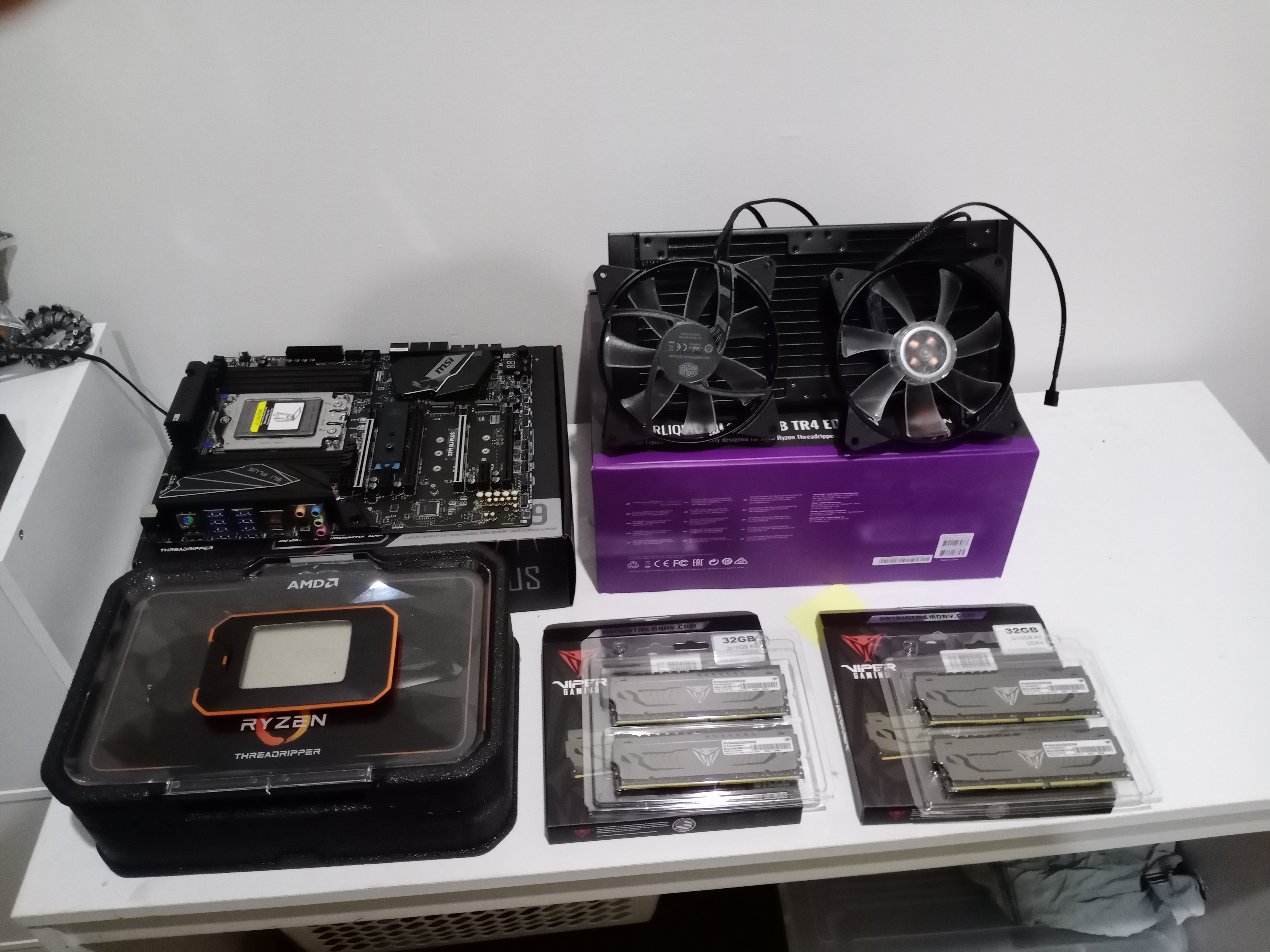
Anyway, here's a rundown of the components going into this rebuild of the CoolerMaster Cosmos II case, some from the previous build and those that I recently ordered:

Motherboard: MSI X399 SLI PLUS.

CPU: AMD Ryzen ThreadRipper 2920X.

CPU Cooler: CoolerMaster MasterLiquid ML280 RGB TR4 Edition.

PSU: Corsair HX1200i Platinum.

RAM: 64GB Patriot Viper Gaming DDR4 3200Ghz.

GPU: AMD Radeon RX570.

SoundCard: Creative Soundblaster ZxR.

OS SSD: Intel 760p 512GB M.2 SSD.

SSD: x 2 500GB Crucial P1 M.2 PCIe SSD.

HDD: x 4 WD 4TB Greens;

That's all the main stuff but there's various bits 'n pieces going in to expand the PCIe slots; the SATA3 ports; the rear USB3.1 slots.  I may also up the 64GB [4 x 16] RAM with another 64GB some time down the track... it would come in handy for music and video editing.

Some would say that this thread is useless without piccies, so here's some to start with:
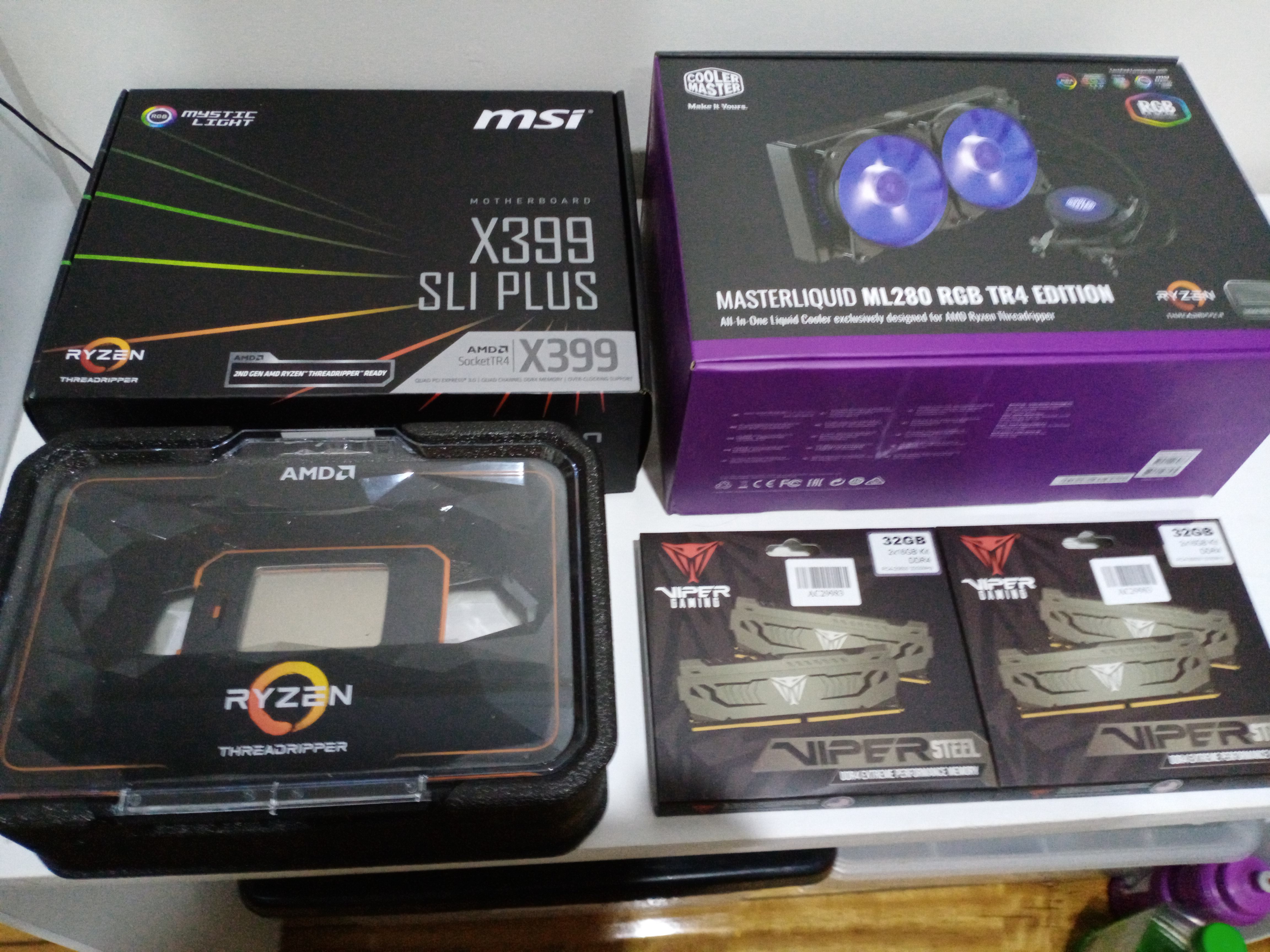
Still in their Boxes

Some of the Other Stuff

WWell that's it for now... more later when I've made some progress.


213,013 views 41 replies
Reply #1 Top

Get yer shit together, Mark!  We want to see it's performance specs.   B)  :beer:  :beer:  :beer:  

Reply #2 Top

17.5TB of storage? Wow!

Reply #3 Top

Quoting LightStar, reply 2

17.5TB of storage? Wow!

That's a lot of p0rn. :blush:  


That's a lot of power for a RX570. Are you going to upgrade the GPU?


Reply #4 Top

I have a RX 580 with 8GB GDDR5 on it.  It more than fits any needs I have. But then, I only have a Ryzen 7 1700 8 core hyper to 16.

Reply #5 Top


Reply #6 Top

Quoting RedneckDude, reply 4

I have a RX 580 with 8GB GDDR5 on it.  It more than fits any needs I have. But then, I only have a Ryzen 7 1700 8 core hyper to 16.

I just jumped to a GTX 1060 3gb from a GTX 750TI. It seems my psu has 2 6 pin connectors, plus the 1060 was $85. I have an older HP ENVY. I upgraded the cpu from a Intel 4430 to a 4970 with 32gb of DDR3 memory. 

Soon I'll be putting together a parts list for a new one. I'd like to go with a 9700K and a 2060 gpu. We'll see.

Reply #7 Top

Quoting RedneckDude, reply 1

Get yer shit together, Mark!  We want to see it's performance specs.   B)  :beer:  :beer:  :beer:  

All in good time, all in good time.... so hold onto yer britches. 

And if yer feel yerself getting impatient, just hoist 'em up real tight like ta take yer mind off it.

Quoting LightStar, reply 2

17.5TB of storage? Wow!

Well I digitised my music collection which take up a fair chunk of a 4TBiter.  Then there's all the photos and videos of family over the years, a fair sized folder with all the skins and wallpapers I've collected since joining WC, so it is fairly well used, that 17.5TB.

Quoting ALMonty, reply 3


Quoting LightStar,

17.5TB of storage? Wow!


That's a lot of p0rn. :blush:  


That's a lot of power for a RX570. Are you going to upgrade the GPU?


Nope, I keep my porn on 12x  4TB externals.  Mind you, they are getting quite full, now I think of it. :grin:  

As for upgrading the GPU, I may do so a bit further down the track.  I'd probably look to a RX590, which has a dual GPU version if I want to go that way.  I quite like Nvidia offerings as well, but going with the AMD Radeons allows me to update my CPU, mobo and GPU drivers in the one go.  Besides, the Radeons are less expensive, leaving a few bucks for other nick knacks that I might like. 

I made some progress today but was hampered by a cussed CPU cooling system.... was too wide with the radiator and fans fixed together, so it simply wouldn't fit inside the case where the instuctions stated.  I had to make some adjustments to the fan holes so they'd reach through the top of the case and screw into the radiator.  Let's just say it was a bastard of a job with a bit of cussing going on.

I'm still waiting on the two M.2 SSDs to arrive [damned Austraia Post.... couldn't organise a piss-up in a brewery].  Was supposed to have left Melbourne for delivery today in Launceston, but somebody at the depot didn't get the message and my parcel obviously didn't get here. 

Hopefully it is on it's way over now and I'll get a Thursday delivery.... or ELSE, I'm gonna ring up and tear somebody a new asshole.

:grin:

Anyhow, 'tis 1.40AM Thursday morning and I should get myself to be, otherwise I'll be falling asleep on the job and achieve very little.

Reply #8 Top

Well the 2x Crucial 500Gb M.2 SSDs arrived this morning, as did the other Coolermaster case.... and WOW, I like it better than the CoolerMaster Cosmos II.   While it isn't a Super tower like the cosmos II, it has fantastic cabling options where pretty much all the wiring and stuff is hidden from view with removable plates/covers. 

So, the new case is more compact and is so aesthetically pleasing, that I'm seriously thinking that I will rebuild the Big Beastie in the new case and relocate my AMD Ryzen 1700X build to the bigger case.  Having said that, however, I still love my Cosmos II and will continue to use it as a hub for storing my music, family photos and video clips that I've accumulated over the years.

Sure, it is going to require more work to swap things around, but at the end of the day it's going to be well worth it, practically and aesthetically.... and it's not that I'll lose all the music or family stuff on what will become my primary PC, I'll be able to access it on the home network, and there's always USB sticks if ever I need them.

Anyway, here's some pics of the new case:


The photography ain't the best, but it was never one of my strong points.  I usually leave that sort of thing to Shaunna, but she's not here at the moment so I had to do it myself.

So, what do you folk think about swapping the ThreadRipper build into the new case?  Personally, I like the idea, despite the extra work involved to set it all up, as it would end up being two builds I'd be doing.  I think I've made up my mind, though.... and the ThreadRipper build in the new case would make it easier and a hell of a lot lighter to move around, especially if I needed to take it into the shop for some reason.


Reply #9 Top

Oh yeah, there is a back side [not backside].  So here's a pic showing the neat cabling covers that will make this a much easier build.... I won't have to be so darned fussy and trey to be a perfectionist;

Anyway, I'd best get to it if I'm ever to get to play with this slightly smaller Beastie..... yup, Beastie MkIII.

Reply #10 Top

I have a question Mark, where do the drives go, I don't see a drive rack. |-)  

Beautiful setup Mate! Cheers! :beer:  :beer:  :thumbsup:  |-)  

Reply #11 Top

There's two bays for HDDs and one 2.5" SSD under the canopy covering the power supply.  On top of that canopy there are two more enclosures for 2.5" SSDs.  There's also 3 slots for M.2 SSDs on the motherboard itself.  I didn't plan on moving too many HDDs over to the new case anyway, perhaps just a couple for onboard storage.

Thanks, mate, it is a nice case to install all those lovely components.  I thought it looked great when placing my order, but honestly, pictures do not do it justice.  When I pulled it out of the box I was gobsmacked at the sleek modern external casing, but opening it up revealed a PC builders dream setup, what with all the cabling options and the PSU hidden away from view. 

I mean, computers aren't exactly known for theit beauty, in fact, some are downright ugly with all those odd shaped components and bare wiring here there and everywhere.  This CoolerMaster Mastercase H500P addresses some of those 'ugly' issues and is a big improvement on cases of the past. 

So glad that manufacturers are putting some thought into the appearance of cases, both inside and out.  In fact, that's why I chose this specific case, I saw no other with the cable covering options it has.  Some came close but this one is the bees knees of PC cases... IMHO.

Reply #12 Top

Well I made some progress, though not as much as I would have liked.... too many distractions and interruptions during the day to achieve much, then at 1.00am [Friday morning], Bianca rang us to say that her bloke had taken a bad turn and needed to go to hospital.  Shaunna went to the hospital to be of support to them both, and now I can't sleep because I'm concerned.

Anyway, I did some work on the build and got some pics to show you all:

That was earlier in the day where I managed to install the motherboard; CPU and cooler; RAM and the M.2 SSDs.

This one was taken after Bianca rang and I couldn't get back to sleep.

Another, slightly better one.  It's 3.20am and I'm awaiting a call from Shaunna to update me on what happened/is going on, so may as well do a bit more so I'm not sitting here twiddling my thumbs.

+1 Loading…
Reply #13 Top

Looking good Mark. :thumbsup:  

Reply #14 Top

It will look a heck of a lot better when I'm done connecting stuff and the cabling is neat and tidy.  Sure, the case has covers and poor cabling could get hidden behind them, but I was always taught that it's better to take the time and do it well than to do a sloppy job and not be able to have any pride in the final product.

I'll post a few more piccies before I replace the covers, so stay tuned and be prepared to be totally amazed at what will be the most exciting event in history.

:grin: :-"  ;P  :rofl:  

+1 Loading…
Reply #15 Top

For all those waiting with bated breath, I had to take a couple of days off from building this beast.... had to go out on Saturday and by the time I got home I was knackered, and yesterday was a day of rest to recuperate from the day before. 

Besides, I needed to get away from puters for a while.  I came up against some frustrating snags late Friday [front panel pins kept coming off when trying to replace the PSU cover] and I had to step away so I could come up with a solution.  A bit of rewiring fixed it, but it's not as tidy as before.  Anyway, there's not much more to do and I'll upload the final piccies when done.

Reply #16 Top

Hah; "there's not much more to do"  Famous last words as I had an absolute **** of a day.  The machine I'm currently on shat itself and I had no end of trouble getting it running again.  I tried system restores, recovery images and repairs via the installation disc, but nothing worked.  Something was preventing any attempt at repairs, so I tried to boot from disc and perform a reformat, still no go.

In the end I had to use my HP 2-in-1 to wipe the OS drive and create another Windows image, but even that wasn't going well.  I used 5 Sony DVDs and the burn failed each time.  They are a good brand, right?  Not so today!  I managed to find some no-name brand discs and the first burn with those worked first time.  So I ran it in the contrary machine and Windows installed without issue.

So why was it so important to get this machine going when I've built another, more powerful one?  Apart from my HP 2-in-1, this is the only working PC in the house just now, the new one still needs a bit of work, and I needed a PC to do some important stuff.  Besides, I don't have a spare copy of Windows even if I did get the new one started up.

Anyway, tomorrow is another [hopefully better] day.  I'll get myself a legit Win 10 license and get the new beastie running...... so 'til then.

Reply #17 Top

Quoting starkers, reply 16

Anyway, tomorrow is another [hopefully better] day.  I'll get myself a legit Win 10 license and get the new beastie running...... so 'til then.

You don't need one....anything from 7 on will do a legit 'upgrade'....done 4 of them in the past few weeks...;)

Reply #18 Top

Quoting Jafo, reply 17


Quoting starkers,

Anyway, tomorrow is another [hopefully better] day.  I'll get myself a legit Win 10 license and get the new beastie running...... so 'til then.


You don't need one....anything from 7 on will do a legit 'upgrade'....done 4 of them in the past few weeks...;)

 All I have is a copy of Win 8 and a copy of Win 8.1.... both have been used to upgrade to 10 before.  I don't think you can use a copy twice to upgrade, can you?  I did have a copy of 7 gifted to me, and it did activate okay, but one day it popped up a message in the lower right hand corner saying that it was not a legitimate copy.  MS reckoned that it expired and that I should purchase a Win 10 license.  What bullshit!  I have 3 copies of XP and none of those expired.  Shame I can't use those to upgrade.

I was going to go to a site that majorgeeks links to and buy a 2 machine license for 48 bucks, but if [?] I can use the old Win 8 copy to upgrade then I'll just use that instead.  Damned computers, especially this one.  I've had nothing but trouble with it since day dot.  I had to RTM the motherboard twice because of BIOS issues  Damned ASUS; damned Intel.  Won't ever be going that way again, I'll stick to AMD, especially since the Ryzen series has up and beaten Intel counterparts on many an occasion.  And no, I'm not an AMD fanboi, it's just that I never had the issues with AMD based products as those I've had with this POS.

Anyway, I doubt very much if I'll ever build another PC, given the pain in my hands these days.  I had a cortisone needle in each hand about a year ago, but they aren't helping much with the pain anymore, and PC building requires healthy hands.... well hands healthier than mine, at least.

Reply #19 Top

For many years I subscribed to Technet and most of my licences came from there...and I suspect the activation process for them is more liberal....pretty sure one has been activated on 3 machines legitimately/successfully.

I think if I ever had to actually PAY directly for 10 that would be the last straw.

Currently there are 8 physical machines in this place...and 5 are on 10, 2 are on 7, and one on XP - it's probably beyond even getting to 7. - it's 'box' is cardboard...somewhat of a free-form computer...;)

MY 'beast' is on 7...but I'm planning to clone the OS to another SSD [not the M.2], and see what happens if I 'upgrade' to 10...if it goes tits-up I'll just reboot into the original.

Meanwhile, before that I have to get Terry's 10 [an old build] to be upgraded to...10...a current build...cos the fucker won't update itself....because when 10 came out it definitely wasn't cooked through.

Reply #20 Top

Quoting Jafo, reply 19

For many years I subscribed to Technet and most of my licences came from there...and I suspect the activation process for them is more liberal....pretty sure one has been activated on 3 machines legitimately/successfully.

It hasn't been active for perhaps a couple of years now so I'll give the Win 8 a try to see if it'll upgrade to 10.  I have nothing to lose.  If it does then good, and if not, I'll do what I was planning anyway and get that 2 machine license I mentioned before.

Quoting Jafo, reply 19

I think if I ever had to actually PAY directly for 10 that would be the last straw.

Heaven forbid!  I'd rather not have to, but my new beastie needs an OS and I mightn't have a choice if the old Win 8 doesn't upgrade.  Thing is, if it comes to that, 48 bucks for 2 licenses isn't too bad.

Quoting Jafo, reply 19

Meanwhile, before that I have to get Terry's 10 [an old build] to be upgraded to...10...a current build...cos the fucker won't update itself....because when 10 came out it definitely wasn't cooked through.

With 10 already on the machine, you can simply download an up-to-date copy using the media creation tool from MS. You just follow the prompts to burn a disc and install 10 over the top of the current version.  That's one good thing about 10, it assigns itself to the hardware signature of the PC it is first installed on, meaning that you can continually update the machine via disc without having to activate it every time.

That was the pain in the neck with earlier Windows versions... once your allotted activations expired you'd have to ring MS and jump through hoops to reactivate.  Anyhow, all the best with it.


Reply #21 Top

Quoting starkers, reply 20

With 10 already on the machine, you can simply download an up-to-date copy using the media creation tool from MS.

Yes, already got that...did the update already on several machines...but only one as an actual 'update' keeping all proggies/info/settings...from 7 to 10 ...and it only worked once out of 3....this time it will need to be 2 out of 4...;)

Reply #22 Top

And if I also do my machine it'll need to be 3 out of 5 ....and I don't like them odds...;)

Reply #23 Top

Well the new Beastie starts up okay. That's one good thing.  I'm not on it yet as I had to power it down and unplug to make some internal adjustments.... nothing serious, just swapping some RAM around and rewiring the front panel because the on/off button isn't active.  The diagram in the user manual is a bit confusing, but I know where I went wrong and it's easily fixed.

The other thing is that I cant get it to boot from disc.  There isn't a DVD drive with the new build so I'm using a portable with Win 8 in it, but the system doesn't seem to recognise it yet.  The system is saying it can't find an OS and to unplug drives without an OS to start again.  Hopefully when I've made the adjustments and disconnected any unnecessary drives, tinkered in the BIOS to enable the portable DVD drive, it'll be business at full speed.

Fingers crossed!

Reply #24 Top

Well I'm finally on the ThreadRipper Beastie, but what a flamin' performance to get thus far.  Today was a good and bad day.  The good was the build starting up without a hiccup, but when I weigh up the pros and cons, today was an absolute 'expletive' of a day.  I got Win 8 to install okay, but from there it went downhill from there.

The motherboard disc wouldn't load any of the drivers because MSI skipped Win 8 and went straight to 10 from 7.  That meant I couldn't connect to the internet to activate it because there was no network drivers installed.  I had to search for compatible drivers using my HP 2-in-1.  I finally found some and was able to connect to the internet and activate Win 8.  That was another good thing, being I needed 8 to be activated to activate 10, but that's about where it stopped.  Win 10 started to install but twice stopped at 73%. 

I then remembered something about updating Win 8 to be the most recent before trying to install 10.  Well that's what I'm doing now, all 129 of them, and then I think there's more to update to Win 8.1 once the prerequisite files are installed.  Thing is, it's going as slow as a wet week and I was hoping to get 10 installed tonight.  It's now 10,57pm and I don't know if I'll be able to last it out 'til then. 

Effin' computers, who the fech put me onto them?  Before that I was happy drinking and chasing wild women, now any satisfaction comes with a lot of pain and frustration.  All I can say is that whoever it was, they're lucky that my memory is up the shit.

Wow, the updates are up to 78 of 129.  Maybe, just maybe, I'll get 10 done yet... depending on whether there's another round of updates or not.  Hmmph, there's more updates, so I'm going to let them run their course and call it a night.  I will leave 10 'til tomorrow as I have a damned headache coming on.... effing computers.


Reply #25 Top

So much for going to bed.  I took a couple of painkillers for the headache and went to bed; however, I couldn't sleep because there was unfinished business with this machine and I needed to complete what I'd begun.  Anyhow, Win 10 is now installed and activated.  Oh, and a word to the wise, if you're on standard Win 8 and want to upgrade to Win 10, you'll need to fully update 8 first then go to the MS Store to update to 8.1.  If you don't do this the Win 10 installation will fail at around 73% - 74%.... as I discovered... twice.

Anyhow, like WOW, this is the fastest, most powerful I've ever used, not that I've had much of a chance to test it out properly as yet.  Once Win 10 was fully installed and updated, it boots up in around 15 - 16 seconds... and that's without fast boot enabled.  Put it this way, if I need to get into the BIOS I'm going to have to be quick... real quick.  I was told there's an app from MSI that will allow the user to boot directly into the BIOS after a restart or shutdown.  I've not come across it as yet, but I will certainly track it down, given the my reflexes aren't that quick anymore.

Well I'm really done for the night now... hooroo.