rlaughl0

Unable To Change Background or Background Settings

Unable To Change Background or Background Settings

I recently changed my DeskScapes background to an animated city landscape. There were no issues applying this background or the settings. A few weeks later, I attempted to change my background and now DeskScapes is locked with this background and I am unable to change the animated image or settings. When I make an attempt, even the preview image does not change inside the DeskScapes application. Nor do the effects change regardless of settings.

The above said I have tried deleting the local image of the background that is stuck. Also, I have completed uninstalled and reinstalled DeskScapes. None of which resolved the issue. The only next logical option I can think of is to completely uninstall the Desk Objects suite and start from scratch. I've been avoiding doing so as I use just about every application in the bundle and would like to avoid having to setup and reconfigure all the features I'm using in the suite as none of the other programs are having any issues.


Thanks in advance if someone has a resolution or workaround! If my description above needs more context or details let me know and I'll do my best to answer any questions!

230,290 views 94 replies
Reply #76 Top

tried both DirectShow's  and have only installed codecs when it stopped working

Reply #77 Top

I have tried Media Foundation and both Direct Show Options; installed K-Lite codec pack at suggestion of Tech Support, nothing  made a difference. 

Am running latest version of Win 10 Pro

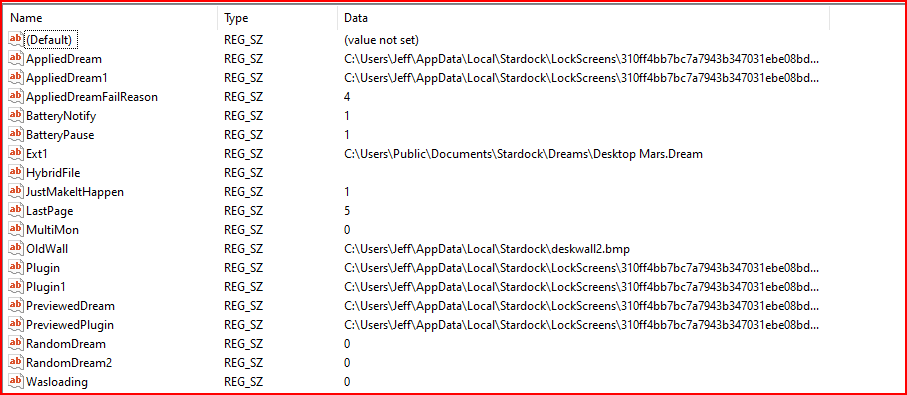
Here is the registry settings prior to changing dream (screen is currently black)

Registry before changing Dream

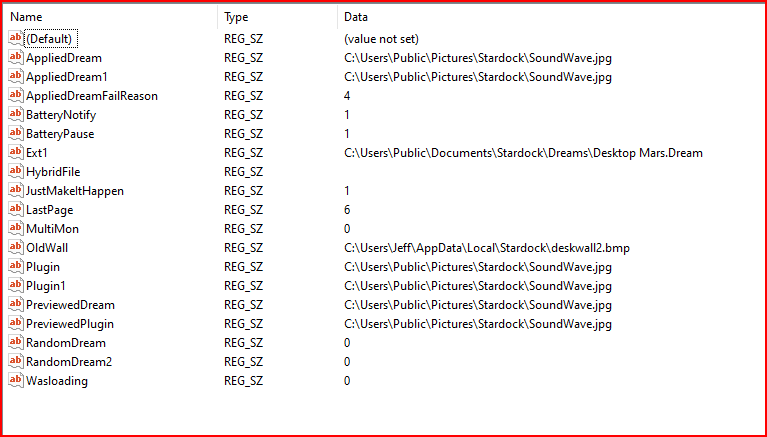
Here it is AFTER changing Dream (same black screen)


Like the previous poster said, this was working fine until about 2 weeks ago. I am having this problem on my laptop; on my desktop (same winver) Mars is still spinning and I don't want to risk changing anything!

I CAN change to a Windows static wallpaper - Registry after application:

Stardock static wallpaper works too...


IF I try to change to a Dream, static wallpaper remains as background; here's the Reg after changing to Dream:

Reply #78 Top

So say I did change the codecs and harmed some. What can I do about it?

Reply #79 Top

Hi, I already posted the Windows Version and other info but here it is again. 

The Regedit screencap is before and after

Before:

(I had the steampunk ani at the time) :

And after:

I chose the vintage dream ani

I appreciate your looking at this and trying to help!

thanks

Reply #80 Top

Hi basj,

OK, so after 4 download attempts (corrupted, try again), I installed 1903. Uninstalled DS8, rebooted, installed DS10.01 and selected a wallpaper first and applied it as asked for in a previous post and that worked. Selected Tropical Underwater dream and applied that. The preview is still the wallpaper and the dream did not appear on the monitors.

I stopped the dreamscape service applied it again and started the service, still no dream!

Here's what it looks like now...

As you can see, the preview is wrong, the description is correct and my Windows is the current version.

Looks like I'm going back to DS8 AGAIN!

dueWest :(

Reply #81 Top

Hello dueWest,

First, thanks for posting. I am sure Dev Team will look into your finding and issues. Please keep an eye on this thread for any updates. We appreciate you feedback and patience.

Thank You,
Basj
Stardock Community Assistant.


Reply #82 Top

Neil , I'm using this version of Windows 10 and DS10 is working Good for me .

I have made a few hundred Dreams in the last few weeks All without issue and 

regedit before and after Dream change.

and I'm using the KLITE Mega Codec pk.

AMD Radeon R7 Graphics

Lenovo Desktop

Before

after dream change 

Reply #83 Top

Quoting dueWest, reply 81

Hi basj,

OK, so after 4 download attempts (corrupted, try again), I installed 1903. Uninstalled DS8, rebooted, installed DS10.01 and selected a wallpaper first and applied it as asked for in a previous post and that worked. Selected Tropical Underwater dream and applied that. The preview is still the wallpaper and the dream did not appear on the monitors.

I stopped the dreamscape service applied it again and started the service, still no dream!

Here's what it looks like now...

Reduced 95%
Original 1216 x 557


As you can see, the preview is wrong, the description is correct and my Windows is the current version.

Looks like I'm going back to DS8 AGAIN!

dueWest :(

Restarting the service does not restart Deskscapes, the service is purely there for loading up DS after a reboot, once loaded it does nothing.

Where did your dream you are trying come from, I cannot locate it on Wincustomize.

Also were you able to switch between other static wallpapers ok, is it just clicking on videos that causes a problem?

Reply #84 Top

I can also choose static images no problem, it won't load any ani's or vids...

Reply #85 Top

I'm having the same issue, cannot load Dreams, just static wallpapers. When selecting a dream, the Preview does not update, but the description does. Applying the dream results in black screen.

Reply #86 Top

Quoting ghitelj2, reply 86

I'm having the same issue, cannot load Dreams, just static wallpapers. When selecting a dream, the Preview does not update, but the description does. Applying the dream results in black screen.

What antivirus app do you use?

Reply #87 Top

Quoting Neil, reply 87


Quoting ghitelj2,

I'm having the same issue, cannot load Dreams, just static wallpapers. When selecting a dream, the Preview does not update, but the description does. Applying the dream results in black screen.


What antivirus app do you use?


Windows Defender and Malwarebytes

Reply #88 Top

FYI,  I've got all the deskscape exe files listed as exceptions, both in WIndow's Defender AND AVG anti-virus (that was the first thing I checked)

Reply #89 Top

Quoting AzDude, reply 83

Neil , I'm using this version of Windows 10 and DS10 is working Good for me .

I have made a few hundred Dreams in the last few weeks All without issue and 

regedit before and after Dream change.

and I'm using the KLITE Mega Codec pk.

AMD Radeon R7 Graphics

Lenovo Desktop


AZ you are still on Windows version 1809 from what I've been seeing everyone that has a problem is on 1903.

Reply #90 Top

Quoting ALMonty, reply 90

AZ you are still on Windows version 1809 from what I've been seeing everyone that has a problem is on 1903.

That's what we need to know who is having the problem on what versions of Windows

Reply #92 Top

Quoting S, reply 65

With service running yes, white. Without service running I get wallpaper until I right click then it turns white