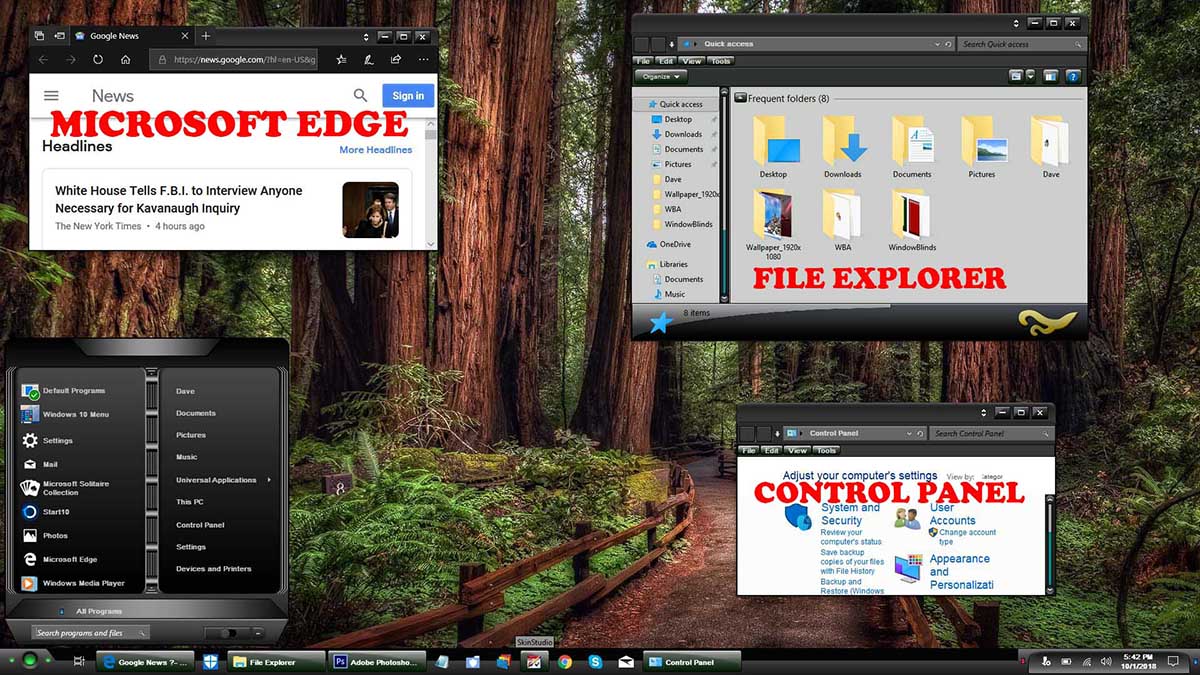
Just curious

Do most of you still use Windows 7?  I always wonder why the only previews for new skins are in Windows 7.  As a Windows 10 user I find it frustrating that there is no preview.  How will I know it will skin explorer properly etc.?  For the Masterskins it is like purchasing sight unseen.

Curious minds want to know.

20,854 views 18 replies
Reply #1 Top

Well, I for one do my Master Skins for Windows 7, 8 and 10, and they look pretty well identical each OS. There is one issue with Windows 10, v1809 right now where the tree (drives) area on the left side of explorer is white regardless of what the skinner set the color to be though. Stardock was informed of this issue quite awhile ago, but they haven't even replied to my email yet. I think it is an issue that will need to be fixed by Neil Banfield, but I am not even sure if he works for Stardock any more as I messaged him too, but he never responded either.

Except for that, and needed to use Start 10 and possibly OldNewExplorer in Windows 10 if you need to, all major areas of Windows 10 will look like the designers screenshots.

Enjoy! :-)

Reply #2 Top

All WB skins are compatible with Windows from Win 7 to Win 10 unless otherwise stated. Two screenshots below show Master Skins and the OS's they were made for.

Reply #3 Top

Quoting Uvah, reply 2

All WB skins are compatible with Windows from Win 7 to Win 10 unless otherwise stated. Two screenshots below show Master Skins and the OS's they were made for.

Pretty sure you're running Old New Explorer there Ross, right? (Big bottom info pane on the Explorer window.)  Don't want anyone to get confused ;)  

[edit]- ack, I see what you did there, just posted the skins' previews.  Yep, I too can get confused.

Reply #4 Top

Everything that Tom (LightStar) said, is correct. If I'm not mistaken (please correct me if I'm wrong), to make Master Skins, they must support Win 7, Win 8, and Win 10. I, like other Master skinners will say in the description what OSs is supported, so you aren't purchasing sight unseen. |-)  

Reply #5 Top

Strange, I have the latest stuff, but my Left "folders bar" still paints in color... :O 

Reply #6 Top

Quoting don5318, reply 4

If I'm not mistaken (please correct me if I'm wrong), to make Master Skins, they must support Win 7, Win 8, and Win 10.

That is correct.

Reply #7 Top

Quoting DaveRI, reply 3

Pretty sure you're running Old New Explorer there Ross, right?

Actually no...not running Old New Explorer. Haven't done that in some time.

Reply #8 Top

Quoting neone6, reply 5

Strange, I have the latest stuff, but my Left "folders bar" still paints in color... :O  

If you have the Window Background color in SkinStudio set be the same as the Explorer Background (Win 10) color for Windows 10, it will be the darker color yes Andy. But changing that Window Background color to a darker color screws up a lot of applications, Microsoft Office and some other major applications too.

Somehow Windows 10, v1809 overrides the setting for the Explorer Folder Bar Background (Win 10) and forces it to be white if the Window Background color is set to white as needed for some applications.

I just wish Stardock support or Neil Banfield would acknowledge my emails / messages on this issue. It has screwed up a LOT of skins made before the 1809 update. :-(

Reply #9 Top

Quoting gmc2, reply 6


Quoting don5318,

If I'm not mistaken (please correct me if I'm wrong), to make Master Skins, they must support Win 7, Win 8, and Win 10.


That is correct.


Sorry to say gmc2, but Master Skins do not have to be made for all current OS's, never seen that anywhere. Personally though I do it for all 3 OS's to accomodate more people. :-)

Reply #10 Top

Quoting DaveRI, reply 3

Pretty sure you're running Old New Explorer there Ross

Actually Dave they are the SS that are the preview with the uploads. Now I am using ONE and have never had a problem. Here is my win 10 SS.

Reply #11 Top

Quoting LightStar, reply 8


Quoting neone6,

Strange, I have the latest stuff, but my Left "folders bar" still paints in color... :O  


If you have the Window Background color in SkinStudio set be the same as the Explorer Background (Win 10) color for Windows 10, it will be the darker color yes Andy. But changing that Window Background color to a darker color screws up a lot of applications, Microsoft Office and some other major applications too.

Somehow Windows 10, v1809 overrides the setting for the Explorer Folder Bar Background (Win 10) and forces it to be white if the Window Background color is set to white as needed for some applications.

I just wish Stardock support or Neil Banfield would acknowledge my emails / messages on this issue. It has screwed up a LOT of skins made before the 1809 update. :(

Ahaa... hm. 

Reply #12 Top

Quoting DaveBax, reply 10

win 10 SS.

I've accidentally kicked us into the ol' "Old New Explorer" loop when I first misinterpreted Ross's image up there (hence the "[Edit]-ack..." there).  I started it, so Sorry - My Bad.  Here's how Explorer tends to look on Win10 without Old New Explorer, colors will vary but there is no status bar image.  Anyway it's a fairly different overall effect:


Reply #13 Top

Old new Exlporer is a MUST for me Design-wise. :cylon:  

Reply #14 Top

Quoting neone6, reply 13

Old new Exlporer is a MUST for me Design-wise. :cylon:  

I agree with you Andy! |-)  

+1 Loading…
Reply #15 Top

Quoting don5318, reply 14


Quoting neone6,

Old new Exlporer is a MUST for me Design-wise. :cylon:  


I agree with you Andy! |-)  

If you don't have win 7, I agree 100%. If it looks good on win 10 it will look good on win 7. Providing you are using oldnewexplorer.


Reply #16 Top

I use W7 and will till MS quits supporting it.

I do believe Master Skins have to include 2 OS's.

Reply #17 Top

Quoting WOM, reply 16

I use W7 and will till MS quits supporting it.

I do believe Master Skins have to include 2 OS's.

Thank you, I thought it was explained to me by ID, when I became Master. :grin:  

Reply #18 Top

Quoting WOM, reply 16

I use W7 and will till MS quits supporting it.

I do believe Master Skins have to include 2 OS's.

Is that in writing anywhere WOM? I have never been told or seen that.