Activating Updated Fences Version 3.0

I currently have fences installed on 2 computers. I upgraded one computer from version 2.02 version 3.0. After updating the 2nd computer to version 3.0, I tried to activate the computer with the download key for version 3.0. The response was that it was already on another computer. Looking at your information I found the following:

"How many PCs can I install the software on

An Individual User may install, use and activate one (1) copy of the Software on up to five (5) unique personal computers simultaneously that are owned by you for your personal use.  The lone exception is Multicity where it is (1) copy per Primary PC.

A Business Entity (which includes commercial, not for profit or educational types) however, may Install and use one (1) copy of the Software on one (1) unique personal computer.

Please see https://www.stardock.com/support/software-eula for Stardock's standard EULA"

How do I activate the 2nd computer? I also noticed that I have a separate product key for versions 2.0 and 3.0..
6,082 views 14 replies
Reply #1 Top

Hello,

I have forwarded your report to the Stardock support team for their review and recommendations.

Please keep an eye on this thread for any updates.

We really do appreciate your feedback, thanks.


AzDude
Stardock Community Assistant

Reply #3 Top

I just checked the 2 activation key histories for version 2 and version 3.
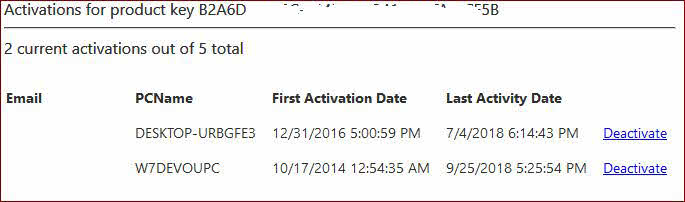
For version 2, it says I have 2 out of 5 available computers active.
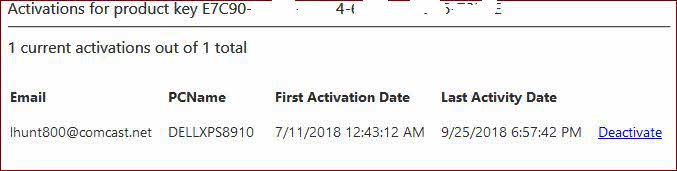
For version 3, it's as I have 1 out of 1 available computers active.
Is version 3 a paid upgrade? I don't remember paying for version 3. Maybe that's the problem… Here are the screenshots:

Tis is for ver 2

Version 2 Message # computers

This is version 3

Ver 3 No of Computers

Reply #4 Top

Hello,

Sorry to hear you are having issues.

YES, version 3 is a Paid Upgrade so if you didn't buy ver3 you need too.

Here's the link to get a discount upgrade from 2 to 3

scroll to the bottom for the link. https://www.stardock.com/products/fences/download


AzDude
Stardock Community Assistant

Reply #5 Top

I think the question that needs to be asked is – how many activations are allowed for version 2, and how many activations are allowed for version 3? If the answer is 5 for both, then I need to know how I can use the additional activations, as again, my version 2 is using only 2 of 5 available activations and I've only used one activation from version 3. Thanks.

Reply #6 Top

Thank you for answering the question about version 3 being a paid upgrade. Does version 3 allow for 5 activations, or only one? Version 2 allowed for 5.

Reply #7 Top

Read reply #4 , I added to it .

both versions allow for 5 activations for personal use only not Corporate.

If you paid for v3 then follow directions in reply #2, please.

Then report back here if your issue is resolved .


AzDude

Reply #8 Top

Thank you for your reply.
I purchased version 3 upgrade on 12/11/2016, order number 3973662.
I purchased version 2 on 10/17/2014, order number 3315144.

So we are back to square one. I have 2 versions, both with 5 activations.
Version 2 has been activated on only 2 of the 5 available activations.
Version 3 has been activated on only 1 of the 5 available activations (please refer to the 2 screenshots in my earlier reply).


The only activation I care about at this point is trying to activate version 3 on my 2nd computer. Version 3 has already been downloaded and installed on the 2nd computer, and when I attempt to activate it using the same product key as computer 1, I get the message that the key is already  used on another computer (you indicated that there are 5 activations), so it should activate that 2nd computer (only 1 of the 5 activations has been used).


Please advise how to activate the product key on the 2nd computer. If additional activation product keys need to be sent, that's okay too. Whatever works… By the way, thank you very much for your very prompt replies to help me out. I really appreciate it very much. We don't usually get responses this quickly from other software companies. Thanks again!

Reply #9 Top

I forgot to mention that this is for personal use only and I am using both computers at home. This is not corporate by any means.

Reply #10 Top

Hello,

I have forwarded your report to the Stardock support team for their review and recommendations.

Please keep an eye on this thread for any updates.

We really do appreciate your feedback, thanks.


AzDude
Stardock Community Assistant

Reply #11 Top

Hello,

One other thing for Windows 10 you can only

use Ver. 3 not 2 ... could that be the problem ?


AzDude
Stardock Community Assistant

Reply #12 Top

Hello,

Sorry to hear you are having trouble.

I have updated the incorrect 1 of 1 on your Fences 3 upgrade.  It will read 5 max now.

----------------
Sean Drohan
Stardock Customer Service Manager

Reply #13 Top

Thank you Sean. Your magic worked like a charm! The 2nd computer is now activated and I see a total of 5 available. Thanks to you and AzDude for all of your very fast and excellent customer service!

With regard to AzDude's question about Windows 10 only using version 3, I had version 2 loaded on both computers for a couple of years and they are both on Windows 10. So that probably wouldn't not have had an effect. They both upgraded quite easily without having to uninstall version 2. It was just a matter of Sean working his magic… Thanks again to you both. I really appreciate all of the help!

Reply #14 Top

Quoting lhunt800, reply 13

Your magic worked like a charm!
End of lhunt800's quote

Excellent, glad to hear it.

----------------
Sean Drohan
Stardock Customer Service Manager