Problems Installing - Icons Packager v10 on Windows 7 Ultimate SP1 (x64-bit)

Getting error while installing says im missing (mfc100u.dll)

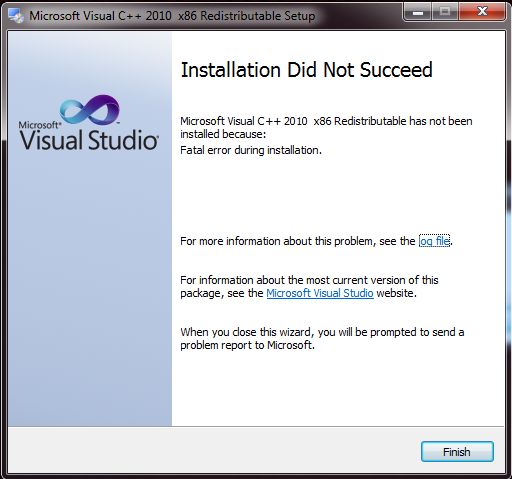
Problems Installing - Icons Packager v10 on Windows 7 Ultimate SP1 (x64-bit) Getting error while installing says im missing (mfc100u.dll) I went to microsoft website and installed visual C++ as that is what microsoft says to do. and it still wont work. im a bit unhappy right now.
39,028 views 18 replies
Reply #2 Top
The problem still happens. I followed the directions step by step very carefully. This is a Brand New Hardrive PNY SSD-1-TB drive and has a Brand new Format and Install of Windows 7 Ultimate SP1 (x64-bit) I dont know whats going on or why I am having these problems. I followed your instructions to the letter and still having install problems in regards to [ mfc100u.dll ]
Reply #3 Top
Also I like to note, I have ALL updates installed for Windows in Windows updater. again, ALL updates are installed. There are currently no more windows updates for my system at this time.
Reply #4 Top

Hello,

I am using Windows 7 Ultimate 64 with all windows update installed too and Icon Packager 10.03 having no problem at all with it.

As a side note mfc100u.dll problem is quite a common problem to have its own, How to fix it, on lifewire.com

https://www.lifewire.com/how-to-fix-mfc100u-dll-not-found-or-missing-errors-2623620

And I do not think your problem is coming from Iconpackager itself. If it is, we should have a lot more occurrence of it reported.

Reply #5 Top

(BASJ)
This is a brand new SSD 1TB drive, also This a brand new Windows Installation...... [ Win7 Ultimate SP1 (x64) ]
So its not something I did,


I barely have any applications installed on this drive, only around 14 applications which are
Firefox
Chrome
Opera
Steam
IrfanView
Notepad++
Rainmeter and 22 addons for rainmeter. (which only goes into rainmeter folder.)
Symless Synergy
My Audio Card Drivers
My EVGA GTX 1080-ti Card drivers.
Realtek LAN Drivers.
Visual Studio Code
IntelliJ Idea Java IDE
IntelliJ Idea Python IDE

I did that yesterday ""The Livewire tutorial to fix it""  and it didnt work.

Reply #6 Top

Did you read the last possibilities on that tutorial? Possibilities of hardware problem?

Reply #7 Top

Quoting Wavelabs, reply 5


Symless Synergy
Visual Studio Code
IntelliJ Idea Java IDE
IntelliJ Idea Python IDE

Any of those run on startup?

Reply #8 Top

This happens on both (x86-bit) and (x64-bit) of the application that Livewire says to install directly from Microsoft.
.

Reply #9 Top

Quoting basj, reply 7


Quoting Wavelabs,


Symless Synergy
Visual Studio Code
IntelliJ Idea Java IDE
IntelliJ Idea Python IDE


Any of those run on startup?


No they do not run at startup. You have to manually start them up all the time. :/
Which is a good thing :)

Reply #10 Top

As I said this has nothing to do with Iconpackager.

Reply #11 Top

Then why am I going through this on a brand spanking new SSD and Windows installation ?


Reply #12 Top

UPDATE* (02-22-2018)
I purchased another brand new PNY 1-TB SSD (again)............  and received it today and installed Windows 7 Ultimate SP1 (x64-bit) on it.
I made sure to install all the windows updates, until there was no more updates and still the Icon Packager does not want to install.
One good thing came out of all this. I know the problem is not on my end and
now I can do RAID-1 for my boot drive with my second SSD.

Reply #13 Top

Wave, while I am sure this is frustrating, saying it is a 'brand new install' actually helps make the case that something is missing with Windows not that something is wrong with IP.

Being a Windows 7 install would mean you have (perhaps had) a long list of updates to install.  Have you installed ALL of the updates for Windows 7?

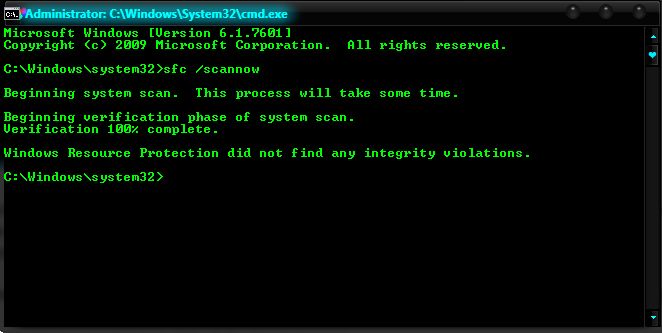
If so, I would recommend a SFC scan:
https://support.microsoft.com/en-us/help/929833/use-the-system-file-checker-tool-to-repair-missing-or-corrupted-system

Also, as basj has pointed out, this is a common issue with Windows, not IP:
https://www.google.com/search?q=mfc100u.dll&oq=mfc100u.dll&aqs=chrome..69i57&sourceid=chrome&ie=UTF-8

Have you tried any of them at all?

Let us know please.

Reply #15 Top

Hello,

As I mentioned earlier it is not IP problem. But just to help you.

Try this solution : https://www.techadvisor.co.uk/how-to/windows/msvcr100dll-is-missing-3589464/

If it still do not work. Try the

"Launch the application or game that caused the error, and it should now run - or complain that another DLL file is missing. If it still asks for the same file, try rebooting your computer and if that doesn't fix it, then copy msvcr100.dll to the application or game's installation folder which could be in C:\Program Files or C:\Program Files (x86)."

Just a suggestion.

Reply #16 Top

I already did that on February 17, 2018, the first time around.
Also I am not missing the msvcr100.dll - I am missing the [ mfc100u.dll ] - Two different DLL files.
anyways, tried it again and I still get this, same as before.
https://forums.stardock.com/487566/get;3704370

Reply #17 Top

Quoting Wavelabs, reply 16

I already did that on February 17, 2018, the first time around.
Also I am not missing the msvcr100.dll - I am missing the [ mfc100u.dll ] - Two different DLL files.
anyways, tried it again and I still get this, same as before.
https://forums.stardock.com/487566/get;3704370

I am sorry. That was my mistake. 

Reply #18 Top

Quoting basj, reply 17


Quoting Wavelabs,

I already did that on February 17, 2018, the first time around.
Also I am not missing the msvcr100.dll - I am missing the [ mfc100u.dll ] - Two different DLL files.
anyways, tried it again and I still get this, same as before.
https://forums.stardock.com/487566/get;3704370


I am sorry. That was my mistake. 


Oooh ok  :)