Draginol Draginol

Stardock has a new killer app: Groupy - organize your windows together

Stardock has a new killer app: Groupy - organize your windows together

From the people who brought you Fences, Start8, ObjectDock, DeskScapes, and countless other amazing programs comes a new one that will transform the way you use your PC: Groupy.

At any given moment, people have a lot of windows open. 

Maybe it's a few Explorer windows, a couple of Excel spreadsheets, maybe a a Word document or a PowerPoint presentation.  Maybe they're working with Adobe Premiere and After Effects and a few other windows.  In any event, dealing with all these windows can get to be quite a mess. So what's the solution?

The answer is: Stardock Groupy, the program that lets you treat all your windows the same way you are now used to treating browser windows -- put them them together with each window given its own tab.

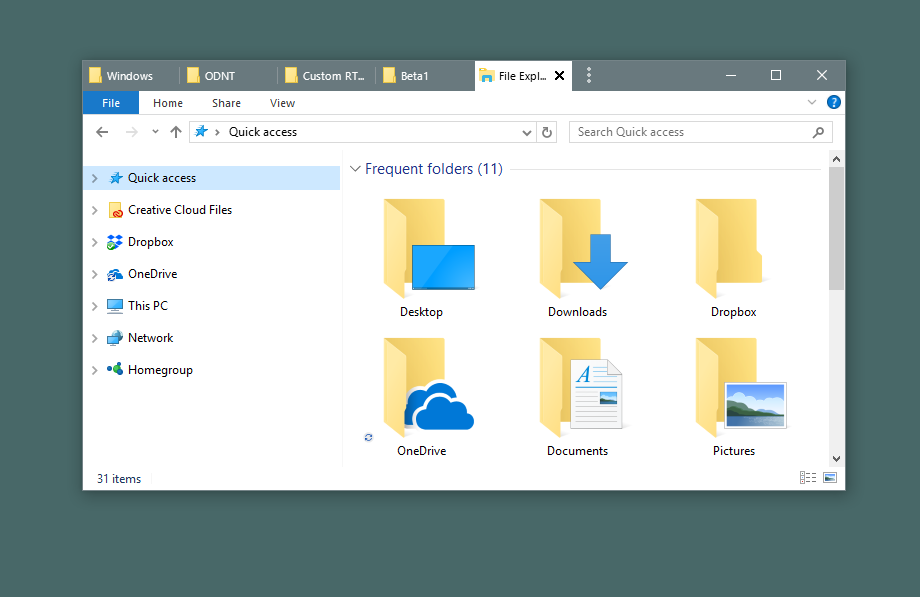
Example 1: Got lots of Explorer windows?

image

No problem:

image

Example 2: So many spreadsheets

Lots of people end up with several Microsoft Office apps running that can easily get misplaced, especially if you have multiple monitors.  Groupy fixes that.

image

Just put them together.

image

Example 3: For the Adobe power user

Many artists are familiar with working between the various amazing Adobe applications.  Navigating between them adds up over time.

image

Instead, just put them together.  Now you can switch between tabs with the Win-~ key instantly.

image

Now it acts as a single app.  If you need to pull them apart, no problem - just drag the tab off like you would with a browser window.

Example 4: Chrome and Edge living together in harmony

Do you find yourself using multiple web browsers occasionally?  Groupy can help with that, too.

image

Groupy supports tabs within tabs.

image

Edge and Chrome are now acting as a single web browser.

Example 5: Mix and Match

Maybe you are a power user or developer who has a diversified mix of applications in use to get a job done.  No problem, Groupy will let you group any window with another window.

image

And to ungroup, just drag the tab off from the group.

It's both the simplest app and most useful app you may ever buy.  Get it now as part of Stardock's award-winning Object Desktop suite of utilities at www.objectdesktop.com today.


Are you an active Object Desktop owner?
Get access to the Groupy beta today by logging into your Stardock Account. If you can't remember the email you used to purchase Object Desktop with, check out this helpful post.

313,925 views 41 replies
Reply #26 Top

So the one thing I am missing in Groupy is a semi-permanent setup - IOW, remember my setups (ie. just an explorer window with file names) and prevent me from closing tabs. After a short test run I must say that Groupy works very well - I'm still thinking of new uses for it.

And for your next trick, how about a tabbed feature on Fences? :D  

Reply #27 Top

I was about to ask if Groupy had the ability to 'remember' groups and launch them from a shortcut or if you have to 'assemble' them each time you log on, which is what Srick is getting at, I think.

Reply #28 Top

Quoting Daiwa, reply 27

I was about to ask if Groupy had the ability to 'remember' groups and launch them from a shortcut or if you have to 'assemble' them each time you log on, which is what Srick is getting at, I think.
Yes - exactly.. and think of how usable a fence would be if it too was a tabbed with subfolders.

Reply #29 Top

Been using this steadily for four days now and generally speaking, I love it!  A lot less scooting windows around. B)  :thumbsup:  

Reply #30 Top

any date yet on the next release that will fix the Excel issue?

Reply #31 Top

** crickets ***

Reply #32 Top

I see there is a new build which did fix the issue, so disregard my unanswered question.

Reply #33 Top

Groupy v0.85 On/Off button unexpected behavior (Win10Home v16299.rs3_release.170928-1534 64bit)

On a standard user, when I turn Groupy "On" after having it "Off", it seems to read the Settings configurations from the Admin User (or maybe the installing user?) instead of from the currently logged-in user. Examples- show/don't show close buttons on tabs, [shift] or [ctrl] grouping requirements, [shift] requirement for tab dragging.   The configuration screen shows the settings intended for the current user even though that's not what it's using.

A logoff/login while Groupy is "On" makes it read from the current user again - "fixes it".

Thanks for the On/Off button though.

Reply #34 Top

Looks like there's some competition with this on the way  from Windows itself

Windows "Sets"

Reply #35 Top

Quoting davidabc66, reply 34

Looks like there's some competition with this on the way  from Windows itself

Windows "Sets"

Its a cool feature, but its only tabbing Microsoft products. Groupy still has an advantage since it allows you to tab everything.

+1 Loading…
Reply #36 Top

At some point in the future, Microsoft will release a feature that will be a sub-set of what Groupy does.

Reply #37 Top

Quoting Frogboy, reply 36

At some point in the future, Microsoft will release a feature that will be a sub-set of what Groupy does.


Minimum 1 year from now ... Stardock is ahead in the game, again.

Reply #38 Top

I don't think so, Imagine that the Hide Mouse Pointer when writing doesn't work at all, only on some of the MS apps but not the rest... what to talk about this feature :P

Reply #39 Top

I recall back in 2016 and buying a tab program that did/does most of what Groupy does, and at the time I said that it would be great if Stardock came up with a similar app that did all that and more.  Well thank you, Stardock, you made one of my software dreams comes true.

I have yet to download and use it, having been a bit distracted lately, but I'm sure it will answer all my needs and then some.

:thumbsup:

Reply #40 Top

I tried Groupy on 3 PCs. All 3 ended up with shutdown errors.  Apparently "Groupy listener" would hang on shutdown.


Uninstalled it. Didn't really care for it anyway.