New Vid Card... (geekery)

Been trying out some new vid cards. At first, I installed a Sapphire NITRO+ Radeon RX 480 4GB and it ran great. Great on the burn in,  and great with memory consuming games like DOOM, but when I would go into FOB on MGSV the fan would spike to 100% and go into an infinite loop error. I would shut the game and bring up Trixx to try adjusting the fan, but it was unresponsive and would blue screen. I figured it might just be a minor fix, but I looked and saw that lots of people were having the same problem. IT was possible a format could have fixed it, but I decided to unload it before I was stuck with it. It was a great card, but it was either defective, or it was flaky as hell. Now I have the MSI GTX 1060 GAMING X 6G installed. I went with a different chipset to avoid the potential that all the 480's would give me the same result. The 1060 is a great card in many ways, but the fans! I can't hear them no matter what... they are like, totally silent! All games are running good and there doesn't seem to be any issues, but when I ran the burn in, I noticed that some parts of the cabinet were getting warm towards the back of the rig near the card. This is of course when I was demanding 99% of the GPU with furmark for 10 minutes. Is that something that could become an issue? should I set up another fan, or worry about it? I doubt many games will call for that much power, but if it did, is such warmth on the back of the cabinet generally something to worry about?

180,825 views 22 replies
Reply #1 Top

I only ever hear my 980 fan on boot.  Once the system is loaded the fun goes into "I'm bored" mode and shuts down.

Maybe with my new monitor on the way I can push the 980 enough to wake the fan up from being lazy.

Difference is....1680x1050 at 60hz vs 2560x1440 at 165hz. ...;)

Reply #2 Top

....oh, and yes, always be wary of "warmth on the back of the cabinet" ...;)

Reply #3 Top

Maybe if I add fans it will fix it. I'm not sure, but I have to max the card for the heat, which I've only done on the burn in. I get 61c on the burn in and games like DOOM run at 51c

Reply #4 Top


Quoting Jafo, reply 1

I only ever hear my 980 fan on boot. Once the system is loaded the fun goes into "I'm bored" mode and shuts down.


Ok, where is the real Jafo?    X|

Reply #5 Top

Yeah, so I guess I'll order another fan for the front so I have 2 and maybe turn up the speed with the mobo utility. I could always add a fan from the bottom and 2 on the top.

Reply #6 Top

Having a warm case is a foreign concept to me, but it's probably not problematic as far as the video card is concerned.


You're only hitting 61C on a burn in test, which is a whopping 1 degree above the fan shutoff, as in you aren't getting any temperature climb at all once the fan starts running.


I'm guessing you could run a burn in test all day and still not overheat the card.

Reply #7 Top

How are your fans setup? 

Reply #8 Top

I have a Fractal R4 and I have 1 fan at the bottom front and one at the top back. I replaced the stock fans with Noctua 140mm. They were good enough for my last 2 cards, but this one probably pushes out more heat. I was thinking I would order another one for the front and maybe turn up the speeds a little. If that doesn't work I could always open the top or go from the bottom as well.

Reply #9 Top

Yeah, so I put another fan in the front for 2, opened up the top and put 1 fan there, and put in a NZXT Sentry 3 to increase the speeds to 1500 when necessary. After that I ran the burn in and the hot spot was gone. The case still has some warmth, but no hot spots or anything that appears unusually high. I can always put another fan at the top for 2 and 1 at the bottom if the case needs it, but it seems like the airflow might be OK for now :D btw this MSI card shreds... great card! and I can't even hardly hear it. Most cards sound like the indy 500 when put to the test. :D

Reply #10 Top

You can't  hear it over the din of all the case fans you just added.....;)

Reply #11 Top

What kind of fans do you use? I have the Noctua's which are really very quiet. They aren't even bad at full speed.  Was thinking about installing a liquid cooler for my cpu, but the horror stories of leakage have made me reluctant.

Reply #12 Top

Is there anything in the second PCI-e slot that might block the fans of the GTX1060 ?
cables - audio cards ?

Furmark is very demanding and in most cases the GPU will never encounter such demand unless you set it to DSR.

Edit: I use Noctua Fans aswell have five of the 140´s and my cpu cooler is an NHD14 had one of those installed in my old 6600k system, it is the "block" of awesomeness.

+1 Loading…
Reply #13 Top

The card was running at a good temp on furmark.  At 60 or 61 Celsius it was a ways off from its max temp, but there was a hot spot in the back and some heat building up in the case.  Seems like the 1060 was pushing more heat into the case than the 660ti I replaced and  it just needed more airflow with additional fans

Reply #14 Top

what type of case do you use ? Is the case coated in insulators to keep it silent?
I have a smiliar setup like this just without the sidefan but with an additional front 140mm fan.
My case has a lot of insulators if that is the propper term in english and what i noticed is that the sidepanel can get warm but that is connected to the insolators that store heat therefore i must have additional fans to compensate.

Reply #15 Top

 That looks like a great airflow setup, but my case doesn't have air filtration for incoming air from the top, so if I used it for incoming air it would probably fill my case with dust. Also its probably a good idea to exhaust the hot air thats rising from the top rather than blow it back into the case? Not sure about the insulators, but its definitely a well built case by Fractal design. The R4.  There are some really nice new cases out there now though, some are really tempting to switch to :D

Reply #16 Top

Quoting Anthony, reply 15

 That looks like a great airflow setup, but my case doesn't have air filtration for incoming air from the top, so if I used it for incoming air it would probably fill my case with dust. Also its probably a good idea to exhaust the hot air thats rising from the top rather than blow it back into the case? Not sure about the insulators, but its definitely a well built case by Fractal design. The R4.  There are some really nice new cases out there now though, some are really tempting to switch to :D


I agree hot air rises to the top, so it would be better to blow it out on the top but this would mean that you also blow out the fresh/cold air that comes from the front fans ^_^  
https://www.caseking.de/demciflex-staubfilter-corsair-air-540-top-zust-135.html some filters for the top 
All you need to do is messure both openings for the Fans on the top and choose the right size =) then they should fit nicely on the R4


Reply #17 Top

Something that might helps is that hot air rises; while, cold air falls.

Reply #18 Top


One way to definitely isolate heat sources....compartmentalize to-the-max.

The Drives, Optical drives and PSU are all separated from the MoBo/GPU, as well as pretty much all the cabling...;)

All 'inlets' are below the compartments...all outlets are at upper-rear.

Chassis is all 3mm sheet aluminium....so the case is its own heat-sink...;)

Reply #19 Top

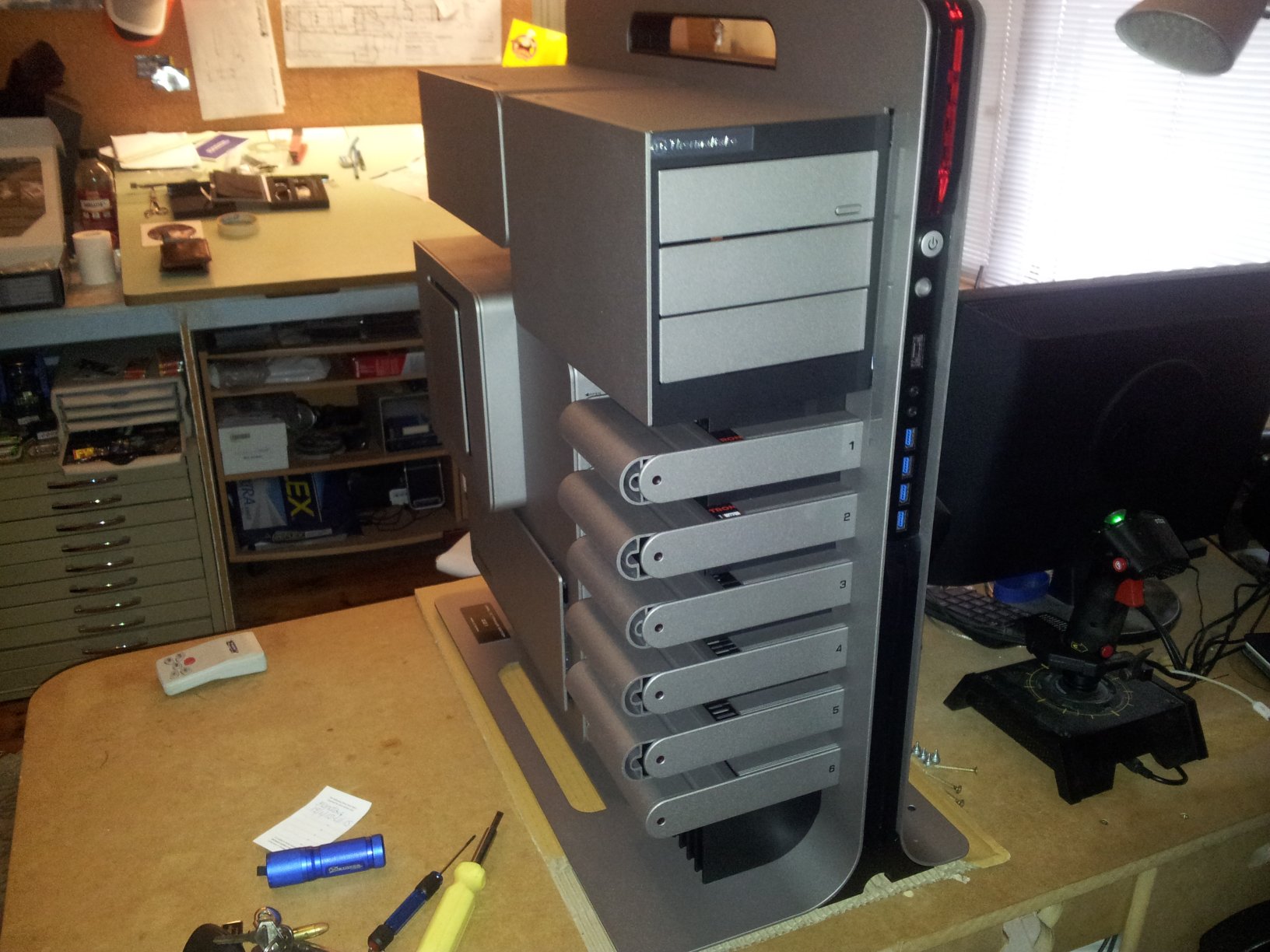
Thanks for the tip Benmanns, but I think I will use the top to exhaust the heat. It seems to be working pretty good. I could always bring in more cool air from the bottom in the future.  Hey Jafo, is that your new rig? very nice! where is that case listed? Just for curiosity and to see its specs.

Reply #20 Top

Yes....it's my 'new' one....almost a year old now though.

The case is a Limited Edition [it'll be sold out].  There were 500 world wide.

Probably 95% of computers cost less than just this case alone.  Thermaltake Level 10 Limited Edition Titanium [it googles]...about $1300 AUD.

Reply #21 Top

Quoting Jafo, reply 20

Thermaltake Level 10 Limited Edition Titanium [it googles]...about $1300 AUD.
Holy sheepsheeet :D But if you like it Jafo I hope you're enjoying it  very much :D Was checking out the reviews on Amazon and they were pretty bummed about the prices as well lol  https://www.amazon.com/Thermaltake-Level-10-Limited-Edition/dp/B00A443V4O

Reply #22 Top

It's pricey...but then I've just updated my monitor....and that was another $1200 ...;)