Island Dog Island Dog

IconPackager 10 Beta Bug and Feedback Thread

IconPackager 10 Beta Bug and Feedback Thread

The beta for IconPackager 10 is now available for current Object Desktop members.

You can download from your Stardock account here: http://download.stardock.com

If you find any bugs or have any feedback about the beta, please use this thread to report them. Please include screenshots and as much information about your problem or feedback that you can include.

WARNING.  If you have IP 5.x installed on Windows 8/10 DO NOT uninstall it before installing IP10.  Doing so will cause damage to icon associations that IP10 will not be able to fix.  Install IP10 OVER IP5.x


Beta 2 update (7/18/16):

  • Fixes a bug with Cortana and All apps
422,809 views 129 replies
Reply #51 Top

Quoting cdhinch, reply 50

I went ahead and uninstalled IP10 and the icons were restored.  The icons were fine before IP10 was installed so there is apparently a bug that is causing the EXE icons to disappear when IP10 is installed.


Just in Cortana?

Reply #52 Top

I was looking at some older IconPackages and many were missing icons.

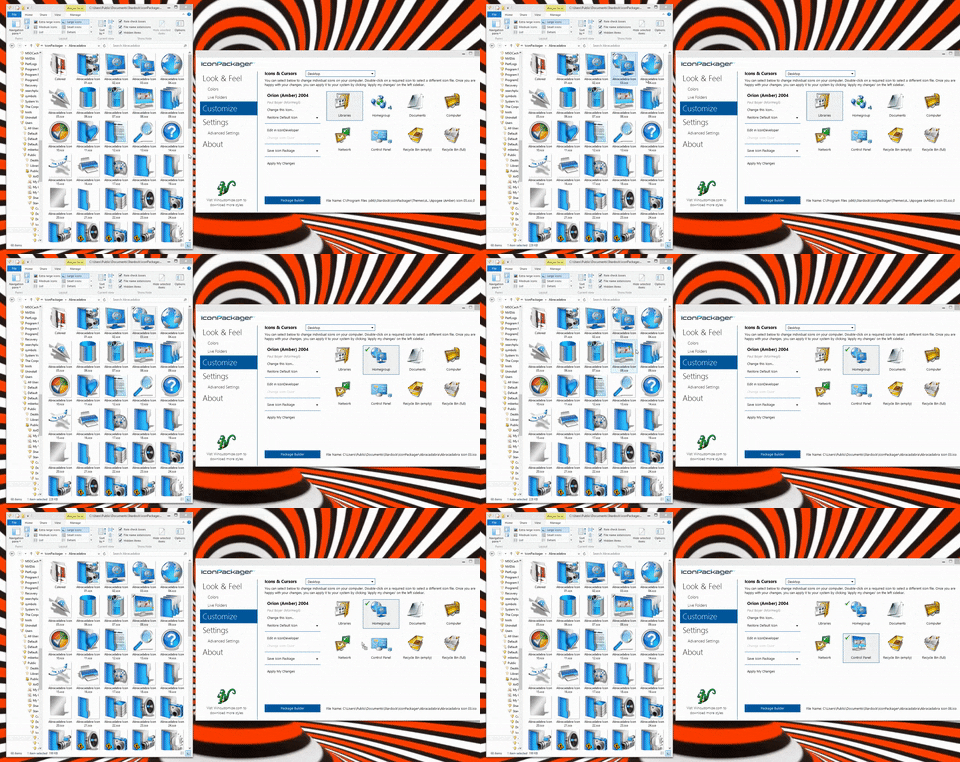
The two best ways I found for fixing them is drag and drop and using the "Similar Icon" option.

For both, the way to start is to apply the icon package and then select "Customize" from the left panel.

To drag and drop, open Windows Explorer and navigate to C:\Users\Public\Documents\Stardock\IconPackager and then to the package you want to get the icons from

Then just drag and drop from the Explorer Window to the icon in IconPackager


For the other method, double click on the icon you want to change and then select "Similar Icons" in the upper left.


Pick one you like!

Reply #53 Top

I have also had the problem of blank .exe icons in Cortana. Also, Some of the Icons in folders in the Start Screen/All Apps menu (From 0-9 thru C in my case) are either blank or wrong. From D on down they're fine. I restored Windows default icons, then ininstalled IP. This fixed the Cortana Problem, but not the Start screen. This is on Windows 10 with all updates installed.

Reply #55 Top

Quoting Robert_Snyder, reply 53

I have also had the problem of blank .exe icons in Cortana. Also, Some of the Icons in folders in the Start Screen/All Apps menu (From 0-9 thru C in my case) are either blank or wrong. From D on down they're fine. I restored Windows default icons, then ininstalled IP. This fixed the Cortana Problem, but not the Start screen. This is on Windows 10 with all updates installed.

The start menu issue sounds like a cache corruption issue.

We are investigating the Cortana issue.

Reply #56 Top

IconPackager is working well here with no problems.  Love the IconPackager title and graphics too. Thanks, Neil! 

Reply #57 Top

Installed the newest version. It was a clean install on Windows 10, RTM build (10560 update 1511).

After applying any package, system icons and other were changed, but all other custom program installed icons (f.e. Visual Studio, Outlook, Word, CCleaner etc.) was covered with some default icon.

Even the repair or other packages didn't help. Only uninstall returned everything on default after restart.


Reply #58 Top

Quoting bvrhovnik, reply 57

Installed the newest version. It was a clean install on Windows 10, RTM build (10560 update 1511).

After applying any package, system icons and other were changed, but all other custom program installed icons (f.e. Visual Studio, Outlook, Word, CCleaner etc.) was covered with some default icon.

Even the repair or other packages didn't help. Only uninstall returned everything on default after restart.


Could you provide a screenshot please.

This does not sound normal.  If there is another icon on top of the others then could it be the shortcut arrow that many iconpacks replace?

Reply #59 Top

I opened the GUI and re-applied the blackout icon pack. That fixed the live folder issue and the icons did not change back to the default icons after shutting down the laptop and starting it back up. One thing I did notice was the ram went to 74% when the GUI was open. I have 4gb of ram installed.

Reply #60 Top

I have none, unfortunately. I uninstalled the software. Tried to repeat it now, but now it is working :o next time, i'll do the screenshot and post it here. Sorry for any inconveniance.

Reply #61 Top

Quoting Uvah, reply 59

I opened the GUI and re-applied the blackout icon pack. That fixed the live folder issue and the icons did not change back to the default icons after shutting down the laptop and starting it back up. One thing I did notice was the ram went to 74% when the GUI was open. I have 4gb of ram installed.

As IconPackager's exe is a 32 bit process it cannot use more than 2GB itself.  I therefore cannot explain why your memory usage would go so high.

Reply #62 Top

well, I'm unhappy to report that IP killed some of my icons already (newsleecher and VMware) showing only default icons

Reply #63 Top

Quoting jabbermacy, reply 62

well, I'm unhappy to report that IP killed some of my icons already (newsleecher and VMware) showing only default icons

  • Desktop or Start Panel or Cortana?
  • Did you reset back to default and did they remain broken?
  • Even after a reboot?
  • What OS?
  • If you right-click on the icon, select Properties, select Icon, select Change Icon, and Restore Windows default is there any change?

     
Reply #64 Top

I made a clean install Win 10 on a win 8.1 HP almost a year ago

I have Object desktop so I only installed Start 10, windowblinds,

deskscapes, WinFX, cursorFX plus,  tiles, fences...


I installed yesterday IP-10 my icons on start menu disappeared

a default blank icon showed but they open the apps then yesterday the apps didn't click open at all

then the start menu didn't open. I uninstalled IP 10 and follow this Microsoft steps

Method 3: Troubleshooting Store.

Step 1: Reset Windows Store

  1. Press Windows + R, to open run prompt.
  2. Type wsreset and press enter

This command will reset the windows store cache.

Step 2: Re-Register Store App.     <-- it restores Start windows 10 Menu

  1. Press Windows + X, Click on Command prompt (Admin).
  2. Copy the following command and paste in command prompt and press enter.

powershell -ExecutionPolicy Unrestricted Add-AppxPackage -DisableDevelopmentMode -Register $Env:SystemRoot\WinStore\AppxManifest.XML


Method 4: Run the following command in PowerShell.

  1. Press Windows + X, Click on Command prompt (Admin).
  2. Type powershell in command prompt and press enter.
  3. Copy the following command and paste in command prompt and press enter.

Get-AppXPackage | Foreach {Add-AppxPackage -DisableDevelopmentMode -Register "$($_.InstallLocation)\AppXManifest.xml"}

The store apps are restored but not my the other icons such as mozilla, all of the stardock icons. They do open on click

but a notification of "object not found" flashes right before. So I went to a Restore point from last week and restored my laptop...

'but I had no luck.... the icons are still the same--BLank.

I love Icon Packager but I am afraid of installing it back again. Any help would be appreciated.


Reply #65 Top

^^ well, I'm glad I True Imaged my system before/after installing.  I am running Win10x64 and starting to see things fall apart  -____-

Reply #66 Top

Quoting jabbermacy, reply 65

^^ well, I'm glad I True Imaged my system before/after installing.  I am running Win10x64 and starting to see things fall apart  -____-

What else is happening?

Reply #67 Top

A couple of times when changing packages Windows has frozen, or, desktop and taskbar gone black. I've had to press the reboot button to get out of it.

Also using WB & Fences.

Reply #68 Top

same as starchefmonique, had to restore to get icons back and start menu working.  NOT gonna install again for now...

Reply #69 Top

Just to remind everyone:

This is a Support thread.

If you have no specific fix or a specific, relevant comment, then don't comment at all. Thanks.

Reply #70 Top

Since re-applying the icon pack and several shut downs later the icons remain. Not going back to default icons. I are a happy camper now. Kudos to the devs, you guys rock!! 

Reply #71 Top

Quoting Neil, reply 55


Quoting Robert_Snyder,

I have also had the problem of blank .exe icons in Cortana. Also, Some of the Icons in folders in the Start Screen/All Apps menu (From 0-9 thru C in my case) are either blank or wrong. From D on down they're fine. I restored Windows default icons, then ininstalled IP. This fixed the Cortana Problem, but not the Start screen. This is on Windows 10 with all updates installed.


The start menu issue sounds like a cache corruption issue.

We are investigating the Cortana issue.

How do I fix the cache corruption? I know how to manually rebuild the icon cache in Win10; would that do it?

Reply #72 Top

I get shortcut overlays on some sets, this odd look on others.


I have shortcut overlays turned off (hidden) in WinFX.


Reply #73 Top

Those look like the places where the short cut arrows go.

Reply #74 Top

Check your iconpack and see what it has set for shortcut overlays.  Also did you have IconPackager v5.x ever installed on this OS?

The feature in WindowFX only applies to icons on the Desktop...

Reply #75 Top

Focus, Ross.....focus.    X|


Quoting Uvah, reply 73

Those look like the places where the short cut arrows go.


Quoting RedneckDude, reply 72

shortcut overlays