Island Dog Island Dog

WindowBlinds 10 Beta Thread

WindowBlinds 10 Beta Thread

WindowBlinds 10 beta is available for Object Desktop members.

More info about that here: https://forums.stardock.com/474045

Please use this thread for discussion about the beta and reporting of any issues you might come across. 

WB v10.0.1 update:


  • Added skin rebuild list button
  • Fixed config screen resolution


1,438,907 views 407 replies
Reply #101 Top

hello i had the same issue and that included the windows title bars on top which were just white no skinning there at all .

i tinkered about and found as soon as i unticked in themes manager , i clicked the settings tab and found 2 options as follows 

a) i want to see advanced options when applying suites 

b) i want to use aero window frames but keep the rest of the skin 

i left a) ticked 

i unticked b) and reapplied skin and bingo everything skinned including the tittle bar on window frames and chrome too !

Reply #102 Top

nothing wrong with the u i . it looks fine . theme manager looks fine . boy what a sight for sore eyes !!!

literally sore eyes . but question though i have been using start 10 since it was out , will we able to still use look before or have to unload windowblinds . ( i dont mean uninstall either )

i would like to be able to make some start buttons and task bar textures of my own , and eventually start menus . 

i dont get to much time at the computer with work and stuff , but that would would be a good place for someone like me to start from .

thank you for getting windowblinds out i think we were starting to loose it for awhile .

microsoft my never realise if it for wasnt for windowblinds there might be a lot less windows users .


Reply #103 Top

Well, I found out you can't run SkinStudio 10 on Windows 7 or 8.1 unless you are using Windowblinds 10. If you install SkinStudio 10 on Windows 7 or 8.1 that have Windowblinds 8, you keep consistently getting nagged about activating Windowblinds 8 for some reason. You activate it, and the next time you open SKS10 or WB8 it asks you to activate again, and again, and again....

Soooo, WB8 = SKS8 only and WB10 = SKS10 only.  :)

Reply #104 Top

Just Upgraded (With a lot of trouble, phew !)

-First thing that strikes me is...Is "Blurred transparency magically back ?? :omg:

Reply #105 Top

Aren't we going to have any background skinning at all & won't the PopUps be skinned ? :(O :(O

-If not, the overall continuity & quality of skins will seriously drop...as well as sales.


Just a little shocked and taken aback, overall, what is there works super good  5*

Reply #106 Top

Still no icon in system tray with the latest beta however I pinned WB and SS to the taskbar so I can live with that. Checking the option under settings "Show icon in the system tray for easy access to WindowBlinds settings" does not stay checked even if you apply a skin or reboot.

Reply #107 Top

I just d/l WindowBlinds 10.02 and uninstalled 10.01 rebooted and now everytime I try to install WindowsBlinds (WB) 10.02 I get a message saying Reboot required - Please reboot to complete the WB uninstall before proceeding with the new installation. the install will now exit. I had  items for WindowBlinds in  Task Manager (Processes and Services) and I stopped and ended the tasks. I have also removed all references to WindowBlinds from the Registry.  After multiple reboots I am still getting the same message.

Everything was working really well up until this issue.

Any suggestions?

Larry


EDIT: Never mind.  The initial uninstall left some items in the WindowBlinds folder and I failed to check that.  Deleted folder, rebooted, installed WB 10.02 and everything seems to be working fine again.  The WindowBlinds icon is now showing in the System Tray also.

Reply #108 Top

Quoting techman5, reply 107

The WindowBlinds icon is now showing in the System Tray also.

Not for me.

Reply #109 Top

Have noticed kind of annoying thing. the open programs like IE or whatever programs in taskbar blinking when hovering over them in taskbar with the mouse.

Windows 10 Pro x64

Reply #110 Top

Quoting Nerius, reply 109

Have noticed kind of annoying problem. the open programs like IE or whatever programs in taskbar blinking when hovering over them in taskbar with the mouse.

Windows 10 Pro x64

Reply #111 Top

Yesterday I noticed that, when playing World of Warcraft, I pressed the windows button to bring up the start(10) menu, the start menu is very shortly glass, and the the skin get's applied. Seems the skin does not apply as quickly as before.


That isn't a huge issue though, what was a issue was that my taskbar was all glass transparency and only a few icons of running programs had the skin behind it. Hovering my mouse over the taskbar made the skin appear properly.


I also noticed that the volume mixer (the one we also know from earlier version, not the new crappy one) also didn't had a skin applied and still used the Windows 10 skin version.


I can provide a screenshot later today if needed.

Reply #112 Top

Just noticed the little button to the right of 'apply style to the desktop' - very useful menu which includes a 'rebuild list' option, thank you.

Loving having desktop skinned again! Thank you.

(Chrome is still titlebar-less though...)

Reply #113 Top

Just installed 10.0.2 on Win 10. Running Naked Noir and it looks good against the default wallpaper. Icon is in the system tray and Chrome is skinned nicely. Got a winner here!

Oh...and I had to make Win10 the default OS rather than 8.1 for this Beta test. The only reason to switch over now is to watch Netflix. Lol

Reply #114 Top

WB10 is acting like its not installed. Other programs like Xion and such which are not installed show blank pages, expected. But WB10.0.2 shows the same. I cannot install any new skins, wba's are blank pages.

Reply #115 Top

Quoting Uvah, reply 114

WB10 is acting like its not installed. Other programs like Xion and such which are not installed show blank pages, expected. But WB10.0.2 shows the same. I cannot install any new skins, wba's are blank pages.

Does using the install option built into WB itself via the ... button work?

Reply #116 Top

Yes, I was able to install Jargon wba and the normal icon showed up in the folder. Checking if its still the same...yup, still a blank page.

Reply #117 Top

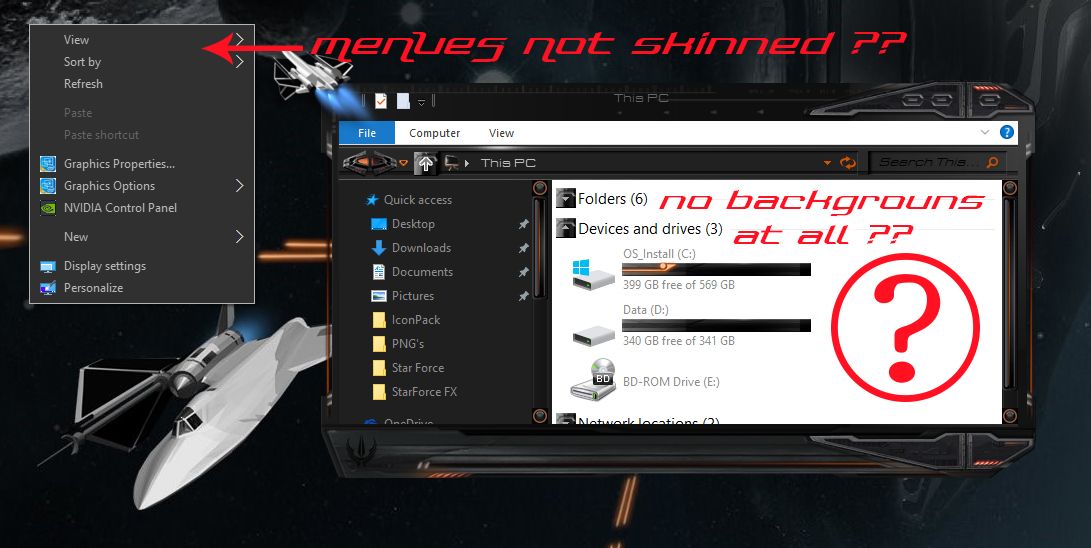
Neil, are the Explorer backgrounds and popup menues skinning going to be fixed ? :\

-I saw there was a checkbox for backgrounds to be skinned in WB settings but...nothing happens when checking it.

Reply #118 Top

OK, I have done everything I can, but still no icon in the tray area. I thought that was fixed?

Reply #119 Top

Quoting neone6, reply 117

Neil, are the Explorer backgrounds and popup menues skinning going to be fixed ? :\

-I saw there was a checkbox for backgrounds to be skinned in WB settings but...nothing happens when checking it.


Install and setup OldNewExplorer Andy, problem solved. You can get rid of all the Windows 10 crap, and make explorer look and function almost exactly like Windows 7.

Reply #120 Top

Quoting LightStar, reply 118

OK, I have done everything I can, but still no icon in the tray area. I thought that was fixed?

Same here.

Reply #121 Top

Quoting LightStar, reply 119

Quoting neone6,

Neil, are the Explorer backgrounds and popup menues skinning going to be fixed ? :\

-I saw there was a checkbox for backgrounds to be skinned in WB settings but...nothing happens when checking it.


Install and setup OldNewExplorer Andy, problem solved. You can get rid of all the Windows 10 crap, and make explorer look and function almost exactly like Windows 7.

I have and it's all good except that Popup menues and explorer backgrounds are still Unskinned. (as I have pointed out twice, see pic.)


+1 Loading…
Reply #122 Top

No tray icon here either but I have it in my Quick Launch so not a big issue.

Reply #123 Top

1. This makes the second time today that I've had to put in my ODNT sub number...after doing it twice yesterday, as well (WB10.0.2).

2. SKS asks for my key number, but crashes when I enter my ODNT key.


OS W7 Home Premium, x64.

Reply #124 Top

Quoting neone6, reply 121


Quoting LightStar,


Quoting neone6,


Neil, are the Explorer backgrounds and popup menues skinning going to be fixed ? :\

-I saw there was a checkbox for backgrounds to be skinned in WB settings but...nothing happens when checking it.


Install and setup OldNewExplorer Andy, problem solved. You can get rid of all the Windows 10 crap, and make explorer look and function almost exactly like Windows 7.

I have and it's all good except that Popup menues and explorer backgrounds are still Unskinned. (as I have pointed out twice, see pic.)


Reduced 31%
Original 1920 x 1080


Oh, OK Andy. I agree, wish those areas could be skinned here too.

Reply #125 Top

Quoting LEMMORSebrof, reply 65


Quoting RedneckDude,


Quoting RedneckDude,


Ken, check the box, then go back to the skins and hit apply.


Once I rebooted, the icon isn't there. 


Same experience I have


So after much fideling, I installed windows 10 64 bit then reapplied WB10 from stardock.com and from Objectdesktop.  Seem Objectdesktop does not give the most current build of WB 10 Beta.  When taken from stardock.com WB 10 beta behaves.  I still not getting the tray icon, however, I was told its beta so expect glitches here and there.  Current version I working with is as follows : WindowBlinds 10 BETA (004 - Windows 10 Edition) - 64 bit OS.