No matter how clever you are with doing backups...and even redundancy backups....

There comes a time when it all goes pear-shaped.

Simplest error - 'CRC'

Cyclic Redundancy Check - Error.


What happened....

I noticed a Syncback log showing a file-backup failure due to a CRC error.

I checked and found the same file had caused the True Image backup of the drive to fail.

I didn't have an even vaguely recent copy of the file....it was a still-to-be-worked-on multi-layer PSP file [PaintShop Pro].

I could 'see' it...but couldn't load/open it.


Because this one file [about 50 meg] was killing the True Image backups it NEEDED to be moved/deleted....

...but I also NEEDED to keep it - get it to work again.


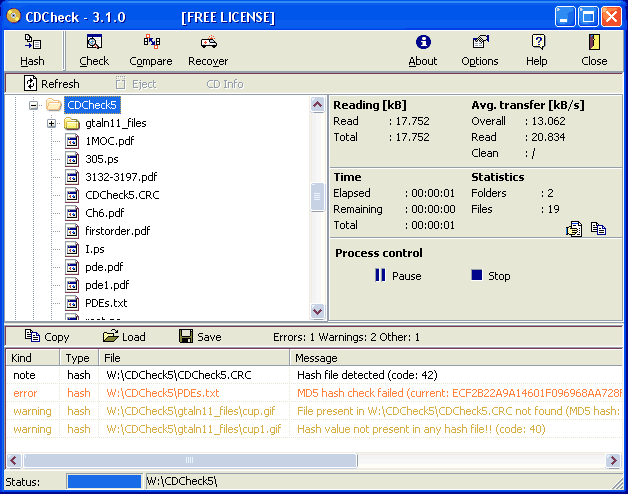
Bit of Googling led me to 'CD Check' ...a little proggy that does more than its name.

It also works on HD files...

AND it also Recovers.

8 errors in the log later and I had a copied/saved psp file...that for the life of me looks exactly as it should....

....and works.


Now I can delete the CRC-riddled one ....chkdsk the HD and get True Image back to doing what it's supposed to.

Oh, and then swap that image to a brand new drive [just to be sure].


Get it.

The price is good, too ....;)

http://kvipu.com/CDCheck/helplink.php?helpfn=overview 
 

44,620 views 10 replies
Reply #1 Top

 Wow, Paul. Thanks a lot!!  I have needed this several times.  :beer:

Reply #2 Top

Now?! Two weeks ago I needed this!

Grrrr!

Btw, on your link it states, "Supported OS: Windows 95, 98, ME, NT, 2000, XP, 2003, Vista"

Which OS were you using it in? Usually what will run in Vista will run in Windows 7...is this the case with this software?

Reply #3 Top

Quoting DrJBHL, reply 2

Now?! Two weeks ago I needed this!

Grrrr!

Btw, on your link it states, "Supported OS: Windows 95, 98, ME, NT, 2000, XP, 2003, Vista"

Which OS were you using it in? Usually what will run in Vista will run in Windows 7...is this the case with this software?

Ah, well...you got it now....;)

OS doesn't matter....I was using 7 Ult 64 [as always] but I assume it'll work on any and all...;)

Reply #4 Top

Update...

Used CDCheck to check the integrity of the 200gig of FSX [the most frequently altered section f the HD] and it showed 2 'warnings' and no 'faults'...so I hooked up the new HD via an external 'dock' and am now currently copying the entire HD to the new.

Gonna take a 'while'.... there's 1,060,000 files...;)

Then I'll reassign drive letters and see what happens...;)

Reply #5 Top

Quoting Jafo, reply 4

1,060,000 files
:omg:

 Thanks for the link. I've run into that dreaded CRC Error a few times as well. This is going to be another great tool to have. :thumbsup:

Reply #6 Top

Well...as things would have it [Sod's Law] ...when I originally installed 7 it did that quaint trick of sticking 'boot/system' files onto a drive other than the 'C' where the OS installed to....and needless to say that was this same wonky drive I needed to replace.

So backing up 'everything' to a the new drive also meant relocating 'boot' and 'bootmgr' etc to the 'C' where it was supposed to be...and setting 'C' to 'system', not as it was to that hidden partition on 'H'.

I'd also added a partition to 'H' to take Images of 'C'...so that HAD to go too.

A few CMD prompts later and it was all done.... and magically everything still works [and slightly faster too ...as all the System is now on the SSD [C]].

I now have more reliable data storage as the primary [H] is squeaky clean and new, and the old HD can reside in the external dock instead.

If it weren't for CDCheck I'd have been in a whole world of hurt due to the failing of TrueImage to keep backups current because of the CRC's.

Sure, I had various redundancy backups of stuff like emails/photos/music/skins/Docs .... but when you have 308gig of installed games amounting to 659 thousand files .... reinstalling it all would constitute a fair-dinkum PITA...;)


Reply #7 Top

BTW....the way to see what exactly takes up all that space on a drive.... another handy proggy called 'Scanner'.

If you're into pie-charts you'll be happy as....

http://scanner.en.softonic.com/ 


Reply #8 Top

CDCheck sounds very useful but what Jafo went through is way above my pay grade.

Reply #9 Top


The price is good, too ....

So good, in fact, I picked up two copies. :-"

Anyway, I can see this tool being quite handy when I can get at my main rig and set it up again.

Quoting Daiwa, reply 8

CDCheck sounds very useful but what Jafo went through is way above my pay grade.

So, retired street sweepers need not apply? :-"

Reply #10 Top

lol @ redneck dude,in a previous topic he mentioned failed restores,i've also had issues where things pass integrity check,didn't take long to learn the only way to check an image was use it.