Quoting ZombiesRus5, reply 5I don't think pictures are the issue. I have plenty of pictures plus a video.
Then you hide them to well!
End of ARESIV's quote
I don't see core listed...
0..1 planet can be activated (i.e. one and only one planet mod is supported at a time)
0..many addons
0..1 militia can be activated (i.e. one and only one should be activated. This is how you change the militia).
1..many races
0..1 core flagship
required core
Instructions at the top of the Fall of Kobol thread...
How To Install Sins of the Fallen
Important: RESTART Sins of a Solar Empire after activating the mod. This will avoid a common mini-dump after starting a game. If the game mini-dumps attempting to deactivate the mod (i.e. similar issue), then delete the EnabledMods.txt in your rebellion mod folder.
How to Activate Sins of the Fallen
Example EnabledMods.txt for what you are trying...
TXT
Version 0
enabledModNameCount 4
enabledModName "SotF Militia Colonial Reb.QA"
enabledModName "SotF Race Colonial Reb.QA"
enabledModName "SotF Race Cylon Reb.QA"
enabledModName "SotF Core Reb.QA"
End of ZombiesRus5's quote
content of the install document linked...
The video is on moddb so I can't put it with the youtube tag. But I made nice icons.
I CAN'T FORCE PEOPLE TO READ THESE THINGS THOUGH 
 How To Install Sins of the Fallen
 Important: RESTART Sins of a Solar Empire after activating the mod. This will avoid a common mini-dump after starting a game. If the game mini-dumps attempting to deactivate the mod (i.e. similar issue), then delete the EnabledMods.txt in your rebellion mod folder.
 How to Activate Sins of the Fallen

How to Install and Activate Sins of the Fallen
The following set of instructions detail how to install the latest release of Sins of the Fallen. This process is standard with any releases or patches for Diplomacy or Rebellion. Sins of the Fallen: Diplomacy or Rebellion Instructions
Instructions for downloading and enabling Sins of the Fallen
How to install mods for Sins of a Solar Empire (General help on how to install mods)
- Download the latest Diplomacy or Rebellion version from moddb.
- Extract the contents into your Diplomacy or Rebellion mod folder.
********************* IMPORTANT ********************* This mod relies heavily on stacking to activate various parts. Failure to follow the guidelines detailed below may result in odd/unsupported behavior to mini-dumps.
Rules and order of activation:
SotF Planet [System] [Version] (Activate 0..1 only)
- Optionally activated (i.e. a Fallen Planet System does NOT need to be activated, instead default planets will be used).
- Only one planetary system should be activated at a time (i.e. don't activate Sol then Rigel as you'll only get Sol).
- Planetary systems should be the TOP mod in the list.
SotF Addon [Type] [Version] (Activate 0..many depending on preferences)
- Optionally activated (i.e. not activating the addon simply means the features won't be present in the game).
- Any or all of the addons may be currently activated at the same time.
- Addons should follow the Planet System mod or be listed first in the mod activation setup if no planets are activated.
SotF Militia [Name] [Version] (Activate 0..1 only, Requires corresponding SotF Race to be activated if not Tech/Advent/Vasari)
- Replaces the standard TEC Militia with the race of your choice.
- Some races are easier due to DPS/Supply while others are badass due to supply/dps differences
- Militia should follow the planet or militia mods if activated or first if no planet or addons are activated.
SotF Race [Name] [Version] (Activate 1..many depending on effect settings and system specs)
- Any or all of the races may be currently activated at the same time (effects should be reduced to High/Medium/Low if you activate a lot).
- NOTE: Some systems may not be able to activate all races. Do not activate races if you don't plan to use them. This will save on system resources.
- SotF Race Advent R#, SotF Race Tec R#, or SotF Race Vasari R# must be activated if you want these races to be selectable or randomly selected.
- Races may be added in any order, however the opening theme music will be based on the top most mod.
- Races should be activated after all planets, addons and militia using the previously stated rules.
- Mini-dump WARNING - Sins loads all textures and meshes whether used in game or not. Loading ALL available races may exceed hard code limits and/or memory limitations regardless of how good your rig is. For example my private build has 11 total races 3 core, 2 from another sub-mod, and the 6 fallen races. Loading them all exceeds the hard coded mesh limit and ram limitations eventually crashing the game.
SotF Core Flagship [Version] (Optional)
- This mod must be enabled directly above SotF Core R# and after the last SotF Race.
- Activates a revised form of my Flagship mini-mod previously released in the sins forum.
- Flagships are randomly chosen from the 5 core capital ships for that faction.
- Flagships are automatically spawned at game start and you only get ONE.
- Flagships have FOUR targets per fire-able bank and increase at double the rate of capitalships per level.
SotF Core [Version] (Always Required)
- This mod must be placed last if you want things to work right. This is the core mod and has all the necessary wiring to enable the various races in SotF.
Available Mods Listing:
Fallen Planets [System] Used to activate different celestial systems. These systems currently include the stock Sins planets though these may be removed in future releases.Supported systems: SotF Planets Sol SotF Planets Rigel SotF Planets SinsPlus SotF Planets [TBD] - More systems will be introduced over time as development frees in other areas SotF Addon [Type] (Availability may vary between Diplomacy and Rebellion) Contains various gameplay or effect addons.Supported addons: SotF Addon Artifacts - Prototype addon - Randomly places a various artifacts that can be captured across the system. SotF Addon Effects - Brings Bailknights effects and Gurkoz sounds to Sins of the Fallen. SotF Addon Moons - Adds moons and prototype moon bases to Sins of the Fallen. SotF Addon Bonus Density - Doubles the chances for Planet based artifacts and Planet Bonuses. SotF Addon Research+ [Release date, TBD] - Doubles many of the research subjects. SotF Pirates [Type] SotF Pirates Rogue [Release date, TBD] - Makes the Rogues the pirate based faction SotF Militia [Name] Allows SotF races to be used as militia (Tech is the default militia, hence no militia addon). SotF Militia Advent SotF Militia Hypercorp SotF Militia Nephilim SotF Militia Plague SotF Militia Rogue SotF Militia Vasari SotF Race [Name] New races and factions for Sins of the FallenSupport races: SotF Race Advent - Adds new AI improvements and custom capital ship SotF Race Alliance (Diplomacy Only)- Homage faction to Hidden Alliance. SotF Race Hypercorp SotF Race Nephilim SotF Race Plague SotF Race Rogue - Adds the rogue faction, diplomacy tree and sounds still a WIP SotF Race Tec - Adds new AI improvements and custom capital ship SotF Race Vasari - Adds new AI improvements and custom capital ship SotF Core Flagship (Optional mod, Requires SotF Core) SotF Core (The base mod that must be activated every time)
Example Activations:
Activates custom planet package, addons, advent militia, all races, and flagships (Note the order of these activations matches the above rules). 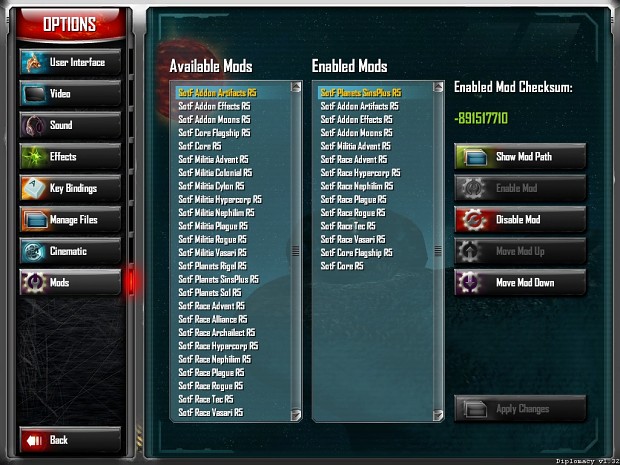 Activates all the stable races and extensions only
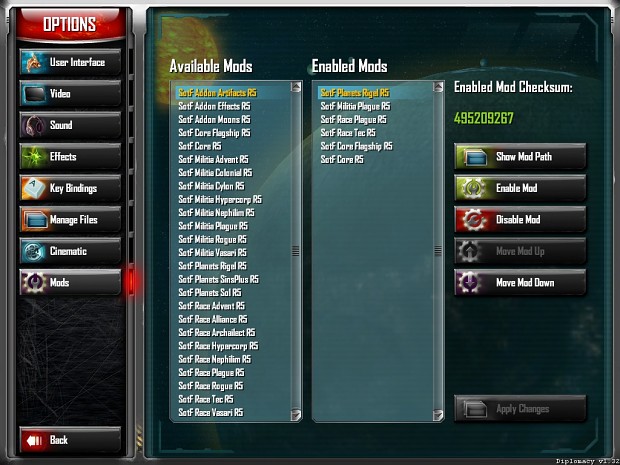
 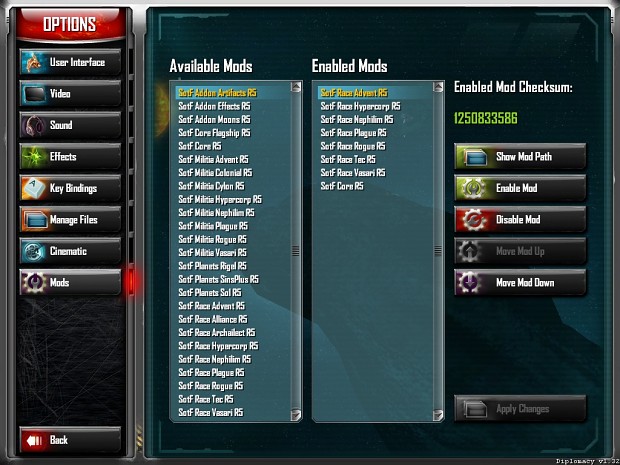 Activates the rigel planet package, plague militia, Plague and TEC races, and flagships
  Minimial activation: activates Plague versus TEC only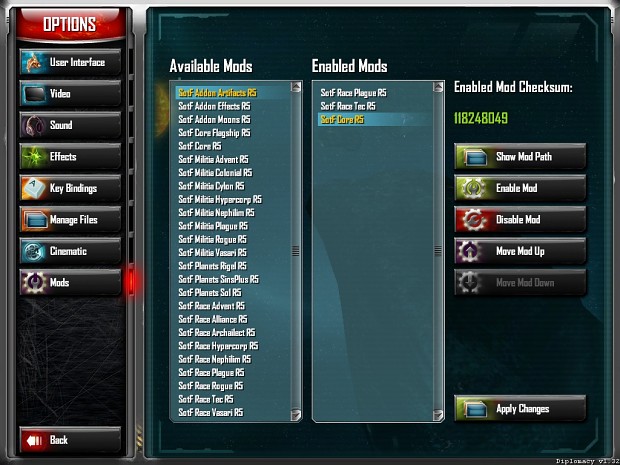
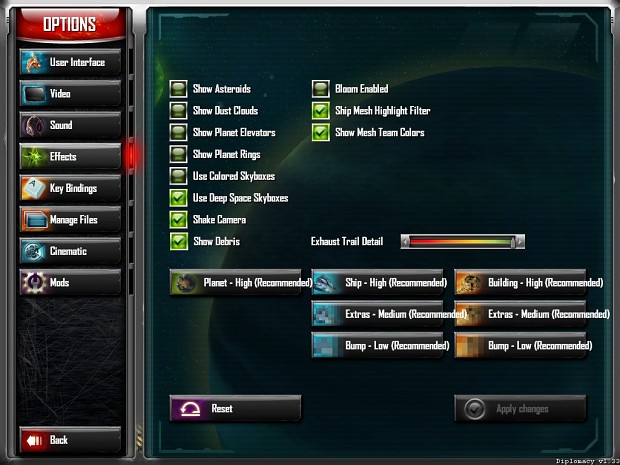
Recommended Effects Settings
(Depending on your system specs and map size you may need to reduce the Detail)
- Planet : Detail - High
- Ship : Detail - High, Extras - Medium, Bump - Low
- Building : Detail - High, Extras - Medium, Bump - Low
Limited Effects Settings
These settings might be possible in smaller maps and/or limiting the amount of features activated. No guarantees and I suggest you monitor you memory usage. Personal experience shows Sins gets unstable on my machine as the process starts to exceed 1.7GB.
- Planet : Detail - Highest
- Ship : Detail - Highest, Extras - High , Bump - Low
- Building : Detail - Highest, Extras - High , Bump - Low
- Show Mesh Team Colors - On
- Show Mesh Highlight Filter - On or Off (Off is darker textures)
Optional Settings (May help with performance)
- Show Cargo Ship Icons - Off
- Show Planet Elevators - Off
- Use Colored Skyboxes - Off
- Show Asteroids - Off
- Show Dust Clouds - Off
Optional User Interface Settings
- Empire Tree (All settings): Off (Typically referred to as trimming the empire tree
- and is reporting to help with lag)
Avoid settings that might cause mini-dumps To avoid the 2GB limit Extra's and Bump should be reduced as much as possible for your system specs. The following labels are guides that can be used to determine which settings are appropriate when enabling new races with this mod. This is only a guide, your mileage may vary and no guarantees are made as to your systems ability to run this mod. 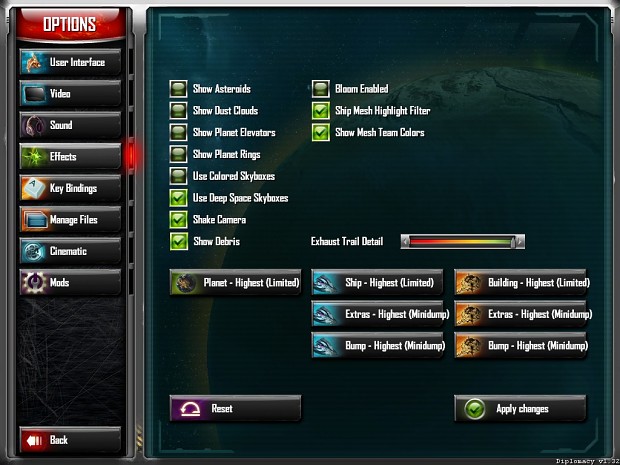 Issue Reporting: Please include the following when reporting issues:
- EnabledMods.txt for the activated mod (see below example)
- What race you were playing
- What races were in the game
- What map was played
- Effect settings
- Ram utilization at time of issue (can usually be captured before the mini-dump is dismissed)
- Save game if possible (uploaded to a file sharing service)
EnabledMods.txt example: EnabledMods.txt: TXT Version 0 enabledModNameCount 10 enabledModName "SotF Militia Advent R5" enabledModName "SotF Race Advent R5" enabledModName "SotF Race Hypercorp R5" enabledModName "SotF Race Nephilim R5" enabledModName "SotF Race Plague R5" enabledModName "SotF Race Rogue R5" enabledModName "SotF Race Tec R5" enabledModName "SotF Race Vasari R5" enabledModName "SotF Core Flagship R5" enabledModName "SotF Core R5"

 Sins Forums


