Only need help to modify Explorer "Details pane" to transparent glass

It's been a long time since I've used Skinstudio.  Im hoping someone can guide me to surgically replace my current boring grey "Details pane" to a tinted glass details pane.  Since I don't have any experience creating images from scratch; nor do I want to learn how to do so just for a single image, I am hoping someone who has access to an existing dark grey tinted Explorer "Details pane" to show me how to use it for my skin.  Im not sure if anyone makes Frankenstein mods like this; but, this is how I was hoping to do it; with someone's help.  I'm even willing to pay an appropriate consulting fee via paypal to help me do this nicely.
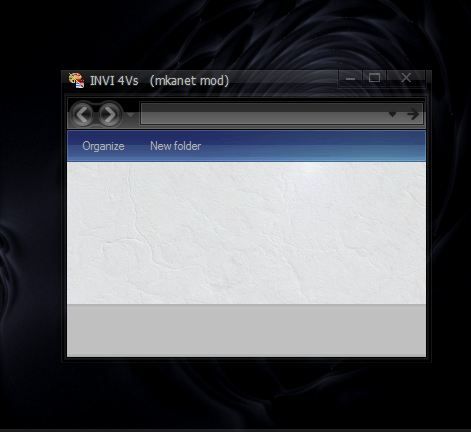


Something like below; except with a glass tinted effect that matches the rest of the Window frame transparency:


6,164 views 1 replies
Reply #1 Top

Ok first find the image in SKS. write down the image name then, find the image in the windowblind folder ( typically located in *Public documents\stardock\windowblinds\ (name of skin)*. open it in with a image editor such as Gimp. If using gimp right clik on the opened image and in the popup menu, scroll down to "layer", in the sub menu that opens scroll down to "transparency" in that sub menu click on add "alpha channel" this will add a transparent Background to the image " tho u cant see it yet"..

next go to the tool bar and select the eraser tool. in the lower section of the tool bar you will see options for the eraser tool.  try these settings: opacity: 25, Brush 19 fuzzy, Scale: 10.  then simply wipe from one side to the other erasing the image, you will see the image start to become see thru but still there, the opacity setting allwos you to control how transparent  the image will become as you erase it. play round with the setting till you find the level of transparency you desire ..

then save the image as TGA with NO RLE compression. now go back in to SKS and select the image if the file was a different image extension than TGA to begin with, such as BMP or jpeg. Apply the skin and you should now see your semi transparent image..

cheers.

And yes most my mods are frankinstonish ;)


**HMM.. i went and tried it with one of my mod's,, It should be working, but it's not, must be a setting some where I'm not seeing in SKS. Maybe someone will wander in and illuminate the situation. I'll keep at it and see if i can figure out why is not showing transparency.**