Default Media Player

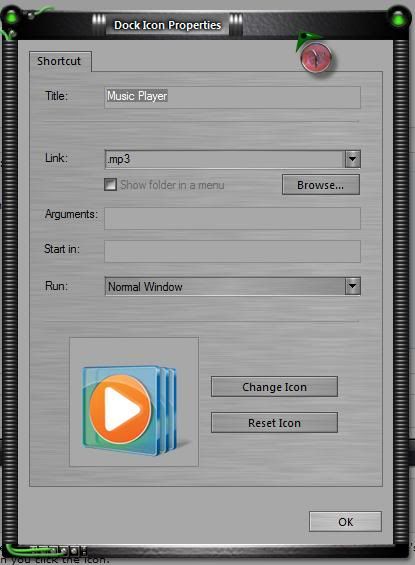
Starting today, when I click on the Media Player icon in my dock it launches VLC Media Player rather than Windows Media Player.  I checked and the default player for mp3 files is WMP, not VLC and yet it keeps launching VLC.  I even set WMP under Default Programs to be the default player for all media it supports but still no change.


If I double-click an mp3 it launches WMP.  How do I change the doc icon (which simply says mp3) to launch WMP again?

2,699 views 5 replies
Reply #1 Top

Set the target of the dock icon to WMP. o_O

Reply #2 Top

I'm right there with ya on that one Bumpkin.........  o_O o_O

Reply #3 Top

The icon doesn't work that way.  I used settings->add->shortcut->music player shortcut to create the icon so there's no target path.  It simply lists mp3 as the target file type to launch when you click the icon.  There's no place to set the target and anyway, why did it change?


As you can see, the shortcut shows the correct WMP icon but somehow still runs VLC.

Reply #4 Top

I created a shortcut for my dock then right clicked on it. This is what I got. Little bit different. Could be the link needs to be changed?

Reply #5 Top

That was my workaround but it's strange that Windows knows WMP is my mp3 launcher but somehow OD+ thinks it's VLC.