Grrr, Firefox hates flash

It had been a long time marriage, even on this temporary machine after I got VISTA installed and all. It worked fine, then "poof" they no longer like each other. I haven't added any new addons, nothing. So, after installs and uninstalls and reinstalls, even dropped the flash down to release 10 (which worked for some pages). I'm trying to find what other things it might be. Is there anything in the apps that might bug flash into not being nice to Firefox?  It seems to run OK until you get to a flash app in a web site. Then it will run ok there - for a minute.  Even if you just let it sit it will eventually freeze up Firefox with no turning back. Sigh. I hate Opera really, and loath Internet Explorer.

6,453 views 19 replies
Reply #1 Top

How about Chrome?  Chrome is a nice browser and supports Flash.  I used it for gaming as both IE 8 and Firefox had problems with that particular game.  OR break down and get Windows 7.  You will love it - promise! :thumbsup:

Reply #2 Top

I also had issues before updating to the last Shockware Flash plugin release 11.1 r102

here you go for your full Firefox plugins update http://www.mozilla.org/en-US/plugincheck/

hope this helps ! ;)

Reply #3 Top

Quoting Cameochi, reply 1
How about Chrome?  Chrome is a nice browser and supports Flash.  I used it for gaming as both IE 8 and Firefox had problems with that particular game.  OR break down and get Windows 7.  You will love it - promise!

I got Windows 7 on my real computer. This one has a hard time running Vista Ultimate 64. I'll port everything back when I get a new HD - probably next Christmas :(


The thing that hangs me up are the plugins. Things like Speed dial (the real one with tabs - not Opera's puny one) and FTP and AdBlocker (Porn blocker too) So many goodies that Opera just don't have. I can't imagine Google allowing an "ad blocker" type plugin - after all a great deal of their income is web page ads.


I just finished a total wipe of Firefox, total wipe of  Flash. First I tried Flash 10 and it failed. Then I tried Flash 11 x64 and it failed even worse. Now I think I will dig up a copy of x32 as I read someplace that Vista 64 is not supported in any way, shape, or form by Adobe and a million others. PLUS they tell me, you are not to use a 64 bit add-on with a 32 bit app.

So...

Sigh...


Reply #4 Top

Liz...you can always trying using an older version of firefox. I'm still using 3.5 because newer versions don't support some of the addons I use and as soon as I saw that I just went back to an older version. It works just fine as does flash.

Reply #5 Top

Some add-ons with Firefox don't play nice, especially with Flash. Try disabling the add-ons and see what happens.

Reply #6 Top

3.6 here and everything works fine. Practice safe surfing and you should be fine.

At work just about everything we do is cloud based and sometimes it's got to drive the IT people nuts! We recently updated the Macs to snow leopard. At least now we are down to three browsers now. Some stuff works best with Chrome, some with Firefox but it's got to be 3.6 and then there's that one thing that only works with Safari. Thing is it seemed like different people had different browsers or versions of browsers so there were some who simply couldn't do their jobs. They had to wait for IT because an IT person had to install and update whatever was needed because we have no admin access. My job is essential so they got me going right away.

I like to be able to get at my job from home so if there's a problem when I'm off I don't have to drive down there. It was amazing how easy it was to get the stuff working at home on my Win7 machine. What took hours at work mainly waiting for the IT guy, took minutes at home. At home I control the horizontal and the vertical so there you go.

As the cloud becomes more and more predominate the browser becomes more and more important.

Reply #7 Top

Quoting WebGizmos, reply 4
I'm still using 3.5 because newer versions don't support some of the addons I use and as soon as I saw that I just went back to an older version. It works just fine as does flash.

Hi WebGizmos this is the Firefox 10+ very good new :

"Version 10’s headline new feature will appeal to those frustrated with having to wait for browser extensions to be recognized as compatible by new builds: from version 10 onwards, browser extensions will automatically be considered compatible unless specifically marked otherwise. " check it on  Betanews

before you had two possibilities 1) to tweack the "about:config"  2) to use the Addon Compatibilty Reporter

hope this helps ;)

Reply #8 Top

Quoting frankell, reply 7
Quoting WebGizmos,
reply 4
I'm still using 3.5 because newer versions don't support some of the addons I use and as soon as I saw that I just went back to an older version. It works just fine as does flash.

Hi WebGizmos this is the Firefox 10+ very good new :

"Version 10’s headline new feature will appeal to those frustrated with having to wait for browser extensions to be recognized as compatible by new builds: from version 10 onwards, browser extensions will automatically be considered compatible unless specifically marked otherwise. " check it on Betanews

before you had two possibilities 1) to tweack the "about:config" 2) to use the Addon Compatibilty Reporter

hope this helps

Sounds good frankell...but that "unless specifically marked" part would keep me from updating. When they get to the point where all the addons and extensions work then I would update. I just hate uninstalling something only to find out the addons I use are the ones "specifically marked" to not be compatible...and then having to go through all that uninstalling and reinstalling again. And honestly I'm perfectly happy with the 3.5 build since it's works fine it's fast and I'm always careful about where I surf or what I open.

Reply #9 Top

actually I skipped all the versions from 4 to 8 and I always used the about:config trick

1. Open Firefox

2. Write about:config in the address bar. Click “I’ll be careful, I promise!” button.
This will open a list about Firefox not-so-secret configuration.

3. Right-click anywhere. Choose New > Boolean.

4. Enter  extensions.checkCompatibility.10  into the next window and click OK.  (in the future: extensions.checkCompatibility.11.0 for Firefox 11, and so on)

5. Select false value at the next window and click OK.

6. Once again, right click at anywhere, select New > Boolean, and click OK.

7. Enter  extensions.checkUpdateSecurity  into the next window and click OK.

8. Select false value at the next window and click OK.

you’re done! You can begin enabling your disabled add on, restart your Firefox, and voila! Your favorite extension is back!

you can just have a try with the portable version  and see what happens ! ;)

Reply #10 Top

I tried FF version 3.5 or whatever you can download. No joy there. The thing that is so upsetting is that I hadn't added any plugins, I hadn't removed any, it was the same version FF that had been running all along, it was the same version Flash (I think)  I've ran it without plugins. I completely removed FF - including deleting anything that say "Mozilla" Nothing. Same with Flash. So I went ahead and put the downloads back (finding and reinstalling because they had all been deleted)

I will try what frankell said, I haven't come across that one yet.

Reply #11 Top

frankell {{ big hug }} So far, better than anytime up to this. There is this message in the Plugins page: Add-on update security checking is disabled. You may be compromised by updates. Enable Is this because of the code? I expect that it isn't a good thing to click it.


Anyone see this site? http://betterbadnews.com It is the one I use to check Flash. And then there is http://webpaws.net This is my own site. It has given me so much grief. I finally took out the Weather Underground bit that streams the stills that my web cam sent them. I think I'll put it back and see what happens

Reply #12 Top

Quoting LizMarr, reply 11
here is this message in the Plugins page: Add-on update security checking is disabled. You may be compromised by updates. Enable Is this because of the code? I expect that it isn't a good thing to click it.
ù

Hi Liz you are right ! don't care about that message but if you already use the Stylish addon or you know about the Firefox Chrome folder

just add as a new style (or add the next lines in the userChrome.css file)

@namespace url(http://www.mozilla.org/keymaster/gatekeeper/there.is.only.xul);
@-moz-document url-prefix(chrome://mozapps/content/extensions){
/*remove incompatible icons blocking extension icons*/
#extensionsView richlistitem[compatible="false"] .notifyBadge,
/*remove incompatible message from extensions*/
#extensionsView richlistitem .incompatibleBox,
/*remove addon compatiblity checking message*/
#addonsMsg>stack{display:none!important}
/*incompatible extension icon border*/
#extensionsView richlistitem[compatible="false"] .addon-icon{border:solid .1pt red!important} }

  :thumbsup: ;)

Reply #13 Top

I must need to know the secret handshake on this one. I even called it usrChrome and build it a new directory as the chrome one was further up the tree.  So I installed Stylish and started again. That is a slick way to edit code. I had uninstalled a bunch of those, including Stylish, when trying to debug this. Actually a total Firefox wipe tends to do that for a person.  So, I must be leaving something out.

userChrome.css (spelled as seen)

@namespace url(http://www.mozilla.org/keymaster/gatekeeper/there.is.only.xul);
@-moz-document url-prefix(chrome://mozapps/content/extensions){
/*remove incompatible icons blocking extension icons*/
#extensionsView richlistitem[compatible="false"] .notifyBadge,
/*remove incompatible message from extensions*/
#extensionsView richlistitem .incompatibleBox,
/*remove addon compatiblity checking message*/
#addonsMsg>stack{display:none!important}
/*incompatible extension icon border*/
#extensionsView richlistitem[compatible="false"] .addon-icon{border:solid .1pt red!important} }


I can't find the one I made with Stylish, but it was a cut and paste.

What is this supposed to do?


Reply #14 Top

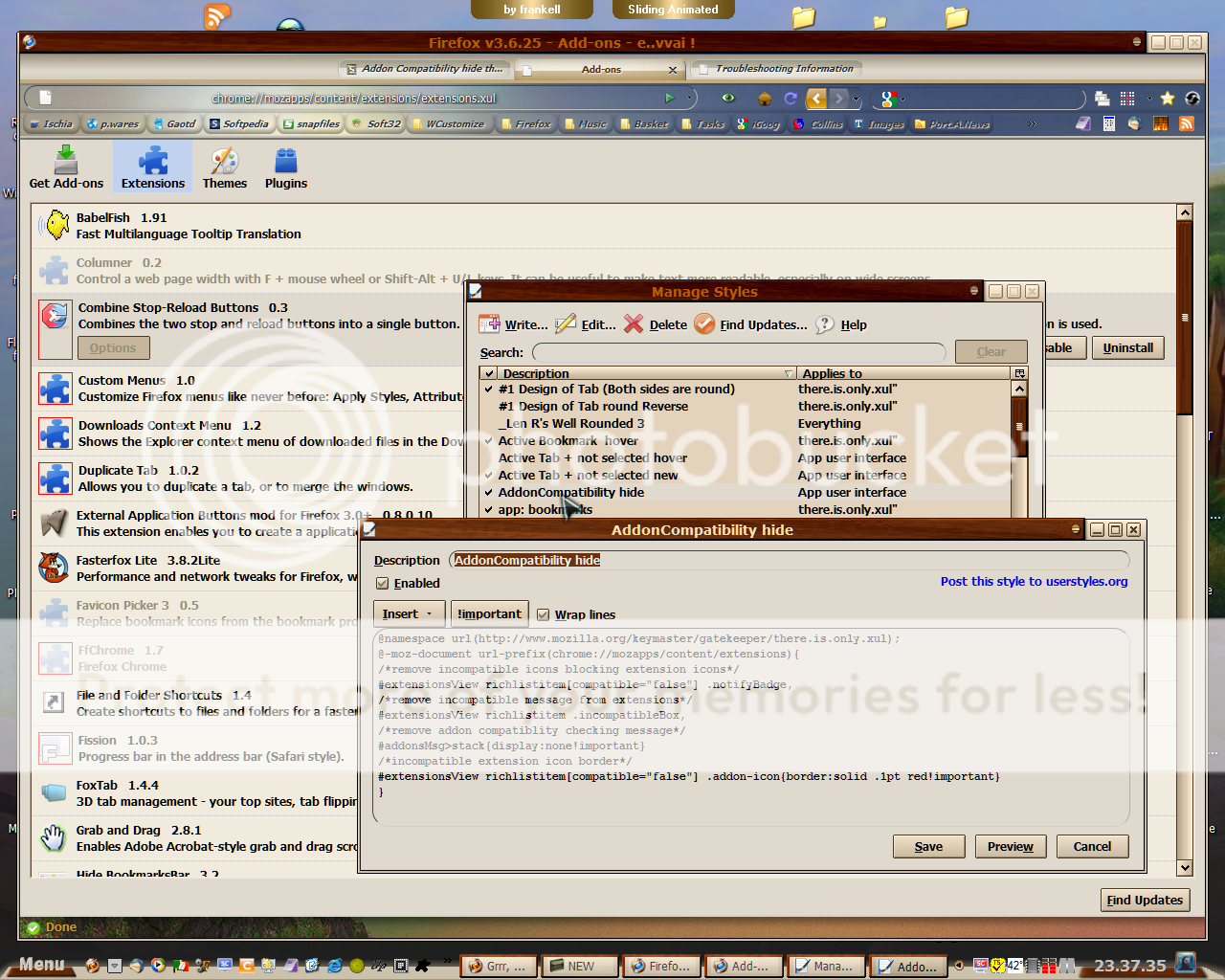
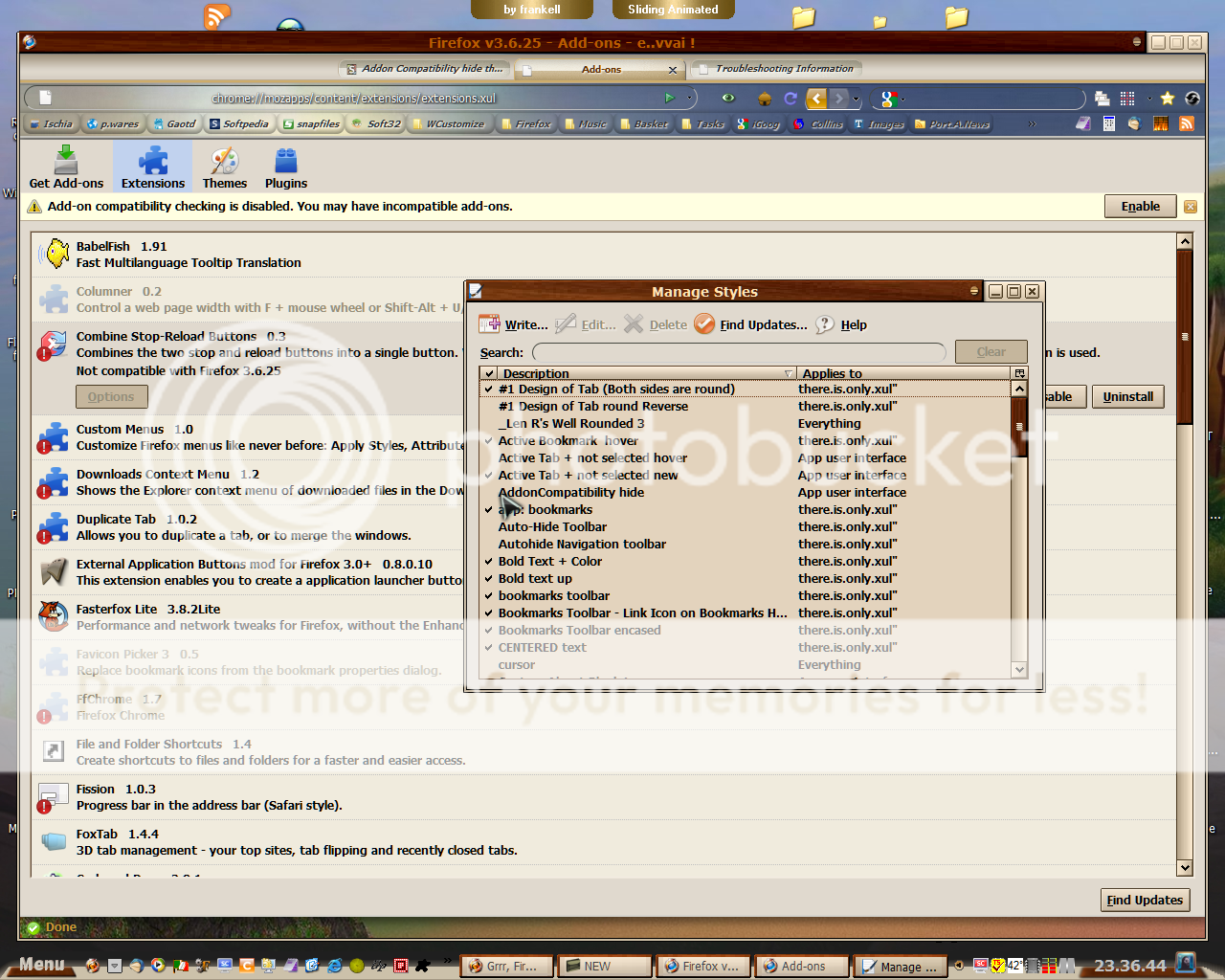
ok let's go for the Stylish style option (I made the shots on my Firefox portable 3.6.25 )

the first shot is with the style checked

the second shot is with the style unchecked

Reply #15 Top

Happy birthday to me. Look what the cat drug home. Flash seems to be working now. Dunno why, it's a Java exploit. I can't find but 3/4 a page in Google about it.

Reply #16 Top

It was a Java exploit that nearly toasted my laptop. A DNS Trojan.

Reply #17 Top

Well, I fixed flash. I moved back to my other laptop... I thought the other was fixed until I went to youtube. Even the hack didn't work. It got another of those bugs too. I wish the log said where they come from - this internet I guess.


Flash is fixed but SoundPackager don't work. SoundPackager worked on the Vista machine. It don't matter, I wasn't using it anyway.


Reply #19 Top

Quoting Disturbedcomputer, reply 18
to Find again

It'll be here when you get back. No worries.