On the verge of tears over a stupid game problem

I cannot find the mod folder , I went to "tools /folder option / view / unhide hidden folders and after i did this it still does not show the mods folder , then I went to " Applicaiton data folder" and there is notting there for sins of a solar empire or iron clad games.                                   

I wish to add mods to Diplomacy (no folder for mods in that folder)

somebody please help me, at witts end here.

I have been all over the net and tryed many things but still no freaking mod folder

96,258 views 18 replies
Reply #1 Top

The easiest way to find where to place the mod is through the game menu. Select "Options" in the main menu the select "Mods" then "Show Mod Path".Pressing "Show Mod Path" should create the folder if there is not one already.

Options Button  Mods Button  Show Mod Path Button

SoaSE.weebly.com/placing-mods.html


+1 Loading…
Reply #2 Top

I tryed that and notting appeared what so ever, Tryed it a few times. 

I have been to that site you posted before I posted here.


(Note: my game is updated and current)

Reply #3 Top

Is that section read only or on some network share that might be blocking writing to?
Are you Admin or restricted user? 

Can you right click and create a folder in the Mods folder?

Reply #4 Top

I'm the Admin, What do you mean by read only and network share ? (sorry I don't understand what your saying regarding that I'm not very computer savy)

Reply #5 Top

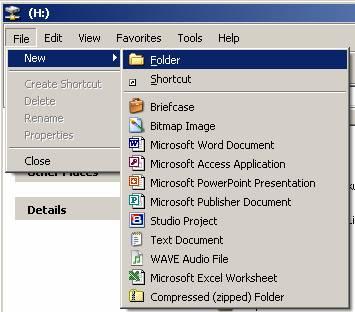
Right click the folder that the mods go into and select Properties and check the Read Only status. Or right click on an empty area in the folder and and select New --> Folder. If it will not let you create a folder you are locked out of editing that area. If you can create a folder try to name it 
Mods-Diplomacy v1.31

Reply #6 Top

Ok i created the folder you said to create with the name you gave me to name it and put a mod into it and i still get no result.

Should i shut impulse and restart it and then load the game and see  if the mods there ? (did not work)

I put the mod folder into the Diplomacy folder in the file directory.

Reply #7 Top

Are you looking in the right place?  It's NOT in the main "c:\Sins of a Solar Empire" (or whatever letter you give to the harddrive) directory.  Personally I absolutely HATE where they chose to put all the mod and settings files.  Why couldn't you guys (Devs) have just put it as a subfolder in in the Game's main directory? 

For Windows 7, (no matter where you installed the game) it creates the mod and settings directory way off in c:\users\yournamehere\AppData\local\Ironclad Games\Sins of a Solar Empire

I'm not sure exactly where Sins puts it for other versions of Windows, but it should still be similar to the Windows 7 location.

Btw, since I work on mods and go into the modding directory so much, I finally got so fed up that I just created a shortcut to the modding directory on my desktop.

Reply #8 Top

Quoting Peter1x9, reply 7
For Windows 7, (no matter where you installed the game) it creates the mod and settings directory way off in c:\users\yournamehere\AppData\local\Ironclad Games\Sins of a Solar Empire

This is also the directory for Vista.

@OP- the directory is a hidden one on Vista&Win7. If you're using said OSs, make sure to tic the "show hidden files&folders" option.

+1 Loading…
Reply #9 Top

Quoting Peter1x9, reply 7
Personally I absolutely HATE where they chose to put all the mod and settings files. Why couldn't you guys (Devs) have just put it as a subfolder in in the Game's main directory?


B/c to get the "Games for Windows" title or whatever you call it...the Devs had to put it into the AppData folder.

So any rage should be put towards Mircosoft not IC. :)

Reply #11 Top

At some point could mods be installed via an exe. file?

Reply #12 Top

Quoting wbino, reply 11
At some point could mods be installed via an exe. file?

I Have seen mods install via EXE but they are not easy to make and some do not trust exes because you can change or add a lot more files than the mod.

The easiest way is for Sins installer to add shortcuts in the Start Menus -> Sins directory that point directly to the mods and maps folders.

+1 Loading…
Reply #14 Top

and here is my standard infor for locating the mods folders for EACH of the expansions (assuming the current versions, and that each of the expansions has been run ONCE to create the folders.

assuming you have sins 1.191/entrenchment 1.051/diplomacy 1.31(the current non-beta versions), AND your windows is installed on the 'C:' drive,  the Mods NEED to be placed here for xp
C:\Documents and Settings\'user name'\Local Settings\Application Data\Ironclad Games\Sins of a Solar Empire\Mods-v1.191
C:\Documents and Settings\'user name'\Local Settings\Application Data\Ironclad Games\Sins of a Solar Empire\Mods-Entrenchment v1.051
C:\Documents and Settings\'user name'\Local Settings\Application Data\Ironclad Games\Sins of a Solar Empire\Mods-Diplomacy v1.31

or here for vista/windows 7
C:\Users\'user name'\AppData\Local\Ironclad Games\Sins of a Solar Empire\Mods-v1.191
C:\Users\'user name'\AppData\Local\Ironclad Games\Sins of a Solar Empire\Mods-Entrenchment v1.051
C:\Users\'user name'\AppData\Local\Ironclad Games\Sins of a Solar Empire\Mods-Diplomacy v1.31

NOTE the first two folders after the 'user name' are hidden , so to see them you must first click on 'tools' then 'folder options', then 'view', then click on 'show hidden files& folders' then click ok, then you will be able to browse your want to the folder. I suggest when you find the folder that you create a shortcut to it on the desktop

NOTE 2 the 'user name' in the above paths is your WINDOWS login user name, eg Administrator

and if the mod you want to use is from an EARLIER sins/entrenchment version place the mod in the mods folder FOR THAT version eg mods-entrenchment v1.03, then download and run my mods updater from the latest version archive which will have the same number as the vanilla sins version number, and AFTER updating the mod(s) to the current version for any mods of pre 1.04 entrenchment ALSO run the manifest maker on ENTITY manifests on EACH of the mods EXCEPT for total conversion mods

the actual cause of your failure to find the modss folder(s) could be the (xp Local Settings)(vista/win7 appdata) folder, and M$%^%^&%&%&%&%&%^& is the cause of this fiasco.

harpo

+1 Loading…
Reply #15 Top

Quoting -Ue_Carbon, reply 9

Quoting Peter1x9, reply 7 Personally I absolutely HATE where they chose to put all the mod and settings files. Why couldn't you guys (Devs) have just put it as a subfolder in in the Game's main directory?


B/c to get the "Games for Windows" title or whatever you call it...the Devs had to put it into the AppData folder.

So any rage should be put towards Mircosoft not IC.


Ah that explains it.  The tendrils of Microsith reach out further and further...world domination is inevitable. 


:P

+1 Loading…
Reply #17 Top

You are not looking in the right place if you cant find it. The game store settings in there so it has to be there :)

The application data cant be empty as windows wouldn't function properly without files there.


Search for the file user.setting. This file is in Settings sub folder one level deeper than the folder you need to find.

Reply #18 Top

Quoting -Ue_Carbon, reply 9

Quoting Peter1x9,
reply 7
Personally I absolutely HATE where they chose to put all the mod and settings files. Why couldn't you guys (Devs) have just put it as a subfolder in in the Game's main directory? 
 

B/c to get the "Games for Windows" title or whatever you call it...the Devs had to put it into the AppData folder.

So any rage should be put towards Mircosoft not IC.

I dont think that is entirely accurate. The deal is: some of the data is stored in your profile, because it is the part of the game used by you. The rest of the game files are in \program files because that is the rest of the game. This type of seperation means you do not have to 'choose a profile' when you log into sins. It has your default settings, save files and all that setup exactly the way you want it. If another user of the same computer logs in and goes to play sins, they will have completely different default settings, save files and all that, which also will in no way affect yours. The goal here is to leverage the use of window's profiles to avoid multi-user issues. Most of the time, this is completely a waste of time (I especially hate the ones that put stuf in the my documents folder).

Now, all that said, it probably is true that "Games for Windows" branding forces this profile setup. So, it may have contributed to the decision, but I would guess that even if it wasn't a requirement, it might have went down that way.