ZubaZ ZubaZ

DeskScapes 3 Beta 1 Bug reports

DeskScapes 3 Beta 1 Bug reports

A DeskScapes beta has been released.  This build has a new user interface, effects that can be applied to dreams, and works on XP, Vista, and Windows 7.  Sadly, the effects are Windows Vista and Windows 7 only.

Double-clicking a dream no longer loads a dream.  You will need to use the "Apply changes" button.

Post anything that looks odd.  Make sure to give us your system information including your video card, your OS (including 32 or 64 bit), and if it's hard to explain (or even if it isn't) a screenshot.

You may want to ensure you have the latest DirectX9 runtimes (even on Win7) by installing the following : http://www.microsoft.com/downloads/details.aspx?FamilyID=2DA43D38-DB71-4C1B-BC6A-9B6652CD92A3&displaylang=en

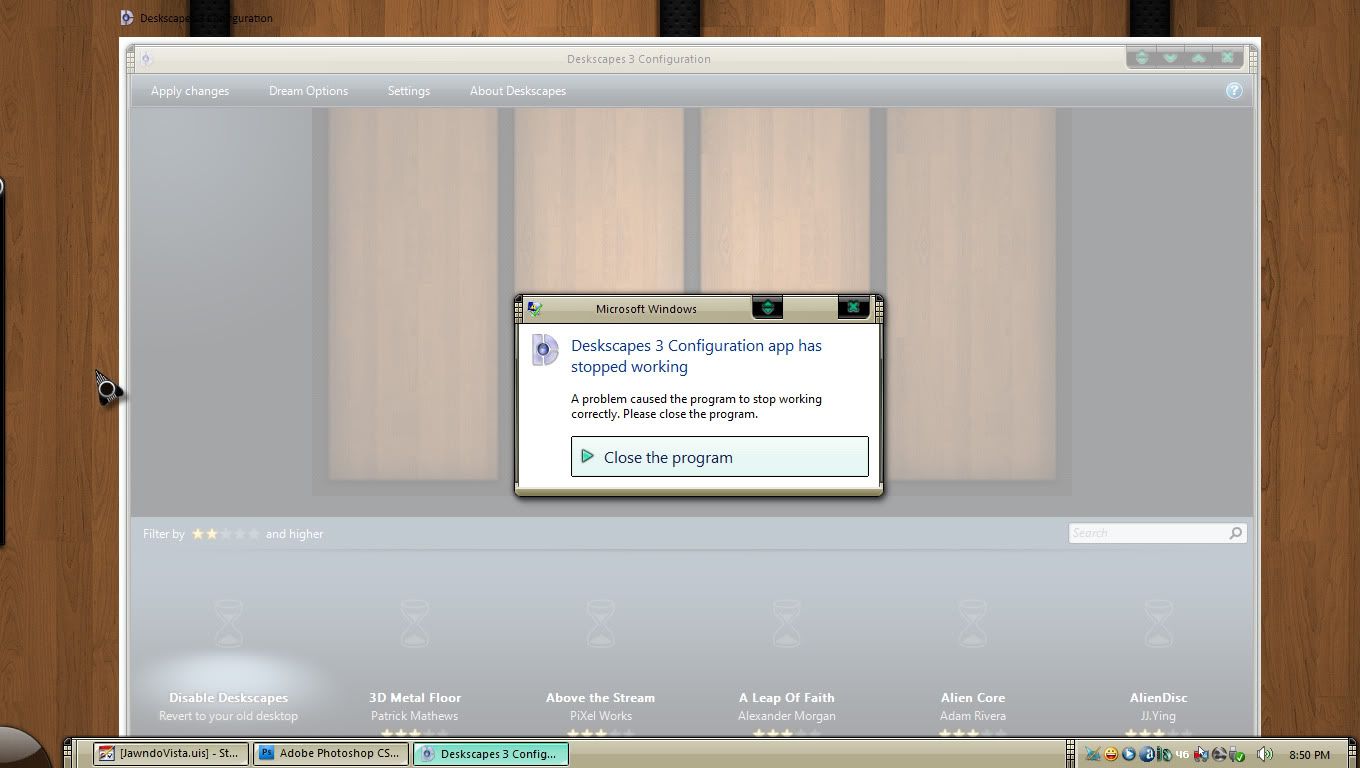
There is an issue on some machines with some dreams where the UI may crash out when it builds the dream list.  There will be an update on Friday morning to resolve this.

337,573 views 129 replies
Reply #26 Top

I removed 38 dreams :)

I will add them one at a time to see which are problems.

So far:

  • 2D3DCubic
  • 3Molecules
  • Alternate_Reality
  • BlueHank
  • WelcometotheMachine
  • AUBars
  • AuroraBurn
  • AustraliaSquare
  • BlueRing
  • BlueTechWall
  • Cascades
  • ChromeGlobe

All work, in that they don't crash the interface.

Reply #27 Top

On an XP SP3 Athlon64 3G RAM ATI Radeon 3600 1G system update to 2.9 fails and crashes system. Even error reflected in Safe Mode. Error : unable to find d3dx9_40.dll. Real concern if able to have successful System Restore session.

Reply #28 Top

Addendum: I have been able to Restore to 2.5 Deskscapes and system working ok.

After downloading DirectX update from the link, update took smoothly-

Very nice layout - wish I had a laptop to show others what has been achieved so far . . .

Thanks Neil

Reply #29 Top

It looks nice. But:

When I try to select the "Stars" dynamic dream, it instacrashes.

"Desktop Collage" preview is all buggered up.

(Vista Home Premium x64 swedish)

On a sidenote:

Pick a picture of a nice landscape and load it as background on the water dream, set drops to occur with a minimum time between drops and put drop size to 75% or so. Finally, switch on extreme motion blur effect... That's really eerie :P

Reply #30 Top

neil, if it matters, i'm using an ati 4870 with the newest cat drivers, win 7 ultimate 64.

Reply #31 Top

Apparently it was Redside Cove Triggered  By amitsaran that was causing the problem for me.


When I added it to the folder and started dreamscapes, it crashed.

when I removed it and started dreamscapes it works!


Now to boot into Win 7 and play with it there!


Reply #32 Top

yah, when i updated to the beta it did launch, but when i loaded my megabites of dreams it crashed and also i had some of the dreams in separate folders i.e. nature, planets ect.

Reply #33 Top

Quoting paulmr, reply 27
On an XP SP3 Athlon64 3G RAM ATI Radeon 3600 1G system update to 2.9 fails and crashes system. Even error reflected in Safe Mode. Error : unable to find d3dx9_40.dll. Real concern if able to have successful System Restore session.

There is an update on the servers which should solve this, or download the latest DX runtimes from the link on the first post.

Reply #34 Top

The issue with the UI crashing out on some machines and with some dreams has been found and should be resolved in the next set of updates.

Reply #35 Top

Quoting mickeko, reply 29
It looks nice. But:

When I try to select the "Stars" dynamic dream, it instacrashes.

"Desktop Collage" preview is all buggered up.

(Vista Home Premium x64 swedish)

On a sidenote:

Pick a picture of a nice landscape and load it as background on the water dream, set drops to occur with a minimum time between drops and put drop size to 75% or so. Finally, switch on extreme motion blur effect... That's really eerie

I am not aware of any problems with the desktop collage preview on Vista.  There is a known issue with the Photo dream preview and some of the other dynamic dreams don't preview quite right on XP.

Reply #36 Top

an original deskscapes 3 and two updates in one evening, neil?


Reply #37 Top

Mine won't run. I can't run any dreams. They are no longer listed under Personalize, choose desktop background. My dream manager from Master Baron won't even load a dream!!!!  Rollback city!!

Reply #38 Top

with the latest update, all is well for me. thanks, neil. i appreciate your hard work and efforts.

Reply #39 Top

Quoting RedneckDude, reply 37
Mine won't run. I can't run any dreams. They are no longer listed under Personalize, choose desktop background. My dream manager from Master Baron won't even load a dream!!!!  Rollback city!!

Reduced 44%

Original 1360 x 768

Dream manager from Master Baron does not appear to be able to detect Deskscapes 3.  I don't know if he plans to update it or not for Deskscapes 3.

The dreams will no longer be shown under personalize, instead you should use the new UI.

The very latest update on Impulse should hopefully resolve your crash issue as it did for IAmPas just above this post.

Reply #40 Top

The very latest update on Impulse should hopefully resolve your crash issue as it did for IAmPas just above this post.

And it did. I regret having a dream manager, for which I paid, that no longer works now. It would seem to me that stardock should fix it so that the dream mgr. does see them. I paid for the program, and now it don't work, bummer.

Other than that, I love the interface.

Reply #41 Top


Neil, thanks. The newest update fixed the dreams of mine that was crashing it out. You save me some re-encoding work. :thumbsup:

Reply #43 Top

Quoting Neil, reply 35

I am not aware of any problems with the desktop collage preview on Vista.  There is a known issue with the Photo dream preview and some of the other dynamic dreams don't preview quite right on XP.

Well, I'm very aware of it. It pops up the desktop collage for a fraction of a second then goes all black. Periodically it flashes into view again.

Also, right clicking on a dream and selecting "Set As Desktop Background" doesn't work on any dream.

Reply #44 Top

mickeko: There shouldn't be a set as desktop background option on .dream files.  Did you upgrade over 2.5?

Reply #45 Top

Quoting RedneckDude, reply 40

The very latest update on Impulse should hopefully resolve your crash issue as it did for IAmPas just above this post.


And it did. I regret having a dream manager, for which I paid, that no longer works now. It would seem to me that stardock should fix it so that the dream mgr. does see them. I paid for the program, and now it don't work, bummer.

Other than that, I love the interface.

Unfortunately I have no idea what that app is looking for.  There have been changes in how Deskscapes 3 handles registry settings and many of the dll files included with Deskscapes 2.5 are no longer included.

What did you use the Dream Manager for?


Reply #46 Top

Quoting Neil, reply 44
mickeko: There shouldn't be a set as desktop background option on .dream files.  Did you upgrade over 2.5?

Yes, I did. Well, Impulse did it for me really, but that might just be semantics. :P

Reply #47 Top

Quoting RedneckDude, reply 40

It would seem to me that stardock should fix it so that the dream mgr. does see them. I paid for the program, and now it don't work, bummer.

I don't see your point dude, why does it seem to you as Stardock should fix it? They didn't sell it to you.

Reply #48 Top

Is this Version exclusive to object desktop customers only?
I ask because I purchased DeskScapes a few days ago as stand alone product, and even though the update-date in Impulse has changed, I can not install the new Version. Still says not supported by your OS (Win 7 Pro MSDN).