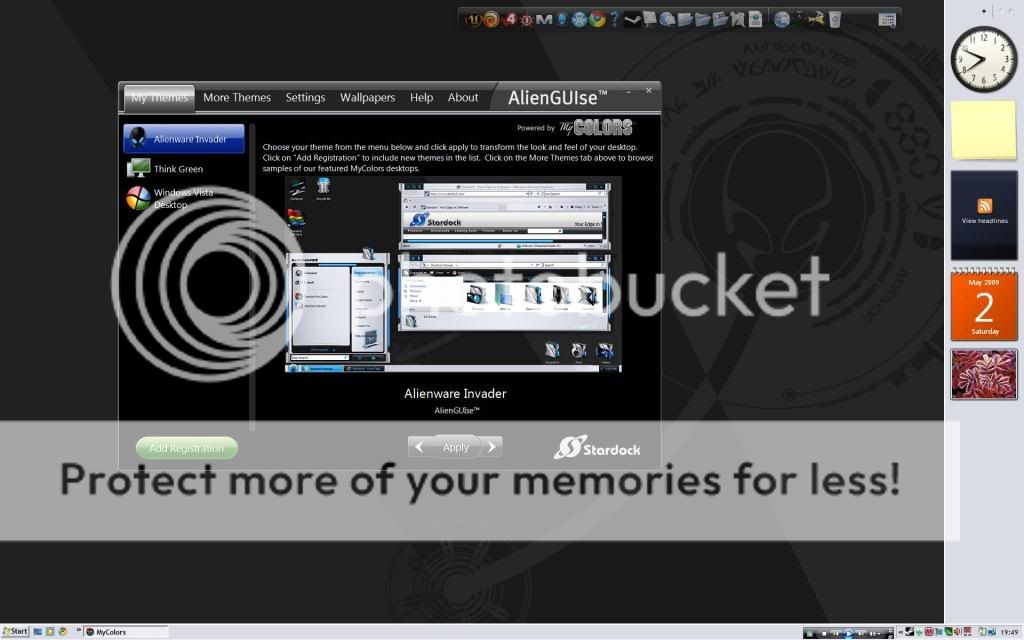
AlienGUIse invader theme doesn't apply propperly (vista 32)

Hello, i have recently recieved my Alienware m15x and decided to try out the invader theme on the website. Ive never skinned my display before but it looked simple. Anyway i downloaded and installed the AlienGUIse vista client and installed it, all went well, restarted, opened it up and went to invader and clicked apply. All that happens is all icons and taskbar etc go to very old looking xp style and wallpaper changes. Any help would be much appreciated, thanks

21,082 views 17 replies
Reply #1 Top

Crapped up my box too. I think it's no longer supported. Did you try it from the alienware website? If so, ask them. MyColors

stopped supporting it as far as I know.

Reply #2 Top

yes it was off their website, is there an older version of mycolors available that does support it? thanks

Reply #3 Top

Darken posted these instructions long ago. I followed them to get Invader for MyColors,WindowBlinds and IP.

"Manual installation" under Vista >

Requirements:
- ObjectDesktop Standard/Ultimate (Installed via Impulse/SDC)
- MyColors (Installed via Impulse or Free version)
- WinRAR (or 7-Zip)


1. Right click on AlienGUIse_Vista.exe and 'Open with WinRAR'
2. Extract Data/OFFLINE folder
3. Find this file: Alienware Invader.mycolors
4. Drop this file here: C:\Users\Public\Documents\Stardock\ThemeManager

Bonus (Vista):
1. Right click on Alienware Invader.mycolors and 'Open with...' > WinRAR
2. 'Extract to' with WinRAR
3. Copy this folder (IconPackager): Alienware Invader (\Alienware Invader\IconPackager) to here: C:\Users\Public\Documents\Stardock\IconPackager
4. Copy this folder (WindowBlinds): Alienware Invader (\Alienware Invader\WindowBlinds) to here: C:\Users\Public\Documents\Stardock\WindowBlinds
5. Open WindowBlinds > 'Skin options' > 'Rebuild list'

But how do you install it on XP??? you may ask.

Only the path is different on XP > C:\Users\Public\Documents\Stardock\ > Documents and Settings...

I am running Vista 32bit. 

LINK to OP,in case you also want Xenomorph.

Reply #4 Top

followed instructions, still not working, heres a pic after applying


Reply #5 Top

 First,did you reboot after installing? Did you completely remove all traces of your earlier effort? You might want to uninstall everything with Revo Uninstaller, reboot, then reinstall it all. Also,do you have WindowBlinds installed? It may be required to make it work.

Reply #6 Top

no did not, i don't have windowblinds installed because it doesnt allow both Mycolours and windowblinds to be installed at same time. Im going to reboot and try again now. I have got the media player skin working now though which looks great


Reply #7 Top

im going to do as you said and reinstall everything, il post whether or not its been successful when im done later

Reply #8 Top

because it doesnt allow both Mycolours and windowblinds to be installed at same time.

That's news to me.I have both MyColors and WB's installed along with ThemeManager. They can all be installed at the same time,without fear of any conflict.

I agree that is one killer Media Player.B)

Reply #9 Top

Media player created by The Skins Factory. Just thought I'd throw that in there. Actually the core graphics for this theme were designed by us as well.

Reply #10 Top

Quoting Wizard1956, reply 8
because it doesnt allow both Mycolours and windowblinds to be installed at same time.

That's news to me.I have both MyColors and WB's installed along with ThemeManager. They can all be installed at the same time,without fear of any conflict.


I agree that is one killer Media Player.

In fact, they share files. The best way to do it is to install MyColors first, then Windowblinds. That's Curt's advice.

Reply #11 Top

il try that, but the installer was what actually said that it couldn't start because of it earlier. :S

Reply #12 Top

ah it is just the shareware version that cant, and im not willing to pay for a theme, especially as it is supposed to be free

Reply #13 Top

The Alienware theme is free,as is MyColors so it must be a limitation of the shareware version of WindowBlinds. That's too bad,but if you really like customizing your computer,the paid version is money well spent,imo.

Media player created by The Skins Factory.

My apologies,TSF,I should have mentioned that.Interestingly enough,Stardocks Logo is still present on the Alienware page for downloading the theme and WMP,while the TSF logo is not.I can't say that I blame you for no longer offering it on your site.


Reply #14 Top

Quoting CarnageJC, reply 12
ah it is just the shareware version that cant, and im not willing to pay for a theme, especially as it is supposed to be free

*edit. Post cross posted. sorry!

Wiz, thanx for noticing!

Reply #15 Top

MyColors Ankh Now Free for Object Desktop Subscribers

Uh,that's nice Doc,but he is trying to install Alienware Invader,not Ankh.

Clues: "the invader theme" ,"installed the AlienGUIse vista client" , "went to invader and clicked apply".  :rolleyes:    

Reply #16 Top

Quoting Wizard1956, reply 15
MyColors Ankh Now Free for Object Desktop Subscribers

Uh,that's nice Doc,but he is trying to install Alienware Invader,not Ankh.

Clues: "the invader theme" ,"installed the AlienGUIse vista client" , "went to invader and clicked apply".     

This cross posted will edit.