Island Dog Island Dog

How Many Computers Do You Use During the Day?

How Many Computers Do You Use During the Day?

Traveling around to different forums and conversing with all types of people throughout the day, I sometimes get a chance to find out what people do, and most interestingly, see their computer setups.  I have talked to people with some crazy setups, and people with just a simple setup of one PC, even if they have a job which involves heavy computer work.

This is my current setup:

DSC_0001

Going from left to right I will start with my Mac Mini with a 19” widescreen running Leopard.  I use this for some personal work, and I also use this as my “communications” machine.  What I mean by that is, this is the computer where I run things like Twitter, IM, Skype, IRC, etc.  It lets me do more work on my other two PC’s and keeping this open for everything else.  I have an Apple wireless keyboard connected to it, which I really like as it’s very small so it saves quite a bit of space. I have no complaints here, but I really need to upgrade to a bigger monitor.

Next up I have my “main” PC which is a custom built rig with an Intel Core 2 Duo processor, Nvidia video card, and 2GB of RAM.  It’s hooked up to a 22” widescreen and this has Vista Ultimate on it with XP as a VM via Parallels.  While I do a bit of everything on this PC, during a “normal” work day I keep Impulse open on this machine, and browsers which keep an eye on WinCustomize, JoeUser, etc.  And obviously this is the machine I run most games on as it is the most powerful of the three, although my laptop can handle most games I throw at it.

Last is my HP laptop with a 17’ screen.  This machine runs Vista Home Premium and I use this machine for mostly everything else like writing articles, recording podcasts, making videos/screencasts, and all the other stuff I do throughout the week.  I have the main PC and my laptop connected with Multiplicity, which allows me to control both PC’s with one mouse and keyboard.  That is very handy especially when needing to transfer files to one PC from another, I really couldn’t work without it.  I also have a couple external hard drives which I mostly use for backups, and some media storage.

So even though I have these three computers going all day (and sometimes all night), it still seems like it’s just not enough to get everything done.  The latest addition to this setup is the 22’ monitor, which is so much more helpful during the day.  It’s amazing how much more screen real estate you get, and I take advantage of every inch of it.  I also have a 12” iBook sitting on the couch, but I think it’s time I put that on eBay as I really don’t use it anymore.  So this is my current setup, and I don’t see it changing drastically anytime soon.  How many computers do you use during the day, and what does your setup look like?

83,996 views 47 replies
Reply #26 Top
Me, I use two...

Captain Blackbeard


AMD Athlon 64x2 6400 Black Edition @ 3.4ghz.
Gigabyte S-Series GA-MA770-DS3 motherboard.
4gb Kingston DDR2 800 SDRAM.
nVidia 8800GT GPU @ 512mb.
Dual array ViewSonic VA2226w/ViewSonic Va912wb monitors.
SoundBlaster X-FI Fatality Pro.
Logitech x-530 x5.1 speakers.
HDD... x2 250gb Western Digital/x1 Samusung 200gb/x1 160gb Maxtor.
Vista Ultimate 32bit/XP Pro 32bit dual boot.

Master Bates

AMD Athlon 64x2 4600 @ 2.6ghz.
Asus M2N MX SE motherboard.
2gb Kingston DDR800 SDRAM.
nVidia 7800GS @ 256mb.
Benq FP92W monitor
Soundblaster Audigy sound
Creative Inspire Digital 5600 x5.1 sound.
HDD: x1 250gb Western Digital/x1 160gb Western Digital.
XP Home.

In the process of building another from upgrade leftovers...

Seaman Staines

Pentium P4 @ 2.8ghz.
2gb DDR 400 SDRAM.
Asrock P4i65G motherboard.
ATI 9950 GPU @ 256mb.
Benq 17" CRT monitor.
Creative SoundBlaster soundcard.
Creative stereo speakers w/sub-woofer.
HDD: 250gb Western Digital.
OS?? Can't get XP in Oz anymore so I might install
Vista Home Premium on Seaman Staines and swap out
my copy of XP Home onto this rig when it's done.

We don't have a car so this 3rd machine will go out in
the (opens both ends) garage we've set up as a second
lounge/sitting room for the Summer months.
:) :)
Reply #27 Top

Too many keyboards and mice, gets confusing sometimes, typing on the wrong keyboard. doh!
End of quote

You need Multiplicity!!!!  https://www.stardock.com/products/multiplicity/

I have three computers and 4 monitors...well, one monitor is a laptop monitor and it has a secondary monitor (it's a Latitude with a 19" attached running Vista).  I also have a Dell test box with a 17" monitor (also running Vista) and an old XP machine that I test on and use for irc.

All are controlled with Multiplicity.  I'd die without Multiplicity ;)


Reply #28 Top
At home my PC (E6750 C2D, 3g DDR2, ATI4850, WinXp Pro, 24" Samsung) is pretty much just for gaming. I have VS.Net installed for fun but mostly leave coding at
work. I remote my work machine when I do need to work from home.

I wouldn't mind having a 2nd PC setup for surfing while gaming but most games are alt+tab friendly so it's really no big. Moreso I prefer a lean and clean workspace as much as I like a lean and clean PC build.

At work I have 1 PC with a single 22" (a capable machine but underpowered compared to my home PC). A lot of our devs use 2 monitors but I'm an alt+tabbing machine and never felt the need (or seen the need, few of them really use it for anything useful). I have a second PC that I run a few utility apps on or use to test code involved with network stuff.

If I counted all the servers I remote on a regular basis or the fact that I can control any PC in on our network...that'd be hundreds of PCs. :P
Reply #29 Top
I use 1 all the time. My other one is for old stuff and has Win98SE on it. My main system has about $1,700 US in parts.
Reply #30 Top
You need Multiplicity!!!!  https://www.stardock.com/products/multiplicity/
I have three computers and 4 monitors...well, one monitor is a laptop monitor and it has a secondary monitor (it's a Latitude with a 19" attached running Vista).  I also have a Dell test box with a 17" monitor (also running Vista) and an old XP machine that I test on and use for irc.
All are controlled with Multiplicity.  I'd die without Multiplicity
 
End of quote


Does it work in Linux? It would be great, but unfortunately we're talking the government ;p and getting them to buy and install programs that promote organization and productivity is like pulling teeth.
Reply #31 Top
Lately only 3, work laptop/desktop and home PC.

Back in the day I used up to a thousand CPUs at a time (fluid dynamics modeling, scene generation, etc.) Here's a photo of one of the first beowulf clusters I built circa 1999 all linux of course.

Reply #32 Top
During the day, when I'm working, I use an IBM Thinkpad and a home-built desktop system, the Thinkpad for work and the desktop for browsing and as a print server. Through the Thinkpad I use 5 remote mainframes and 1 remote Linux server.

In the evening and on weekends, I use one home-built desktop and one AlienWare laptop for gaming, browsing, and personal email.

How many computers do I use? By my count, that's 10.
Reply #33 Top
Counting LAN? Then, that'd make it about 2500+ millions (for me too) and numbers adding by the minute!! :)

Like everyone logged on the web, mind you not all can have access to triads and lock them through mirrors or even ghosting. Please don't bring up the piracy networking flips into this 'evaluation' or you're in for a mind-wrecking puzzle that not even the best security corps can solve (yet).

But, since Publius took the remote servers as being used... the world itself has multiple "connections"... try just a quick trace session, you'll see how complex the whole single personal PC(s) link is in fact.
UDP ports, firewalled, shared.

At home or mobile... one fact remains - identity theft or phishing are two problems with web communications. Soooo much money dumped into an IP (worldwide, by all and any) that we're not far from being at the mercy of providers along with their inherent server flaws.
:p
Reply #34 Top
QUESTION- how many computers you use during the day?
ANSWER- None, I use all in the night...
hehehe
Reply #35 Top
computers during the day....

3

My old machine which I use as mostly a media server:
Amd Athlon 64 3500
1 gig ram
2x250gb hard drives
ATI 3650 512mb version (my fav graphics card, as you'll see in a moment :CONGRAT: )
15" Emachines monitor I had lying around...
Startech sound card
Windows XP


Main home computer, handles the climate, lights, etc.
(HP tower, but new inards)
3.0 ghz AMD X2
750gb harddrive
I think an Nvidea 6000 series
20" CRT monitor (old behemoth, but Samsung so it's lasted)
Linux of some flavor...

And my newest machine, custom build and I'm proud of it!!
AMD Phenom X4 9950 Black edition 2.6 ghz oc'd to around 3.4
A wonderful watercooling system
4xATI 3650 1gb version via crossfire overclocked to 956mhz
8gb ocz ram @ 1066 (not ready to overclock this quite yet lol)
1TB harddrive
300GB raptor 10000rpm hd
4 15" monitors and one 26" hd televison for displays

I use this one for everything else, rendering, movie processing, dvd burning and ripping, digital video,gaming, large string math problems...

sorry, but that's my brag machine. Only $2300 about two months ago. And now I'm set for a long time.

:D
Reply #36 Top
Oh my god. Nobody commented on that dinosaur up there...HA, I can't believe it still works. I use 3 thru the day. 1 in a secure area, 1 in an unsecure area, then my home pc which is a dell dimension 3100 duo core 3.2 GHz with 2GB Ram. 2 internal 80Gb hardrives, one with xp, one with vista. A WD 320 MyBook external for storage. 20 flatscreen monitor. I also have my dell laptop 2.8 GHz with 2GB ram running xp. I only use that when the wife has this one tied up and when I travel.
End of quote


Dinosaur? I am hoping to upgrade to one of those in the near future
Reply #37 Top
ANSWER- None, I use all in the night...
End of quote


;p And how many are there in the night?
Reply #38 Top
None they go to sleep in the night.
Reply #39 Top
ANSWER- None, I use all in the night...
End of quote

None they go to sleep in the night.
End of quote


So... none during the day, and none at night. Whatcha postin from?

The one I use is:
(New) Dell XPS 420 (Bought late March 2008)
Core 2 Duo Processor E8400 (6MB L2 Cache,3.0GHz,1333FSB)
4GB Dual Channel DDR2 SDRAM at 800MHz - 4 DIMMs
22 inch SP2208WFP Wide Flat Panel with Webcam and Mic
nVidia GeForce 8800 GT 512MB
320GB - 7200RPM, SATA 3.0Gb/s, 16MB Cache
Windows Vista Home Premium
56K PCI Data Fax Modem (It was free.)
Single Drive: 16X CD/DVD burner (DVD+/-RW) w/double layer write capability
Sound Blaster X-Fi Xtreme Music
Norton Internet Security 2008, 15-Month (Yes, I like it.)
Corded USB keyboard and mouse (As backup)
(Old)
Creative 2.1 speakers
Microsoft Wireless Comfort Keyboard 1.0A
Microsoft Wireless optical Mouse 2.0
Linksys Wireless-G PCI card with Speedbooster
Reply #40 Top
2 home (3 if you count my laptop), and the one at work, so 4 I guess. That's the reason I'm having sure a spaz with DRM and Registering, cause not only do I have a different email address for each, but I'm always upgrading, and reformating, and the new copy protection always thinks It's a "new computer", and I can't play the game.

I still have those big O'l "tube" monitors on my desktops, so I'm envious of all those flatscreens.
Reply #41 Top
As many as I freaking can!!!!!
Reply #42 Top
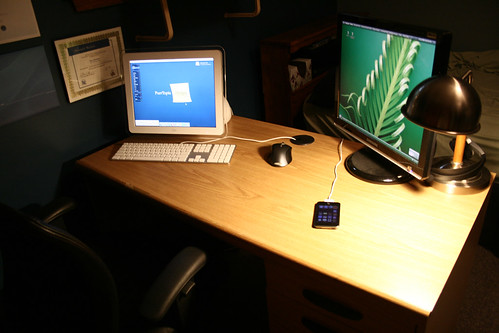
I generally end up using 5 over the course of the day, but my two 'main' systems are here:


Left:
iMac G4
800MHz PowerPC G4
768MB RAM
60GB Seagate
Combo Drive
GeForce 2MX 32MB
Mac OS X Tiger 10.4.11

Right:
Custom-built
2.8GHz P4
2GB DDR RAM
250GB WD SATA
Lightscribe DVD Burner
GeForce 7800GS
Windows Vista Ultimate SP1
19" Samsung LCD

The keyboard and mouse are spanned across both computers using Synergy (which is like Multiplicity but actually has a Mac version, hint hint ;)):

Apple Wired Aluminum Keyboard
Logitech MX1000

And of course the iPod touch is hanging out charging after it's 2.0 upgrade on Apple's hectic day.
Reply #43 Top
Mines all the same as I've had since Sept. but I've added some memory. One PC used daily and an older laptop used for XP skinning only (hell I gotta update the thing soon so I can skin XP again, ugh). :)

old pic but nothing much has changed (except the screenshot part hehe)


Specs...
---------------------------------------
Cooler Master Stacker 830 Case
--- Intel Core 2 Duo E6750 2.66G 1333 FSB
--- OCZ 4GB DDR2 800 RAM SLI ready
--- 500GB Western Digital SATA 3Gb
--- 20X DVD-Burner
--- 650i SLI MSI motherboard
--- XFX Geforce 8800GTS 320MB
--- Thermaltake toughpower 600 watt PSU SLI ready

24" Dell Ultraclear mointor
Ergotron Monitor arm
Logitech Wave keyboard/mouse combo
Saitek P2900
WD 250GB External HDD
Belkin 1100va UPS

and running Vista Ultimate (ofcoures... die XP DIE!!)
Reply #44 Top
But, since Publius took the remote servers as being used... the world itself has multiple "connections"... try just a quick trace session, you'll see how complex the whole single personal PC(s) link is in fact.
End of quote


You have a good point, but I didn't take "remote servers as being used" the way you interpreted it. The machines I was talking about are ones where I have a user account, and "use" them by logging in and issuing commands on them. Not quite the same as "using" a Google farm.
Reply #45 Top
true... interpretation aside - i simply couldn't resist "enhancing" the reasoning beyond LAN or whatever we all have physically present in front of us when we *use* a PC.
Reply #46 Top
Typically just one (working from home FTW), but my desktop does have two monitors (sorry, no camera for pic)  :)
Reply #47 Top
Work laptop is a Dell Latitude D820. Also have a P4 system in my office for building images and testing applications.
At home:
Primary desktop is a couple-year-old custom built w/AMD 4200, running XP Pro
Mac G4 running MAMP that I use as a local web server
Lenovo T42 running OpenSUSE 11, used for working on website, and general Linux fooling around.

Nothing to compare to Jafo's fine machine, though.